How do I improve email deliverability and in what order should I fix things?
 ChatGPT
 Claude
 Gemini
 Perplexity
 Grok
GrokIn brief
How to improve email deliverability in 12 ordered steps: authenticate with SPF, DKIM and DMARC, repair sender reputation, then earn engagement.
Improving email deliverability means fixing three layers in order: authentication first, then sender reputation, then the mail itself. The order matters because the layers gate each other. A perfect campaign from an unauthenticated domain still fails, and a perfectly authenticated domain with a spam-complaint problem still lands in junk. The 12 steps below follow that order, and each one names the mechanism it changes. For the wider topic, including the bulk sender rules and provider-specific failures, see the email deliverability hub.
At a glance
Quick takeaways
- Authentication comes first: publish SPF, sign with DKIM, and set a DMARC policy before touching content or send times.
- Gmail and Yahoo have required authentication, a low spam rate, and one-click unsubscribe from senders of roughly 5,000 messages a day since February 2024, and Outlook.com added its own authentication requirement in May 2025.
- Keep the spam complaint rate reported in Postmaster Tools below 0.10%. Mitigation starts at 0.3%, so 0.29% is not a safe operating level.
- Reputation recovers slowly. Providers want to see weeks of clean sending before they restore full inbox placement, which is why prevention beats repair.
- Deliverability is an outcome receivers control. You cannot switch it on, but you can remove every reason they have to filter you.
Fix authentication first
Authentication failures are the only deliverability problem that can hard-reject mail on its own, and they are also the fastest to fix: each one is a DNS record you control.
Step 1: Publish an SPF record
SPF lists the servers allowed to send mail for your domain. Publish one TXT record at the domain root naming every legitimate source: your mail platform, your CRM, your invoicing tool, your help desk. Sources you forget will fail authentication and, once you enforce DMARC, stop arriving. Check what your domain publishes today with the SPF checker, and keep the record under the 10-DNS-lookup limit, because a record over the limit returns a permanent error instead of a pass.
Step 2: Sign with DKIM everywhere you send
DKIM attaches a cryptographic signature that survives the trip from server to inbox. Turn it on at every sending platform, not only your primary mail provider. A DKIM signature travels with the message, so it keeps authenticating through forwarding when SPF breaks, which makes it the more durable of the two checks. Verify a selector with the DKIM checker.
Step 3: Publish a DMARC record with a reporting address
DMARC ties SPF and DKIM to the domain a recipient actually sees, and it is the requirement the bulk sender rules name explicitly. Start with a monitoring policy and a reporting address: v=DMARC1; p=none; rua=mailto:dmarc@yourdomain.com. The reports name every source sending as your domain, legitimate or not, and they are the evidence for every later step. A record with no rua address collects nothing, which leaves you enforcing blind. The DMARC setup guide walks through publishing it at your DNS provider.
Step 4: Align the passing domain, then enforce
DMARC only passes when the domain that SPF or DKIM authenticated matches the visible From domain. A vendor passing SPF on its own domain does you no good, so fix alignment sender by sender using the aggregate reports from step 3. When a full sending cycle shows every legitimate source passing, tighten the policy to p=quarantine, then p=reject. Enforcement is what stops spoofing, and consistent authentication is also what the receivers grading your reputation want to see.
Repair and protect your reputation
Reputation is the receiver's memory of your sending history. It decides whether authenticated mail reaches the inbox or the spam folder, and it moves slower than any DNS record.
Step 5: Keep the spam complaint rate under 0.10%
Google's sender guidelines require keeping the spam rate reported in Postmaster Tools below 0.3%, and recommend staying below 0.10%. Treat 0.10% as the operating ceiling, not the target, because mitigation at 0.3% means mail is already being filtered. The two levers that move complaint rate are consent and relevance: send to people who asked for the mail, about the thing they asked for.
Step 6: Remove hard bounces and sunset the unengaged
A hard bounce means the address does not exist. Sending to it again tells the receiver you do not manage your list, and enough of them reads as address harvesting. Remove hard bounces immediately and stop mailing addresses that have not opened or clicked in months. A smaller list that engages outperforms a bigger one that ignores you, because engagement is itself a placement signal.
Step 7: Warm up new domains and IPs
A sender with no history has no reputation to draw on, and receivers treat unknown volume as suspicious by default. Start small, increase gradually over weeks, and keep the daily pattern consistent rather than spiking. This applies to a new dedicated IP, a new domain, and a new subdomain moving to its own reputation.
Step 8: Check your sending IP against the blocklists
A blocklist entry explains sudden 5xx rejections that no authentication change will fix. Run your sending IP through the blocklist checker, and if it is listed, follow the operator's own delisting process. Then find the cause, because a delisted IP that keeps the same sending behavior gets relisted.
Make the mail worth delivering
With authentication passing and reputation stable, the remaining filters judge the mail itself and how recipients react to it.
Step 9: Give marketing mail one-click unsubscribe
Bulk senders must include RFC 8058 one-click unsubscribe headers on marketing mail and honor the request within two days. That is a Gmail and Yahoo requirement, not a courtesy. It also protects your complaint rate: a recipient who cannot find the unsubscribe link uses the spam button instead, and the spam button costs far more.
Step 10: Send only to people who opted in
Purchased lists, scraped addresses, and pre-checked consent boxes all convert into complaints and spamtrap hits. Collect addresses yourself, confirm the subscriber wants the mail, and record when and how they opted in. Consent is the root cause behind most complaint-rate problems, which makes it the cheapest one to fix early.
Step 11: Keep volume and cadence consistent
Receivers model your normal sending pattern. A domain that sends 2,000 messages a day and suddenly sends 80,000 looks compromised, and the response is deferral or filtering while the receiver decides. Plan launches and seasonal peaks as ramps rather than cliffs, and keep transactional and marketing mail on separate streams so one cannot damage the other.
Step 12: Monitor DMARC reports and spam rates continuously
Deliverability work does not stay fixed on its own. New tools get connected, keys expire, and a forgotten integration starts failing quietly. Aggregate DMARC reports show every source sending as your domain, so a broken sender appears in a report before it appears as lost mail. Pair them with Postmaster Tools for the complaint-rate side, and review both on a schedule.
Match the fix to the evidence you have
The steps above are ordered by mechanism, but the fastest route through them depends on the evidence in front of you.
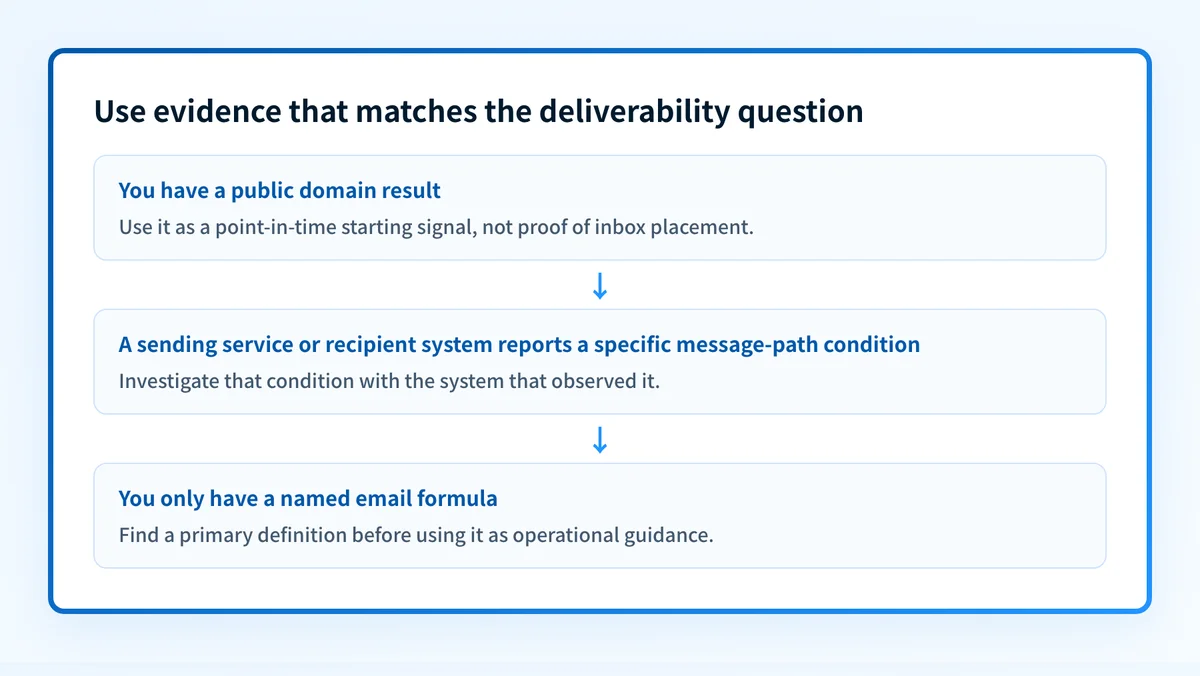
- A bounce message with an SMTP code names its own fix. Look the code up in the SMTP error code index and start there.
- A domain and nothing else supports a public check first. The Email Security Score shows every authentication gap at once.
- DMARC aggregate reports point at the exact sending service that fails, which turns "improve deliverability" into a named list of senders to fix.
- A generic rule with no source, from any vendor, is not evidence about your domain. Test it against your own reports before acting on it.
Common issues when improving deliverability
Authentication passes but mail still lands in spam
This is a reputation or engagement problem wearing an authentication costume. SPF, DKIM, and DMARC establish who sent the mail; they do not override a complaint spike, a cold IP, or recipients who never open the mail. Check the spam rate in Postmaster Tools first, then engagement by segment.
Deliverability dropped suddenly after months of stability
Sudden drops usually have a single trigger: a blocklist entry, a complaint spike from one campaign, a volume spike, or a new sending tool that fails alignment. Check the blocklists, the most recent campaign's complaint numbers, and the newest source in your DMARC reports, in that order.
A new domain sends everything to spam
No history means no trust. Warm the domain gradually, authenticate it fully before the first campaign, and send the first weeks of volume to your most engaged recipients so the early signals are positive. A subdomain builds its own sending reputation, so warm it as its own sender.
Forwarded mail keeps failing
Forwarding rewrites the sending path, which breaks SPF. A valid DKIM signature survives forwarding, so DMARC still passes on the DKIM side for correctly signed mail. If forwarded mail fails both, the fix is DKIM signing at the original platform, not an SPF change.
How do you know it worked?
Measure before and after with the same instruments: the spam rate in Postmaster Tools, the bounce rate at your sending platform, and your DMARC aggregate reports. A deliverability test shows what a receiving server records about one real message, which is useful for confirming a specific fix landed. Placement changes take longer than DNS changes: expect authentication fixes to show up within days and reputation recovery to take weeks.
For an ongoing DMARC program rather than a one-off cleanup, Palisade analyzes your aggregate reports, identifies the sending sources behind every authentication and alignment failure, and creates prioritized remediation tickets. It proposes each policy step when the evidence supports it, and a human reviews and applies every change.
Palisade does not control a receiver's private placement decision or guarantee delivery, and it does not change a DMARC policy on its own.
Evidence
Sources and further reading
- Google: Email sender guidelines (spam-rate thresholds and the 5,000-message requirements; checked 2026-08-27)
- Yahoo Sender Best Practices (checked 2026-08-27)
- RFC 8058: one-click unsubscribe (checked 2026-08-27)
- Microsoft: fix NDR 550 5.7.515 in Outlook.com (checked 2026-08-27)
Related reading
Questions readers ask
Frequently asked questions
What improves email deliverability fastest?
Authentication improves email deliverability fastest, because it is DNS you control and it removes hard failures the same day. Publishing SPF, enabling DKIM, and adding a DMARC record with a reporting address takes an afternoon. Reputation and engagement improvements follow, but they compound over weeks rather than days.
What is a good spam complaint rate?
A good spam complaint rate is below 0.10% in Google Postmaster Tools. Google's guidelines require staying under 0.3% and recommend 0.10%, and filtering ramps up between the two, so the recommended number is the one to operate by.
What is the 30/30/50 rule for cold emails?
No mailbox provider or standards body defines a 30/30/50 rule. It circulates as informal cold-email advice with varying meanings, so do not treat it as a deliverability control. The measurable levers remain authentication, complaint rate, list quality, and consistent volume.
What does the 3-21-0 email rule mean?
There is no primary source defining a 3-21-0 rule. Named formulas without a documented definition cannot explain how a receiver handled your mail. If a tactic matters, its effect will be visible in your own bounce, complaint, and DMARC report data.
Which strategy will improve email deliverability the most?
The strategy that will improve email deliverability the most is the one the evidence in front of you supports. Hard rejections with SMTP codes point at authentication, so start at steps 1 to 4. Spam-folder placement with clean authentication points at reputation: complaints, list quality, and volume patterns, steps 5 to 8. If you have no evidence yet, run a deliverability test and read your DMARC reports before changing anything, because a strategy picked without evidence usually changes the wrong layer.
Do the bulk sender requirements apply to small senders?
The strict thresholds start at roughly 5,000 messages a day to one provider's users, and Yahoo applies the same rules without publishing a number. The requirements themselves, authentication, low complaints, easy unsubscribe, are best practice at any volume, and small senders that follow them get steadier placement too.
How long does reputation recovery take?
Reputation recovery takes weeks, not days. Receivers want to see a sustained low complaint rate and consistent volume before restoring full inbox placement. DNS-level fixes propagate in hours, so the gap between "fixed" and "recovered" is normal rather than a sign the fix failed.

Written by
Dominic LandryDeliverability & DNS
Dominic Landry works on email deliverability and DNS configuration at Palisade, from SPF and DKIM records through to DMARC enforcement.
More from Dominic →