Valid Characters for an Email Address
 ChatGPT
 Claude
 Gemini
 Perplexity
 Grok
GrokIn brief
Valid characters for an email address are letters, digits, and punctuation such as ! # $ % & ' * + - _ in the local part, with dots only between them.
Valid characters for an email address depend on where they appear. In an ordinary unquoted local part before @, RFC email syntax allows ASCII letters, digits, selected punctuation, and single dots between other characters. The domain after @ follows domain-label rules. Quoted local parts and SMTPUTF8 permit more characters, but a syntactically valid address can still be rejected by a signup form, provider, or receiving mailbox.
At a glance
Quick takeaways
- The local part and domain follow different character rules.
- An unquoted local part can contain more punctuation than many forms accept.
- A dot cannot begin or end an unquoted local part, and two dots cannot be adjacent.
- An apostrophe is valid in an unquoted local part under RFC 5322.
- A quoted local part can represent spaces and other characters, but support varies.
- Non-ASCII mailbox characters require SMTPUTF8 support along the delivery path.
Who is affected?
These rules affect form developers, identity teams, email senders, mailbox providers, and support staff deciding whether an address is malformed. The same address can pass the Internet Message Format grammar and still fail a product's account policy or a provider's mailbox rules.
Separate three questions:
- Is the string valid under the applicable email syntax?
- Does the application choose to accept that valid syntax?
- Does a mailbox exist and accept mail at that address?
What are the requirements?
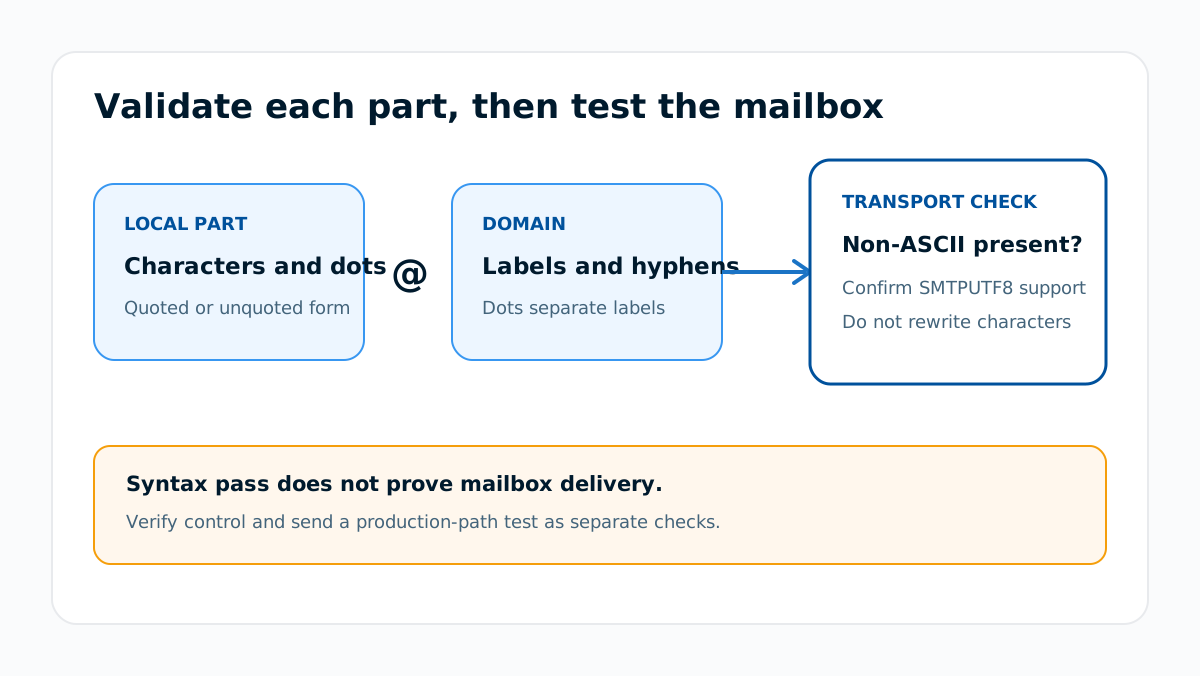
An email address has a local part and a domain
RFC 5322 defines addr-spec as a local part, an @ sign, and a domain. The local part identifies the mailbox within the domain's rules. The domain identifies the system responsible for that namespace.
local-part@domainDo not validate both sides with one character class. A punctuation mark allowed before @ can be invalid in a domain label.
An unquoted local part allows letters, digits, and selected punctuation
RFC 5322 defines the atext character set. An unquoted local part can use ASCII letters, digits, and these printable characters:
Letters:       A-Z a-z
Digits:        0-9
Other ASCII:   ! # $ % & ' * + - / = ? ^ _ ` { | } ~
Separator:     .  only between non-dot elements
That makes addresses such as o'connor@example.com, sales+ca@example.com, and first_last@example.com syntactically possible. It does not require a provider to create or accept those mailboxes.
Dots have placement rules
The unquoted dot-atom form permits a dot only between other atext runs. An unquoted local part cannot start with a dot, end with a dot, or contain two adjacent dots.
Valid dot shape:     first.last@example.com
Invalid dot shapes:  .first@example.com
                     first.@example.com
                     first..last@example.com
Provider-specific behavior can be narrower or different after syntax is accepted. For example, the separate guide on dots in Gmail addresses explains how personal Gmail delivery treats dot variants.
Quoted local parts permit a wider ASCII range
RFC 5322 also allows a quoted-string local part. Quoting can represent spaces and characters that are not valid in an unquoted dot-atom, with escapes where the grammar requires them.
"customer support"@example.comThis is a syntax example, not a claim that every signup form or provider accepts quoted mailbox names. A production sender should test the systems that create, store, transport, and receive the address before relying on this form.
The domain follows domain-label rules
RFC 5321's mailbox grammar uses domain labels made from letters, digits, and hyphens, separated by dots. A label cannot begin or end with a hyphen. An underscore is therefore not valid in an ordinary mailbox domain label, even though underscores appear in other DNS names such as _dmarc.example.com.
SMTPUTF8 extends mailbox syntax beyond ASCII
RFC 6531 defines the SMTPUTF8 extension, which permits UTF-8 in mailbox addresses when the SMTP systems involved support the extension. A Unicode address is not safe to downgrade by deleting or replacing characters. Preserve it exactly and confirm support on the intended delivery path.
When does the requirement take effect?
RFC 5321 and RFC 5322 define the modern baseline SMTP and message-format syntax. RFC 6531 adds internationalized mailbox support through SMTPUTF8. There is no single provider effective date that makes every syntactically valid address usable everywhere.
An application can adopt narrower product rules, but it should describe those as application limits instead of declaring an RFC-valid address universally invalid. Review the rule whenever an identity provider, mailing platform, or mailbox system changes.
How do I implement the requirement?
1. Preserve the address exactly as entered
Trim only surrounding input whitespace that is not part of the address field. Do not remove punctuation, change Unicode characters, or lowercase the stored local part as an automatic repair.
2. Parse the local part and domain separately
Split at the structural @ boundary with a parser that supports the address forms your product accepts. Avoid a short regular expression that silently rejects apostrophes, plus signs, or internationalized addresses without a documented product reason.
3. Apply a documented product policy
Decide whether the product supports quoted local parts and SMTPUTF8 addresses. Return a precise error when the product accepts less than the RFC grammar. Do not call a valid but unsupported address malformed.
4. Verify control and test delivery separately
Send a verification message through the actual production path. Syntax validation cannot prove that the domain resolves, the mailbox exists, or the person controls it. For public domain evidence, a DNS lookup can show the domain's current records without validating the mailbox.
How do I validate compliance?
Build tests from each supported class rather than one list of familiar addresses. Include ordinary letters and digits, apostrophes, plus signs, underscores in the local part, legal dot placement, illegal dot placement, a quoted local part if supported, and a UTF-8 address if SMTPUTF8 is supported.
Record three outcomes for each case: parser acceptance, account-verification behavior, and actual message delivery. A parser pass is syntax evidence. A verification click is control evidence. SMTP acceptance is delivery evidence. None of those alone proves future inbox placement.
Keep this work within the broader email infrastructure hub, where DNS, SMTP, message headers, and transport rules are treated as separate evidence layers.
Evidence
Sources and further reading
Questions readers ask
Frequently asked questions
Can an email address contain an apostrophe?
Yes. RFC 5322 includes the apostrophe in the atext set allowed in an unquoted local part, though an individual provider or form can support a narrower set.
Can an email address contain a space?
Only in a quoted local part under the message syntax. Many providers and forms do not support quoted mailbox names, so test the complete production path before relying on one.
Can an email local part start or end with a dot?
No. The ordinary unquoted dot-atom form cannot start or end with a dot, and it cannot contain adjacent dots.
Can an email address contain Unicode characters?
Only when the systems on the delivery path support the SMTPUTF8 extension defined by RFC 6531. Preserve the address exactly instead of attempting an ASCII rewrite.
Which special characters are allowed in an email address?
Only the ones RFC 5322 lists in atext: ! # $ % & ' * + - / = ? ^ _ { | } ~` alongside letters and digits, plus a dot between other characters. Anything outside that set has to be quoted to appear in a local part.
Which characters are invalid in an email address?
The specials set from RFC 5322 cannot appear unquoted: ( ) < > [ ] : ; @ \ , " and the space. A dot is also invalid at the start or end of an unquoted local part, and two dots cannot sit next to each other.
Does valid email syntax prove that the mailbox exists?
No. Syntax validation checks the address form. Domain resolution, mailbox acceptance, account control, and inbox placement require separate evidence.

Written by
Samuel ChenardCEO & Co-Founder, Palisade
Samuel Chenard is the CEO and co-founder of Palisade, agentic DMARC software for IT teams and MSPs, from one domain to thousands.
More from Samuel →