Gmail spam filter: what senders can control
 ChatGPT
 Claude
 Gemini
 Perplexity
 Grok
GrokIn brief
Gmail weighs authentication, reported spam, reputation, subscription practices, content, and sending behavior. You control the records, not the verdict.
Gmail's spam filter is not a published formula that a sender can score or switch off. A legitimate sender can still diagnose controllable evidence: SPF, DKIM, and DMARC results; complaint rate; domain and IP reputation; consent and unsubscribe practices; sending changes; transport errors; and the result of a comparable retest. The useful goal is to isolate one supported cause, not to guess which word triggered a private classifier.
At a glance
Quick takeaways
- Gmail does not publish the weights or complete rules used by its spam systems.
- Google recommends keeping the user-reported spam rate below 0.10% and avoiding 0.30% or higher.
- Passing authentication is necessary for many senders, but it does not guarantee inbox placement.
- Diagnose DNS, a delivered message, Postmaster data, and the same sending path in that order.
- Change one cause at a time so the retest can tell you something.
What does the failure mean?
Spam placement means Gmail accepted a message and classified it away from the inbox for that recipient. A temporary or permanent SMTP rejection is a different outcome. Google also says its systems consider signals including authentication, reported spam, reputation, subscription practices, content, and sending behavior, but it does not publish a deterministic filter recipe (Google email sender guidelines).
Work at the right unit. One recipient moving a wanted message to Spam is not the same as a stream-wide change across hundreds of recipients. One clean header does not prove the rest of a campaign used the same path. Compare the same visible From domain, return path, DKIM signing domain, sending IP, recipient population, content type, and time window.
What usually causes it?
Authentication or alignment does not match the stream
SPF can pass for the bounce domain while DKIM signs with another domain. DMARC passes only when at least one authenticated identifier aligns with the visible From domain, as specified in RFC 9989 Section 4.4 (identifier alignment) and Section 4.1 (the DMARC pass condition) (RFC 9989). A forwarding path can also change SPF behavior. Diagnose the delivered message rather than assuming the public records describe what was sent.
Recipients report messages as spam
Google's current guidance recommends a spam rate below 0.10% and says senders should avoid reaching 0.30% or higher. Its FAQ defines a bulk sender as a primary domain that sends close to 5,000 or more messages to personal Gmail accounts in 24 hours, and says that classification does not expire once assigned (Google sender-guideline FAQ). These are Google thresholds, not universal Internet limits.
Reputation or volume changes abruptly
A new domain, new IP, dormant list, sudden volume increase, or unexpected traffic source changes the evidence Gmail sees. A compromised credential can create the same pattern. Do not treat a volume drop as the repair before checking who sent, through which system, and with what authorization.
Consent, unsubscribe, or targeting is weak
Recipients who did not expect a message are more likely to report it. Google requires one-click unsubscribe for marketing and subscribed mail from bulk senders and expects unsubscribe requests to be honored promptly under its current guidelines. Transactional mail should not be padded with unrelated promotional content just to reuse a stream.
Content and destinations contradict the identity
Misleading display names, link domains unrelated to the visible sender, URL shorteners, attachment-heavy bursts, or a message that imitates another organization can create risk even when authentication passes. There is no reliable list of forbidden words. Evaluate the complete request and destination.
How do I diagnose the failure?
Start with reproducible evidence.
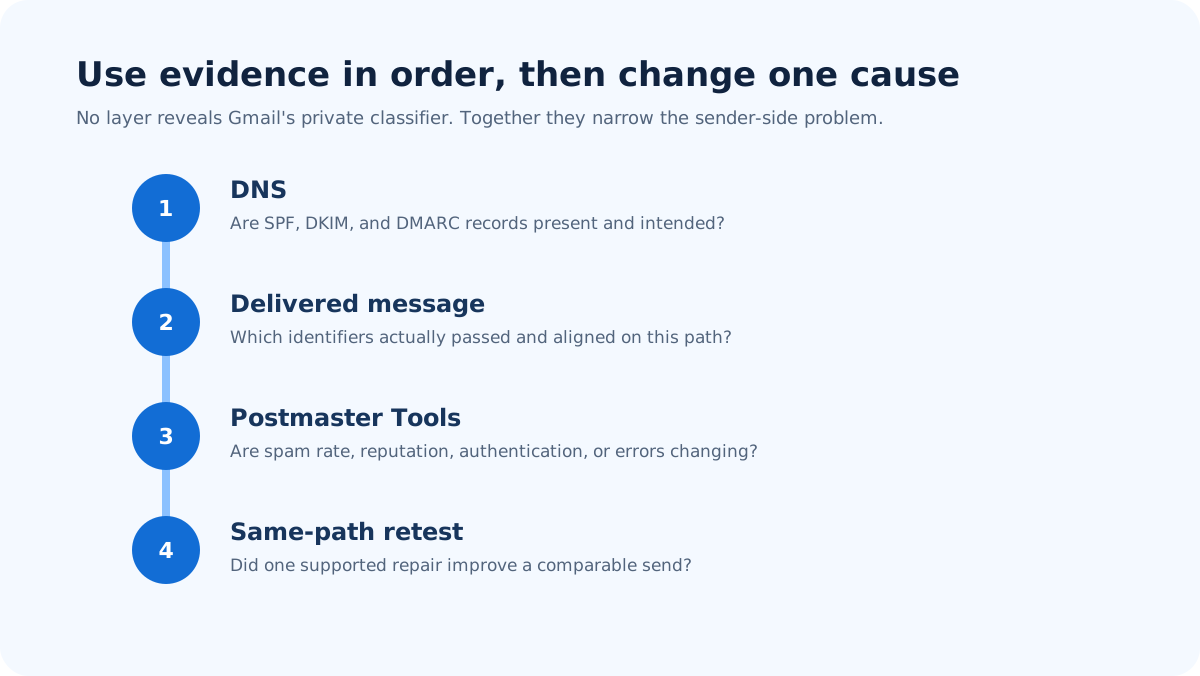
Run the steps in order before changing anything.
1. Define the affected cohort
Record the visible From domain, campaign or message type, sending system, time window, approximate Gmail volume, and observed outcome. Separate personal Gmail recipients from Google Workspace recipients because the published bulk-sender thresholds refer to personal Gmail accounts. Keep recipient addresses and message bodies redacted in shared notes.
2. Inspect one representative delivered message
Obtain raw headers from a message that reached Spam. Read the receiver-added Authentication-Results, DKIM-Signature, Return-Path, and relevant Received fields. RFC 8601 Section 1.2 warns that an authentication header is meaningful only inside the receiver's trust boundary, so do not accept a lookalike field inserted by the sender (RFC 8601, Section 1.2). Use Palisade's Email Header Analyzer to parse headers you supply; it cannot expose Gmail's private score.
3. Compare Google Postmaster evidence
For domains with enough traffic, Google documents dashboards for spam rate, IP and domain reputation, authentication, encryption, and delivery errors (Postmaster Tools dashboard definitions). Compare the incident period with a normal baseline. Missing data can mean the domain did not meet a dashboard's data threshold; it is not automatically a clean result.
4. Trace changes and unauthorized sources
Compare deployment, list-source, sending-domain, IP, authentication, and volume changes against the first affected time. Use DMARC aggregate data to look for unexpected sources using the From domain. Preserve the timeline before rotating credentials or editing DNS.
5. Form one cause statement
Write a falsifiable statement such as: "The news.example stream moved from 8,000 to 42,000 Gmail recipients on August 19, while its Postmaster spam rate rose from 0.04% to 0.20%." The concrete calculation is 96 / 48,000 x 100 = 0.20% if the dashboard period shows 96 user reports across 48,000 delivered messages. Use the dashboard's own definitions rather than inventing counts it does not expose.
How do I fix it?
Repair authentication at the actual source
If the delivered message fails or misaligns, correct the authorized sending source, return path, or DKIM signing configuration. Use Authenticate email for Gmail for the DNS and signing workflow. Do not relax DMARC policy merely to make an unrelated identifier pass.
Stop unwanted or unexplained traffic
Pause a compromised or unapproved source, rotate the affected credential through its authorized owner, and remove recipients whose consent cannot be demonstrated. Preserve logs and establish a rollback before changing production systems.
Restore predictable subscription behavior
Separate transactional and marketing intent, make sender identity clear, honor unsubscribe, and reduce sharp volume changes while the underlying list and authorization problem is corrected. Lower volume is not a substitute for valid consent.
Correct misleading content or destinations
Use domains and links the recipient can recognize and verify. Remove false urgency and avoid hiding the real destination. Do not rewrite copy randomly while leaving a compromised source or misalignment unresolved.
How do I validate the repair?
Repeat the affected sending path with the same From domain, message class, authentication path, and a comparable Gmail cohort. Confirm the new header results first. Then watch Postmaster authentication, spam-rate, reputation, and delivery-error evidence over an appropriate volume and time window. Google does not publish a universal recovery period, so report the observations and dates rather than promising a number of days.
A fair retest changes one diagnosed cause. If SPF or DKIM now aligns but placement does not improve, keep the authentication repair and continue with consent, reputation, traffic-source, and content evidence. Do not undo a valid security control because another layer still needs work.
If the repair exposes several authorized and unknown sources using the domain, Palisade's DMARC Agent can organize aggregate DMARC evidence across those streams. Smart DNS Deployment can write only DNS changes a human approves. It cannot reveal Gmail's private classifier or guarantee inbox placement. Start with Palisade after the same-path retest shows that cross-source monitoring is the remaining gap.
When does this not apply?
This workflow does not apply to a consumer trying to train their own inbox, to a single missing message with no sender access, or to Promotions placement. It also cannot explain Gmail's private model or guarantee a particular folder. A clear SMTP rejection should be diagnosed from its exact enhanced status code before using a spam-placement workflow.
Evidence
Sources and further reading
Questions readers ask
Frequently asked questions
Does Gmail publish a spam-word list?
No. Google does not publish a universal list that determines placement. Evaluate authentication, consent, reputation, traffic changes, destinations, and the actual request rather than swapping words until one test reaches the inbox.
Is the Promotions tab the same as Spam?
No. Promotions is an inbox category, while Spam is a separate classification. Diagnose the observed destination before changing anything because category placement and spam placement answer different recipient and sender questions.
Should my Google Postmaster spam rate be below 0.10%?
Yes. Google currently recommends staying below 0.10% and avoiding 0.30% or higher. Those figures are Google sender-guideline thresholds and should be read with the dashboard's scope and traffic qualifications.
Can SPF and DKIM guarantee Gmail inbox placement?
No. Authentication establishes technical identity evidence; it does not prove consent, reputation, useful content, or recipient engagement. Passing and aligned results remove one class of failure but do not control Gmail's final classification.
Will Gmail placement recover immediately after a repair?
No. Google does not publish one recovery time for every cause. Retest the same path, record message-level authentication, and monitor the relevant Postmaster period without making several unrelated changes at once.

Written by
Dominic LandryDeliverability & DNS
Dominic Landry works on email deliverability and DNS configuration at Palisade, from SPF and DKIM records through to DMARC enforcement.
More from Dominic →