Why do my emails land in Gmail's Promotions tab?
 ChatGPT
 Claude
 Gemini
 Perplexity
 Grok
GrokIn brief
Why emails land in Gmail's Promotions tab: classify the delivered message, test one sender-controlled change, and validate the same sending path.
Emails land in Gmail's Promotions tab because Gmail categorizes delivered mail using documented broad signals: who sent it, its content type, and how Gmail users interact with similar messages. Promotions placement is an observed Gmail outcome, not proof that the message failed authentication or that every recipient sees a deliverability problem. First separate promotional mail from operational mail, then test one sender-controlled variable through the same production path.
At a glance
Quick takeaways
- Gmail describes Promotions as a category for deals, offers, and other promotional email.
- A message in Promotions was delivered to Gmail. It was not rejected or automatically placed in spam.
- Gmail says category sorting considers the sender, message content, and Gmail user interaction with similar messages.
- Gmail does not publish its complete category-classification logic or a sender control that guarantees Primary placement.
- Test the exact production stream, not a manually sent substitute message.
- Public DNS checks can confirm published authentication records but cannot explain Gmail's private category decision.
What does the failure mean?
The symptom is a delivered message that Gmail displays in the Promotions tab when the sender expected a different category, often Primary. Gmail's category documentation describes Promotions as mail for "deals, offers, and other promotional emails." Gmail also provides Primary, Social, Updates, and Forums categories.
Google describes the inputs to Gmail category sorting as:
who the email comes from, what type of content is in the message and how Gmail users have interacted with similar contentGoogle's explanation of Gmail sorting says direct recipient input is the most important signal. A recipient can move a message to Primary, reply when a reply makes sense, or add the sender to contacts.
This category is a receiver outcome. It does not prove a universal deliverability failure, a DMARC failure, spam placement, or a rejected message. Google has not published a complete weighting system, so a claim that one word, image, link, or email platform caused a specific classification is an inference unless a controlled retest isolates it.
What usually causes it?
The message is promotional by purpose
A newsletter, product offer, sale announcement, or campaign can fit Gmail's documented Promotions category. In that case, no technical repair may be appropriate. Measure the outcome that matters for the campaign rather than treating Promotions placement as an authentication incident.
The message contains marketing-oriented content
Google says Gmail considers the type of content in a message. A campaign layout, offer language, many calls to action, product imagery, or a large marketing footer are reasonable test variables for an operational message. Google does not document a fixed list of triggers or a threshold for category placement.
Remove only marketing content that does not belong in the affected transactional or personal stream. Do not redesign a legitimate campaign solely to pursue a Primary placement that Gmail does not guarantee.
One sender identity is used for unrelated streams
Google says the sender is one category signal. If the same visible From identity or domain sends newsletters, receipts, password resets, and personal correspondence, it can be harder to interpret a category observation. Google does not require separate domains or streams, so separating streams is an operational test, not a documented Gmail rule.
Map the application, visible From address, envelope sender where available, DKIM signing domain, and route for each message type. A password reset from one service is not evidence about a newsletter sent through another.
Recipient behavior differs
Gmail says interaction with similar content affects sorting, and direct recipient input matters most. The same sender can therefore appear in different categories for different recipients. A recipient who wants a message in Primary can move a representative message there, reply where appropriate, or add the sender to contacts.
Those are recipient preferences. They are not sender-side controls that can be imposed across a mailing list.
An authentication mismatch is a separate failure
Promotions placement does not establish an authentication problem, but a raw delivered message may show one. If the trusted receiving system reports DKIM or SPF failure, or DMARC failure, investigate that evidence separately. Palisade's ESP authentication setup hub provides context for provider-specific authentication work.
How do I diagnose the failure?
1. Preserve the delivered-message evidence
Use the Gmail message that showed the symptom. Record the visible From address, recipient test account, subject, Gmail category, timestamp, message purpose, and the application or campaign that generated it.
Keep complete source and headers in an access-controlled incident record. The raw message helps identify the production path. It also distinguishes a delivered category observation from a test message sent through a different route.
2. State the recipient task
Write down what the recipient should do with this message. A promotion or newsletter may belong in Promotions. A receipt, confirmation, reminder, or automated account notification may be more comparable to Gmail's Updates category, which Gmail's category definitions describe separately.
The goal is a category that matches the message's purpose and recipient expectation. It is not automatically Primary.
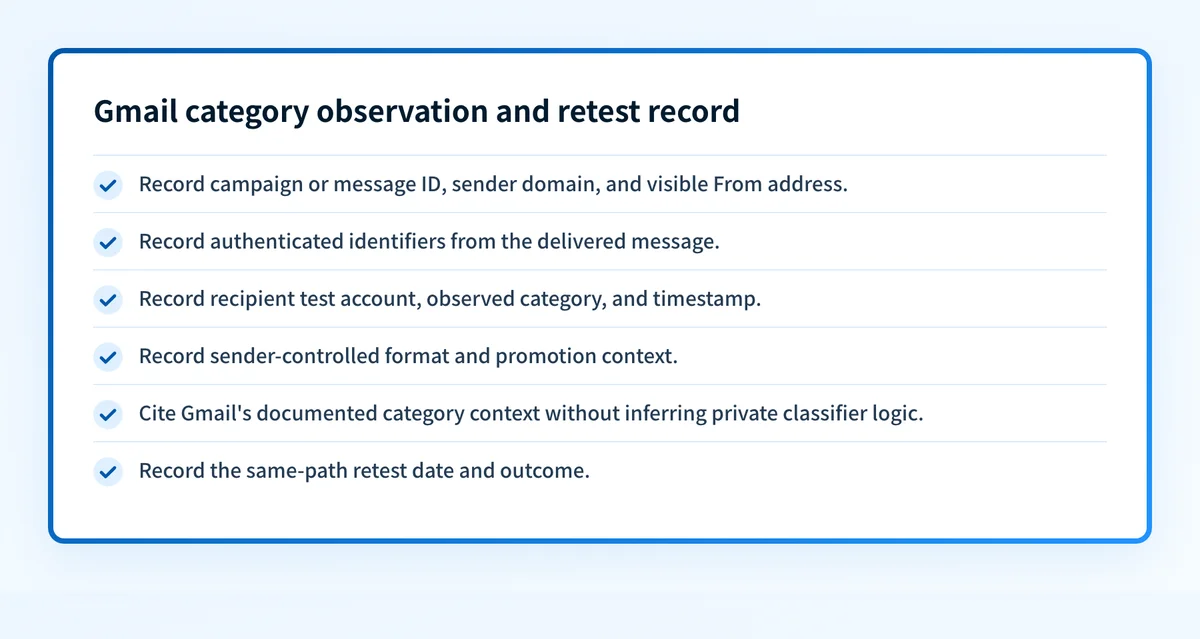
3. Create an observation-and-retest record
Use one record per observed message and preserve it through the retest. Separate sender-controlled evidence from Gmail factors that are private or recipient-specific.
Illustrative redacted observation record
Campaign or message ID: txn-password-reset-2026-08-12-01
Sender domain: yourdomain.com
Visible From address: accounts@yourdomain.com
Authenticated identifiers observed: DKIM d=yourdomain.com; SPF domain recorded from headers
Recipient test account: qa-gmail@example.net
Observed Gmail category: Promotions
Observed timestamp: 2026-08-12T10:15:00-04:00
Message format and promotion context: HTML password-reset notice; no offer copy; one reset link
Official Gmail category context: Gmail says sorting considers sender, content type, and interaction with similar content
Retest date: pending
The message format, copy, sender identity, and route are evidence the sender can control or document. Gmail's category model, recipient history, and the relative weighting of signals are private classifier factors. Record them as unknowns rather than assigning a cause.
4. Choose the safe next branch
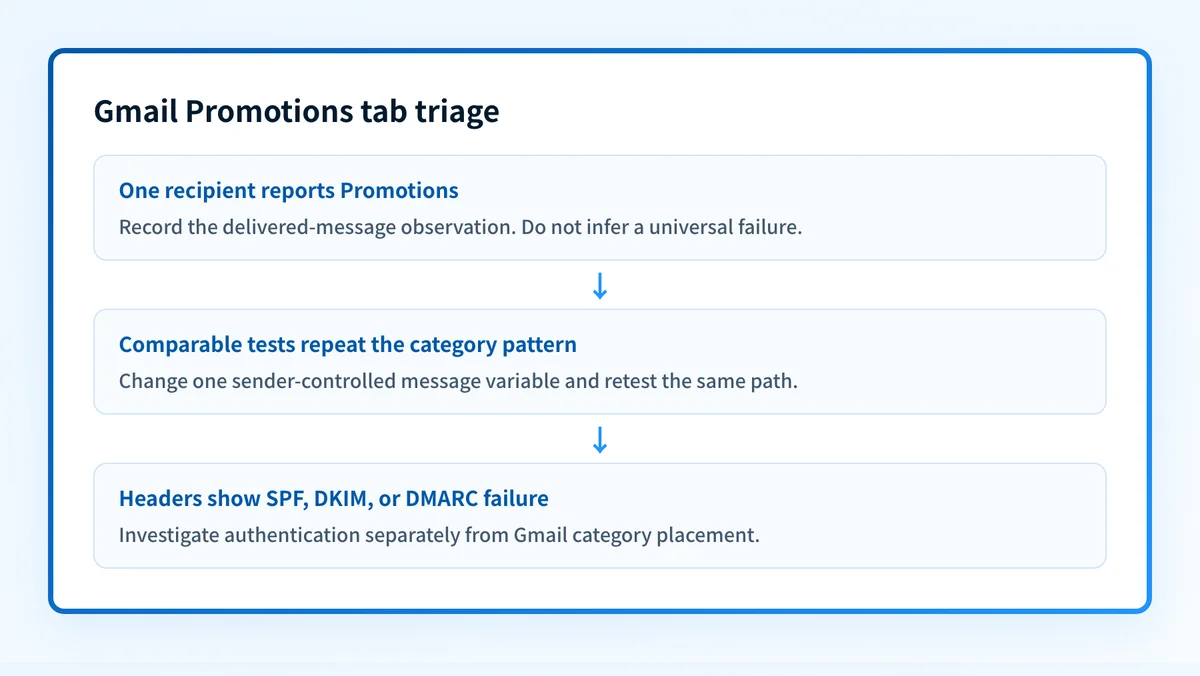
For a single-user observation, treat it as one recipient outcome. Confirm the message was delivered, record the category, and avoid changing an entire production template based on one mailbox.
For a repeatable test pattern, use controlled test accounts and send through the same application, visible From identity, authenticated domains, and route. Keep the recipient type and core message purpose constant. Change one sender-controlled variable at a time, such as unnecessary promotional copy or a nonessential marketing footer.
For an authentication mismatch, preserve the exact trusted Authentication-Results values from the delivered message. Do not infer authentication from category placement. A category result and an authentication result answer different questions.
5. Check public DNS only when the question is DNS
If the message evidence points to a missing or unexpected published DMARC record, use the DMARC checker to inspect the public record for the sending domain. If a header identifies a DKIM selector that needs confirmation, use the DKIM checker.
A public DNS check can show the record currently visible to public resolvers. It cannot prove that the sending application used that domain, that the delivered message authenticated, why Gmail assigned a category, or how future messages will be placed.
How do I fix it?
Keep legitimate promotional mail in Promotions
When the message is a deal, offer, newsletter, or campaign, treat Promotions as an expected category unless a tested business requirement shows otherwise. Do not weaken DMARC policy or alter authentication because a delivered promotional message appears in Promotions. Those changes address different problems.
Remove irrelevant promotional material from operational mail
For an account notice, confirmation, receipt, or password-reset email, remove only content that is unrelated to the recipient's task. Test one revision through the same production sender and route.
Do not remove security instructions, legal content, or required account details merely to change a Gmail category. Preserve the recipient task and test the smallest supported change.
This repair changes message content. It does not control Gmail's private classification decision.
Separate streams as a measured operational change
If one identity sends both campaigns and operational mail, consider using separately managed streams after documenting the existing route and expected authentication. This is a testable operational change, not a Gmail requirement.
Before changing a sender identity, verify that the new production path has its own approved authentication configuration. Changing a visible From address, envelope sender, or DKIM signing domain can create an authentication mismatch if the route is incomplete.
Repair confirmed authentication failures separately
When delivered-message headers show a failure, diagnose that failure from the header evidence and the relevant sending path. A DMARC policy relaxation is not a fix for a DKIM or SPF configuration issue. It changes requested enforcement, while the technical repair restores the failed authentication or alignment condition.
How do I validate the repair?
Resend through the same application, sender identity, route, recipient type, and message purpose that produced the original observation. Update the observation-and-retest record with the new message ID, timestamp, category, and any sender-controlled change.
Validate applicable layers independently:
- DNS: Confirm the relevant public DMARC or DKIM record only if the repair changed DNS.
- Vendor: Check the sending provider's current authentication status if the provider supplies one.
- Message: Inspect a newly delivered message's trusted authentication results and confirm it used the intended production identifiers.
- DMARC: Review aggregate-report data after it accumulates to identify whether the source authenticates and aligns as expected.
Check the DMARC record behind the sending domain
If your evidence includes the sending domain, inspect its published DMARC record before mixing a category observation with a DNS problem.
A record check cannot prove why Gmail placed one delivered message in Promotions, confirm the application used the record, or guarantee future placement. When a team needs to track which production sources authenticate and align over time, Start with Palisade. Palisade analyzes DMARC aggregate-report data, identifies sources and authentication or alignment issues, and proposes next policy steps for human review. It does not control Gmail's private category decisions or guarantee Primary placement.
Evidence
Sources and further reading
Questions readers ask
Frequently asked questions
Does Promotions mean Gmail marked my email as spam?
No. Promotions is an inbox category for delivered mail. Spam placement is a separate receiver outcome and needs different evidence.
Can I force every email into Gmail Primary?
No. Gmail does not publish a sender setting that guarantees Primary placement. Recipient interaction and private Gmail classification factors affect the result.
Should transactional emails always appear in Primary?
No. A transactional message may be categorized differently depending on its purpose and recipient preferences. First verify that the message is delivered, appropriate to its recipient task, and authenticating through the intended production path.
Can a DMARC record move an email out of Promotions?
No. A DMARC record supports authentication policy and reporting. It does not select Gmail's inbox category or explain an individual Gmail categorization decision.
What should I do after one Gmail user reports Promotions placement?
Only record the delivered-message evidence, confirm the message purpose, and avoid broad changes based on one recipient. Use comparable controlled tests if the issue repeats.
What if the Gmail message has an authentication failure?
Inspect the trusted delivered-message authentication results and diagnose the specific SPF, DKIM, or DMARC failure. Promotions placement alone does not establish the cause.

Written by
Dominic LandryDeliverability & DNS
Dominic Landry works on email deliverability and DNS configuration at Palisade, from SPF and DKIM records through to DMARC enforcement.
More from Dominic →