Where to report a phishing email and what each route does
 ChatGPT
 Claude
 Gemini
 Perplexity
 Grok
GrokIn brief
Report email phishing scams to the route that can act: your mailbox provider, your workplace, the impersonated brand, or a US reporting body.
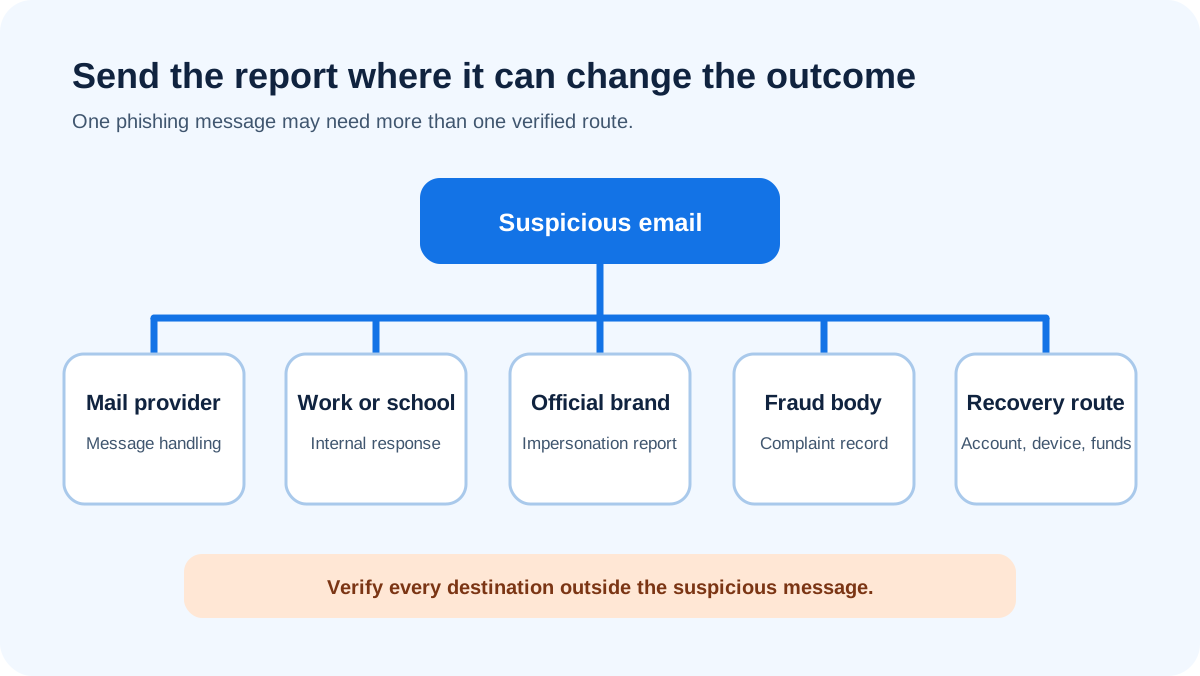
Where to send a phishing email depends on what you need done. Send it through your mail provider's phishing control for filtering review, through your employer or school's security channel for internal investigation, and through the impersonated organization's published abuse route when it accepts reports. In the United States, the FTC accepts fraud reports and directs suspicious email to the Anti-Phishing Working Group. Financial loss, identity theft, or a business incident needs a separate recovery or law-enforcement route.
At a glance
Quick takeaways
- Start with the mailbox or organization responsible for the account.
- Use the impersonated brand's current official reporting instructions when available.
- A provider report, employer report, fraud report, and police report do different jobs.
- Preserve the original message when the receiving process requests it.
- Do not forward attachments or sensitive data to an address you have not verified.
- Begin recovery immediately after credentials, devices, identity data, or money are affected.
Choose the destination by the outcome you need
The word "report" hides several different outcomes. A mailbox provider can review a message for abuse and filtering. An employer can search its environment, protect accounts, and remove related mail. An impersonated company can investigate abuse of its name or service. A consumer-protection body can collect fraud reports. Law enforcement can receive a complaint about crime or loss.
One destination rarely does all of those jobs. Sending a suspicious message to a brand does not notify your employer that a staff account may be exposed. Clicking a provider's Report phishing control does not contact your bank. Filing a fraud report does not remove the message from coworkers' inboxes.
Use the closest responsible body first, then add another report only when it has a distinct role. Verify a route before you use it: prefer a control inside your mail client or a destination published by the organization itself, rather than an address quoted in the suspicious message. The rest of this page maps each destination to the action it can actually take. If you have already clicked, start with what to do if you clicked on a phishing link and come back to reporting once containment is done.
Send it to your mail provider for message handling
Use the phishing-report control in the mail service that received the message. That keeps the report attached to the provider's copy and the account context it understands. Do not use a "Report" graphic inside the message. Use the mail application's own toolbar, menu, or organization-deployed control.
Provider reporting is the closest route when your immediate goal is to classify the message and improve how that mailbox service handles it. Do not assume it opens a case you can track, blocks the sender for everyone, removes related messages, or tells your employer.
For Microsoft users, how to report a phishing email in Outlook covers the client mechanics. Other providers publish different controls, and mobile apps can place them in a different menu. Use current provider documentation rather than a remembered screenshot.
Send work or school mail to the security team
A message received through an employer, school, nonprofit, or managed service belongs in that organization's documented reporting process. The security team can connect one report with directory activity, sign-in events, endpoint alerts, other recipients, mail trace data, supplier workflows, and previous cases.
Follow the organization's preservation rule. The original message may contain addresses, routing headers, link destinations, and attachment metadata that a screenshot omits. Do not forward it broadly, upload it to an unapproved public service, or send sensitive customer and employee content outside the approved route.
Say what happened. "Received only," "clicked," "entered password," "approved prompt," "opened file," and "sent money" require different responses. A silent report button cannot supply that context unless the workflow explicitly asks.
If the organization has no published route, contact the help desk or security owner through a known directory entry. Do not guess a forwarding address from a general article.
Send brand impersonation to the brand's official route
Some organizations publish a forwarding address or form for messages that misuse their name. Use the route on the organization's official help or security page. Type the site address yourself or reach it from an app you already trust. Do not use a reporting address, phone number, or form linked by the suspicious message.
The brand report can help the organization investigate impersonation, an abused account, a malicious site, or a fake support channel. Its scope varies. It may not respond to each reporter, recover your account, reverse a payment, or coordinate with your employer.
Preserve forwarding headers if the published instructions request them. If a message contains private account or payment information, follow the brand's guidance on what to include. Do not add passwords, one-time codes, full card numbers, government identifiers, or unrelated mailbox content.
Use US consumer fraud and phishing routes
The Federal Trade Commission accepts fraud reports at ReportFraud.ftc.gov and directs suspicious phishing email to the Anti-Phishing Working Group at reportphishing@apwg.org (FTC phishing guidance). These are additional US reporting routes, not replacements for a mailbox or workplace report.
Use ReportFraud.ftc.gov when you are reporting a scam or fraud experience to the FTC. Forwarding the suspicious email to APWG supplies the message to an anti-phishing reporting body. Follow the current FTC page because destinations and instructions can change.
If you disclosed personal information, the FTC points people to IdentityTheft.gov for a recovery plan. Recovery is a separate task from forwarding the message. Change exposed credentials through the real service, contact financial institutions through known numbers, and preserve transaction details.
Use organizational and law-enforcement routes for serious incidents
CISA publishes phishing reporting guidance for organizations and points organizations toward its incident-reporting channels and the FBI's Internet Crime Complaint Center (CISA phishing guidance). The FBI's IC3 accepts internet-crime complaints through its official site (FBI Internet Crime Complaint Center).
Use an incident or law-enforcement route when the facts fit its scope, especially for business email compromise, fraud, extortion, account intrusion, or financial loss. File complete, accurate information and keep the complaint confirmation. Do not delay a bank recall, account containment, or device response while waiting to submit a complaint.
Outside the United States, use the national cyber, fraud, or police service responsible for your jurisdiction. This article does not invent a universal address. Government routes, reporting thresholds, and emergency channels vary, so confirm them on the authority's own site.
Preserve useful evidence without spreading the threat
The destination's instructions control what to send. Useful fields can include the original message, full sender and reply addresses, subject, delivery time, real link destination, attachment name, claimed transaction, report time, and a short account of any interaction.
Forward as an attachment only when the verified instructions request it and your organization permits it. Ordinary forwarding can change headers and expose a live link or attachment to another person. A screenshot shows what you saw but may omit routing and destination evidence.
Use a simple intake note:
Mailbox or organization:
Message received at:
Displayed sender and full address:
Claimed person, brand, or transaction:
Requested action:
Interaction: none, clicked, signed in, opened, approved, or paid
Reports already submitted:
Recovery already started:
Redact the note before sharing it outside the authorized process. Never include a password, private key, full payment-card number, one-time code, or unneeded personal data.
Do not confuse reporting with blocking or avoidance
Reporting routes the evidence. Blocking changes how a mailbox handles later messages. Avoidance is the habit of verifying requests outside the message. Those are related actions, not duplicate names for one control.
Use how to block phishing emails for filters, rules, and sender blocks. Use how to avoid phishing emails for recognition and verification habits. A person may need all three: avoid the unsafe action, report the evidence, then block a repeat pattern.
If someone already interacted, recovery outranks tidy routing. Start the credential, endpoint, identity, or payment process, then send the report to each body that has a separate job.
Evidence
Sources and further reading
Questions readers ask
Frequently asked questions
Where should I forward a phishing email in the United States?
Start with the mail provider or workplace reporting route. The FTC also directs suspicious phishing email to reportphishing@apwg.org and accepts fraud reports at ReportFraud.ftc.gov. Use IC3 when the facts fit an internet-crime complaint, especially after fraud or financial loss.
Should I send phishing email to the company being impersonated?
Only when the company publishes a current reporting address or form. Find it through the company's official site or app, not through the suspicious email. A brand report does not replace your mailbox, workplace, bank, or incident report.
Is reporting to my email provider enough?
No, not when the message affected a work environment, account, device, identity, or payment. Provider reporting handles the message channel. The responsible organization or service must handle containment and recovery.
Can I forward the email to a coworker for advice?
Not casually. Use the organization's approved security route. Forwarding can spread active links or attachments and may change useful headers. Send only the evidence the authorized process requests.
Should I report before deleting the message?
Yes, when a verified provider or organization process asks for the original. Preserve the message until that process captures the needed evidence. Afterward, follow its cleanup instruction rather than assuming deletion is always the next step.
What if I already sent money or entered personal information?
Start recovery immediately. Contact the bank or service through known information, secure exposed accounts, and use the identity-theft or incident process that matches the loss. Reporting the email remains useful, but it cannot reverse the action by itself.

Written by
Ian BussieresCTO & Co-Founder, Palisade
Ian Bussieres is the CTO and co-founder of Palisade, agentic DMARC software for IT teams and MSPs.
More from Ian →