Google's stricter email sender rules (Nov 2025)
 ChatGPT
 Claude
 Gemini
 Perplexity
 Grok
GrokIn brief
Google's stricter email sender rules: track Gmail's authentication, alignment, TLS, DNS, spam-rate, and unsubscribe requirements after Nov 2025.
Google's stricter email sender rules refer to Gmail's ramped-up enforcement of its existing sender requirements, which Google says began in November 2025. For mail sent to personal Gmail accounts, authentication, DNS, TLS, spam controls, and unsubscribe behavior remain the documented controls. Bulk senders have additional DMARC alignment and one-click unsubscribe requirements, and Google says noncompliant traffic can experience temporary or permanent rejections.
At a glance
Quick takeaways
- Last checked: August 12, 2026
- Next review: September 12, 2026
- Content owner: Samuel Chenard
- Google's email sender guidelines apply to mail sent to personal Gmail accounts.
- Google describes bulk senders as organizations that send close to 5,000 or more messages to personal Gmail accounts in 24 hours, and says bulk-sender status does not expire once assigned in its sender-guidelines FAQ.
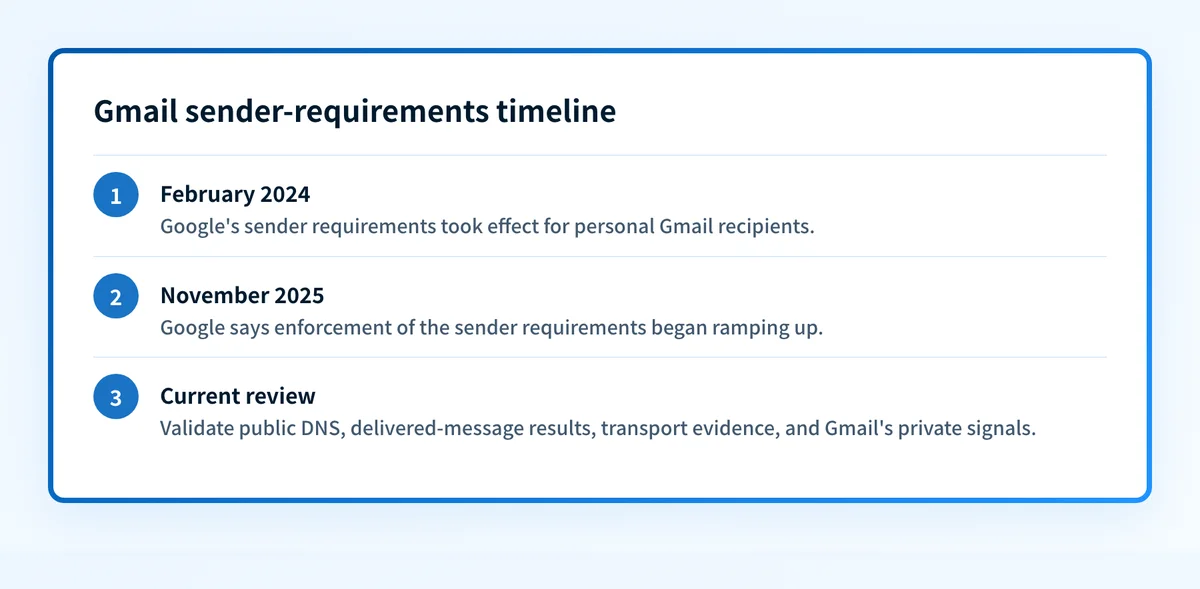
- Google says enforcement of its sender requirements ramped up beginning in November 2025, with noncompliant mail subject to temporary and permanent rejections.
Who is affected
Google's current email sender guidelines apply to senders delivering messages to personal Gmail accounts, including addresses ending in @gmail.com and @googlemail.com.
Google separates the requirements into two sender classes:
- All senders that deliver mail to personal Gmail accounts.
- Bulk senders, which Google's sender-guidelines FAQ describes as senders of close to 5,000 or more messages to personal Gmail accounts within 24 hours.
This tracker covers Gmail only. For Microsoft's separate requirements, see What are Microsoft's new email authentication rules?. For broader protocol context, use the email authentication learning hub.
Current requirements
Authentication for all senders
- Applies to: All senders to personal Gmail accounts.
- Effective: February 1, 2024. Google lists this date in its email sender guidelines, checked August 12, 2026.
- Required evidence: A newly delivered production message shows that SPF or DKIM passed.
- Consequence: Google says messages that do not meet its requirements might be rate-limited, blocked, marked as spam, or not delivered as expected.
For the sender-side record and delivered-message checks in that first requirement, follow the Gmail email-authentication procedure.
DMARC and alignment for bulk senders
- Applies to: Bulk senders to personal Gmail accounts.
- Effective: February 1, 2024, according to Google's email sender guidelines, checked August 12, 2026.
- Required evidence: SPF and DKIM are set up, a DMARC record is published, and direct mail aligns the visible From domain with either the SPF domain or the DKIM signing domain. Google says a DMARC policy of
p=none, which requests no enforcement, is acceptable for this requirement. - Consequence: Google says noncompliant mail might not be delivered as expected or might be marked as spam.
Forward and reverse DNS
- Applies to: All senders to personal Gmail accounts.
- Effective: February 1, 2024. Google's email sender guidelines list valid forward and reverse DNS as a sender requirement, checked August 12, 2026.
- Required evidence: Each production sending IP has a PTR record, and the hostname returned by that PTR record resolves back to the same IP through A or AAAA DNS.
- Consequence: Google says mail that fails applicable sender requirements might be rate-limited, blocked, marked as spam, or not delivered as expected.
TLS and message formatting
- Applies to: All senders to personal Gmail accounts.
- Effective: February 1, 2024. Google's email sender guidelines require TLS for transmission and messages formatted according to RFC 5322, checked August 12, 2026.
- Required evidence: Production SMTP logs or a controlled delivery test confirms TLS on the sending path, and the delivered message is correctly formatted.
- Consequence: Google says mail that fails applicable sender requirements might not be delivered as expected.
Spam rate
- Applies to: All senders to personal Gmail accounts.
- Effective: Google's current email sender guidelines state the operational guidance, checked August 12, 2026.
- Required evidence: The domain's spam rate in Google Postmaster Tools.
- Consequence: Google advises senders to keep spam rates below
0.10%and avoid reaching0.30%or higher.
0.10% figure is an operating recommendation. The 0.30% figure is a boundary Google tells senders to avoid, not a target for normal operations. A public checker cannot access Gmail's private complaint and reputation signals.
One-click unsubscribe
- Applies to: Marketing and subscribed messages from bulk senders. Google excludes transactional messages from this requirement.
- Effective: Google's bulk-sender requirements began February 1, 2024. The sender-guidelines FAQ says senders that already had an unsubscribe link had until June 1, 2024 to implement one-click unsubscribe for commercial and promotional messages, checked August 12, 2026.
- Required evidence: A delivered covered message includes the one-click unsubscribe headers and a visible body unsubscribe link. The unsubscribe endpoint accepts the required request and suppresses the recipient in the actual sending system.
- Consequence: Google says it does not automatically reject or mark a message as spam solely because one-click unsubscribe is missing. Google also says senders without it are ineligible for delivery-issue mitigation.
Implementation and validation
1. Inventory every sending path
List each platform that sends mail using the domain, including marketing, support, billing, identity, recruiting, and low-volume automated systems. Record its visible From domain, envelope domain, DKIM signing domain, sending IPs, and whether it sends covered promotional mail.
For a useful interpretation of report data during this inventory, see What do Google's updated DMARC reports reveal?.
2. Check public DNS before changing records
Inspect the published DMARC record for the exact visible sending domain, then compare it with a real delivered message. A structural DMARC example is below.
Do not publish this example as a production record without confirming the reporting addresses, policy plan, and every legitimate sending source.
_dmarc.yourdomain.com TXT "v=DMARC1; p=none; rua=mailto:dmarc-reports@yourdomain.com"Use the DMARC checker to inspect the public record. It can show the record visible in public DNS, but it cannot prove every production sender aligns, reveal Gmail's private enforcement decision, or guarantee later delivery.
3. Validate a delivered message from each production path
Send a controlled message from every listed source to a personal Gmail mailbox you can inspect. Confirm SPF, DKIM, and DMARC results in the receiver-added authentication results. Then compare the domains used by the message with the visible From domain.
Repeat this check after a DNS or sending-platform change. A green status in a sender platform does not replace evidence from the message path Gmail received.
4. Validate transport, DNS, and unsubscribe controls
For each sending IP, confirm the PTR hostname and forward resolution. Use production logs or the sending provider's documented transport evidence to confirm TLS.
For covered marketing or subscribed messages, verify these message headers and test the one-click endpoint without a login, cookie, or redirect:
List-Unsubscribe: <https://example.com/unsubscribe/opaque-id>
List-Unsubscribe-Post: List-Unsubscribe=One-Click
A successful HTTP response is not enough if the recipient remains eligible to receive later marketing mail. Confirm suppression in the system that sends the message.
5. Review Gmail's private signals and aggregate evidence
Use Google Postmaster Tools for spam-rate and compliance evidence. Then use DMARC aggregate reports to identify sources and alignment failures that a one-time DNS check cannot show. Google's February update is useful historical context in Just In: February 14th Update for Google's Email Sender Requirements.
Change log
August 12, 2026
Rechecked Google's email sender guidelines and sender-guidelines FAQ. Confirmed the all-sender and bulk-sender classes, the February 1, 2024 requirement start, the close-to-5,000-message bulk-sender description, permanent bulk classification, and the documented November 2025 enforcement ramp. Clarified the difference between Google's 0.10% operating recommendation and its instruction to avoid 0.30% or higher.
November 2025
Google's sender-guidelines FAQ says enforcement ramped up beginning in November 2025. Google states that messages failing its sender requirements can experience disruptions, including temporary and permanent rejections.
Check the published DMARC control, then close the sender inventory gap
Start by checking the public DMARC record for the domain used in the visible From address. Compare the result with headers from a recently delivered Gmail message before changing policy.
A public record check does not identify every production source that uses the domain, show which source later fails alignment, or control Gmail's private delivery decision. Palisade is agentic DMARC software that analyzes DMARC aggregate-report data, identifies sources and authentication or alignment issues, and creates prioritized remediation tickets. It can propose the next policy step when the evidence supports it, while your team reviews the evidence and applies the change.
For a provider-specific implementation of these authentication checks, see Why does Gmail report TLS errors?.
Evidence
Sources and further reading
Questions readers ask
Frequently asked questions
Did Gmail create new sender requirements in November 2025?
No. Google's sender requirements began in February 2024. Google says enforcement ramped up beginning in November 2025, including temporary and permanent rejections for mail that fails the requirements.
Are small senders exempt from Gmail's requirements?
No. Google's guidelines apply to all senders to personal Gmail accounts. The bulk-sender classification adds requirements such as DMARC alignment and one-click unsubscribe for covered messages.
Does a DMARC policy need to be set to quarantine or reject for Gmail?
No. Google's email sender guidelines state that bulk senders can meet the DMARC publication requirement with a p=none policy. The sender must still meet Google's documented alignment requirement for direct mail.
Does a passing DMARC DNS check prove Gmail will deliver my email?
No. A DNS check shows the public record at the time of the lookup. It does not prove the sending platform authenticated a specific message, that every source aligns, or that Gmail will make a particular delivery decision.
Is a 0.30% spam rate acceptable?
No. Google advises senders to keep spam rates below 0.10% and to avoid reaching 0.30% or higher. Treat 0.10% as the operating target and investigate rising complaints before the rate approaches Google's upper boundary.

Written by
Johanie DupontBrand & Ecommerce Email
Johanie Dupont works on brand and ecommerce email at Palisade: BIMI and verified marks, sender requirements, and getting marketing mail into the inbox.
More from Johanie →