Why does Gmail report TLS errors?
 ChatGPT
 Claude
 Gemini
 Perplexity
 Grok
GrokIn brief
Gmail TLS errors mean an SMTP connection could not meet transport-security checks. Capture the exact host, handshake evidence, policy, then retest.
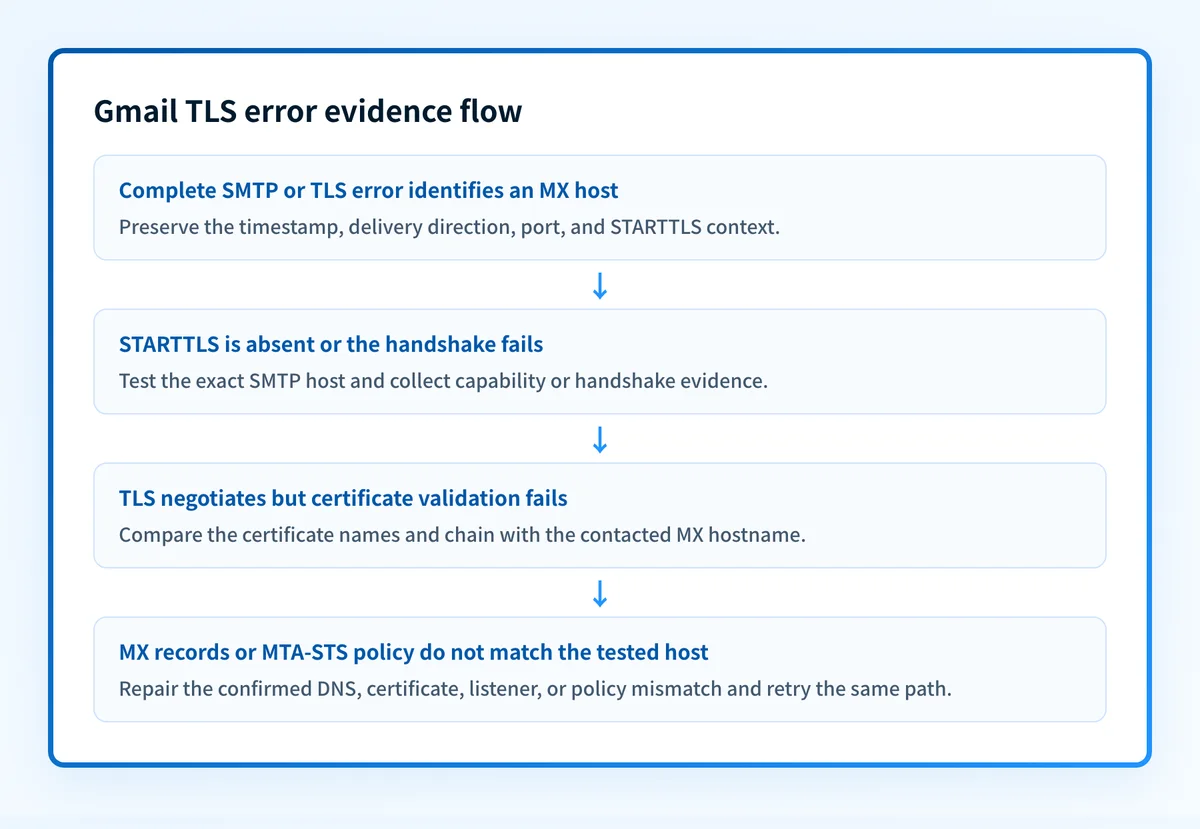
Gmail reports a TLS error when the SMTP connection for a delivery attempt cannot complete or cannot meet the transport-security checks that apply to that route. Start with the complete SMTP error and the exact MX host involved. Then test that SMTP path, compare its TLS certificate and configuration with published MX and MTA-STS records, repair the confirmed issue, and retry through the same route. SPF, DKIM, and DMARC do not repair a failed TLS negotiation.
At a glance
Quick takeaways
- A Gmail TLS error concerns SMTP transport security before SPF, DKIM, or DMARC results can help explain delivery.
- The full SMTP response, delivery direction, MX hostname, and timestamp determine the useful diagnostic branch.
- STARTTLS support, TLS protocol compatibility, certificate validation, MX records, and MTA-STS policy are separate checks.
- An MTA-STS policy in
enforcemode can cause a sender to defer delivery when the selected MX host or its certificate fails policy requirements. - Public DNS inspection can reveal published MX records, but it cannot prove the exact production SMTP route or Gmail's decision for one attempt.
- A successful TLS connection does not establish message acceptance, inbox placement, or future delivery.
What does the failure mean?
Google's SMTP error reference for senders documents delivery responses that help identify mail transport failures. Google also requires bulk senders to use TLS or SSL for SMTP connections. The phrase "TLS error" alone does not identify one cause. It can refer to a failed STARTTLS exchange, a handshake failure, certificate validation, or a conflict with the receiving domain's transport policy.
TLS errorPreserve the complete SMTP response exactly as logged, including any three-digit SMTP code and enhanced status code. Also retain the sending system, recipient domain, receiving MX hostname, source IP, timestamp, and message ID where available. The string above identifies the symptom, not the responsible host or configuration fault.
SMTP STARTTLS in RFC 3207 defines the protocol sequence. An SMTP server advertises STARTTLS during capability exchange. The client requests TLS only after that advertisement, then the peers begin the TLS handshake. A failure before or during that handshake is a transport-layer problem. It is separate from message-authentication evaluation.
For broader protocol context, use the email transport security learning hub.
What usually causes it?
The receiving SMTP server does not offer usable STARTTLS
The SMTP server may not advertise STARTTLS, or a gateway on the route may interfere with the capability exchange. RFC 3207 states that an SMTP client must not begin TLS negotiation unless the server advertises the extension.
This branch fits evidence that the connection did not reach a TLS handshake. An HTTPS browser test does not disprove it because SMTP can use a different port, certificate, network path, and security device.
The peers cannot negotiate compatible TLS settings
The sending and receiving systems need mutually supported TLS settings. Google's Gmail SMTP TLS documentation publishes the TLS versions and cipher suites Gmail supports for SMTP connections.
Do not infer the exact protocol or cipher issue from a short SMTP response. Inspect the sending MTA, gateway, or receiving SMTP logs for offered settings, negotiated settings, or the handshake alert that ended negotiation.
The SMTP certificate does not validate for the MX host
A server can offer TLS and still fail certificate validation. Relevant evidence can include an expired certificate, a certificate that is not yet valid, an incomplete chain, an untrusted issuer, or a certificate name that does not match the MX hostname the sender contacted.
Certificate faults and protocol-compatibility faults require different repairs. Replacing a certificate does not solve a lack of compatible TLS settings. Changing cipher settings does not make an expired or incorrectly named certificate valid.
MX records, the SMTP listener, and MTA-STS policy disagree
An MX record can direct mail to a host whose certificate does not cover that host. During a migration, a lower-priority MX host can remain published with an old certificate or different TLS configuration.
RFC 8461 defines MTA-STS. With an enforce policy, a policy-aware sender must use TLS, select an MX host permitted by the policy, and validate the certificate for that host. If the active MX, certificate, or policy mx pattern disagree, the sender can defer delivery instead of using an unauthorized route.
A provider-managed sender or gateway controls the failing hop
The failure can occur while Google Workspace sends to a remote domain, while an external sender delivers to your MX infrastructure, or at a provider-operated gateway between them. The delivery direction and connection evidence identify who controls the failing SMTP host.
This is an operational inference from the SMTP path, not a documented Gmail mapping. If another operator controls the host, provide that operator with the complete response, hostname, timestamp, and certificate evidence.
How do I diagnose the failure?
1. Preserve the SMTP evidence
Save the raw SMTP transcript or complete log event before changing DNS, certificates, TLS settings, or MTA-STS policy. Determine the delivery direction first.
- If your system sends to a Gmail or Google Workspace recipient, inspect outbound MTA or gateway logs.
- If Gmail or Google Workspace sends to your domain, inspect the inbound SMTP listener and the MX host Google attempted to reach.
- If a provider sends mail for your domain, request connection evidence from that provider.
2. Build a TLS evidence packet
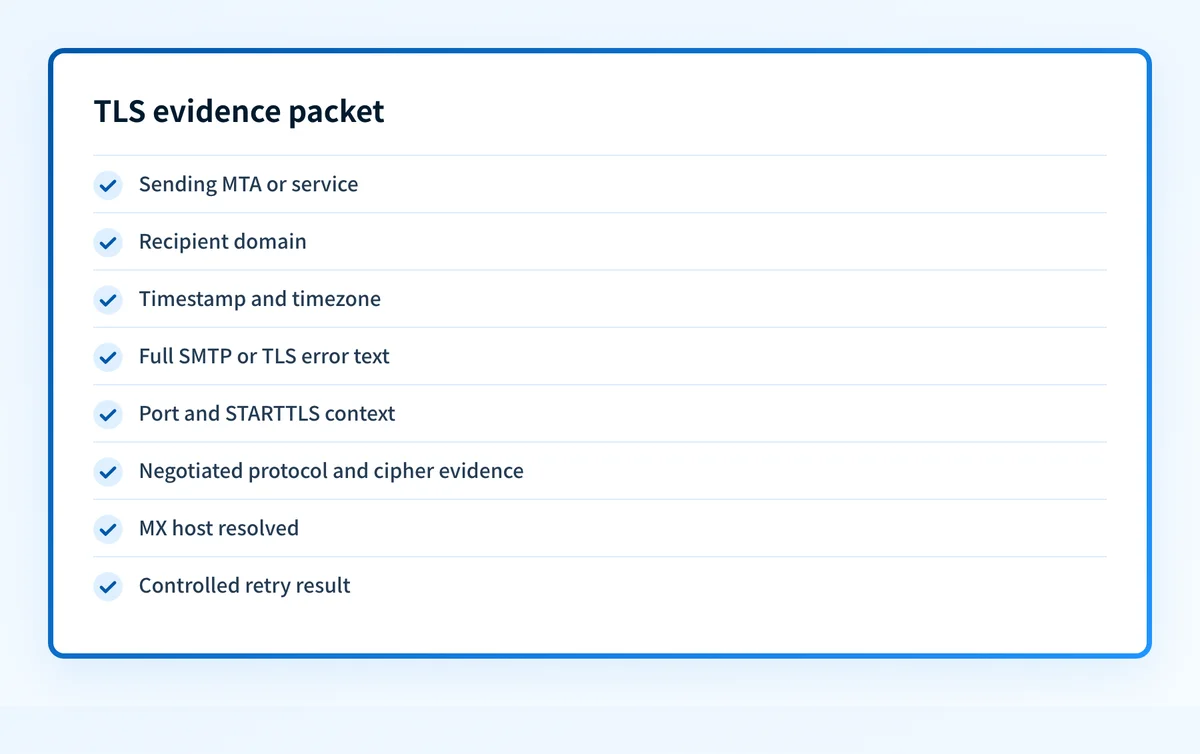
Use one labelled packet for the incident ticket, provider escalation, or controlled retest:
- Sending MTA or service: the application, outbound MTA, ESP, or gateway that opened the SMTP connection.
- Recipient domain: the domain used to resolve MX records.
- Timestamp and timezone: the delivery attempt time with a timezone, so both operators can locate the same event.
- Full SMTP or TLS error text: preserve the string and codes without rewriting them.
- Port and STARTTLS context: record the port, whether
STARTTLSwas advertised, whether the client issuedSTARTTLS, and where the exchange ended. - Negotiated protocol and cipher evidence: record the protocol and cipher if negotiation completed, or the available alert and offered-settings evidence if it did not.
- MX host resolved: record the exact hostname and IP used for the failed connection.
- Controlled retry result: record the same-path test result after one scoped change or a confirmed no-change retry.
Timestamp: 2026-08-12 09:14:22 America/Toronto
Sending service: outbound-mta.example
Recipient domain: recipient.example
MX host resolved: mx1.recipient.example
Port: 25
STARTTLS: advertised, client command accepted
TLS evidence: handshake failed before negotiated protocol/cipher was recorded
SMTP/TLS error: TLS error
Controlled retry: same route, same result
Connection evidence can establish which SMTP host was contacted, whether STARTTLS was offered, and whether the TLS session negotiated or failed. It cannot establish that Gmail accepted the message body, assigned a message to the inbox, or would make the same decision for a later attempt.
3. Test the affected SMTP host
Test the hostname identified in logs from a network authorized to reach it. This command is an example for a host you control:
openssl s_client -starttls smtp -connect mx1.yourdomain.com:25 -servername mx1.yourdomain.com -showcertsInspect whether the server advertises and accepts STARTTLS, the negotiated TLS version and cipher, certificate validity dates, certificate names, and the returned chain.
Do not test only the highest-priority MX host. A lower-priority host can receive traffic during an outage, maintenance event, or routing change.
If an outbound gateway completes TLS on behalf of the sending application, establish that through approved logs or a controlled test. Do not bypass a production security control without the owning team's approval.
4. Compare MX publication, certificates, and MTA-STS
Look up the recipient domain's MX records, then test every host that can receive mail. Compare the SMTP hostname with the valid names in its certificate.
For a domain using MTA-STS, compare active MX names with the policy's mx patterns. This is illustrative only. Obtain the real values from the domain's own published policy.
version: STSv1
mode: enforce
mx: mx1.yourdomain.com
mx: mx2.yourdomain.com
max_age: 86400
An enforce policy does not repair an incorrect certificate or stale MX record. It changes delivery behavior by requiring compliant senders to use an authenticated TLS route that matches policy.
Use the MX records checker to inspect public MX publication before comparing it with connection logs and direct TLS tests. An MX lookup cannot prove port 25 reachability, the certificate presented on the production route, a gateway's routing choice, or why Gmail treated one attempt as a TLS failure.
5. Separate transport failure from message authentication
Do not change SPF, DKIM, or the DMARC policy while the TLS failure remains unconfirmed. These controls answer different questions. The guide to Gmail SPF errors covers an authentication failure after message handling reaches that stage.
If Google sends an MTA-STS report, compare the report timing and destination host with the evidence packet. The Google MTA-STS TLS reports guide explains why those reports need SMTP and DNS evidence before a repair decision.
How do I fix it?
Restore usable STARTTLS on the affected SMTP listener
If logs show that the host does not advertise or accept STARTTLS, correct the listener or the gateway configuration on that specific route. Confirm the listener supports the SMTP service expected on port 25 before changing other hosts.
This repair changes transport configuration. It does not change SPF, DKIM, DMARC, or the requested DMARC enforcement policy.
Align TLS capabilities on both peers
If evidence shows no mutually supported protocol version or cipher suite, update the system you control to a configuration compatible with the peer's documented support. For Gmail connections, compare the local configuration with Google's published SMTP TLS support.
Change one TLS setting group at a time and keep the previous configuration available for rollback. A broad TLS-policy change can affect other mail routes.
Correct the certificate and hostname mapping
If the certificate is expired, incomplete, untrusted, or mismatched to the contacted MX hostname, deploy a valid certificate chain for that hostname or correct the MX publication to a hostname covered by the intended certificate.
Test every published MX host after the change. Repairing only the primary host leaves an intermittent failure when a backup host receives traffic.
Repair the MX and MTA-STS relationship
If the MTA-STS policy permits different hosts than current MX records, correct the stale MX record, certificate, or policy entry according to the intended receiving architecture. Keep policy changes separate from the underlying repair.
Do not switch mode: enforce to a weaker mode as a substitute for repairing a broken mail path. That changes transport-policy enforcement but does not restore certificate validity, STARTTLS support, or routing correctness.
Escalate provider-managed failures with the evidence packet
If a provider controls the sending MTA, receiving MX host, or intervening gateway, send the redacted TLS evidence packet and ask the provider to identify the failed connection stage. Include the controlled retry result.
Do not assume a provider dashboard status proves the same production SMTP path was healthy. Request confirmation tied to the hostname and timestamp in the failed event.
How do I validate the repair?
Repeat the failed delivery through the same application, sending service, recipient domain, and route. Confirm that the affected SMTP host advertises and completes STARTTLS, then record the negotiated TLS version and cipher when available.
Validate all applicable layers:
- DNS: query authoritative DNS and at least one public resolver for the current MX records. Confirm that every reachable MX hostname matches the intended infrastructure.
- Vendor: check the sending or receiving provider's current connection status when that provider controls the affected service.
- Message: send a new message through the same production path and preserve its SMTP result. A successful TLS session does not itself prove acceptance or inbox placement.
- DMARC: once reports accumulate, inspect aggregate-report data for the sending domain's authentication and alignment behavior. DMARC reports do not replace SMTP TLS evidence.
Track transport issues that DNS checks cannot show
Use the MX checker to confirm what public DNS currently publishes, then compare that result with the affected SMTP logs.
A public MX check cannot test the live TLS handshake, prove Gmail accepted a message, monitor future route changes, or diagnose a provider-managed connection failure. For teams handling recurring domains and senders, Palisade is agentic DMARC software that analyzes DMARC aggregate-report data, identifies sending sources and authentication or alignment issues, and creates prioritized remediation tickets. It does not change the DMARC policy automatically, control an SMTP peer's TLS configuration, or guarantee delivery.
Evidence
Sources and further reading
Questions readers ask
Frequently asked questions
Does a Gmail TLS error mean my DMARC record is wrong?
No. A TLS error concerns the SMTP transport connection. DMARC evaluates alignment and authentication results after message processing reaches the applicable authentication stage.
Can an expired certificate cause a Gmail TLS error?
Yes. A certificate that is expired, not yet valid, incomplete, untrusted, or mismatched to the contacted MX hostname can prevent successful certificate validation. Confirm the exact host from SMTP evidence before replacing a certificate.
Can a public MX lookup prove Gmail can deliver mail?
No. An MX lookup shows publicly published routing records. It cannot prove port 25 availability, STARTTLS support, the certificate presented to Gmail, Gmail's private delivery decision, or inbox placement.
Does MTA-STS enforce mode block fallback to a bad TLS route?
Yes. Under RFC 8461, a policy-aware sender using an enforce policy must use TLS and validate an MX host and certificate that meet the policy. The sender can defer delivery if those requirements are not met.
Should I lower my DMARC policy to fix a TLS error?
No. Lowering the DMARC policy changes requested DMARC enforcement. It does not repair STARTTLS capability, TLS compatibility, certificates, MX routing, or MTA-STS policy mismatches.

Written by
Ian BussieresCTO & Co-Founder, Palisade
Ian Bussieres is the CTO and co-founder of Palisade, agentic DMARC software for IT teams and MSPs.
More from Ian →