Why is Google sending MTA-STS TLS reports to my domain?
 ChatGPT
 Claude
 Gemini
 Perplexity
 Grok
GrokIn brief
Google MTA-STS TLS reports explain SMTP TLS delivery results for your domain, the policy Google found, failures, and a safe validation workflow.
Google sends MTA-STS TLS reports because your domain has published an SMTP TLS Reporting, or TLS-RPT, record that asks receivers to send aggregate feedback. The reports describe Google's attempts to deliver mail to your domain, including the policy it detected, session totals, and TLS failures. A report does not by itself mean mail was lost. Read the date range and failure details, then compare them with the live MTA-STS policy, MX records, certificates, and inbound SMTP service.
At a glance
Quick takeaways
- Last checked: August 12, 2026
- Next review: September 12, 2026
- Content owner: Samuel Chenard
- TLS-RPT is aggregate feedback about SMTP transport security. It is separate from SPF, DKIM, and DMARC authentication.
- Google Workspace documents daily TLS reports with connection, policy, traffic, and failure information for a receiving domain.
- Publishing a TLS-RPT record requests reports. Google does not document TLS-RPT as a universal mandate for Google Workspace domains.
Who is affected
This tracker applies to administrators of domains that receive mail and publish an SMTP TLS Reporting record at _smtp._tls. RFC 8460 defines the TLS-RPT mechanism and the aggregate JSON report format.
Google's MTA-STS and TLS reporting documentation describes reports about connections from external mail servers to a domain. In practical terms, a Google-generated report concerns Google's delivery attempts to your receiving MX hosts. It does not report outbound mail sent by your users unless Google is acting as a receiving system for another domain's report.
Google does not publish a numeric traffic threshold for receiving TLS reports. A domain can receive a report with successful sessions, failures, or both. Other participating senders can send their own reports to the destination in the TLS-RPT record.
For the broader protocol context, see the infrastructure learning hub.
Current requirements
TLS-RPT publication for aggregate feedback
- Applies to: A receiving domain that wants participating senders to send SMTP TLS aggregate reports.
- Effective: When the domain publishes a valid TLS-RPT TXT record. RFC 8460 does not define a Google-specific enforcement date.
- Required evidence: A TXT record at
_smtp._tls.yourdomain.comwith av=TLSRPTv1version tag and at least oneruareport destination. - Consequence: Participating senders can send aggregate reports to the declared destination. Publishing the record does not prove that every sender supports TLS-RPT or that every delivery attempt will appear in a report.
_smtp._tls.yourdomain.com. IN TXT "v=TLSRPTv1; rua=mailto:tls-reports@yourdomain.com"MTA-STS policy matching
- Applies to: A domain that publishes an MTA-STS policy and has senders that apply it.
- Effective: When the sender has retrieved a valid MTA-STS policy and the policy is in
enforcemode. - Required evidence: The live
_mta-sts.yourdomain.comTXT record, the HTTPS policy file, current MX answers, and a production connection test for each receiving MX host. - Consequence: RFC 8461 says a sender applying an enforce-mode policy must not deliver when it cannot establish an authenticated TLS connection to an MX host authorized by that policy.
Google Workspace report content
- Applies to: Google Workspace administrators receiving reports about connections to their domain.
- Effective: Google documents reports as daily. Google does not publish a numeric sender threshold for this reporting behavior.
- Required evidence: The report's policy domain, reporting interval, summary counts, and failure details, compared with current receiving infrastructure.
- Consequence: Google says its reports can provide information about detected MTA-STS policies, traffic statistics, failed connections, and undelivered messages. The report does not identify every possible sender or establish the cause of an individual recipient's non-delivery.
Implementation and validation
1. Confirm that the report was requested
Check DNS for the exact receiving domain named in the report. The TLS-RPT record is distinct from the MTA-STS policy record. A domain can request reports without publishing MTA-STS, because RFC 8460 can report on other applicable TLS policies.
Use the MTA-STS checker for the public record and policy inputs. A public check cannot inspect Google's report stream, your inbound mail logs, future DNS state, or every sender's connection path.
2. Read the reporting interval and totals
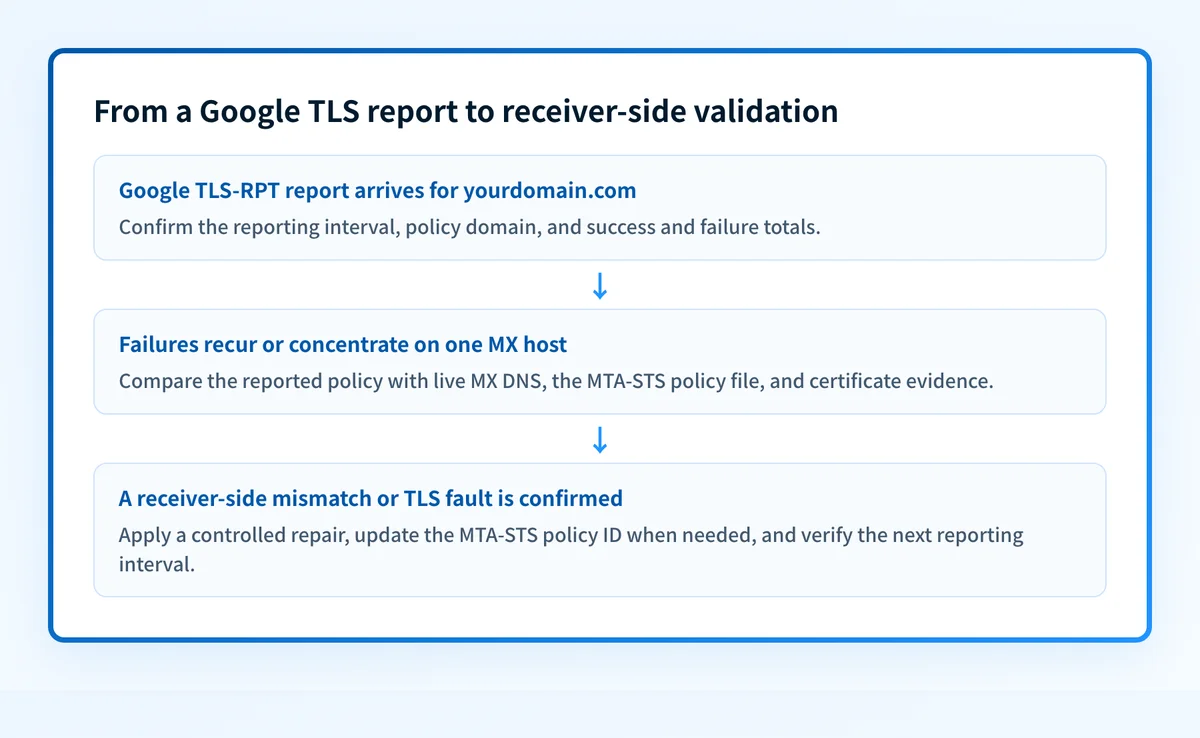
RFC 8460 reports aggregate outcomes for a date range. Start with the policy domain and the start and end timestamps. Then compare the successful and failed session counts before treating a report as an incident.
A report that contains successful sessions only is expected feedback. A small isolated failure count can be an operational signal, but it does not establish a persistent fault. Compare several report periods before drawing that conclusion.
3. Match each failure to the current receiver path
Review the report's failure details alongside the MX host that handled the connection. Then compare the report's policy description with the current MTA-STS policy, DNS answers, certificate name, certificate chain, and SMTP TLS negotiation from outside your network.
The report format can identify the policy context and failure category. Mapping a category to one local root cause is an operational inference until your DNS, certificate, load balancer, and MTA evidence confirms it.
Do not remove an MX host from an MTA-STS policy or disable enforce mode as a first response. A rushed policy change can make a legitimate backup route unavailable to senders that honor MTA-STS.
4. Test every advertised MX host
Test primary and backup MX hosts. Include hosts with lower MX preference because senders can reach them during a failover. Confirm that each authorized hostname resolves as expected, accepts SMTP connections, offers STARTTLS, and presents a certificate valid for the host name under the policy.
An illustrative MTA-STS policy has this shape:
version: STSv1
mode: enforce
mx: mx1.yourdomain.com
mx: mx2.yourdomain.com
max_age: 604800
The policy file belongs at the HTTPS location specified by RFC 8461. Increment the policy ID in the _mta-sts TXT record when you publish a changed policy so senders can detect that they should retrieve it again.
5. Validate at four independent layers
A working DNS record is only one layer of evidence.
- DNS: Query the authoritative DNS provider and at least one public resolver for
_smtp._tls,_mta-sts, and the MX records. - Vendor: Review the Google-generated report for the covered interval and policy details. Google's report reflects its own observed connections.
- Message and transport: Use inbound MTA logs or a controlled external SMTP test for each production MX host. DNS does not prove a successful TLS session.
- Ongoing DMARC evidence: Use DMARC aggregate reports to inventory mail sent using your domain. Those reports do not replace receiver-side TLS evidence.
Change log
August 12, 2026
Rechecked Google's MTA-STS and TLS reporting documentation, RFC 8460, and RFC 8461. Confirmed that Google documents daily TLS reports with policy, traffic, failed-connection, and undelivered-message information. Confirmed that RFC 8460 defines aggregate reporting through a published TLS-RPT destination and that RFC 8461 defines enforce-mode delivery behavior. No Google-published numeric threshold or universal TLS-RPT mandate was found.
July 18, 2026
Published the initial tracker with the distinction between expected aggregate reports and persistent receiver-side failures. Recorded the need to compare report evidence with live DNS, MTA-STS policy, TLS certificates, and inbound SMTP service.
Check the public MTA-STS configuration before changing it
Run your receiving domain through the MTA-STS checker to inspect the public TLS-RPT record, MTA-STS DNS record, policy file, and advertised MX host patterns. Compare that result with the report's policy domain and failure details before changing a certificate or policy.
Palisade is DMARC software. It can analyze DMARC aggregate-report data, identify sending sources and authentication or alignment issues, and propose a next policy step for human review. It does not repair an inbound TLS failure, control Google's delivery decision, or make a public check continuous proof of SMTP transport behavior.
Evidence
Sources and further reading
Questions readers ask
Frequently asked questions
Why am I receiving Google MTA-STS TLS reports?
You are receiving Google MTA-STS TLS reports because the receiving domain has a TLS-RPT record that requests aggregate SMTP TLS feedback. The report describes Google's attempts to connect to that domain during its reporting interval.
Does a Google TLS report mean email was not delivered?
No. A Google TLS report can contain successful sessions only. Review the failed-session count and failure details before treating it as evidence of lost mail.
Do I need MTA-STS to receive TLS-RPT reports?
No. TLS-RPT and MTA-STS use separate DNS records. RFC 8460 allows reporting for applicable SMTP TLS policies, while RFC 8461 defines MTA-STS policy discovery and enforcement behavior.
Should I delete the TLS-RPT record to stop the reports?
Only if you no longer want aggregate transport feedback. Removing the record stops an evidence source, but it does not repair an MX, certificate, DNS, or SMTP TLS problem that a report may have identified.
Can an MTA-STS checker prove Google will deliver mail?
No. An MTA-STS checker can inspect public DNS and the available policy file. It cannot prove Google's private delivery decision, a future connection outcome, or the behavior of every sender.

Written by
Ian BussieresCTO & Co-Founder, Palisade
Ian Bussieres is the CTO and co-founder of Palisade, agentic DMARC software for IT teams and MSPs.
More from Ian →