Why does Gmail report an SPF error?
 ChatGPT
 Claude
 Gemini
 Perplexity
 Grok
GrokIn brief
Gmail SPF errors mean Gmail could not authorize the sending IP for the envelope domain it evaluated. Inspect headers, repair the SPF path, and retest now.
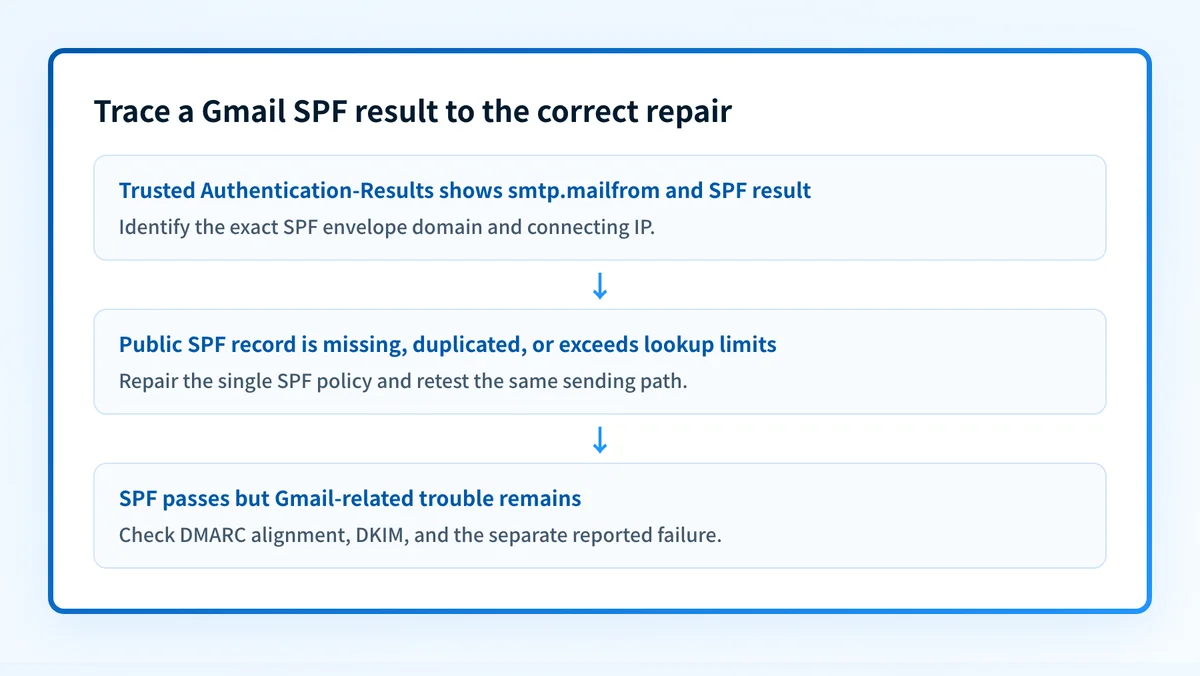
Gmail reports an SPF error when it cannot authorize the IP address that connected to Gmail for the envelope sender domain it evaluated, or when it cannot evaluate that domain's SPF policy. Start with Gmail's trusted Authentication-Results header and its smtp.mailfrom value. The visible From address can be different, so editing that domain's SPF record may not affect the failing mail stream.
At a glance
Quick takeaways
- SPF evaluates the SMTP envelope sender domain, usually shown as
smtp.mailfrom, rather than the visible From address. failmeans the connecting IP is not authorized by the evaluated SPF policy.permerrorcommonly points to a permanent SPF record problem, including duplicate records or too many DNS lookups.temperrorpoints to a temporary DNS evaluation failure and should be investigated before rewriting the policy.- An SPF pass does not prove DMARC passes, because SPF must also align with the visible From domain.
- A forwarded message can fail SPF because Gmail receives it from the forwarder's IP.
What does the failure mean?
SPF authorizes an SMTP client for the domain used in the SMTP MAIL FROM command. If that command has an empty reverse-path, SPF can evaluate the SMTP HELO identity instead. Google's authentication troubleshooting guidance directs senders to inspect message headers when diagnosing authentication results.
This illustrative redacted header fragment shows the evidence to preserve:
Authentication-Results: mx.google.com;
       spf=fail (google.com: domain of bounce@yourdomain.com does not designate 192.0.2.10 as permitted sender) smtp.mailfrom=bounce@yourdomain.com
RFC 8601 defines Authentication-Results as a receiver-added field for reporting message-authentication checks. In this example, Gmail evaluated yourdomain.com for bounce@yourdomain.com and found that 192.0.2.10 was not authorized.
The result establishes what Gmail evaluated for that received message. It does not identify the owner of the sending IP, prove why Gmail made an inbox or rejection decision, or show every service that sends with the domain.
What usually causes it?
The sending service is missing from the evaluated SPF policy
A marketing platform, CRM, help desk, billing service, or outbound relay may use an IP address that the envelope domain does not authorize. Google's SPF setup guidance says to identify every service that sends mail for a domain and add the required authorization to that domain's SPF record.
This is the likely cause only when the header identifies an expected service's IP and the provider documents the authorization it needs. Do not add an include: value because it appears in another domain's SPF record.
The record was changed on the visible From domain
SPF normally evaluates smtp.mailfrom, not the address recipients see in the From field. A message can have From: notices@yourdomain.com while Gmail evaluates smtp.mailfrom=bounce@mail.yourdomain.com.
This follows from the SPF protocol rule. It is not a documented Gmail-specific mapping. If Gmail evaluated mail.yourdomain.com, inspect the TXT record published there. Updating yourdomain.com does not repair a policy published on its subdomain.
More than one SPF record exists
RFC 7208 requires permerror when a DNS lookup returns more than one SPF record. This often happens when a second TXT record beginning with v=spf1 is added instead of merging required mechanisms into the existing policy.
The evaluated hostname needs one SPF policy. Other TXT records can exist, but they must not be additional SPF records.
The SPF policy exceeds the DNS lookup limit
RFC 7208 limits SPF evaluation to 10 DNS-querying mechanisms and modifiers. include, a, mx, exists, redirect, and nested lookups can contribute to that limit. Exceeding it produces permerror.
Remove services that no longer send mail before altering the record. If frequent sender changes make the policy difficult to maintain, evaluate an SPF management approach only after confirming the lookup count and the actual active senders. That approach still needs public DNS validation and does not prove delivery at Gmail.
DNS evaluation had a temporary failure
A temperror means the SPF evaluation encountered a temporary error. RFC 7208 distinguishes temporary errors from permanent SPF policy errors.
Check authoritative DNS and public resolver responses before changing the record. A public DNS result is a point-in-time observation. It cannot prove Gmail used the same resolver response or that the production sender used the expected return path.
A forwarder changed the connecting IP
Google explains that forwarding and mailing lists can affect authentication. SPF depends on the final SMTP connection, so a forwarder can cause Gmail to see its IP instead of the original sender's authorized IP.
Forwarding is an inference until the original sending route and Gmail-received copy are compared. DKIM may still provide aligned authentication for DMARC after SPF fails on a forwarded message.
How do I diagnose the failure?
1. Preserve the Gmail-received message source
Open the original message source in Gmail and save the complete headers. Record the exact Authentication-Results line, Return-Path, visible From domain, smtp.mailfrom, smtp.helo, SPF result, DKIM result, DMARC result, Message-ID, and sending time.
Use Gmail's receiver-added result. Do not diagnose from a screenshot of the rendered message or a copy that someone forwarded, because forwarding can create a different SMTP path.
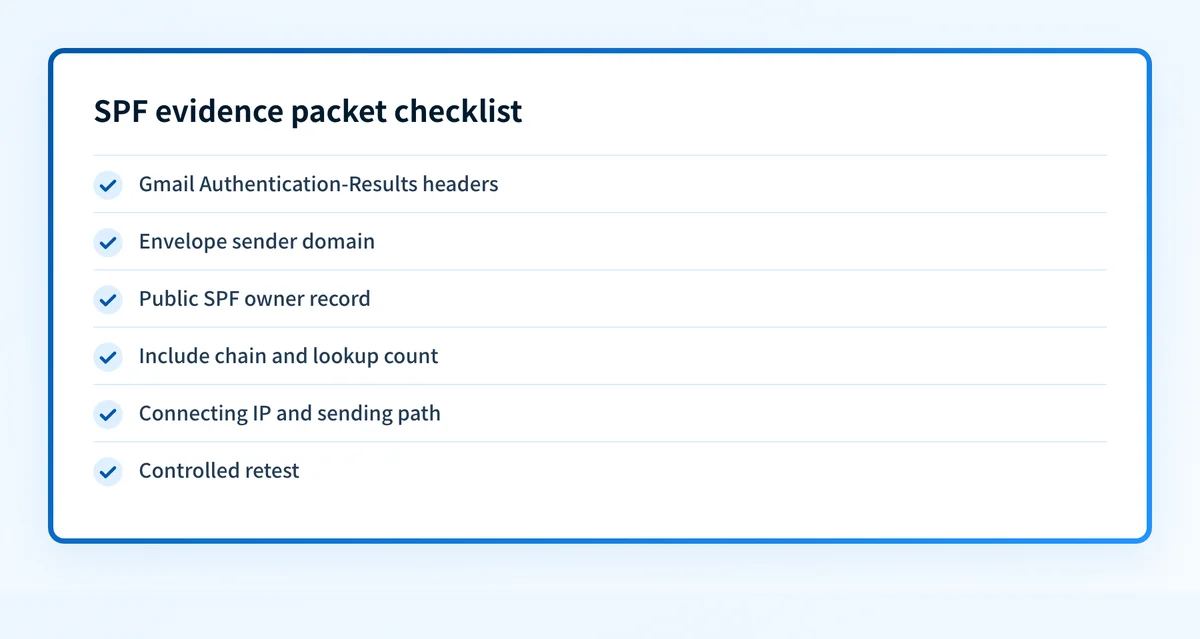
2. Build an SPF evidence packet
Keep these items together before requesting a DNS or sending-platform change:
- Visible From domain: the domain in the recipient-visible
From:field. - SPF envelope domain: the domain or address shown in
smtp.mailfrom, or the HELO identity if the reverse-path was empty. - Exact result: the complete trusted
spf=pass,spf=fail,spf=softfail,spf=temperror, orspf=permerrordiagnostic. - Public SPF owner record: the TXT record at the exact hostname Gmail evaluated.
- Include chain: each active
include:orredirect=target needed to reach the authorization decision. - Lookup-count evidence: the DNS-querying terms and nested paths, when
permerroror a lookup limit is suspected. - Message evidence: Message-ID, sending time, connecting IP shown in the result, and the sending service or relay expected to use that route.
- Controlled retest: a newly sent message through the same application, return path, relay, and recipient path.
yourdomain.com. IN TXT "v=spf1 include:spf.sender.example -all"
spf.sender.example. IN TXT "v=spf1 ip4:192.0.2.10 -all"
The sending provider must document the real authorization values. Inspect the public SPF record with Palisade's SPF checker after identifying the evaluated domain. A public record lookup cannot inspect the raw Gmail message, prove the sender used that record, monitor later changes, or explain Gmail's private delivery decision.
3. Match the connecting IP to the real sending path
Compare the IP named in Gmail's SPF diagnostic with the application, outbound relay, and documented IP or include mechanism for that mail stream. Check whether the service uses a custom return path or a separate bounce subdomain.
If the IP belongs to an expected service, compare its documented authorization with the SPF policy on the evaluated domain. If the IP is unexpected, investigate the service configuration, routing, or account access before editing DNS.
4. Check DNS publication and SPF lookups
Query the evaluated hostname through its authoritative DNS servers and at least one public resolver. Confirm that one usable SPF record begins with v=spf1 and that no duplicate SPF record remains.
Trace each DNS-querying term, including nested include: values. A record can look short while its includes consume the lookup budget. Record the actual evaluated path rather than estimating from visible mechanisms alone.
5. Check DMARC separately
SPF and DMARC are separate checks. DMARC requires an authenticated identifier to align with the domain in the visible From field. An SPF pass for mail.yourdomain.com may still fail DMARC for yourdomain.com under strict SPF alignment. An aligned DKIM pass can allow DMARC to pass when SPF fails.
For the broader protocol relationship, use the email authentication learning hub. If Gmail reports a transport issue rather than an SPF result, see why Gmail reports TLS errors.
How do I fix it?
Repair a missing SPF record
If the evaluated hostname has no SPF record, publish one policy that authorizes only its confirmed sending paths. Obtain the provider's actual mechanism or return-path instructions from its documentation.
Do not replace a working root-domain SPF record with a subdomain policy, and do not add a second v=spf1 TXT record. A DNS change can interrupt mail from another active sender.
This repair changes SPF authentication. It does not guarantee Gmail delivery or resolve an unrelated DMARC alignment failure.
Reduce an SPF lookup-limit permerror
If the evidence packet shows more than 10 DNS-querying terms, remove inactive includes and obsolete mechanisms first. Consolidate only when the sending providers document a supported configuration. Retest every remaining sender, including less frequent transactional paths.
Do not loosen the DMARC policy as a response. DMARC policy changes requested enforcement. They do not reduce SPF lookups or repair an SPF permerror.
Authorize the confirmed sending source
If Gmail's connecting IP belongs to an expected provider and that provider's documented SPF authorization is absent, add that authorization to the single SPF record for the evaluated envelope domain. Preserve existing required mechanisms.
If the source is unknown, stop before authorizing it. Adding an unknown relay to SPF expands who can send mail using that envelope domain.
Investigate an SPF pass with another failure
If Gmail reports spf=pass, SPF has authorized the connecting IP for the evaluated identity. Check whether that identity aligns with the visible From domain for DMARC, then inspect DKIM and DMARC results. The SPF pass does not establish that Gmail will place the message in the inbox, nor does it explain a TLS, content, reputation, or recipient-policy issue.
For a wider set of provider error symptoms, see how to resolve Yahoo and Gmail email error codes.
How do I validate the repair?
Send a new message through the same application, envelope sender, outbound relay, content path, and Gmail recipient path. Check the new receiver-added Authentication-Results header for the expected SPF result and record the connecting IP.
Validate four layers independently:
- DNS: verify the evaluated hostname has one correct public SPF policy through authoritative DNS and a public resolver.
- Vendor: confirm the sending service reports the expected authenticated domain or return-path state, where that service provides such a status.
- Message: confirm the new Gmail-received message has the expected SPF result for the intended
smtp.mailfromidentity. - DMARC: review aggregate reports after data accumulates to confirm that the source and alignment pattern remain understood.
Check the SPF record behind Gmail's result
When the trusted header identifies the evaluated envelope domain, check that public SPF record with Palisade.
Start with Palisade to inspect DMARC aggregate-report data, identify sending sources and authentication or alignment issues, and create prioritized remediation tickets after you have repaired the immediate SPF path. Palisade does not control Gmail's private filtering decision, change the DMARC policy without human review, or prove future messages will authenticate.
Evidence
Sources and further reading
Questions readers ask
Frequently asked questions
Does an SPF error mean the visible From domain is wrong?
No. SPF usually evaluates the envelope sender domain shown as smtp.mailfrom, which can differ from the visible From domain. Use Gmail's Authentication-Results header to identify the actual evaluated identity.
Can Gmail report an SPF error when there is no SPF record?
Yes. If the evaluated domain has no usable SPF policy, Gmail cannot authorize the connecting IP through SPF. Confirm the exact result in the trusted header before publishing a new record.
Does an SPF pass mean DMARC passes?
No. SPF must also align with the visible From domain for DMARC to use that SPF pass. An aligned DKIM pass may satisfy DMARC when SPF does not align.
Should I add the failing IP address directly to SPF?
Only if the IP belongs to a confirmed, approved sending path and the provider documents that direct IP authorization is appropriate. An unknown IP may indicate an unintended relay, configuration issue, or account-access problem.
Can a forwarded message fail SPF at Gmail?
Yes. A forwarder can change the SMTP client IP Gmail evaluates. Compare the original path with Gmail's received copy, then inspect DKIM and DMARC results as well.

Written by
Samuel ChenardCEO & Co-Founder, Palisade
Samuel Chenard is the CEO and co-founder of Palisade, agentic DMARC software for IT teams and MSPs, from one domain to thousands.
More from Samuel →