How many SPF records can a domain have and why do multiple records cause PermError?
 ChatGPT
 Claude
 Gemini
 Perplexity
 Grok
GrokIn brief
Multiple SPF records at one DNS name cause PermError. Learn why receivers do not merge them, how to combine legitimate senders, and how to retest.
Multiple SPF records at one exact domain or subdomain cause SPF permerror. A receiver does not merge the policies or choose one. Build one replacement that keeps every approved sender mechanism, publish it as the only v=spf1 TXT value at that name, and retest each production sending path. Leave unrelated TXT records in place.
At a glance
Quick takeaways
- One exact DNS owner name can have one selected
v=spf1policy. - Two or more SPF policy records at the same name produce
permerror. - Other TXT values, including domain-verification values, can coexist with an SPF record.
- A subdomain is a different DNS name and can publish its own SPF policy.
- Combine authorized mechanisms into one reviewed record before removing duplicates.
- A consolidated record can still fail if it exceeds SPF's DNS-querying-term limit.
Why SPF permits one policy at an exact name
SPF record selection in RFC 7208 applies to the exact DNS name SPF evaluates. When selection finds one matching SPF record, evaluation can continue. When it finds two or more matching records, the result is permerror.
The count is per DNS owner name, not per company or registered domain. For example, yourdomain.com and mail.yourdomain.com are separate names. Microsoft also states in its SPF configuration guidance that each domain or subdomain needs its own SPF TXT record, with one SPF record at that name.
SPF evaluates the envelope sender domain or, when needed, the HELO or EHLO identity. The visible From address can be different. Read what DNS records a business email domain needs alongside this rule when you are checking the wider DNS configuration for a sending domain.
When the answer changes
The answer changes only when the DNS name changes.
A policy at yourdomain.com does not automatically become an SPF policy at news.yourdomain.com. If a service sends with news.yourdomain.com as its envelope domain, SPF can query that subdomain as its own exact name. That subdomain may publish one v=spf1 policy.
Ordinary TXT records do not count as extra SPF policies. RFC 7208 selects records that begin with the SPF version prefix, v=spf1. These can coexist at one name:
yourdomain.com. TXT "v=spf1 include:mail.example.net -all"
yourdomain.com. TXT "service-verification=example-value"
Only the first illustrative TXT value is an SPF policy. The second is unrelated TXT data.
Do not add a vendor's newv=spf1value beside an existing SPF policy as a temporary measure. The duplicate state itself can cause SPFpermerrorfor mail using that name.
Review each sender mechanism before consolidation. An a mechanism, for example, authorizes a domain's address records under SPF rules. See what the SPF a mechanism does before retaining or adding it to a production policy.
Common duplicate-record cases
A provider wizard added a second policy
A mailbox or marketing provider may show a complete v=spf1 example even when the domain already has SPF. Publishing that example beside the existing record creates the duplicate. Extract the new provider's authorization mechanism, place it before the existing final all term, and keep one version token.
Do not copy an include, IP range, or qualifier until the provider's current instructions and the actual envelope-sender domain agree. Some services authenticate a dedicated return-path subdomain and do not need a new mechanism at the root domain.
A DNS interface displays one TXT value as several strings
A long TXT value may appear as adjacent quoted strings in a DNS interface or lookup result. Those strings can belong to one TXT record and are concatenated for SPF evaluation. They are not automatically multiple SPF records.
The failure occurs when DNS returns two or more independently selectable TXT records beginning with v=spf1 at the same owner name. Preserve the raw DNS answer in the change record so the reviewer can distinguish a split value from two policies.
The records are at different owner names
An SPF policy at yourdomain.com and another at news.yourdomain.com are not duplicates. SPF selects a policy for the exact MAIL FROM or HELO identity under evaluation. Check the domain shown in the receiver's SPF result before merging anything across the parent and subdomain.
Worked example: merging duplicate SPF policies
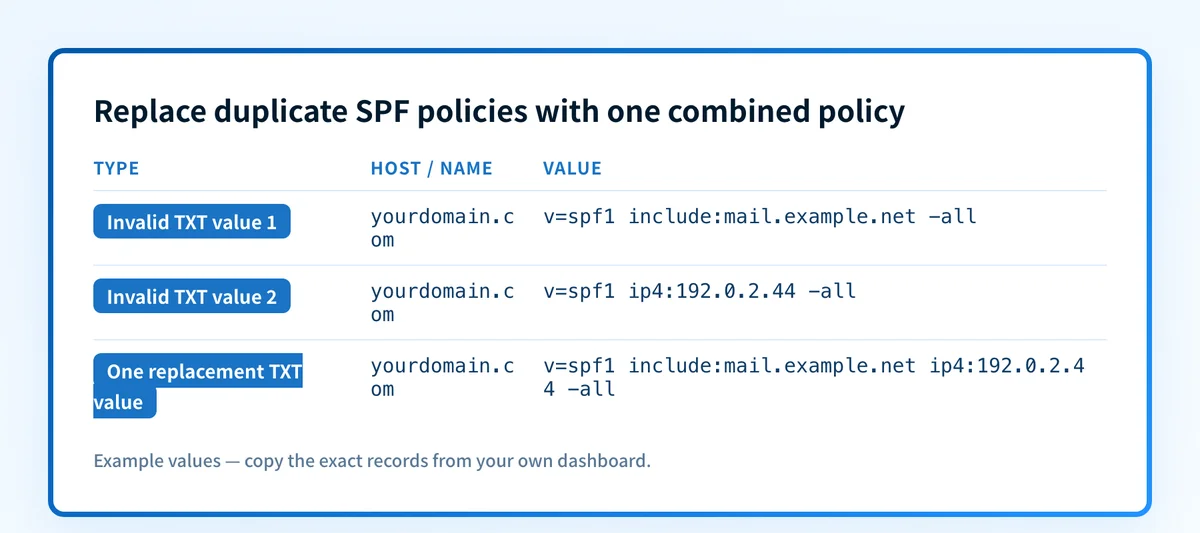
These two SPF records at the same exact owner name are invalid together:
yourdomain.com. TXT "v=spf1 include:mail.example.net -all"
yourdomain.com. TXT "v=spf1 ip4:192.0.2.44 -all"
If both sending sources are current and authorized, replace both with one reviewed policy:
yourdomain.com. TXT "v=spf1 include:mail.example.net ip4:192.0.2.44 -all"The domain, service name, and IP address are illustrative only. Do not copy them into production. Obtain each real mechanism from the sender's current documentation and confirm that the sender still uses the envelope domain you are editing.
Use this decision rule:
- If two TXT values at the same name start with
v=spf1, inventory the senders and create one replacement policy. - If one TXT value starts with
v=spf1and another is a verification token, retain both. - If the policies are at different names, assess each name separately instead of merging them.
- If the replacement contains
include,a,mx,ptr,exists, orredirectmechanisms, count SPF DNS-querying terms before publishing.
permerror. Nested include: records count toward the limit, so a short-looking policy can still exceed it.
How to diagnose multiple SPF records
Confirm the exact SPF identity
Start with a delivered message or rejection that identifies the SPF domain. In a trusted receiver-added Authentication-Results field, that identity commonly appears beside smtp.mailfrom or smtp.helo. Do not assume the visible From domain is the DNS name SPF checked.
Record the message path, application, envelope domain, and result before making a DNS change. This baseline gives you a same-path test after the repair.
List every selected SPF value
Query TXT records at the exact owner name and copy every separate value beginning with v=spf1. Keep unrelated verification and service TXT values out of the merge. If a provider splits one long TXT value into quoted chunks, preserve their order and treat them as one logical record.
Compare the authoritative DNS answer with at least one public resolver. A resolver can retain an older duplicate while cached data remains valid, so capture which server returned each result and when.
Map each mechanism to an approved sender
For every include, ip4, ip6, a, mx, exists, or redirect term, identify the sender and owner that still needs it. Mark an unfamiliar term as unresolved instead of deleting it. A duplicate-record repair that removes an active sender replaces one authentication failure with another.
Keep the original final qualifier as the default unless the change owner separately approves a policy change. Combining duplicate records fixes record selection. Changing ~all to -all, or the reverse, changes the result returned for unmatched senders and should be reviewed as a different decision.
Build and review one replacement
Create one candidate with a single v=spf1 token, all confirmed authorization mechanisms, and one final all term. Count the full reachable DNS-querying path, including nested includes, before publication. The SPF record format guide explains how those terms are evaluated.
Have the sender owners review the candidate against their current configurations. Then publish the replacement in one controlled change so the domain does not remain with two policies while an obsolete record waits for a later cleanup.
Check the published result before changing mail flow
Start with the affected exact DNS name, then list every TXT value returned for it. Identify every value beginning with v=spf1, map each mechanism to an active sender, and prepare one replacement record. Keep unrelated TXT values unchanged.
After publishing, check authoritative DNS and at least one public resolver. Then inspect the one published SPF policy and its lookup path. Microsoft documents the same operational approach: keep authorized senders in one SPF record rather than publishing separate policies for each sender.
Next, send mail through every active production platform. Inspect receiver-added Authentication-Results fields in delivered-message headers. RFC 8601 defines that field for communicating authentication results. Finally, use DMARC aggregate reports when available to find sources that still fail authentication or alignment after the DNS repair.
For more email-authentication context, visit the email authentication learning hub.
Check the published SPF policy
Use the Palisade SPF checker after the consolidated TXT value resolves publicly. Enter the affected domain to inspect the published SPF policy and identify an obvious duplicate-record result before you test production mail.
A public DNS check cannot prove that every production sender uses the expected envelope domain, that a delivered message passed SPF, or that a receiver will accept the message.
Evidence
Sources and further reading
Questions readers ask
Frequently asked questions
Can a domain have several TXT records?
Yes. A DNS name can publish several TXT values. The one-record restriction applies to selected records beginning with v=spf1, not to verification tokens or other non-SPF TXT data.
Can a subdomain have its own SPF record?
Yes. A subdomain is a separate DNS owner name and can publish one SPF policy. The parent domain's SPF policy does not automatically authorize mail that SPF evaluates against the subdomain.
Will receivers merge two SPF records?
No. RFC 7208 specifies permerror when two or more SPF records are selected for the same name. Consolidate authorized mechanisms into one policy.
Should I remove duplicate SPF records before I know every sender?
Only after you have a reviewed replacement policy that retains each legitimate sender. Leaving duplicate policies live causes its own SPF error, while removing an active sender can break that sender's authentication.
Does one SPF record guarantee an SPF pass?
No. The connecting sender must match an authorized mechanism, SPF evaluation must complete within its processing limits, and the message must use the envelope or HELO identity you expected.

Written by
Dominic LandryDeliverability & DNS
Dominic Landry works on email deliverability and DNS configuration at Palisade, from SPF and DKIM records through to DMARC enforcement.
More from Dominic →