What causes SPF TempError?
 ChatGPT
 Claude
 Gemini
 Perplexity
 Grok
GrokIn brief
SPF TempError means SPF evaluation hit a temporary DNS or processing failure. Find the evaluated domain, trace its lookups, and validate the sending path.
SPF TempError means the receiving system could not complete SPF evaluation because it encountered a transient problem, usually a DNS error or timeout. A later evaluation can succeed without any record change. Repeated SPF TempError needs investigation because a failure in the evaluated domain or any SPF dependency can prevent an intended SPF pass and, where relevant, prevent DMARC from using SPF as aligned authentication.
At a glance
Quick takeaways
- SPF TempError is a temporary evaluation failure, not an explicit SPF authorization failure.
- DNS errors and timeouts during SPF processing can produce SPF TempError.
- The failing DNS name may belong to an
includeorredirectdependency rather than your visible From domain. - An SPF processing-limit violation produces SPF PermError, which requires a different repair path.
- A delivered message's
Authentication-Resultsheader identifies the SPF result and evaluated identity. - A successful public DNS lookup does not prove that the affected production message path is now reliable.
How SPF TempError happens
RFC 7208 defines SPF TempError as a transient error during SPF processing. The RFC describes it as generally DNS-related, with the expectation that a later attempt may succeed without action by the DNS operator. This differs from SPF PermError, which indicates a condition that needs correction before SPF evaluation can succeed.
SPF evaluates an SMTP identity, usually the envelope sender domain rather than the domain readers see in the From header. If those identities differ, review what SPF is before assuming which domain failed.
An SPF record can require DNS queries for mechanisms and modifiers such as include, redirect, a, mx, and exists. RFC 7208's DNS lookup rules state that a DNS query error, including a timeout, during those operations can terminate evaluation with TempError. The same section recommends a limit on total SPF evaluation time. If a receiver reaches its time limit, the result can also be TempError.
A receiving system decides how to handle the message after SPF evaluation under its local policy. SPF TempError itself does not prove that the sender is unauthorized, that a recipient rejected the message, or that a retry will succeed at every receiver.
When SPF TempError means a different problem
The practical cause depends on which DNS lookup failed and whether the issue repeats.
- A timeout or server failure at the evaluated domain can cause SPF TempError. Intermittent authoritative DNS availability, incomplete delegation, or resolver reachability may affect some receiving systems while others use cached data.
- A failure in an
includeorredirecttarget can propagate to the top-level evaluation. The published SPF record may be available, while a provider-managed dependency is temporarily unavailable. - Slow resolution across a large dependency chain can reach a receiver's overall SPF evaluation time limit. This is separate from the SPF DNS-querying-term limit.
- Too many DNS-querying terms is not SPF TempError. RFC 7208 requires SPF PermError when evaluation exceeds the limit of ten DNS-querying mechanisms and modifiers.
- Multiple SPF records, invalid syntax, or other permanent record defects also require a PermError investigation rather than a transient-DNS investigation.
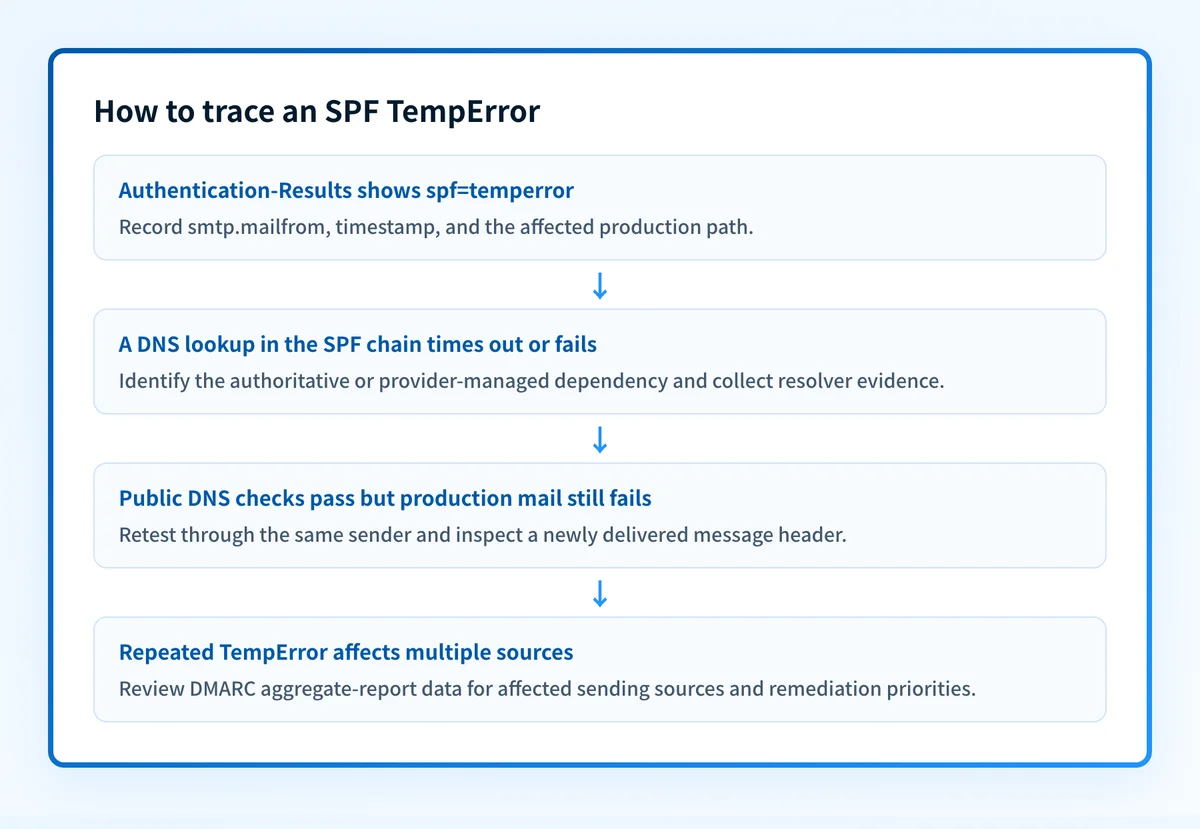
Authentication-Results header field, which can show the SPF result and an evaluated property such as smtp.mailfrom. That receiver-added evidence is more useful than guessing from the visible From address.
Worked SPF TempError evidence example
A delivered message may contain an authentication result shaped like this:
Authentication-Results: receiver.example;
  spf=temperror smtp.mailfrom=bounces.yourdomain.com
This is illustrative only. Do not publish full message headers because they can contain recipient addresses, message identifiers, routing details, and other private data.
The example tells you to start at bounces.yourdomain.com, not automatically at the visible From domain. Resolve that domain's SPF TXT record, then trace each DNS-dependent branch that the receiving system could reach for the sending IP.
Record each lookup with its time, resolver, response, and authoritative nameserver where available. Focus on observable failures:
- A resolver returns
SERVFAIL, times out, or returns no usable response where a DNS-dependent SPF step needs one. - Different resolvers produce inconsistent results.
- A provider-owned SPF dependency repeatedly fails during the same periods as the affected messages.
- The message path produces TempError again after DNS appears healthy in a one-time public check.
Do not replace an SPF provider include with copied IP ranges as a quick fix. That can leave authorized sending infrastructure stale when the provider changes its published SPF record.
For an operator-facing definition of the result, see what SPF TempError means. The separate question of SPF record construction belongs in the SPF checker, which can inspect a public record but cannot replay a recipient's past DNS resolution.
Validate the cause with the evidence you have
Start with the message evidence. Preserve the result, time, connecting IP where available, and evaluated SPF identity from the receiver. If a bounce or provider dashboard reports a temporary SMTP response, preserve that text exactly as well.
Next, query the evaluated domain and its referenced SPF domains through more than one public resolver. Compare those results with direct authoritative DNS checks if your operational access permits it. A passing cached answer is useful evidence, but it cannot disprove an intermittent authoritative DNS or network failure.
Then send a controlled message through the same production application, relay, and envelope-sender path. Check the delivered message's Authentication-Results header rather than relying only on an ESP status indicator or DNS checker result. If SPF passes, check whether the passing smtp.mailfrom domain aligns with the visible From domain for DMARC.
After the immediate repair, review DMARC aggregate reports once they accumulate. This layer can reveal whether a source still produces authentication failures at scale, but it does not replace the message-level evidence for the individual TempError.
You can use Palisade's SPF checker to inspect the public SPF record for the evaluated domain. It is a useful configuration check when you have the domain name. It does not prove the DNS response a particular receiver received, inspect a private provider decision, or monitor future DNS reliability.
Track the sending sources that still need remediation
After you isolate the DNS dependency, the remaining question is whether other production senders use the same domain or still fail authentication. Palisade is agentic DMARC software that analyzes DMARC aggregate-report data, identifies sending sources and authentication or alignment issues, and creates prioritized remediation tickets. It can propose the next DMARC policy step when the evidence supports it, while a human reviews the evidence and applies the change.
Palisade cannot prove the cause of one historical SPF TempError, repair an unavailable third-party DNS dependency, or guarantee that every future message will authenticate.
Evidence
Sources and further reading
Questions readers ask
Frequently asked questions
Is SPF TempError the same as SPF fail?
No. SPF fail is an SPF result that states the sending IP is not authorized under the evaluated SPF policy. SPF TempError means the receiver could not complete SPF evaluation because of a transient condition.
Can an SPF include cause TempError?
Yes. SPF evaluation can query domains referenced through include or redirect. A DNS error or timeout in one of those dependencies can cause the top-level SPF evaluation to return TempError.
Does exceeding ten SPF lookups cause TempError?
No. RFC 7208 requires SPF PermError when SPF evaluation exceeds the DNS-querying-term limit. A slow lookup chain can still produce TempError if it reaches a receiver's overall processing time limit.
Will retrying the message fix SPF TempError?
Only sometimes. TempError indicates that a later evaluation may succeed, but the result depends on whether the underlying DNS or network condition has cleared and on the receiver's own retry and evaluation behavior.
Does DMARC fix SPF TempError?
No. DMARC uses SPF and DKIM results. It does not repair the DNS or processing problem that stopped SPF evaluation. A DKIM-aligned pass may still allow DMARC to pass when SPF returns TempError, depending on the message and DMARC alignment.

Written by
Samuel ChenardCEO & Co-Founder, Palisade
Samuel Chenard is the CEO and co-founder of Palisade, agentic DMARC software for IT teams and MSPs, from one domain to thousands.
More from Samuel →