How do I fix the 'SPF PermError: too many DNS lookups' error?
 ChatGPT
 Claude
 Gemini
 Perplexity
 Grok
GrokIn brief
SPF PermError: too many DNS lookups means SPF exceeded its 10-term DNS limit. Map the lookup chain, remove or separate senders, then retest.
SPF PermError: too many DNS lookups means the receiver needed more than 10 SPF DNS-querying terms to evaluate the envelope-sender or HELO domain. Fix it by mapping the full reachable include and redirect chain, removing confirmed unused authorizations, consolidating supported senders, or separating a sender onto its own subdomain. Then send a new message through the same production path and inspect its SPF result.
For the counting rules and nested examples, see what counts toward SPF’s lookup limit. Use the procedure below when the reported failure is lookup exhaustion.
At a glance
Quick takeaways
- RFC 7208 limits SPF evaluation to 10 DNS-querying terms and modifiers.
- Nested
includerecords count against the same lookup budget as the top-level SPF record. ip4,ip6, andalldo not consume the SPF DNS lookup budget.- The failed SPF identity can be the envelope sender or HELO domain, not the visible From domain.
- Removing an active sender authorization can break legitimate mail, so identify its owner before publishing a change.
- A public DNS check cannot prove the production application used the intended sending path.
What does the failure mean?
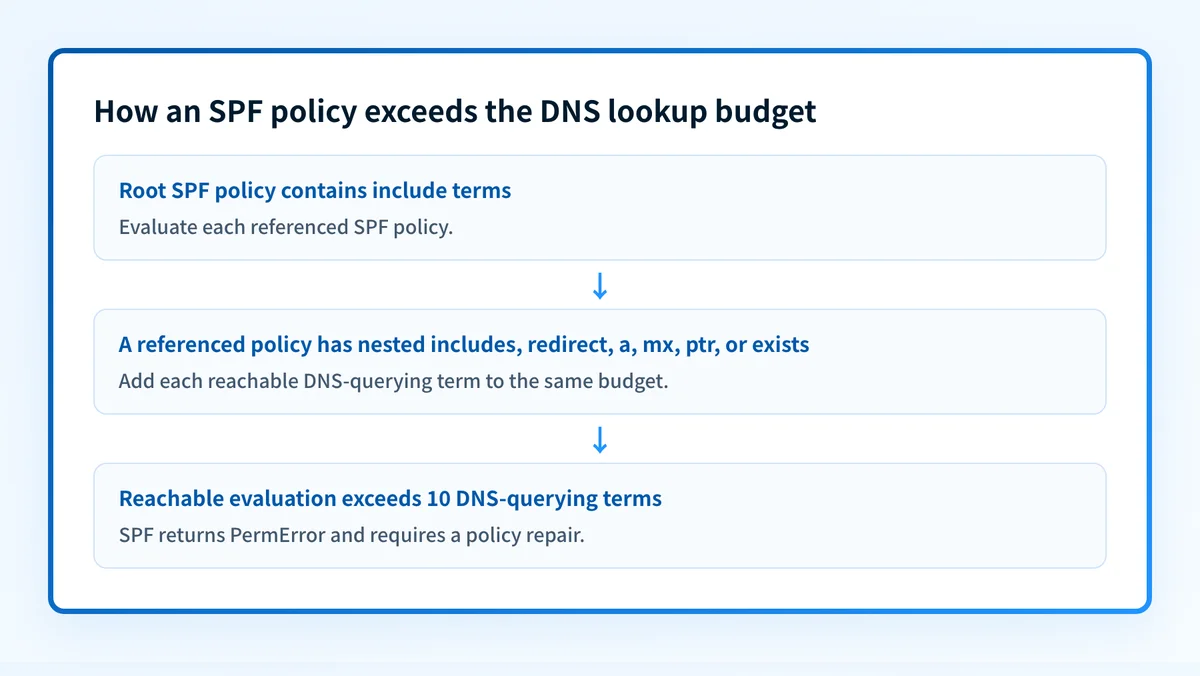
SPF authorizes the IP address that sent a message for the SMTP envelope sender or HELO identity. To prevent unbounded DNS work, RFC 7208 section 4.6.4 requires SPF evaluators to limit DNS-querying terms and modifiers to 10. When evaluation exceeds that limit, the SPF result is permerror.
SPF PermError: too many DNS lookupsThe error proves that SPF evaluation exceeded the limit. It does not identify the exact nested include, redirect, or sender service that used the final permitted lookup.
include, a, mx, ptr, exists, and redirect can require DNS processing during SPF evaluation. ip4, ip6, and all do not. An mx mechanism counts as one term toward the overall 10-term limit; its address lookups also have a separate limit under RFC 7208 section 4.6.4. The overall budget is not simply a count of DNS network requests.
A separate permerror can occur when a domain publishes more than one SPF record. RFC 7208 also recommends a limit of two void lookups, such as NXDOMAIN or an empty answer. Do not assume that a short top-level record is healthy until you trace its reachable records.
What usually causes it?
Nested include records exceed the budget
An include causes the receiver to evaluate the referenced SPF policy. Its reachable DNS-querying terms count toward the same total. A top-level record with only a few includes can exceed 10 after those records expand. The SPF lookup-limit guide explains the limit and mechanisms in more detail.
A redirect reaches another complex policy
The redirect modifier directs SPF evaluation to another SPF record when no earlier mechanism matches. It counts toward the limit. A long redirected policy, especially one with nested includes, can create the failure even when the root record looks short.
Retired services remain authorized
A newsletter platform, CRM, help desk, or transactional provider may have left an old include behind. The SPF result alone cannot prove that a service is unused. If the service has no current owner, this is an operational inference that needs confirmation before you remove it.
DNS-based mechanisms add hidden work
a, mx, ptr, and exists mechanisms can consume lookups without appearing as an included vendor policy. RFC 7208 strongly discourages ptr. Replace it only after confirming the current sending IP address or supported provider configuration.
Multiple SPF records exist
A domain must publish one SPF record beginning with v=spf1. Multiple SPF records produce permerror, which can coexist with an over-limit policy. Check record count before changing mechanisms.
How do I diagnose the failure?
1. Preserve the receiver's authentication evidence
Save the raw source of a message that failed. Record the trusted receiver-added Authentication-Results header, SMTP envelope sender when available, HELO identity, sending application, outbound IP address, and recipient provider.
RFC 8601 defines Authentication-Results. It can identify the SPF identity with properties such as smtp.mailfrom and smtp.helo.
Authentication-Results: receiver.example;
  spf=permerror smtp.mailfrom=yourdomain.com
This is illustrative only. Redact recipient addresses, message identifiers, and customer data before sharing a ticket.
2. Build a labelled DNS evidence record
Query the exact SPF identity shown in the receiver result. Capture the evidence before remediation so another operator can reproduce both the lookup count and the authorization decision.
SPF owner queried: sender.example
Test IP: 192.0.2.10
Root TXT: v=spf1 include:spf.mail.example include:spf.crm.example -all
spf.mail.example TXT:
  v=spf1 a:m1.example a:m2.example a:m3.example a:m4.example -all
spf.crm.example TXT:
  v=spf1 a:c1.example a:c2.example a:c3.example a:c4.example a:c5.example -all
Assumption: each a: hostname resolves to 192.0.2.20, not the test IP.
Evaluation path:
  1       include:spf.mail.example
  2-5     a:m1.example through a:m4.example; no match; included policy fails
  6       include:spf.crm.example
  7-10    a:c1.example through a:c4.example; no match
  11      a:c5.example would exceed the limit; SPF returns permerror
The -all mechanisms do not consume this budget.
Representative result: spf=permerror smtp.mailfrom=sender.example
The names and results are illustrative only. The calculation boundary is the SPF evaluator's reachable execution path for the identity and message under test, not a count of words in the root TXT record. Record multiple SPF TXT values, void answers, and branches that are not reached for the test path separately.
Use the Palisade SPF checker to inspect the publicly published SPF record and its lookup path. It is a DNS lookup, not proof that an application used the expected envelope sender, that all production routes are represented, or that a receiver accepted a specific message.
3. Expand every reachable DNS-querying term
Follow each include to its SPF record and continue through nested includes. Trace redirect only where its conditions apply. Count a, mx, ptr, and exists mechanisms that the evaluation can reach.
Do not flatten a provider's published IP ranges into your record without a named maintenance owner. Provider infrastructure can change, and a static flattened record can become stale.
4. Verify the authorization owners
Map each authorization to a current sending service, owner, and test path. Confirm whether it sends using the failed SPF identity. If ownership is unknown, preserve the term until you can test the suspected service.
Do not delete an authorization because its name looks unfamiliar. A syntactically valid SPF record can still cause SPF failure for an active sender after a careless removal.
5. Check duplicate records and void lookups
Confirm that the root and any redirected SPF domain publish only one v=spf1 TXT record. Then check that referenced DNS names resolve as expected. A deleted provider hostname or typo can cause a different SPF permerror even when the lookup count is below 10.
How do I fix it?
Remove confirmed unused senders
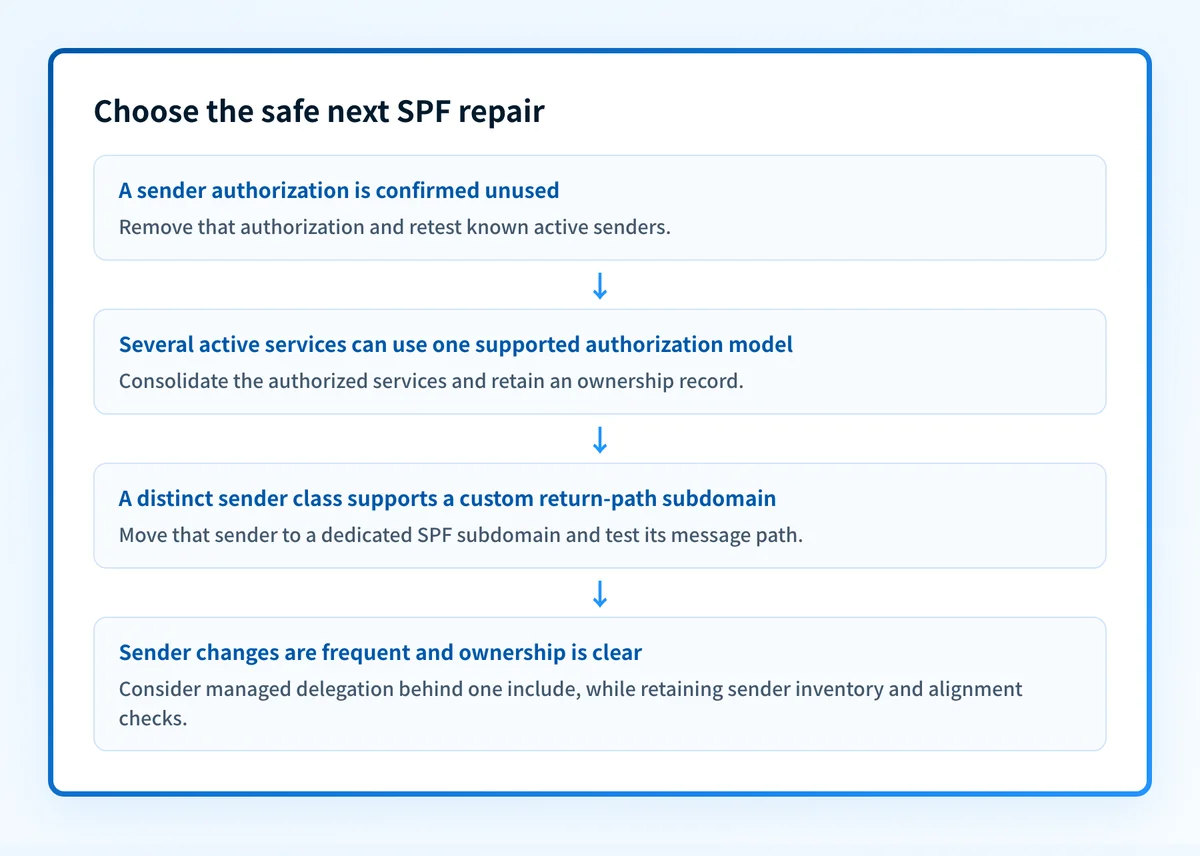
Remove an include or other authorization only when its service is retired or has moved to another approved sending identity. Retest that service's known paths after the change.
Confirming that a service is retired is the harder half, and DMARC aggregate reports are the evidence. An authorization whose sender has produced no passing SPF result across a long reporting window is a candidate for removal; one that carried mail last week is not. Palisade's hosted SPF sender list records the last day mail passed SPF through each entry and marks the entries that have been silent for the full window, so the decision rests on report history rather than memory. Where that view is not available, read the aggregate reports for the sending source directly before removing its authorization.
This repair changes SPF authorization. It does not change the DMARC policy, DKIM signing, or a receiver's delivery decision.
Consolidate authorized services
When several active services use overlapping provider policies, move them to a supported shared authorization model if the provider documents one. Keep a service inventory beside the SPF record so later changes do not recreate the lookup chain.
This is preferable to copying provider IP ranges into a static record unless your team owns the ongoing maintenance and change process.
Use a dedicated sending subdomain
When a marketing or transactional provider supports a custom return path, move that sender class to a subdomain such as news.yourdomain.com. The subdomain has its own SPF evaluation budget.
news.yourdomain.com. TXT "v=spf1 include:spf.provider.example -all"This record is illustrative only. Use the provider-generated values for the real configuration. Confirm that the sender uses the subdomain as its envelope sender, then check DKIM alignment in a delivered message.
Use managed delegation only with clear ownership
If senders change frequently and an owner maintains the inventory, a delegated SPF record can keep the parent policy to one managed include. Palisade Hosted SPF documentation describes Palisade's hosted SPF option. A single include is not by itself proof that the complete evaluation stays within the limit; verify the resulting chain after migration.
Hosted SPF does not replace inventorying senders, approving authorization changes, or checking SPF and DKIM alignment in a real delivered message. It also does not control a receiver's private delivery decision.
How do I validate the repair?
Publish the smallest confirmed change, then query the authoritative DNS server and at least one public resolver to confirm the intended SPF record is visible. Recount the reachable DNS-querying terms for the same SPF identity.
Send a new message from the same application, envelope sender, route, and recipient provider that produced the failure. Confirm the receiver's trusted Authentication-Results no longer reports spf=permerror. A passing SPF result still does not prove DMARC passes. Check whether the SPF-authenticated domain aligns with the visible From domain, or whether aligned DKIM supports DMARC.
After DMARC aggregate-report data accumulates, review the affected source for SPF, DKIM, and alignment results. For teams responsible for several domains or sender changes, Palisade DMARC software analyzes aggregate reports, identifies authentication and alignment issues, and creates prioritized remediation tickets. A human reviews the evidence and applies DNS or DMARC policy changes.
Track the SPF sender inventory after the repair
Use the public SPF lookup to confirm the record you just changed, then keep an operational record of which sources use that SPF identity.
A public SPF check cannot inventory every production sender, monitor later authorization drift, prove alignment for a delivered message, or guarantee delivery.
Evidence
Sources and further reading
Questions readers ask
Frequently asked questions
Does every include count as one SPF lookup?
No. An include itself requires SPF evaluation of another domain, and DNS-querying terms inside that policy also count. Count the full reachable chain, not only top-level includes.
Can I fix SPF PermError by changing DMARC to p=none?
No. DMARC policy changes requested handling for DMARC failures. It does not reduce SPF DNS lookups or change an SPF permerror.
Should I flatten my SPF record?
Flatten your SPF record only when a named owner can maintain the resulting IP authorizations and provider changes. Static flattened ranges can become stale. Removing unused senders, consolidating supported services, or using a dedicated subdomain is often easier to operate safely.
Can a DNS checker prove the fix worked for production mail?
No. A DNS checker can show the published SPF record and its public lookup path. Send a new message through the same production route and inspect the receiver's Authentication-Results header.
Can SPF pass while DMARC fails?
Yes. SPF can pass for an envelope-sender domain that does not align with the visible From domain. DMARC can still pass through aligned DKIM, but validate the exact delivered message and later review aggregate reports.

Written by
Dominic LandryDeliverability & DNS
Dominic Landry works on email deliverability and DNS configuration at Palisade, from SPF and DKIM records through to DMARC enforcement.
More from Dominic →