How can you resolve Yahoo and Gmail email error codes?
 ChatGPT
 Claude
 Gemini
 Perplexity
 Grok
GrokIn brief
Google and Yahoo are tightening email authentication rules, and you may see new SMTP error codes when sending messages.

How can you resolve Yahoo and Gmail email error codes?
Google and Yahoo are tightening email authentication rules, and you may see new SMTP error codes when sending messages. Each code points to a specific part of the sender requirements your domain is missing. Read the code, fix the underlying record, and delivery recovers. The most common failures come from a missing DMARC record, more than one SPF record on the domain, SPF or DKIM that passes without aligning to the From domain, and a sending IP with no PTR record.
At a glance
Quick takeaways
- Google and Yahoo's bulk-sender rules took effect in February 2024; Gmail began ramping up enforcement (including rejections) from November 2025.
- Gmail's
4.7.xcodes are temporary rate limits that name the exact failure:4.7.27(SPF),4.7.30(DKIM),4.7.32(DMARC alignment),4.7.29(TLS),4.7.23(reverse DNS). - The permanent
550 5.7.26means the message was blocked because it was not authenticated with SPF or DKIM. - The Gmail bulk threshold is 5,000 messages per day to Gmail addresses. Keep your spam rate below 0.3% at all times and ideally under 0.1%.
- Bulk senders must publish a DMARC record and support one-click unsubscribe (RFC 8058) with
List-UnsubscribeandList-Unsubscribe-Postheaders.
What Google and Yahoo now require from senders
Since February 2024, both providers expect every outbound message to be authenticated and every bulk sender to prove it. The requirements split into three groups, and the SMTP codes below map directly onto them.
Authentication. Set up SPF and DKIM for your sending domain, and publish a DMARC record with a policy of at least p=none. For messages sent to personal Gmail addresses, the domain in the visible From: header must align with either the SPF domain or the DKIM domain. Gmail requires both mechanisms to be present, but only one needs to align.
Infrastructure. Sending IPs need valid forward and reverse DNS (a PTR record that resolves back to the sending IP), and all mail must travel over a TLS connection.
Bulk-sender obligations. If you send 5,000 or more messages a day to Gmail accounts, you are a bulk sender. On top of the authentication and infrastructure rules, you must keep your spam rate (measured in Google Postmaster Tools) below 0.3% at all times, with 0.1% as the target you actually aim for. Marketing and subscribed messages must offer one-click unsubscribe and show a visible unsubscribe link in the body. Yahoo enforces an equivalent set of rules through its Sender Hub.
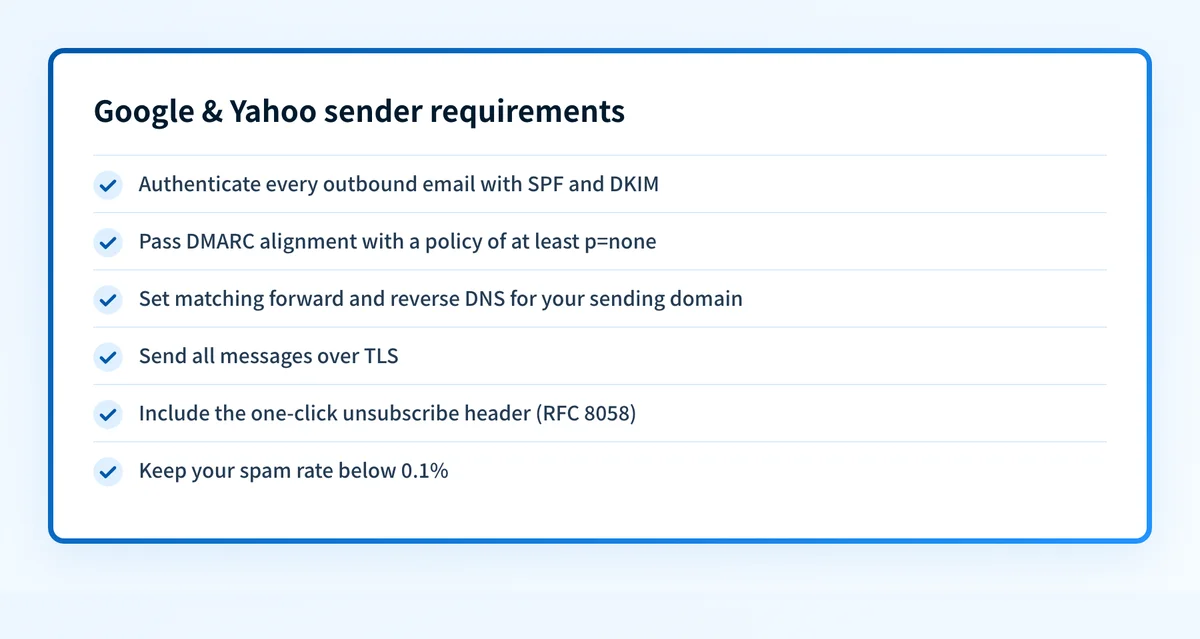 Miss any of these and you may see the new SMTP error codes.
One-click unsubscribe is defined by RFC 8058. In practice you add two headers to bulk mail: List-Unsubscribe, which carries the opt-out URL or mailto, and List-Unsubscribe-Post, which lets the mailbox provider trigger the opt-out with a single POST, no landing page, no login. Missing or malformed unsubscribe headers are a common reason otherwise-authenticated bulk mail still lands in spam.
How to read SMTP enhanced status codes
Most rejections have two parts, though servers that don't support enhanced status codes send only the three-digit reply code and its text. The basic reply code is the first three digits: 4xx means a temporary failure and the sending server will retry, while 5xx means a permanent failure that blocks delivery until you fix the cause. The enhanced status code (the X.Y.Z value like 4.7.27) pinpoints why.
The middle digit 7 denotes a security or policy problem, which is why nearly all of the authentication codes start with 4.7 or 5.7. The final number identifies the exact rule: SPF, DKIM, DMARC alignment, TLS, or DNS. Reading the two halves together tells you both how urgent the failure is and which record to correct. For what each common bounce code means, code by code, see the SMTP error codes reference.
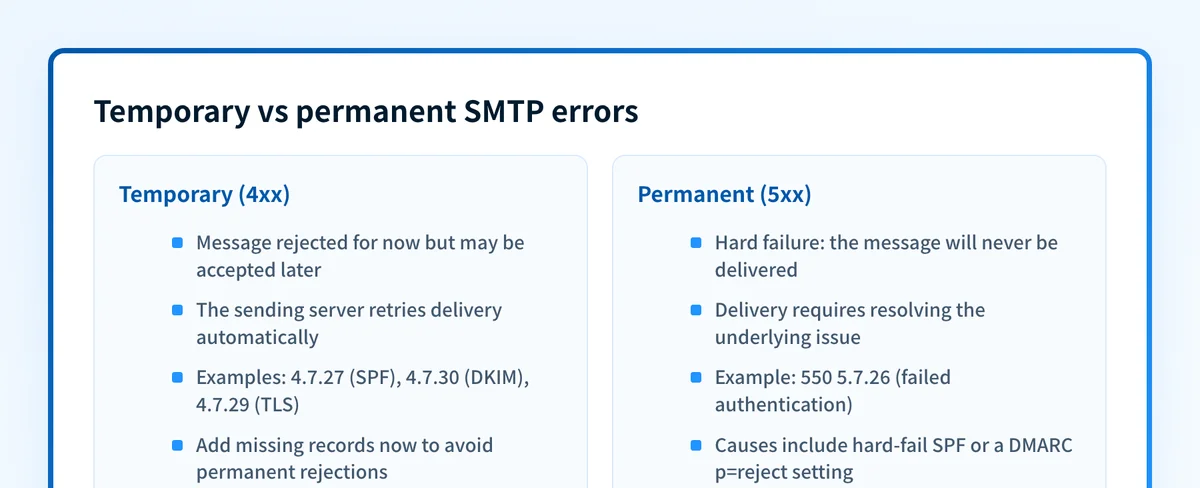 4xx codes are retried automatically; 5xx codes block delivery until the issue is fixed.
Here is how Gmail's current codes map to requirements:
4.7.27: SPF authentication did not pass. Add or fix your SPF record.4.7.30: DKIM authentication did not pass. The message is unsigned or the signature fails.4.7.32: TheFrom:header does not align with the authenticated SPF or DKIM organizational domain (DMARC alignment).4.7.29: The message was not sent over a TLS connection.4.7.23: The sending IP has no PTR record, or its reverse DNS does not resolve back to the sending IP.550 5.7.26: Permanent block: the sender is unauthenticated because neither SPF nor DKIM passed.
4.7.x codes are rate limits, not rejections. Gmail is throttling you and will retry, but the throttling tightens the longer the record stays broken. Treat every one as a to-do you fix now, before enforcement turns it into a 5.7.26.
Common issues with Gmail and Yahoo error codes
Why do I keep getting 4.7.27 after adding an SPF record?
The record exists but the message still fails SPF alignment. Confirm you have exactly one SPF TXT record on the domain (multiple SPF records is itself a failure), that it includes every service that sends on your behalf via the correct include: mechanisms, and that it ends in ~all or -all. Then check that the domain in the Return-Path (the envelope sender) matches your From: domain, since SPF authenticates the envelope sender, not the visible one. Re-test with the SPF checker after DNS propagates.
My DKIM is set up but I still see 4.7.30, what's wrong?
A 4.7.30 after setup usually means the receiving server cannot find or verify the signature. Check that the DKIM selector in the message header has a matching public key published in DNS at selector._domainkey.yourdomain.com, that the key has not been rotated out from under the signer, and that no forwarding or content rewriting is altering the message body after it was signed. Validate the published key with the DKIM checker.
How do I fix a 4.7.23 reverse DNS error?
This code means the sending IP has no PTR record, or its PTR resolves to a hostname that does not point back to that IP. You cannot fix reverse DNS from your own DNS zone. The owner of the IP block controls it. Ask your hosting provider, ISP, or ESP to set a PTR record for the sending IP, then confirm the hostname's forward A/AAAA record resolves back to the same IP. If you send through an ESP, this is usually already handled on their shared IPs. See Reverse DNS does not match SMTP banner for the full walkthrough.
Why is authenticated mail still bouncing with 550 5.7.26?
If SPF and DKIM both look correct but Gmail still returns 550 5.7.26, the failure is almost always alignment, not the records themselves. Gmail requires the passing mechanism to align with the From: domain. A common cause is sending through an ESP that signs DKIM with its own domain and uses its own bounce domain for SPF, both pass, neither aligns. Fix it by enabling custom (aligned) DKIM signing on your From: domain at the ESP, and by verifying alignment in a DMARC monitoring report before you tighten policy.
Related reading
- Why is Gmail rejecting my emails with a 550 error?
- What are Gmail and Yahoo error codes and how can I fix them?
- Why does Gmail report TLS errors?
Questions readers ask
Frequently asked questions
What is the difference between temporary (4xx) and permanent (5xx) error codes?
Temporary 4xx codes tell the sending server the message was rejected for now but may be accepted on retry, so the server keeps trying automatically. Permanent 5xx codes are hard failures: the message will not be delivered until the underlying issue, such as an unauthenticated sender or a p=reject DMARC policy, is resolved.
How can I verify my domain's DMARC, DKIM, and SPF status?
Run your domain through Palisade's free tools: the email security score for an overall health report, plus the dedicated DKIM, SPF, and DMARC checkers to inspect each record and get specific fixes.
Can I use a separate bounce domain for SPF while keeping the From domain unchanged?
Yes, but the bounce (Return-Path) domain needs its own valid SPF record, and for DMARC to pass on SPF it must align with the From: domain, relaxed alignment accepts a shared organizational domain. If alignment is not possible on SPF, make sure aligned DKIM carries the message instead.
How often should I re-check my email authentication records?
Check at least quarterly, and always after DNS changes, ESP migrations, or adding new sending subdomains. Continuous DMARC monitoring is better than spot checks because it alerts you the moment a source starts failing, rather than after mail already bounced.
Does Yahoo use the same error codes as Gmail?
Yahoo enforces the same underlying requirements (SPF, DKIM, DMARC, TLS, and one-click unsubscribe) but its bounce text and codes differ from Gmail's. If you fix the authentication failures Gmail reports, you will generally satisfy Yahoo's Sender Hub rules at the same time. See What are Gmail and Yahoo error codes and how can I fix them? for provider-by-provider detail.

Written by
Dominic LandryDeliverability & DNS
Dominic Landry works on email deliverability and DNS configuration at Palisade, from SPF and DKIM records through to DMARC enforcement.
More from Dominic →