What is email filtering and how does it prevent spam?
 ChatGPT
 Claude
 Gemini
 Perplexity
 Grok
GrokIn brief
Email filtering evaluates messages for spam and threats using authentication, reputation, and message signals before delivery or quarantine.
Email filtering is the process a mailbox provider or security gateway uses to evaluate an incoming message and decide whether to deliver it, place it in spam, quarantine it, or reject it. It prevents some spam by combining evidence about the sender, the message, and the recipient environment. Authentication helps establish authorized domain use, but it does not guarantee inbox placement or prove a message is safe.
At a glance
Quick takeaways
- Email filters make a receiver-side decision for each message or sending stream.
- Sender authentication, reputation, and message characteristics can all affect filtering.
- SPF, DKIM, and DMARC help receivers evaluate whether a domain's use is authorized.
- A DMARC pass does not mean a message is harmless or entitled to inbox placement.
- A false positive is legitimate mail sent to spam or quarantined by a filter.
- Public DNS checks can inspect published records, but cannot show a receiver's private filtering decision.
How email filtering works
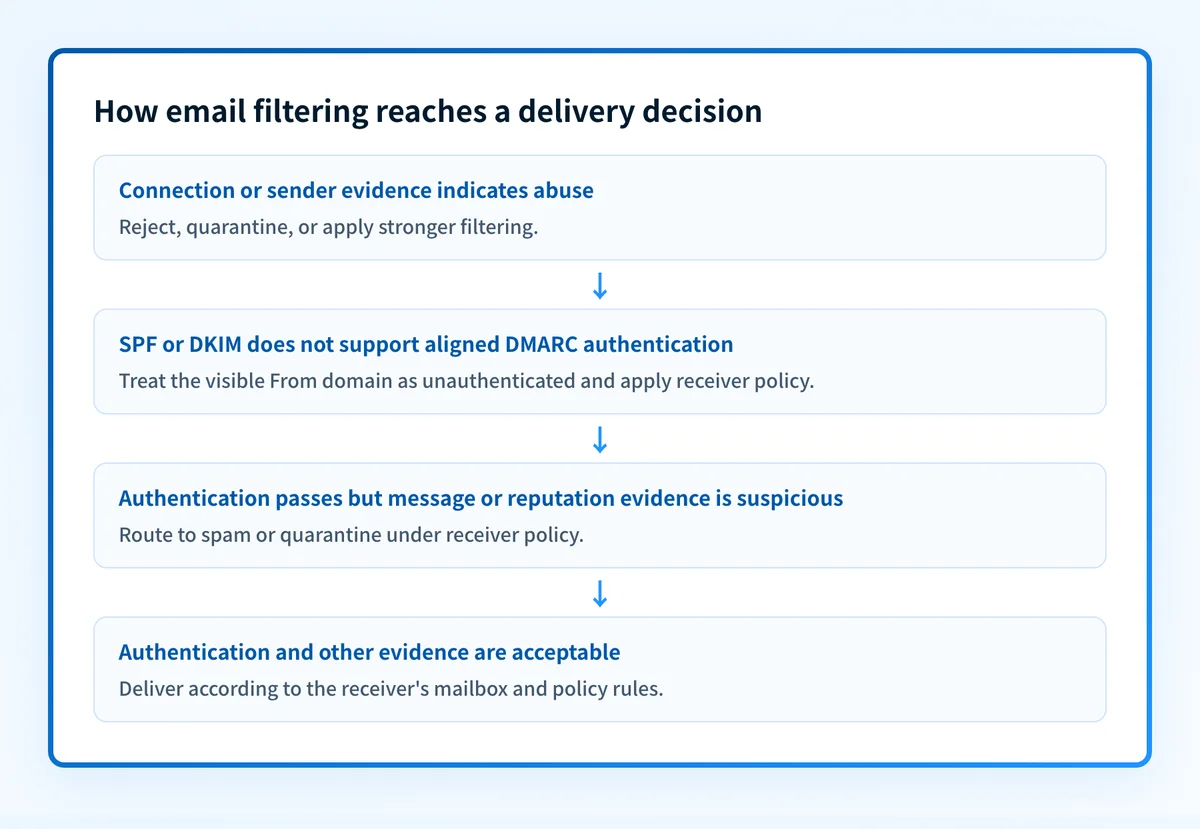
Email filtering applies checks at different points in mail flow. A receiving service can reject a connection before delivery, classify a message after accepting it, or route it to a spam or quarantine location. Microsoft describes its email protection as including connection filtering, spam filtering, anti-malware filtering, and related controls in Exchange Online Protection. Each provider can use its own policies and evidence, so there is no universal spam score that guarantees the same result everywhere.
A filter commonly has evidence in these areas:
- Connection and sender evidence: The receiving system can evaluate the sending IP address, domain, and prior behavior associated with the source. A poor reputation can affect a message even if its visible content appears ordinary.
- Authentication evidence: SPF authorizes hosts to use a domain in mail, while DKIM provides a domain-level signature that a receiver can verify. RFC 7208 defines SPF, and RFC 6376 defines DKIM signatures.
- Domain alignment and policy: RFC 9989 defines DMARC as a way for a domain owner to publish an authentication policy and request reports. DMARC passes only when SPF or DKIM passes with an identifier aligned to the visible From domain.
- Message and recipient evidence: Filters can assess message content, links, attachments, headers, recipient-level settings, and reports from users. The exact weighting is generally not published by mailbox providers.
For broader sender-side context, see email deliverability. Deliverability covers whether mail reaches the intended recipient and where it lands after the receiving system makes its decision.
How MX filtering changes the mail route
MX filtering is a deployment pattern in which a domain publishes the filtering service's hosts as its MX destination. Sending servers deliver inbound mail to that service first. The filter evaluates the message and forwards accepted mail to the organization's final mailbox system. Microsoft documents this route for third-party cloud filtering services.
MX preference still follows SMTP routing rules. RFC 5321 says lower MX preference numbers are preferred, so the published record order controls which advertised host a sender tries first. The MX record guide explains preference, failover, and the difference between inbound routing and sender authentication.
A public MX lookup can identify the hostnames advertised for inbound delivery. It cannot reveal every filtering policy, prove which product handles a generic hostname, or show whether a message was accepted, quarantined, forwarded, or rejected. Confirm the route with the domain owner or mail administrator before assigning a vendor from DNS alone.
When filtering prevents spam, and when the result changes
Filtering prevents spam when the available evidence gives the receiver a reason to block, quarantine, or classify a message as unwanted. The decision changes with the evidence available to that specific receiver.
A legitimate-looking message can be filtered when its sending service is unauthorized, its DKIM signature fails, its domain has a poor reputation, or a local policy treats the message as suspicious. That outcome is a false positive when the message was legitimate.
Spam can still reach an inbox when it evades the receiver's current controls, comes from a source without an established negative reputation, or uses a domain that is not the exact domain protected by DMARC. DMARC addresses unauthorized use of the visible From domain. RFC 9989's anti-phishing scope does not cover every fraudulent message, including visually similar domains and display-name abuse.
Use this decision rule:
- If the problem is an unknown message received by a user, inspect the message's headers and the receiver's security or quarantine view. A public DNS lookup cannot explain the provider's final decision.
- If the problem is mail your organization sends, confirm the sending domain's SPF, DKIM, and DMARC publication first. Then test a real message through the production path.
- If the problem is recurring spam that impersonates your exact domain, use DMARC aggregate reports to identify unauthorized use and legitimate sources before changing policy.
- If the problem is user-reported spam or spam-folder placement, treat authentication as one part of the investigation. Content, reputation, and the receiving provider's local controls can still determine the outcome.
A worked filtering example
Consider a password-reset message sent with From: support@yourdomain.com. The following is an illustrative evidence object, not a record to publish or a copy of a real message.
Visible From domain: yourdomain.com
SPF result: pass for mail.example-sender.com
DKIM result: pass with d=yourdomain.com
DMARC result: pass because the DKIM domain aligns with yourdomain.com
Receiver action: still determined by the receiving system's filtering policy
The DMARC result can pass because the DKIM signing domain aligns with yourdomain.com. That establishes authorized use of the visible From domain under the DMARC evaluation model.
It does not settle every filtering question. The recipient's provider can still consider the sending stream's reputation, the message's links or attachments, and local policy. Conversely, a failed authentication result gives a receiver a reason to treat a message with more caution, but the receiver still controls the final handling.
Do not move a domain directly to a stricter DMARC policy because a DNS check looks correct. First verify every important production sender with a real delivered message and use aggregate reports to find sources that need remediation.
For a sender trying to reduce spam-folder placement, this example points to a useful sequence: verify published DNS, inspect the exact production message, then compare what the receiver recorded. How to stop emails going to spam in Outlook covers the provider-specific evidence to collect when Outlook is the receiving environment.
What to check next
Start with the evidence you have.
If you only have a sending domain, inspect its public authentication posture. A domain-level result can show whether SPF, DKIM, and DMARC records are publicly discoverable. It cannot prove that the application sending a particular message uses those records correctly.
If you have a message that reached spam, use the raw message headers and the receiving provider's available spam or quarantine details. Compare the visible From domain, SPF result, DKIM result, and DMARC result with the path your application was meant to use. Then send a controlled test through the same production service. Do not rely on a test from a different platform, subdomain, or return path.
If the recurring issue is promotional mail, separate spam classification from category placement. A message can arrive outside the primary inbox without being spam. The useful evidence is the receiver's placement and the authentication results from that exact message. For Gmail-specific diagnosis, see why emails go to spam in Gmail.
If inbound spam claims to be from your exact domain, investigate domain impersonation separately from general filtering. DMARC can help receivers identify unauthorized use of that domain, while a lookalike domain needs other detection and response work. What is spam email and how to prevent it? covers the broader user-facing prevention measures.
Check the authentication signals behind filtering
Run the sending domain through Palisade's email security score checker to inspect the public authentication and DNS signals that a receiver can look up.
A public check does not prove why a specific receiver filtered a message, repair content or reputation issues, monitor future changes, or guarantee inbox placement. For teams with recurring authentication gaps, Palisade autonomously analyzes DMARC aggregate-report data, identifies sending sources and alignment issues, and creates prioritized remediation tickets. A human still reviews the evidence and applies any DNS or policy change.
Evidence
Sources and further reading
Questions readers ask
Frequently asked questions
Is email filtering the same as spam filtering?
No. Spam filtering is one part of email filtering. Email filtering can also apply malware checks, connection controls, attachment policies, quarantine rules, and organization-specific mail-flow rules.
Does SPF prevent spam?
No. SPF lets a receiver check whether the connecting host is authorized to use a domain in the SMTP envelope identity. It is an authentication signal, not a complete spam-prevention system.
Does a DMARC pass guarantee inbox placement?
No. A DMARC pass validates authorized use of the visible From domain for that message. The receiving system can still consider reputation, message characteristics, and local policy when deciding placement.
Can a legitimate email go to spam?
Yes. Legitimate mail can be classified as spam when the receiver's available evidence or local policy treats it as suspicious. Check the exact production message, its authentication results, and the receiving provider's available details before changing DNS.
Can a filter block a spoofed email from my domain?
Yes. A receiver that evaluates DMARC can use a domain owner's requested policy after DMARC failure. The receiver makes the final handling decision, and DMARC does not protect against every fraudulent use of a similar-looking domain.

Written by
Samuel ChenardCEO & Co-Founder, Palisade
Samuel Chenard is the CEO and co-founder of Palisade, agentic DMARC software for IT teams and MSPs, from one domain to thousands.
More from Samuel →