What is spam email and how do you prevent it?
 ChatGPT
 Claude
 Gemini
 Perplexity
 Grok
GrokIn brief
Spam email is unwanted bulk email that can carry scams or malware. Learn how filters, reporting, and email authentication help prevent it safely.
Spam email is unwanted email, often sent at scale, that recipients did not request. It can be ordinary unsolicited advertising, but it can also deliver phishing links, fraudulent payment requests, or malicious attachments. Preventing it requires two different actions: recipients report and avoid suspicious messages, while domain owners authenticate legitimate mail so receivers can distinguish authorized messages from impersonation attempts.
At a glance
Quick takeaways
- Spam is unwanted email, while phishing is a deceptive attempt to obtain information, money, or account access.
- A spam report helps a mailbox provider classify similar mail for the reporting recipient and may affect broader filtering decisions.
- SPF and DKIM provide authentication signals, but DMARC requires an aligned SPF or DKIM pass for the visible From domain.
- A sender can publish correct DNS records and still have mail filtered because receivers use their own local policies and signals.
- Do not use links, attachments, or unsubscribe controls in a suspicious message until you have independently verified the sender.
- A public DNS check can inspect published authentication records, but it cannot prove delivery, inbox placement, or a receiver's private spam decision.
How spam email prevention works
Mailbox providers evaluate incoming mail before deciding where to place it. Their filtering decisions are local to each provider, and a sender cannot see every signal or rule that a recipient uses. For example, Google's sender guidelines require bulk senders to authenticate mail and describe spam-rate expectations, while Microsoft's email authentication guidance explains how SPF, DKIM, and DMARC help protect domains from spoofing.
For recipients, prevention begins with treating an unexpected message as untrusted until its request and sender make sense. A message that claims to be from a bank, supplier, executive, or software service can still use a convincing display name. Verify a payment, credential, or account-change request through a phone number, account portal, or contact method you already know.
For senders, prevention is about reducing unauthorized use of the domain. SPF lets a domain publish authorized sending infrastructure. DKIM lets a receiving system validate a domain-associated cryptographic signature. RFC 9989 defines DMARC as the policy and reporting framework that evaluates whether SPF or DKIM passes with identifier alignment to the visible From domain.
A DMARC pass does not guarantee inbox placement. It gives the receiver an authenticated, aligned signal about the From domain. The receiver still makes its own delivery and filtering decision.
When the answer changes
Spam prevention changes based on the evidence you have.
If you are a recipient with a suspicious message, preserve the message and report it through your mailbox provider's spam or phishing controls. Do not forward an unredacted suspicious message outside your organization if it contains private information. If the message requests a payment or password reset, verify the request through an independent channel.
If you are a sender whose legitimate mail lands in spam, start with the exact production sending path. Check the visible From domain, the envelope sender, DKIM signing domain, sending application, and delivery headers from a real delivered message. RFC 8601 defines the Authentication-Results header field, which can show a receiver's recorded SPF, DKIM, and DMARC evaluation.
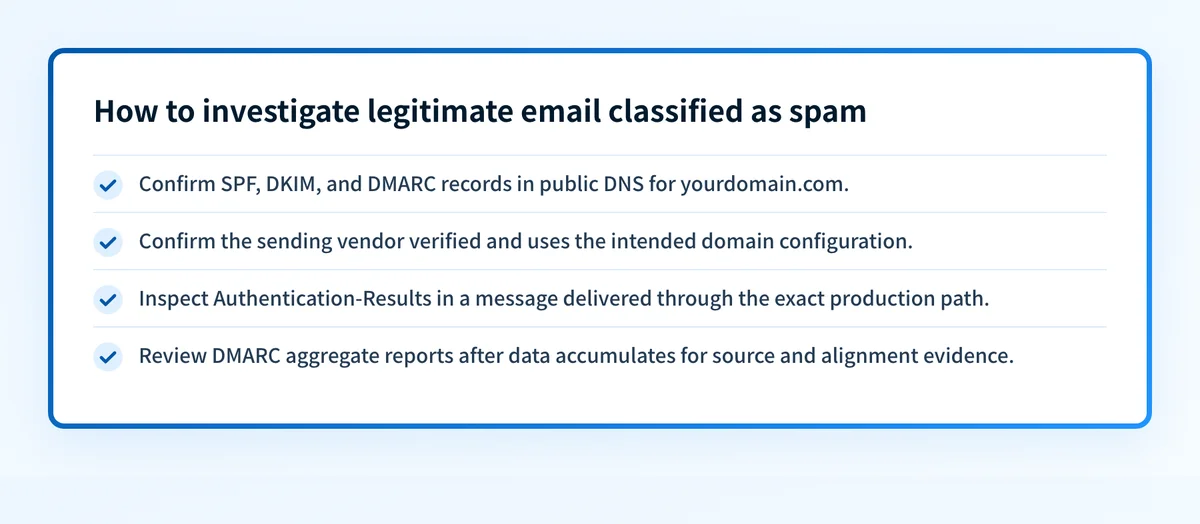
A domain's public DNS record is useful evidence, but it is only one layer:
- DNS: confirm the published SPF, DKIM, and DMARC records through authoritative DNS and a public resolver.
- Vendor: confirm the sending provider has verified the intended domain and is using its generated configuration.
- Message: inspect a real message from the production path and its Authentication-Results header.
- DMARC: review aggregate reports after they accumulate to identify sending sources and authentication or alignment failures.
Do not change a DMARC policy from monitoring to quarantine or rejection because a DNS lookup looks correct. Validate every important production sender first. A legitimate sender that still fails DMARC can be disrupted by a stronger policy.
Worked example: checking whether a sender is authenticated
A delivered message can contain an Authentication-Results field similar to this structural example:
Authentication-Results: mx.example.net;
  spf=pass smtp.mailfrom=mail.yourdomain.com;
  dkim=pass header.d=yourdomain.com;
  dmarc=pass header.from=yourdomain.com
This example shows a receiver recording SPF, DKIM, and DMARC passes. The important DMARC detail is alignment: the visible header.from=yourdomain.com aligns with the authenticated DKIM domain in this example. RFC 9989 specifies the relationship between the visible From domain, SPF, DKIM, and DMARC evaluation.
A passing result in one delivered message does not establish that every application using the domain is configured correctly. A different ESP, transactional service, forwarding path, or subdomain can use different authentication identifiers.
What to do next with the evidence you have
If you have only the domain name, inspect its published records. The email deliverability learning center provides the wider context for authentication and placement issues, and Palisade's Email Security Score can check public SPF, DKIM, and DMARC posture.
If you have a suspicious message, use your provider's reporting controls and keep the original headers for your security team. A public DNS check cannot establish whether that specific message was fraudulent.
If you have legitimate mail that is being filtered, collect a header from the exact sending path and compare its authentication results with the DNS records. New sending domains can need extra care because a clean configuration does not control a receiver's local filtering decision. See why Gmail marks new-domain emails as spam for that situation.
Inspect the authentication records behind your sending domain
Start with a public check of the SPF, DKIM, and DMARC records for the domain that appears in your legitimate mail's From address. Compare the result with a delivered message's Authentication-Results header before changing DNS.
Check your email security records
A public record check cannot prove that an application is using the intended signing domain, repair a sender configuration, monitor later changes, or guarantee inbox placement.
If you need to inventory sending sources and resolve recurring DMARC alignment issues across domains, Start with Palisade. Palisade is agentic DMARC software that analyzes DMARC aggregate-report data, identifies sending sources and authentication or alignment issues, and proposes prioritized remediation work. It does not autonomously change your DMARC policy or guarantee delivery.
Evidence
Sources and further reading
Questions readers ask
Frequently asked questions
Is spam email always malicious?
No. Some spam is unsolicited commercial advertising, while other messages attempt fraud, credential theft, or malware delivery. Treat unexpected messages cautiously because the sender's intent is not established by the message's appearance.
Is spam the same as phishing?
No. Spam is unwanted email, often distributed in bulk. Phishing is a deceptive message intended to obtain sensitive information, money, or access. A phishing message can be delivered through spam campaigns, but the terms describe different problems.
Can SPF stop all spoofed email?
No. SPF checks whether the sending infrastructure is authorized for the envelope sender domain. DMARC uses SPF and DKIM results with alignment to the visible From domain, which provides stronger protection against visible From impersonation.
Does DKIM prove that an email is safe?
No. DKIM can validate that a signature associated with a domain verified for the message. It does not establish that the content is trustworthy, that the sender's account was not compromised, or that the message should reach the inbox.
Should I click unsubscribe in suspected spam?
Not until you have verified the sender. A legitimate sender may offer a working unsubscribe control, but a suspicious message can use links to track activity or direct you to a harmful site. Use an independently verified account portal or report the message instead.

Written by
Samuel ChenardCEO & Co-Founder, Palisade
Samuel Chenard is the CEO and co-founder of Palisade, agentic DMARC software for IT teams and MSPs, from one domain to thousands.
More from Samuel →