Spam vs phishing
 ChatGPT
 Claude
 Gemini
 Perplexity
 Grok
GrokIn brief
Spam vs phishing: spam is unsolicited bulk email, while phishing uses deception to steal information or prompt harmful action from recipients.
Spam is unsolicited bulk messaging. Phishing is deceptive fraud that tries to obtain sensitive information or cause a harmful action. A message can be both when someone sends the same deceptive request to many recipients. Treat an unexpected message as phishing when it impersonates a trusted party or pressures you to sign in, pay, disclose information, open an attachment, or follow a link.
At a glance
Quick takeaways
- Spam describes unsolicited bulk delivery, while phishing describes deception and fraudulent intent.
- A bulk phishing campaign can be both spam and phishing.
- A suspicious email is not safe because it resembles ordinary marketing junk mail.
- Spoofing can support phishing by using a false identity, but spoofing and phishing are different classifications.
- Report suspected phishing through the security process available to you instead of interacting with its links or attachments.
- A public DNS check can inspect a managed domain's published controls, but it cannot classify one delivered message.
How spam and phishing differ
NIST defines spam as unwanted electronic junk mail and unsolicited bulk messages. The term describes the delivery pattern: recipients did not request the messages, and the sender distributes them widely.
NIST defines phishing as fraudulent solicitation that masquerades as a reputable entity to trick people into disclosing sensitive information. Phishing therefore turns on the message's deceptive request and claimed identity, not on how many people received it.
Use those definitions for a practical distinction:
- Spam is unsolicited bulk promotion or messaging that does not necessarily make a deceptive request.
- Phishing is a deceptive message that seeks credentials, payment, sensitive data, or another unsafe action.
- A false sender identity is a warning sign, but the key phishing question is what the recipient is being asked to do.
For the adjacent identity question, whether a message fakes who it is from, makes a deceptive request, or both, see spoofing vs phishing.
When the classification changes
Classify the message by purpose before volume.
- If an unsolicited email promotes a product or service without a deceptive request, it is spam.
- If it pretends to be a trusted organization or person and asks for credentials, money, sensitive information, or an unsafe action, it is phishing.
- If a deceptive request is sent indiscriminately to many recipients, it is both spam and phishing. This is an inference from NIST's definitions of unsolicited bulk messaging and phishing, not a separate NIST category.
- If the message claims to come from an organization you know, verify the request through a website, phone number, or contact method you already trust.
Do not use the link, phone number, or reply address supplied in a suspicious message to verify it. Use an independently known contact path.
The Federal Trade Commission's phishing guidance advises people not to click unexpected links or attachments, and to contact a company through a known good website or phone number when verification is needed.
Authentication does not settle this classification. A message can pass SPF or DKIM and still contain a deceptive request or link. Conversely, an authentication failure is not by itself proof that a message is phishing. A domain operator investigating legitimate mail that lands in junk should use a delivery-focused path, such as why emails go to spam in Gmail.
A worked classification rule
Use the observable request in the email to decide how it should be handled. This rule does not require you to prove who sent the message.
Illustrative classification rule
Unsolicited bulk promotion with no deceptive request
= spam
False or misleading identity plus a request for credentials, money,
sensitive information, a link click, attachment opening, or urgent action
= phishing
Deceptive request sent indiscriminately to many recipients
= spam and phishing
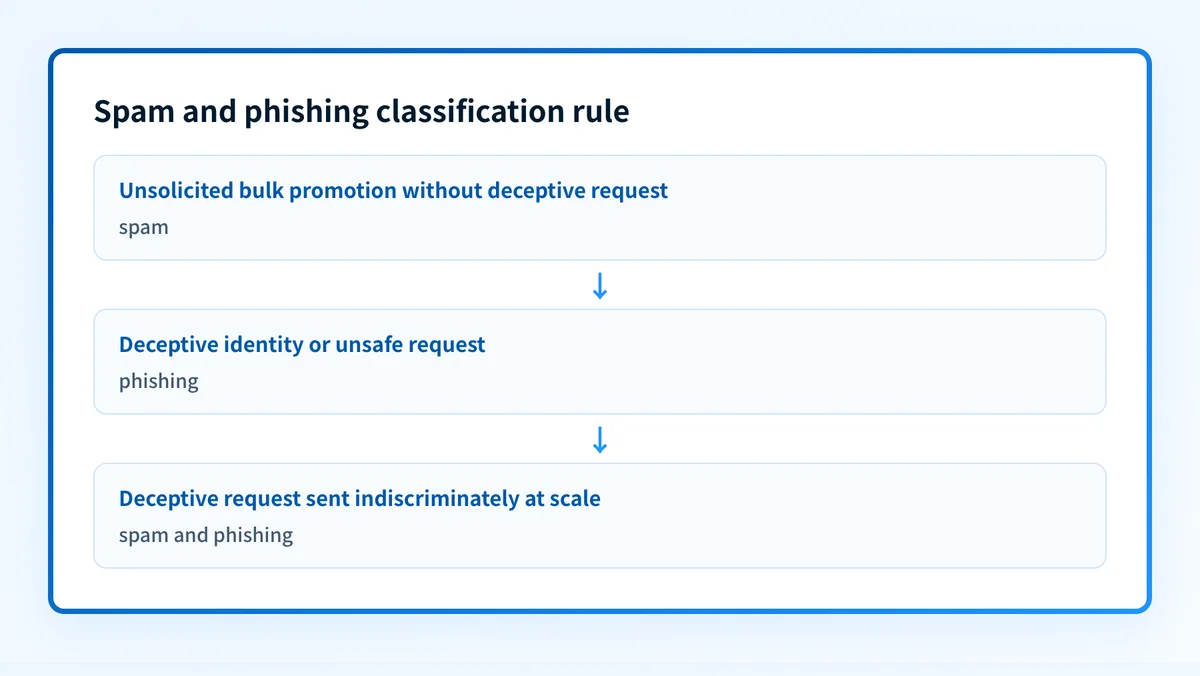
The decision rule is intentionally narrow. It does not identify the sender, determine whether a linked website is malicious, or replace an organization's incident-response process. It helps a recipient avoid treating deceptive mail as routine junk.
What to do with the evidence you have
If you only have the email, avoid its links, attachments, reply address, and requested payment or sign-in process. Report the message through your organization's security route or the reporting option offered by the mailbox service. Preserve only the redacted information your security team requests.
If you manage the domain shown in the message, keep the message investigation separate from a domain-control review. Inspecting a domain's published DMARC, SPF, DKIM, and related DNS records can show which controls are visible publicly. It cannot reveal the specific message's headers, linked destination, sender intent, or the receiver's final decision.
For legitimate mail sent through Microsoft services, see how to stop emails going to spam in Outlook. That is a deliverability question, not evidence that an unexpected inbound message is harmless.
Check public controls for a domain you manage
If the suspicious message uses a domain your team manages, use the Email Security Score to inspect its published email-security controls. This is useful after you have separated the suspicious-message report from the domain's DNS posture.
Check the domain's email security score
A public DNS check cannot classify an individual message as spam or phishing, inspect its headers or links, prove sender intent, or establish why a receiver accepted, rejected, or filtered it.
Evidence
Sources and further reading
Questions readers ask
Frequently asked questions
Is phishing a type of spam?
Only sometimes. Phishing describes deceptive fraud, while spam describes unsolicited bulk delivery. A targeted phishing message sent to one person may not be spam. An indiscriminate phishing campaign can fit both classifications.
Is all spam harmless?
No. Spam is a delivery and consent classification, not a safety verdict. Some spam may be unwanted promotion, while some bulk messages use deception and should be treated as phishing.
Should you mark a phishing email as spam?
No. Use the phishing-reporting process available through your organization or mailbox service. The FTC recommends reporting phishing attempts, because a deceptive message may imitate a trusted identity or target other recipients.
Can spam filters stop phishing?
No. Spam filters can keep many phishing emails out, but the FTC notes that scammers keep trying to bypass filters. A delivered email is not proof that its request is legitimate.
How can you tell the difference between spam and phishing?
Classify the message by purpose. Unsolicited bulk promotion is spam. A deceptive request for credentials, money, sensitive information, or an unsafe action is phishing. A bulk deceptive campaign can be both.

Written by
Ian BussieresCTO & Co-Founder, Palisade
Ian Bussieres is the CTO and co-founder of Palisade, agentic DMARC software for IT teams and MSPs.
More from Ian →