Phishing scam email example: how to assess one safely
 ChatGPT
 Claude
 Gemini
 Perplexity
 Grok
GrokIn brief
Phishing scam email examples reveal sender, urgency, and link clues. Learn how to inspect a suspicious email and verify it safely for safer decisions.
A phishing scam email often claims to be from a familiar organization, creates pressure to act, and directs you to a link, attachment, or reply path controlled by the attacker. No single clue proves an email is fraudulent or safe. Treat the claimed identity, actual sender address, requested action, and destination as separate evidence, then verify the claim through contact details you already know.
This page works through one message in detail. To compare invoice, account-alert, executive, file-share, and support pretexts side by side, use the phishing email examples library.
At a glance
Quick takeaways
- A phishing email can use a convincing display name while sending from an unrelated address.
- Urgency, unexpected requests, and unusual payment or sign-in prompts are reasons to investigate.
- Link text can differ from the destination that opens when you select it.
- Do not use a phone number, reply address, link, or attachment supplied by a suspicious message to verify it.
- An SPF, DKIM, or DMARC result does not establish that a message is legitimate or that its request is safe.
- If you clicked a suspicious link, use your organization's incident process or follow a documented post-click response.
How a phishing scam email works
The National Institute of Standards and Technology describes phishing as an attempt to trick people into revealing sensitive information or taking an unsafe action. The email may impersonate a business, colleague, delivery service, or account provider. Its purpose is usually to get a recipient to disclose information, open an attachment, visit a website, send money, or approve a change.
The message below is fictional. The domains, sender, attachment, and request are invented for this example. It does not depict a real company, account, or scam.
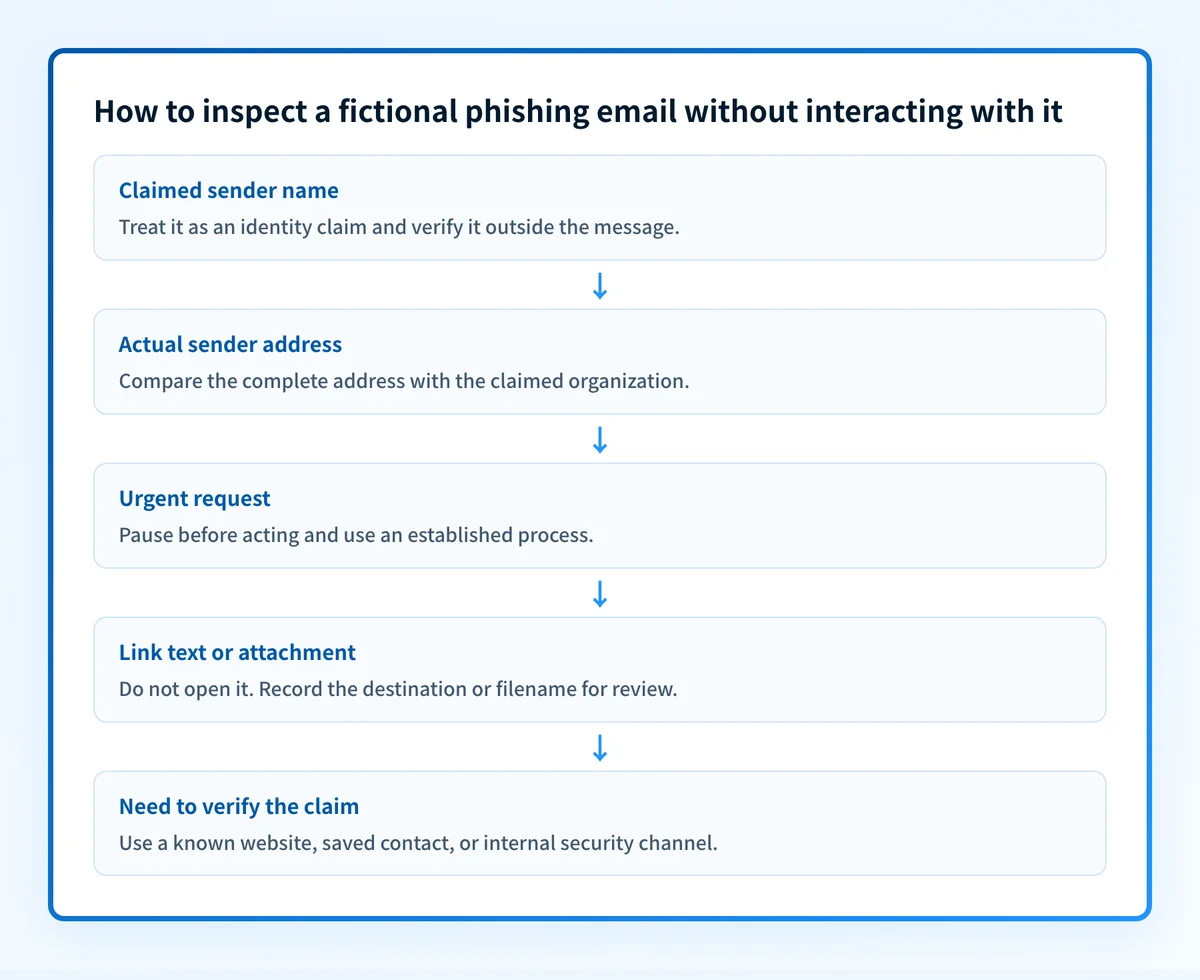
Read the example in evidence order:
From: "Account Review Team" <notice@accounts-example-mail.com>
Subject: Immediate action required: account review
Your account will be suspended today unless you review the attached
Account-Status-Update.html file.
Or sign in now: https://example-account-check.invalid/signin
Do not contact support. This review must be completed within one hour.
The display name, "Account Review Team," is a claim. The address after it is the sending identity shown to the recipient. The email's demand to act within one hour is pressure, not evidence that the account needs attention. The attachment and sign-in destination are separate risks to inspect without opening.
Google's phishing guidance advises checking the sender address and avoiding suspicious links or attachments. Microsoft's phishing guidance also advises checking the full sender address and examining links before selecting them. Those checks can reveal inconsistencies, but an address that looks plausible is still not a verdict.
For a broader explanation of attack methods, see email-security guidance. A request from a compromised real account can still be harmful, and a poorly formatted legitimate message can still be genuine.
When the answer changes
A suspicious message deserves a different response depending on what you have already done.
- If you only received the email, preserve it and verify the claimed organization outside the message.
- If the email claims to be from a colleague or supplier, use a known phone number, address book entry, or established ticketing channel. Do not reply to the email to ask whether it is real.
- If the email requests a payment, bank-detail change, credential reset, or urgent approval, use the organization's established verification process before acting.
- If you opened a link or attachment, stop interacting with it and follow your organization's incident process. The next steps can differ from the safe handling of an unopened message.
- If the message appears to be from a business domain your team controls, public DNS configuration can provide context, but it cannot inspect the message itself.
A message can also be part of business email compromise, where the harmful request may come from a real or compromised mailbox. In that case, a familiar sender name or domain is not enough to approve a financial or account change.
A worked phishing-email decision rule
Use this short checklist before clicking, downloading, replying, or calling a number from a suspicious email.
- Claimed identity. Does the display name or branding make a claim you can verify elsewhere?
- Actual sender. What is the complete address, and does it match the claimed organization?
- Requested action. Is the message asking for credentials, payment, an attachment download, a sign-in, or an urgent change?
- Destination. What website, attachment, reply address, or phone number does the email supply?
- Independent route. What known website, saved contact, or internal process can verify the claim without using the message?
Email authentication has a similar limit. SPF and DKIM examine parts of the sending path and message authentication, while DMARC evaluates aligned authentication for the visible From domain. A passing result does not establish the sender's intent, make a linked website safe, or prove that a payment request is authorized. For the domain-authentication boundary, see anti-phishing software guidance.
Do not open an HTML attachment or sign in through a link from a suspicious email to test whether it is real. Verify the claim through a known route first.
What to do with a suspicious email
Preserve the message. Your organization may need the original email, headers, sender address, destination, and attachment name for reporting or investigation. Then use an independently known website, phone number, saved contact, or internal security channel to verify the claim.
If the email appears to use a domain your organization owns, inspect the public configuration separately. Palisade's Email Security Score can check public SPF, DKIM, and DMARC configuration for that domain. Keep that result separate from message evidence. It cannot identify the intent of the sender or inspect a private email, attachment, or destination.
Report the message through your email provider's reporting process or your organization's security process. If you interacted with the message, report that fact promptly so the response can focus on the exact action taken.
Check the claimed domain's public email security
Use public sender-domain evidence only as context for a domain you control, then keep it separate from the private message.
A public record check cannot decide whether a private email is a phishing scam.
Evidence
Sources and further reading
Questions readers ask
Frequently asked questions
Can I get phished just by opening an email?
Not usually by reading plain email content alone, but opening an email can expose you to a deceptive request. The greater risk is selecting a link, opening an attachment, replying with information, or following contact details supplied by the message. Preserve the email and verify its claim independently.
What are four warning signs that an email is a phishing email?
Four common warning signs are a sender address that does not match the claimed organization, pressure to act immediately, an unexpected request for credentials or payment, and a link or attachment that leads outside the expected service. Each sign is a reason to investigate, not proof on its own.
How do I know if a phishing email is real?
Do not try to prove it by replying, clicking, opening an attachment, or calling the number in the email. Contact the claimed organization through a known website, saved contact, or established internal process. That independent route is stronger evidence than the message's own claims.
What are four types of phishing emails?
Four common types are credential phishing that asks for sign-in details, attachment phishing that asks you to open a file, invoice or payment phishing that requests money or banking changes, and impersonation phishing that pretends to be a trusted person or organization. A single message can use more than one type.
Does a passing DMARC check mean an email is safe?
No. DMARC can show that a message passed aligned SPF or DKIM authentication for its visible From domain. It does not determine whether the sender's request is authorized, whether an account was compromised, or whether a linked site or attachment is safe.

Written by
Ian BussieresCTO & Co-Founder, Palisade
Ian Bussieres is the CTO and co-founder of Palisade, agentic DMARC software for IT teams and MSPs.
More from Ian →