Phishing email examples: ten patterns to inspect
 ChatGPT
 Claude
 Gemini
 Perplexity
 Grok
GrokIn brief
Review ten realistic phishing email examples, compare their warning signs, and learn how to verify suspicious requests without using the message.
Phishing email examples are most useful when they teach you what to verify, not which phrases to memorize. The ten fictional messages below use different pretexts, but each exposes evidence you can check safely: the sender identity, the requested action, the real destination, and whether the request matches activity you can confirm elsewhere. None of the examples includes a live domain, working credential form, or malicious attachment.
At a glance
Quick takeaways
- A familiar display name or logo does not authenticate the person or company behind a message.
- Urgency matters when it pressures you to bypass a normal approval or verification channel.
- Inspect the destination separately from the visible link text, but do not visit a suspicious destination.
- Confirm invoices, account alerts, file shares, and support requests through a channel you already trust.
- Report suspected phishing through your organization's process instead of replying to the sender.
How should I read these phishing examples?
Treat each example as a small evidence exercise. The wording is not a detection rule. Good writing can be malicious, and awkward writing can be legitimate. The US National Institute of Standards and Technology describes phishing as deceptive messages designed to obtain sensitive information or induce harmful action. Its current guidance highlights unexpected requests, urgency, suspicious sources, and requests for sensitive information as useful signals (NIST phishing guidance).
The sender line and the message body are claims. They become more credible only when independent evidence supports them. That may include a purchase visible in an account you opened yourself, a colleague reached through a known directory number, or trusted receiver-added authentication results. Even then, authentication does not prove that every request or link is safe. For a line-by-line walkthrough of one message, use the existing phishing scam email example.
Ten worked phishing email examples
All names, domains, ticket numbers, and amounts below are invented. Domains ending in .invalid cannot be registered for normal Internet use.
Invoice bank-change example
From: Northline Supply <billing@northline-payments.invalid>
Subject: Updated remittance instructions for invoice 48172
The USD 18,740 balance is due today. Our bank changed this morning.
Use the attached instructions and confirm by reply before 3:00 PM.
The concrete values make the message feel operational, but they also give the recipient something to verify. The sender domain differs from the established supplier domain. A same-day bank change and reply confirmation bypass the procurement record. The safe action is to call the supplier using the number already stored in the vendor system and compare invoice 48172, the amount, and approved bank details. Do not use a number in the email.
Account suspension example
From: Storage Security <alerts@storage-notice.invalid>
Subject: Your account will close in 27 minutes
We blocked a sign-in from 192.0.2.44. Review activity now:
https://files-login.invalid/session/7391
This example combines a countdown, an unfamiliar domain, and a sign-in claim. 192.0.2.44 is in a documentation address range here, so it does not identify a real attacker. Open the service from a bookmark or a typed official address, then review its security activity. The Federal Trade Commission advises contacting the company using a phone number or website you know is real rather than the contact details in an unexpected message (FTC phishing guidance).
Executive gift-card example
From: Maya Chen, CEO <maya.chen@executive-mail.invalid>
Subject: Need a private favor before the board call
Buy eight USD 200 gift cards. Send the codes to me and do not involve Finance.
The decisive clue is not the executive title. It is the attempt to remove the normal approver and move value through a hard-to-reverse channel. Verify the request using the corporate directory, and follow the organization's payment policy. This is also an example of spear phishing because the message targets a role and imitates a named leader rather than sending a generic account alert.
Shared-file example
From: Priya shared "Q4 Compensation Draft"
Reply-To: access@document-share.invalid
Open secure document
Visible label: company.share.example
Actual destination shown by the mail client: document-share.invalid
The pretext uses confidentiality to discourage questions. The visible label and actual destination disagree, and the unexpected document asks the recipient to sign in. Contact Priya in the normal collaboration tool or open the organization's approved file service directly. Do not test the suspicious link. A padlock would only describe the connection to that destination, not whether the destination belongs to the expected company.
Fake support-call example
From: Apple Account Support <case@apple-helpdesk.invalid>
Subject: Case 630184 requires phone verification
Call +1 202-555-0147 and read the six-digit code sent to your device.
The message asks the recipient to transfer an authentication factor to an unsolicited caller. The brand name does not make that safe. Open the vendor's official support route independently and check whether case 630184 exists. Never provide a password or one-time code because an inbound message claims support needs it. The Apple phishing email guide applies that verification pattern to current Apple guidance.
Package redelivery-fee example
From: Parcel Updates <notice@parcel-redelivery.invalid>
Subject: Delivery held: pay USD 1.82 by 6:00 PM
We could not deliver package PR-48172. Pay the redelivery fee now:
https://parcel-redelivery.invalid/PR-48172
The small fee makes the request easy to dismiss as harmless, but the payment form can collect card and address details. The tell is the missing connection to an order you can confirm, paired with an unfamiliar destination and a same-day deadline. Open the retailer or carrier from your real order history and compare the tracking number there. Do not enter the number from this message into its link.
Payroll tax-document example
From: People Operations <forms@hr-documents.invalid>
Subject: Reissue your tax statement before payroll closes
Upload your tax ID and banking details to receive the corrected statement:
https://hr-documents.invalid/reissue
This pretext asks for identity and bank data through a new portal instead of the normal payroll system. The tell is the process change: a tax-statement correction should match an existing HR notice, case, or employee-portal task. Open the payroll portal from a saved address or contact HR through the corporate directory. Do not use the form or reply with personal information.
Unsolicited job-offer example
From: Recruitment Desk <offers@remote-careers.invalid>
Subject: Remote analyst offer: onboarding required today
You were selected without an interview. Upload photo ID and banking details:
https://remote-careers.invalid/onboarding
The giveaway is the missing hiring history. There was no application, interview, named recruiter, or offer inside a hiring system the recipient already used. The message jumps straight to high-value identity and banking data. Look up the employer's careers page independently and contact its published recruiting channel. Do not send documents to the reply address or upload them through the message.
Email-quarantine release example
From: Mail Security <quarantine@message-release.invalid>
Subject: Three messages will be deleted from quarantine
Release held messages before 4:15 PM:
https://message-release.invalid/quarantine
The message imitates a security control to create urgency around a credential prompt. The tell is that the release destination is outside the organization's known mail-security service, and the claimed held messages are not visible anywhere else. Open the approved quarantine portal from the normal bookmark or ask the mail administrator to verify the notice. Do not sign in through the email.
Required software-update example
From: IT Operations <updates@remote-tools.invalid>
Subject: Critical VPN update required before your next login
Install VPN_Update.zip and disable endpoint protection if prompted.
The attachment and the request to weaken endpoint protection give this example away. Real update notices should match the organization's managed software channel, change record, or service-status notice. Check the device-management portal or contact IT through the help desk address already published inside the organization. Do not open the attachment or disable a security control to make it run.
Compare the evidence instead of memorizing one phrase.
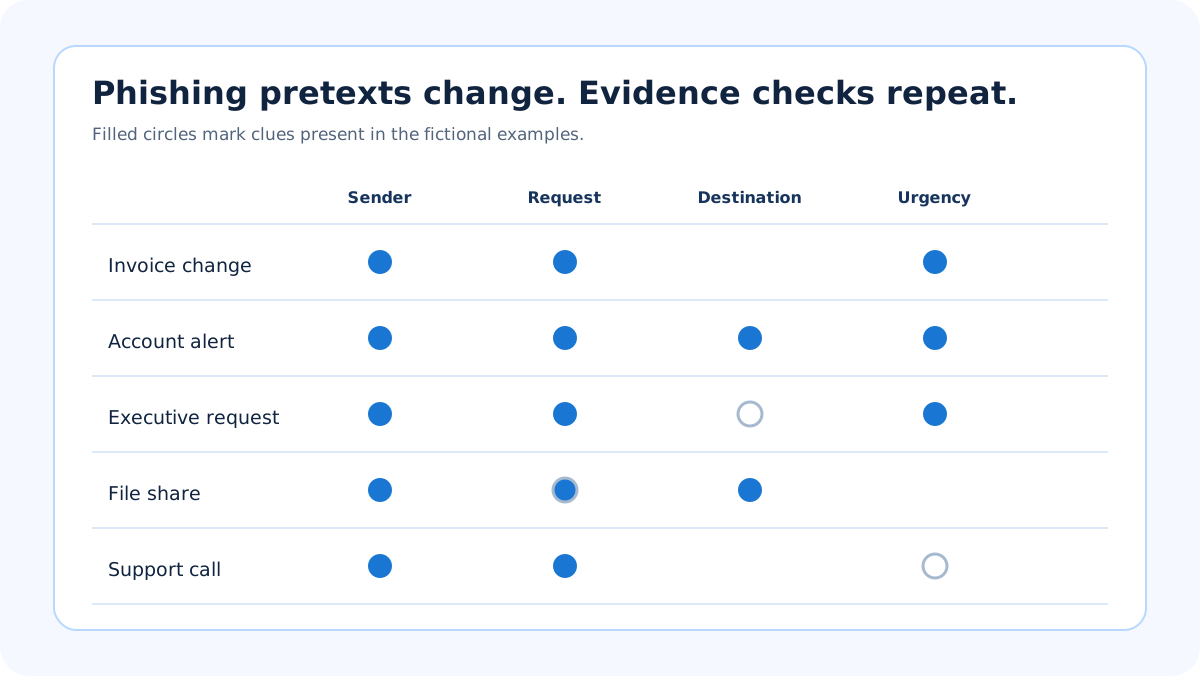
Use the matrix to choose a safe verification step. When an example turns on a link, the Palisade phishing link checker inspects that URL before you open it. It reports public threat signals for the destination; it cannot prove a site is safe, and it cannot inspect the message itself.
What evidence deserves the most weight?
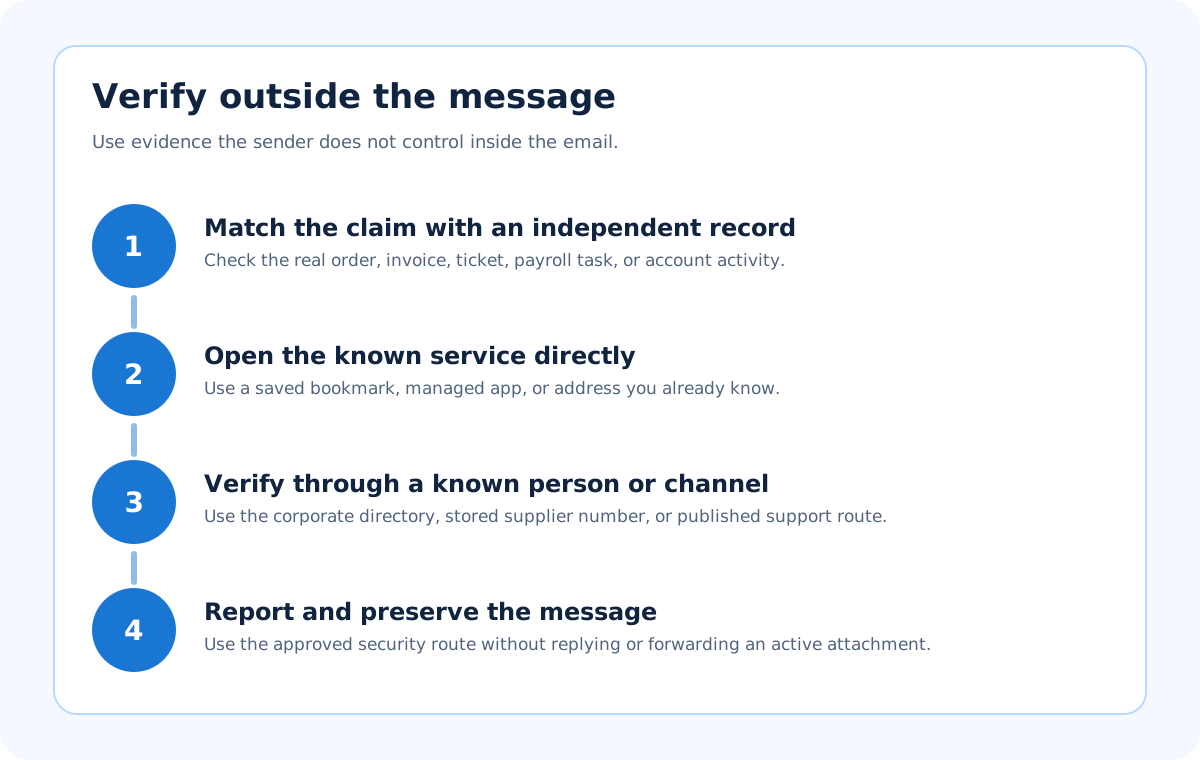
A single misspelling deserves less weight than a request that conflicts with known business context. Start with facts the sender cannot control inside the message: an existing purchase record, a supplier's stored bank details, the security activity visible after you open an account independently, or a known colleague reached outside email.
Header evidence can help a security team determine which domain authenticated the message, but it has limits. RFC 8601 Section 1.2 explains that an Authentication-Results field is meaningful only within the receiver's trust boundary; a sender can insert an untrusted lookalike field (RFC 8601, Section 1.2). A message can also pass SPF or DKIM for an attacker-controlled domain. That is why phishing can pass SPF and DKIM without becoming legitimate.
When do these examples not apply?
These patterns do not establish that every urgent request, changed invoice, shared file, or support email is malicious. Real teams sometimes change banks, systems send genuine alerts, and colleagues share sensitive documents. The correct conclusion is "unverified," followed by independent verification, not an automatic accusation.
The examples also do not replace an incident-response process. If someone entered credentials, disclosed a code, opened an attachment, changed payment details, or sent money, stop the example comparison. Contact the authorized security or finance team using the established emergency path. Preserve the original message and relevant device or account evidence. Do not forward an active attachment to people who do not need it.
What should I do with a suspicious example in my inbox?
Stop interacting with the message. Capture the observable details your organization requests, such as sender, subject, time, claimed transaction, and visible destination. Then use the mail provider's phishing report control and the organization's security channel. The FTC also accepts reports at ReportFraud.ftc.gov and directs suspicious email to the Anti-Phishing Working Group at reportphishing@apwg.org (FTC reporting guidance).
Do not reply to challenge the sender. A reply can confirm that the address is active and keeps the conversation inside the attacker's chosen channel. If the message is merely unsolicited bulk advertising without deception, the spam versus phishing guide explains why the reporting path can differ.
Evidence
Sources and further reading
Questions readers ask
Frequently asked questions
Are phishing emails always badly written?
No. Some are polished, localized, and copied from real messages. Grammar is weak evidence by itself. Give more weight to an unexpected request, an independently observed domain mismatch, an attempt to bypass procedure, or activity that you cannot confirm in the real account.
Can a phishing link use HTTPS?
Yes. HTTPS can encrypt the connection to a malicious site. It does not prove that the destination belongs to the company named in the email. Verify the hostname and open the expected service independently rather than visiting the message's link.
Is the executive request an example of spear phishing?
Yes. It targets a particular role and imitates a named executive with a request shaped around organizational context. The safe response is still evidence-based verification through a known channel and the normal payment or approval process.
Should I forward a phishing email to a coworker for a second opinion?
No. Use the organization's approved reporting method so the original message and headers are preserved safely. Ordinary forwarding can change context, spread a dangerous attachment, or expose information to someone who does not need it.
Can a spam filter stop every phishing example?
No. Filters reduce risk but cannot determine the truth of every business request or stop every newly created domain and compromised account. People still need a trusted verification path for unusual payments, credential prompts, account alerts, and confidential file shares.

Written by
Ian BussieresCTO & Co-Founder, Palisade
Ian Bussieres is the CTO and co-founder of Palisade, agentic DMARC software for IT teams and MSPs.
More from Ian →