What does no MX record found mean in a bounce?
 ChatGPT
 Claude
 Gemini
 Perplexity
 Grok
GrokIn brief
No MX record found in a bounce can mean no usable mail route, a null MX, DNS failure, or a bad address. Diagnose the DNS result and retest safely.

A no MX record found bounce means the sending system did not find a usable SMTP route for the recipient domain. It does not always mean the domain has no mail service. SMTP can fall back to the domain's A or AAAA address when no MX record exists, while NXDOMAIN, a DNS failure, a null MX, or an unusable fallback route can all stop delivery. Start by preserving the bounce and checking the recipient domain's DNS result.
At a glance
Quick takeaways
no MX record foundis a sender-side routing symptom, not a complete DNS diagnosis.- A domain with no MX record can still receive mail through SMTP's implicit MX fallback.
NXDOMAIN, no-data answers, temporary DNS failures, and null MX records require different actions.- A null MX explicitly says that a domain does not accept email.
- Public DNS checks cannot prove a mailbox exists, that a recipient owns a domain, or why a provider rejected one message.
- Retest through the same sending system after the DNS or recipient-address issue is resolved.
What does the failure mean?
The bounce text is evidence that the sending system could not establish a usable destination route. It is not the authoritative DNS response by itself. Preserve the full bounce, including any enhanced status code, timestamp, and recipient address, before changing anything.
no MX record foundRFC 5321 section 5.1 defines SMTP destination lookup. If a domain has no MX records, an SMTP sender can treat the domain itself as an implicit MX with preference 0, then look up an A or AAAA address for that domain. That fallback only works when the address is reachable and the host accepts SMTP.
A true no-data MX response therefore does not prove that a domain cannot receive email. It can indicate that the domain relies on its own address record for inbound mail. It also cannot prove that a specific inbox exists, that the recipient controls the address, or that the sending domain has a reputation problem.
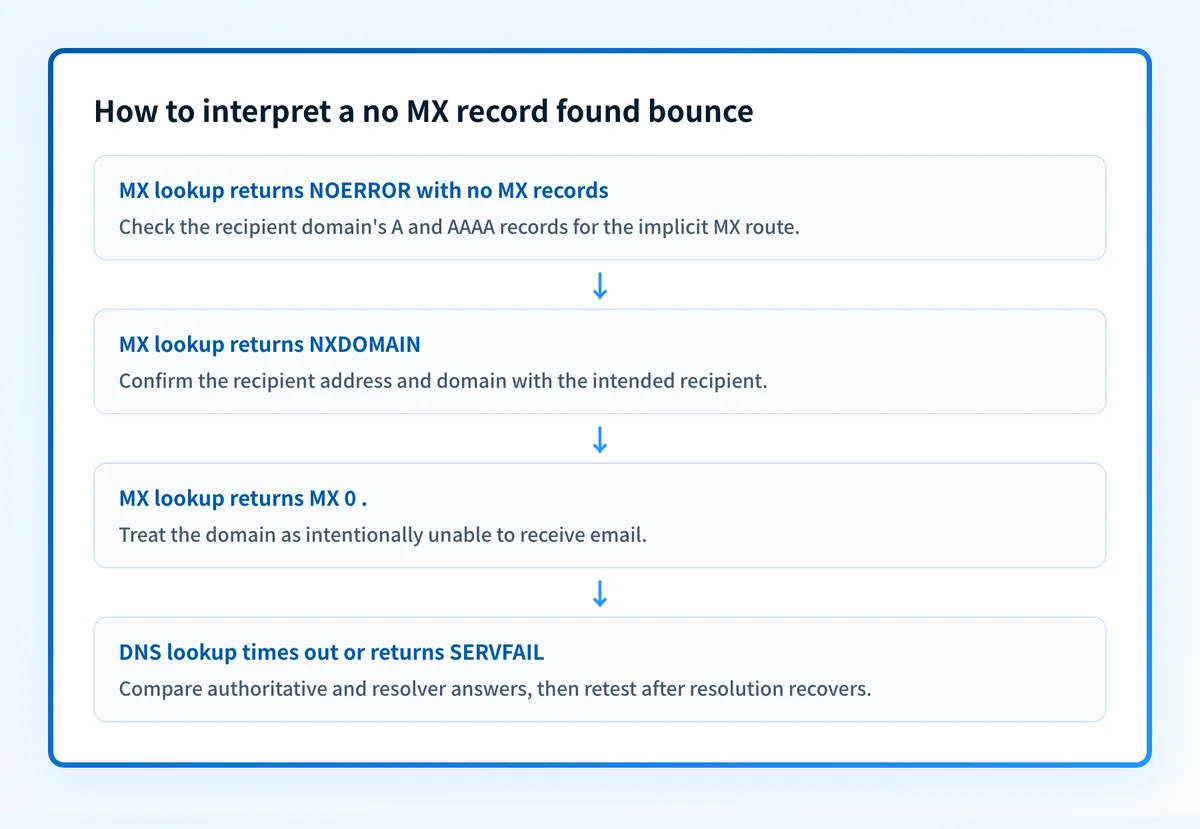
Other DNS outcomes look similar in some sender logs but have different meanings:
NXDOMAINmeans the queried domain name does not exist.NOERRORwith no MX answer means the domain exists but has no published MX record.- A timeout or
SERVFAILmeans DNS resolution did not complete and may be temporary. - A null MX is a deliberate declaration that the domain accepts no email.
0 and exchange .. A sender that recognizes the record must not attempt delivery to that domain.
This is recipient-routing evidence. It is separate from sender authentication. SPF, DKIM, and DMARC can affect how a receiver evaluates a message, but they do not create an inbound SMTP route for the recipient domain. If a DKIM lookup also fails elsewhere in your environment, see why a DKIM checker says no record found.
What usually causes it?
The recipient domain does not exist
A malformed address, expired domain, failed delegation, or typing error can return NXDOMAIN. SMTP cannot route mail to a domain name that DNS says does not exist. This is a recipient-address or domain-ownership issue, not a sender-authentication failure.
Do not create or alter DNS records for a domain your organization does not control. Confirm the recipient address with the recipient through a trusted channel.
The domain has no MX and no usable implicit route
When MX records are absent, RFC 5321 allows the domain's A or AAAA record to act as the destination. The sender can still fail if the domain has no usable address record, the address is unreachable, or the target does not accept SMTP on port 25.
This is an inference from the route lookup and SMTP result. A public MX query alone cannot show how the sender's production resolver or outbound system handled the fallback.
The domain publishes a null MX
A null MX uses the following shape:
yourdomain.com. IN MX 0 .The record tells SMTP senders that the domain does not accept mail. It is common for domains that are used for websites or other non-mail purposes. Do not remove a null MX unless the domain owner intends to accept inbound email and has an inbound mail service ready.
DNS resolution failed temporarily
A timeout, unreachable authoritative server, or SERVFAIL can prevent a sender from discovering valid mail routes. RFC 5321 requires SMTP clients to handle temporary DNS errors differently from permanent name errors. The sender may retry, depending on its queue policy.
Treat this as a resolution incident until you compare the sender's result with authoritative and public-resolver answers. Publishing a new MX record is not a safe response until you know the zone's intended configuration.
A resolver still has a negative DNS answer cached
After a domain or MX record is corrected, a recursive resolver can retain an earlier NXDOMAIN or no-data answer. RFC 2308 defines DNS negative caching. Compare timestamps and TTLs before assuming the correction failed.
How do I diagnose the failure?
1. Preserve the bounce from the original sending path
Capture the recipient domain exactly as submitted to the sending system. Save the full SMTP bounce text, status code if present, sending-system name, send time, and message identifier.
Do not rely on a screenshot or a shortened application notification. The original delivery log or non-delivery report may distinguish a DNS error from a permanent recipient-domain error.
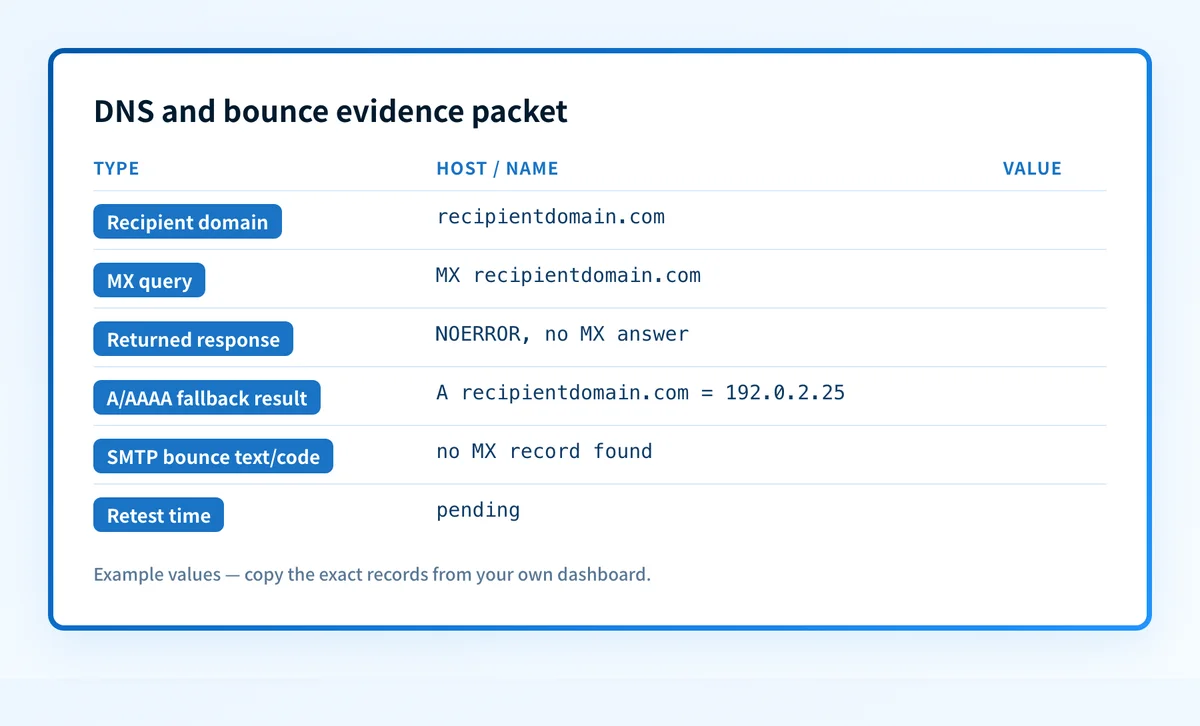
2. Build a DNS and bounce evidence packet
Use one packet for the incident so the DNS result, sender evidence, and retest are tied to the same recipient domain.
Recipient domain: recipientdomain.com
MX query: MX recipientdomain.com
Resolver and query time: resolver.example, 2026-08-12T12:00:00Z
Returned response: NOERROR, no MX answer
A/AAAA fallback result: A recipientdomain.com = 192.0.2.25
SMTP bounce text/code: no MX record found
Sending system: outbound-mail-system
Retest time: pending
Redact recipient local parts, message content, internal hostnames, and customer data before sharing this packet outside the incident team. Keep the complete original in the access-controlled incident record.
3. Check the recipient domain's MX answer
Use Palisade's MX records checker to inspect the public MX result for the exact recipient domain. Record whether the result is an MX record, no-data answer, null MX, or an error.
A public MX lookup checks a current public DNS view. It does not prove that the recipient mailbox exists, that the destination server will accept your message, or that the production sender used the same resolver.
4. Test the implicit MX branch when there is no MX answer
If DNS returns NOERROR with no MX records, query A and AAAA records for the recipient domain itself. RFC 5321 permits that domain-address fallback.
For an address record returned by the domain, test only from an approved network and only against the public SMTP endpoint. Record whether the target returns an SMTP greeting. Do not attempt authentication, mailbox probing, or repeated delivery attempts.
A website address is not proof of a working implicit MX route. A host can answer HTTP while SMTP is unavailable or intentionally blocked.
5. Compare authoritative, public, and sender-side evidence
Query the authoritative DNS servers for the zone, then compare the answer with a public resolver and the sender's own resolver or delivery logs. Different answers can point to delegation errors, stale negative caching, split DNS, or a resolver outage.
If the recipient is managed by a provider, use that provider's documented status or administrator console as the vendor layer of evidence. A provider-controlled mailbox may have rules or routing states that public DNS cannot expose.
How do I fix it?
Correct a malformed recipient address or nonexistent domain
When the evidence packet shows NXDOMAIN, confirm the address with the intended recipient. Correct the domain only after the recipient confirms it, then resend through the original sending system.
Do not guess at similarly named domains. A guessed replacement can disclose message content to the wrong organization.
Repair the intended inbound DNS route for a domain you control
If your organization owns the recipient domain and it should receive mail, publish valid MX records whose exchange hostnames resolve to working SMTP servers. If the domain intentionally relies on implicit MX, restore its usable A or AAAA address and SMTP listener instead.
The required record values come from the inbound mail provider. Do not copy illustrative values or another organization's MX targets.
Wait and retest after a temporary DNS problem
If the sender recorded a timeout or SERVFAIL, check authoritative DNS health and resolver status. Avoid unrelated record changes while the failure remains temporary. Retest after the affected resolver can return a complete answer.
If a prior negative result was cached, wait for the applicable TTL to expire before treating the production retry as evidence of a failed repair.
Use the recipient provider's process for provider-controlled mail
When the recipient domain, mailbox service, or routing is controlled by another organization, provide the redacted evidence packet to that organization's administrator or provider support channel. They can verify mailbox state, routing policy, and tenant-specific configuration.
Do not promise that a DNS correction will cause delivery. The recipient provider can still reject or defer a message for reasons that public DNS does not reveal.
How do I validate the repair?
First validate DNS. Check the authoritative answer and at least one public resolver. For a no-MX domain using the implicit route, confirm the A or AAAA answer and the approved SMTP test result. For explicit MX, confirm that each intended exchange hostname resolves.
Then validate the vendor layer where it applies. Confirm the recipient's mail provider or administrator reports the intended inbound configuration as active. A green provider status does not replace a same-path message test.
Send a controlled message through the same application, outbound service, sender domain, and recipient domain that produced the bounce. Preserve the resulting SMTP response and delivered message headers. A successful delivery to a valid test mailbox is message-layer evidence, while the old bounce alone is not.
Finally, keep this incident separate from DMARC remediation. Palisade's DMARC Agent domain overview explains how Palisade analyzes DMARC aggregate-report data, identifies sending sources and authentication or alignment issues, and creates prioritized remediation tickets. DMARC reports do not diagnose or repair a recipient's MX route.
Track sender-authentication work after the bounce is resolved
After you have corrected the recipient address or confirmed the recipient DNS route, use Palisade to investigate the separate ongoing question: which production sending sources still have SPF, DKIM, or DMARC alignment issues? Palisade is agentic DMARC software that analyzes DMARC aggregate-report data and proposes the next policy step for human review.
Palisade does not control another organization's recipient DNS, mailbox state, SMTP acceptance decision, or this individual bounce.
Evidence
Sources and further reading
Questions readers ask
Frequently asked questions
Can email work without an MX record?
Yes. SMTP can use the recipient domain's A or AAAA record as an implicit MX when the MX query returns no records. The address must lead to a host that accepts SMTP.
Does no MX record found mean the recipient inbox does not exist?
No. The phrase does not prove whether an individual inbox exists. It only indicates that the sending system did not obtain a usable route from the evidence it recorded.
Is a null MX the same as a missing MX record?
No. A null MX is an explicit DNS record with preference 0 and exchange . that says the domain does not accept email. A missing MX record can still allow implicit MX fallback.
Should I add an MX record to another company's domain?
No. Only the domain owner or its authorized administrator should change recipient DNS. Send the redacted DNS and bounce evidence packet to the recipient's approved contact or provider support process.
Can SPF, DKIM, or DMARC fix a no MX record found bounce?
No. SPF, DKIM, and DMARC evaluate sender authentication. They do not create an SMTP route for the recipient domain. See the email deliverability learning hub for related delivery diagnostics.

Written by
Dominic LandryDeliverability & DNS
Dominic Landry works on email deliverability and DNS configuration at Palisade, from SPF and DKIM records through to DMARC enforcement.
More from Dominic →