Why is my email queued and how do I fix it?
 ChatGPT
 Claude
 Gemini
 Perplexity
 Grok
GrokIn brief
Why is my email queued? Find the queue location, capture the SMTP response, repair the documented condition, and validate the same delivery path.
Queued means an email is waiting before final acceptance by the recipient mail server. It may still be in a local outbox, or a sending mail transfer agent (MTA) may be retrying after a temporary SMTP response. Find the queue owner and preserve the exact SMTP response first. Then repair the condition that response identifies and retest through the same application, relay, and recipient path.
At a glance
Quick takeaways
Queuedis a state, not a complete diagnosis.- An SMTP response beginning with
4is temporary, so the sending MTA should retain and retry the message. - A queue ID, destination host, and exact SMTP response are stronger evidence than a mail client's
Queuedlabel. - A public MX lookup can show a recipient domain's published route, but cannot prove receiver availability or a private filtering decision.
- Do not change the DMARC policy to solve an SMTP queue condition.
- Recipient-server acceptance ends the SMTP delivery attempt, but does not guarantee inbox placement or reader visibility.
What does the failure mean?
The visible symptom is:
QueuedQueued alone does not identify the failure. It can mean an email client or application has not submitted a message to SMTP. It can also mean that a sending MTA accepted the message and retained it for a later delivery attempt.
SMTP defines replies beginning with 4 as transient negative completion replies. The sender should retain the message and retry because the condition may clear. Replies beginning with 5 are permanent negative completion replies, so retrying that same delivery attempt is not the normal remedy.
Keep these states separate:
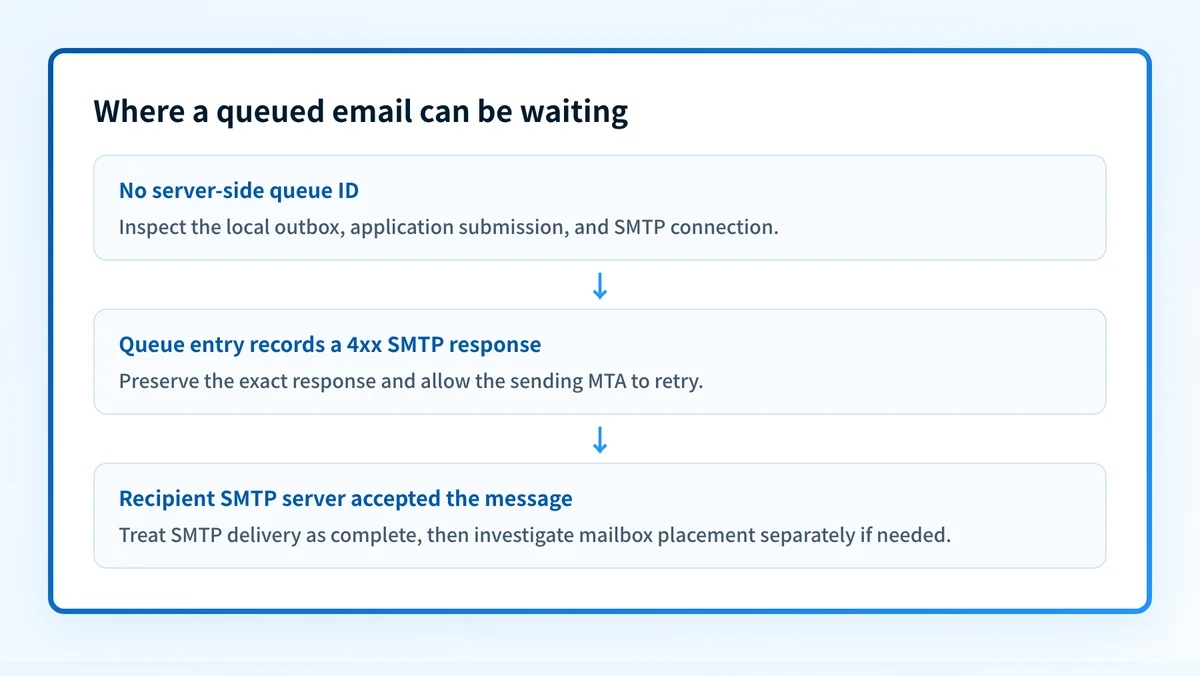
- A local queue condition means the client or application has not handed the message to the sending SMTP service. There may be no queue ID, MX attempt, or recipient SMTP response.
- A remote temporary response means the sending MTA reached a recipient system and recorded a
4xxresponse. The MTA should retry according to its configured schedule. - Final recipient-server acceptance means the recipient SMTP server accepted the transaction. It does not prove later mailbox placement or reader visibility.
Authentication-Results header field, while the queue entry records whether the sending system reached and completed the SMTP delivery attempt.
What usually causes it?
The recipient server returned a temporary SMTP response
This is the most likely cause when the queue log includes a 4xx response. SMTP treats that response as a condition that may be corrected by retrying later. The full response text and any enhanced status code can distinguish a service issue from a response tied to a recipient policy.
Do not infer the cause from Queued without the response. The response separates a remote delivery deferral from an unsent local message.
The recipient system is temporarily unavailable
A receiving server can defer delivery when it cannot complete the SMTP transaction. SMTP reserves transient replies for conditions that may clear, and the sending MTA should retain the message for later attempts.
Treat this as recipient-side only when the response identifies a remote availability condition. Changing SPF, DKIM, DMARC, or sender DNS without supporting evidence does not repair a temporary recipient outage.
The recipient is greylisting the sending path
Greylisting temporarily refuses a message and expects a legitimate sender to retry. A correctly configured sending MTA retries, and a later attempt may succeed.
Greylisting is an inference unless the response itself or recipient documentation identifies it. Do not add aggressive retries or bypass retry controls based only on a queue label.
The sender has a local transport or configuration failure
A sending system can retain messages when it cannot reach its configured relay, resolve a required destination, establish the required connection, or submit mail from the application. This branch is more likely when the log names a local relay, connection, DNS-resolution, or configuration error rather than a response from the recipient system.
A public MX lookup cannot diagnose local SMTP credentials, relay configuration, or an application that never submitted its message.
The recipient repeatedly defers this sender or message class
A recipient can defer traffic based on its own operational or policy decisions. The response may identify a published requirement, but a public DNS or reputation check cannot reveal the receiver's private decision process.
If the queue response points to authentication, investigate it as a separate documented cause. The email authentication failure guide covers mailbox and SMTP login failures. Do not assume an authentication problem caused one queued message without evidence from the recipient response, message headers, or the sending system.
How do I diagnose the failure?
1. Identify where the message is queued
Confirm whether the message has a server-side queue entry. If it has a queue ID and delivery-attempt record, follow the SMTP branch. If it has no server-side evidence, inspect the local outbox, account connection state, application logs, and submission settings.
Do not use a recipient MX lookup to investigate a message that never reached the sending SMTP service.
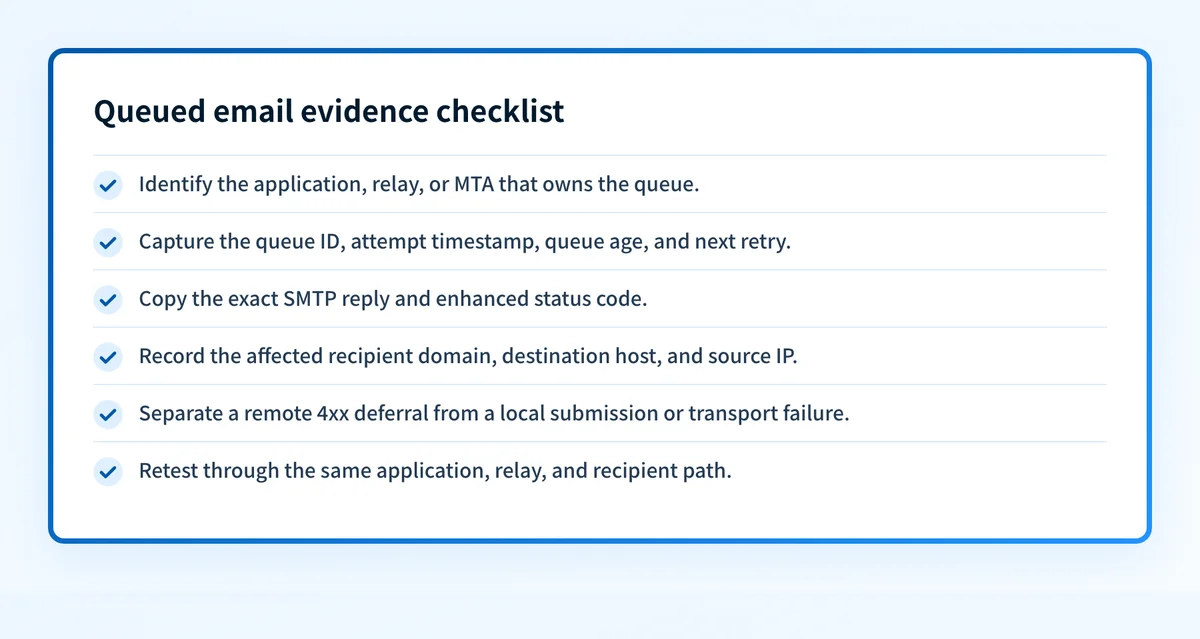
2. Capture the complete queue evidence packet
Collect the evidence before forcing a retry or changing controls. Redact recipient addresses, content, credentials, tokens, and customer data in shared tickets. Keep an access-controlled original for the incident.
Record these fields:
- Sending system or MTA: the application, relay, or MTA that owns the queue.
- Queue ID: the identifier for this delivery attempt.
- Timestamp and age: the latest attempt time in UTC and how long the message has been queued.
- Recipient scope: the recipient domain, destination host, and whether one or many recipients are affected.
- Exact SMTP response: the numeric reply, enhanced status code when present, and response text.
- Retry state: attempts made, next attempt, expiry behavior, and whether the MTA is still retrying.
- Source IP: the IP address used for the outbound SMTP attempt when the MTA records it.
- TLS and authentication context: details from the log when available.
- Message ID: the application or RFC message identifier that links the queue entry to the message.
MTA: outbound-relay.example
Queue ID: REDACTED-QUEUE-ID
Message-ID: <REDACTED@yourdomain.com>
Attempt time: 2026-08-12T11:34:00Z
Queue age: 00:18:42
Recipient scope: recipient.example via mx.recipient.example
Source IP: 192.0.2.25
TLS context: negotiated, details retained in MTA log
SMTP response: 421 4.7.0 <copy the exact recipient response here>
Retry state: deferred, next attempt scheduled by MTA
3. Isolate the affected recipient scope
Check whether the same sending path queues mail for one recipient, one recipient domain, or many domains. A single deferred domain points toward that destination's route or policy. A failure across unrelated domains points more strongly toward the sending application, relay, network path, or local configuration.
Compare like with like. Use the same application, sender identity, relay, and message type where possible. A different application can use a different relay or authentication path and produce misleading results.
4. Check the published recipient route when the log names a destination
When the queue entry identifies a recipient domain or destination hostname, compare it with that domain's current public MX records. The Palisade DNS lookup tool can inspect the published DNS for the recipient domain.
A public lookup does not prove that the recipient server was available at the failure time, reveal its private policy decision, or establish why an individual message was deferred.
5. Separate remote deferrals from local transport failures
A temporary remote deferral has a recipient SMTP response, remote host, and retry state. Let the MTA retry when the response describes a transient condition.
A local transport or configuration failure is different. Inspect relay configuration, application submission logs, local DNS resolution, connection errors, and credentials only within the system that owns the queue. Repair the documented local failure, then submit a new message through the same application and relay.
6. Check the next retry outcome
Record whether the next scheduled attempt receives the same response, a new response, or final acceptance. Repeated identical 4xx responses narrow the incident to the condition named by the recipient. A change in response can show that the original condition cleared or that another stage now blocks delivery.
Do not convert a temporary response into a permanent diagnosis until the MTA reaches its configured expiry behavior or the recipient documents a persistent requirement.
How do I fix it?
Let the MTA retry a confirmed temporary recipient condition
When the queue entry records a 4xx response and the MTA has a normal retry schedule, allow the scheduled retry to run. This addresses delivery timing only. It does not alter authentication, alignment, reporting, or DMARC enforcement.
Do not delete a queued message or force repeated manual sends before preserving the SMTP response. You can lose the evidence needed to distinguish a remote deferral from a local failure.
Repair the documented local transport failure
When the queue owner reports a local relay, DNS-resolution, connection, or submission failure, correct only that documented configuration or transport condition. Verify that the application can submit to its intended SMTP service, then send one controlled test through the same path.
Keep a rollback path for any relay or routing change. A broad routing change can interrupt mail for applications that were not part of the incident.
Correct an authentication requirement only when the response supports it
If the recipient response or message evidence identifies an authentication requirement, repair the named sending identity or authentication path before retesting. Use the recipient's documented requirement where available. The Gmail unauthenticated sender troubleshooting guide applies when Gmail provides that specific failure.
This repair changes authentication. It is separate from SMTP retry behavior, and it does not guarantee recipient acceptance or inbox placement.
Escalate a persistent recipient-side deferral with the evidence packet
When the same destination repeatedly defers mail and the response does not give a repair path, provide the recipient provider or internal mail team with the queue ID, timestamps, source IP, exact responses, and affected-recipient scope. Do not send unredacted message content or credentials.
The recipient controls its own operational and policy decisions. A sender-side DNS check cannot override that decision.
How do I validate the repair?
Send a new controlled message through the same application, outbound relay, sender identity, and recipient domain that produced the queue entry. Confirm that the sending MTA records the new SMTP outcome. If the original problem was local, confirm the application now submits successfully before interpreting remote delivery results.
Validate each applicable layer:
- DNS: if the repair involved a public record or recipient route, check the authoritative DNS result and at least one public resolver.
- Vendor or sending service: confirm the service's current status when the service provides an authentication or configuration result.
- Message: inspect the receiver-side copy or trusted receiver-added headers for the exact test message when it is delivered.
- DMARC: after data accumulates, review aggregate reports for the relevant production source. A passing test does not prove every future source or message path will authenticate.
Check the sender domain after a queue incident
If a recipient response points to sender authentication, inspect the sending domain's published DMARC record before changing policy. A record check is useful after you have queue evidence, but it cannot diagnose a local outbox, identify a recipient's private deferral reason, or prove why one queued message was delayed.
Palisade is agentic DMARC software that analyzes DMARC aggregate-report data, identifies sending sources and authentication or alignment issues, and creates prioritized remediation tickets. It does not control a recipient server's temporary SMTP response, change a recipient's private policy decision, or guarantee future delivery.
Evidence
Sources and further reading
Questions readers ask
Frequently asked questions
Is a queued email the same as a bounced email?
No. A queued email is still awaiting a delivery attempt or retry outcome. A bounce normally reports that a delivery attempt failed, often with an SMTP response that identifies whether the failure is temporary or permanent.
Should I resend an email that is queued?
Only after you capture the queue evidence and understand the queue owner. Resending can create duplicate messages if the original MTA later completes delivery.
Can an MX lookup fix a queued email?
No. An MX lookup shows published recipient routing. It cannot repair a local SMTP configuration, prove a recipient server was available, or reveal the recipient's private filtering decision.
Does changing DMARC to p=none fix a queued email?
No. Changing p= changes requested DMARC enforcement. It does not repair an SMTP connection, recipient deferral, local relay failure, or application submission problem.
How long should an email remain queued?
Only the sending MTA's configured retry and expiry behavior determines that period. Check its queue record for the next attempt and expiry state, then use the exact SMTP response to decide whether the condition needs a repair or escalation.

Written by
Dominic LandryDeliverability & DNS
Dominic Landry works on email deliverability and DNS configuration at Palisade, from SPF and DKIM records through to DMARC enforcement.
More from Dominic →