How do lookalike domains bypass DMARC?
 ChatGPT
 Claude
 Gemini
 Perplexity
 Grok
GrokIn brief
Lookalike domains bypass DMARC because DMARC applies only to the exact From domain, not a separately registered similar domain. Authentication can pass.
Lookalike domains bypass DMARC because DMARC evaluates the domain in a message's visible From address, then applies any policy published for that domain. A separately registered name such as examp1e.com is outside example.com's DMARC scope, even if it resembles the real brand. An attacker can authenticate mail from the lookalike domain and pass DMARC for that attacker-controlled domain.
At a glance
Quick takeaways
- DMARC protects the exact visible From domain and its applicable policy domain.
- A lookalike domain is a separate registration, so your DMARC record is not consulted for it.
- An attacker can publish SPF, DKIM, and DMARC records for a lookalike they control.
- A DMARC pass verifies aligned authentication for the visible From domain. It does not verify that the domain belongs to the brand a recipient expected.
- DMARC enforcement still blocks direct spoofing of domains you own.
- Lookalike defense needs controls beyond DMARC, such as monitoring, recipient reporting, and takedown processes.
How the DMARC scope creates the gap
DMARC evaluates the domain in the RFC 5322 From field. For a DMARC pass, SPF or DKIM must pass with an identifier aligned to that visible From domain. The receiver discovers the relevant DMARC policy for the domain used in that From field.
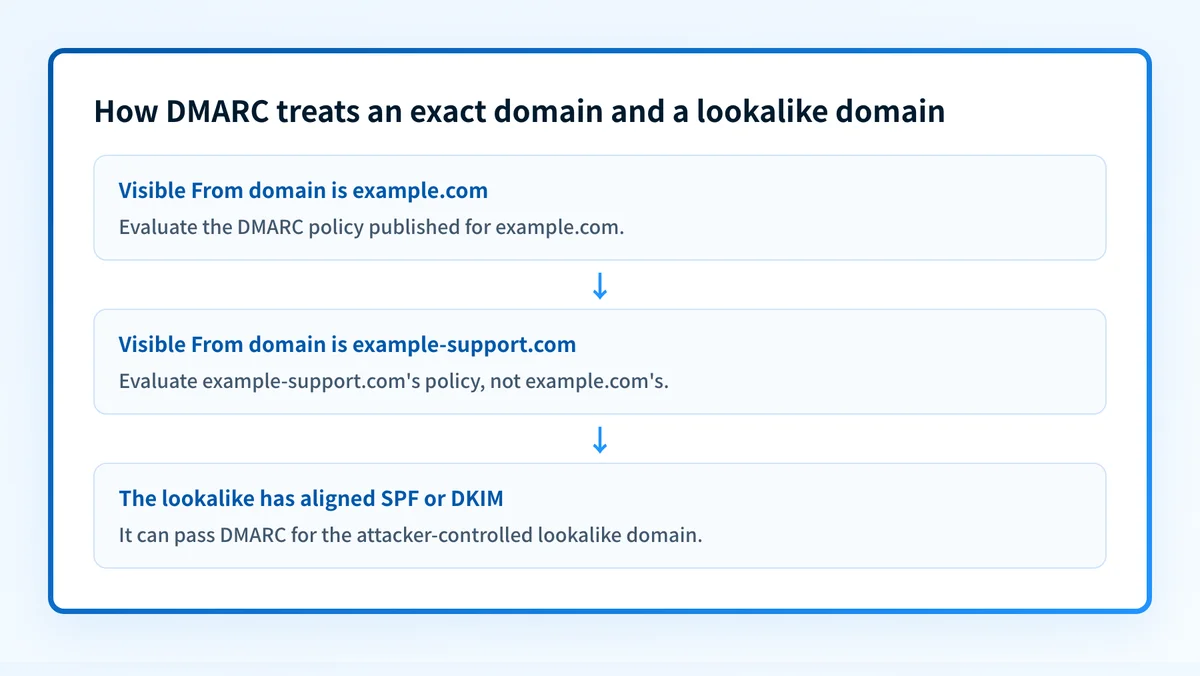
That scope is deliberate. If a message says it is from billing@example.com, the receiver evaluates example.com and the applicable DMARC policy for that domain. If it says it is from billing@example-support.com, the receiver evaluates example-support.com instead. A policy at _dmarc.example.com cannot impose a policy on a separate registration.
A lookalike can use a typo, an added word, a different top-level domain, or visually similar characters. The technical result is the same: the sender uses a domain that is different from the protected domain.
An attacker who controls that separate domain can configure their own sending service and publish authentication records for it. If the message has aligned SPF or DKIM, it can pass DMARC for the lookalike. That pass says the message authenticated as example-support.com. It does not say that example-support.com is the real example.com.
For the policy side of this distinction, see what a domain's DMARC policy is. For the wider protocol context, visit the DMARC learning hub.
When DMARC can and cannot help
DMARC helps when the attacker places a domain you own in the visible From address. A policy such as p=reject asks receiving systems to reject messages that fail DMARC for that protected domain. The receiver still makes the final delivery decision under its local policy, as RFC 9989's DMARC policy model describes.
DMARC does not help when the sender changes the visible From domain to an attacker-owned lookalike. The following decision rule keeps the distinction clear:
- If the malicious message uses
billing@example.com, inspect DMARC enforcement and the message's authentication evidence forexample.com. - If the message uses
billing@example-support.com, yourexample.compolicy does not govern it. Preserve the evidence for reporting and use your organization's lookalike-domain response process. - If the displayed sender name looks legitimate but the address differs, inspect the complete From address. Display names are not the domain DMARC evaluates.
Authentication-Results header can help identify what a receiver evaluated. RFC 8601 defines this header field, including authentication method results and properties such as smtp.mailfrom. It records an authentication service's assessment. It is not a statement that a sender is safe, legitimate, or authorized to use a brand.
Do not move a domain to a stricter DMARC policy based only on a public DNS result. Validate legitimate production mail paths before changing policy, because an unaligned sender can fail after enforcement.
A worked lookalike-domain example
Assume that example.com publishes a DMARC policy and an attacker registers example-support.com. These records are illustrative only. Do not copy them into DNS. Each domain owner publishes and controls records only for its own domain.
From: Billing Team <notice@example-support.com>
Authentication-Results: receiver.example;
  dkim=pass header.d=example-support.com;
  dmarc=pass header.from=example-support.com
The example message can pass DMARC because the DKIM signing domain and visible From domain are both example-support.com. The receiver does not test whether that domain resembles example.com, because visual similarity is not a DMARC alignment rule.
A similar header result for example.com would answer a different question: whether the message authenticated as example.com under that domain's DMARC policy. It would not establish why a recipient trusted a display name or whether a separate lookalike domain was malicious.
What to do with the evidence you have
If you only have a suspicious address, copy the full visible From domain and compare it with the domain your organization owns. Do not rely on the display name or a cropped screenshot.
If you have the original message, preserve the raw headers and inspect the receiver's Authentication-Results fields. Compare header.from with the passing SPF or DKIM identifier. This separates direct spoofing from authenticated mail sent through a lookalike domain.
If the message uses your real domain, check the published policy with the Palisade DMARC checker. Compare the DNS result with the real message header and with the sending systems your team has approved. A public DNS lookup confirms the current published record. It cannot prove that the suspicious message followed your production path, explain a receiver's private decision, or show every sender that may later fail alignment.
If the message uses a lookalike, preserve the domain, message headers, URLs, timestamps, and any recipient reports for your security team and the relevant abuse-reporting or takedown process. DMARC aggregate reports can help identify mail using your own domain, but they do not inventory every independently registered lookalike domain.
An unauthorized aggregate-report destination can also complicate DMARC reporting. See why DMARC says an rua or ruf domain is not authorized if the reporting address itself is the problem.
Check the DMARC policy on the real domain
When a suspicious message appears to use your exact domain, inspect the real domain's published DMARC record before deciding whether a policy gap exists. Then compare it with raw message headers from the affected path.
Palisade autonomously analyzes DMARC aggregate-report data, identifies sending sources and alignment issues, and proposes a next policy step for human review. It does not control an attacker-owned lookalike domain, perform a takedown, or guarantee that every future message will authenticate.
Evidence
Sources and further reading
Questions readers ask
Frequently asked questions
Can a lookalike domain pass DMARC?
Yes. An attacker who controls a lookalike domain can publish SPF, DKIM, and DMARC records for that domain. A passing result authenticates that lookalike domain, not the brand it resembles.
Does p=reject block lookalike domains?
No. p=reject applies when messages claiming to use your protected domain fail DMARC. It does not apply to a separately registered domain, even when its name looks similar.
Can DMARC identify every impersonation attempt?
No. DMARC evaluates messages that use the domain being assessed. It does not discover every domain that resembles your brand or determine whether a separately registered sender is deceptive.
Does a DMARC pass mean the sender is trustworthy?
No. A DMARC pass means aligned SPF or DKIM authenticated the visible From domain under the receiver's evaluation. It does not establish the sender's business identity, intent, or reputation.
Should I still enforce DMARC on domains I own?
Yes. DMARC enforcement protects against direct use of your owned domains in the visible From address. Validate legitimate senders and alignment before moving to a stronger policy.

Written by
Ian BussieresCTO & Co-Founder, Palisade
Ian Bussieres is the CTO and co-founder of Palisade, agentic DMARC software for IT teams and MSPs.
More from Ian →