What is a domain's DMARC policy?
 ChatGPT
 Claude
 Gemini
 Perplexity
 Grok
GrokIn brief
A domain's DMARC policy is the p tag in its DNS record. It requests how receivers handle messages that fail DMARC for the domain: none, quarantine, or.
A domain's DMARC policy is the requested handling for messages that use its visible From domain but fail DMARC. The domain owner publishes that request in a DNS TXT record, usually at _dmarc.example.com. The p tag can request none, quarantine, or reject. Receiving systems make their own final decisions, so the published policy does not prove a particular message was rejected, delivered, or placed in an inbox.
At a glance
Quick takeaways
- The
ptag contains the DMARC policy requested by the domain owner. p=nonerequests no specific handling for DMARC failures.p=quarantinerequests suspicious treatment for DMARC failures.p=rejectrequests that receivers reject messages that fail DMARC.- A receiver can apply its own local policy when handling a failing message.
- A DMARC record lookup shows published DNS, not the result for an individual email.
How a domain's DMARC policy works
RFC 9989 defines DMARC policy records as DNS records through which a domain owner communicates requested handling for mail that fails DMARC evaluation. DMARC evaluates the visible Header From domain against SPF or DKIM authentication that also meets the relevant alignment rule.
The policy takes effect only after DMARC fails. A valid SPF or DKIM result alone is not enough for DMARC when the authenticated domain does not align with the visible From domain.
The p tag expresses the requested policy for the organizational domain:
p=nonerequests no specific handling action for a DMARC failure.p=quarantinerequests treatment as suspicious.p=rejectrequests that a receiver reject the failing message.
p=reject is not evidence that every receiver rejects every failing message. It also does not guarantee inbox placement for messages that pass DMARC.
For the broader protocol and alignment rules, see the DMARC learning hub.
When the published policy changes
Read the visible From domain before deciding which DMARC policy applies. A message from alerts.yourdomain.com can have a more specific DMARC record at _dmarc.alerts.yourdomain.com. If there is no usable record at that name, DMARC discovery can use the organizational domain's record, as specified in RFC 9989 policy discovery rules.
The sp tag can request a separate policy for subdomains. When a record has no sp tag, the organizational domain's p value normally supplies the requested policy for subdomains. A subdomain with its own usable DMARC record can change the result.
Use this decision rule:
- If the visible From domain has its own usable DMARC record, read that record.
- If it does not, identify the organizational domain and read its
pvalue. - If the organizational-domain record contains
sp, use that requested policy for the subdomain. - If
spis absent, use the record'spvalue as the requested subdomain policy.
rua. An rua address does not prove that reports are arriving, being parsed, or acted on. DMARC policy for subdomains covers the subdomain case in more detail.
Worked DMARC policy example
The following is illustrative only. Publish the report destination approved for your own domain and reporting service.
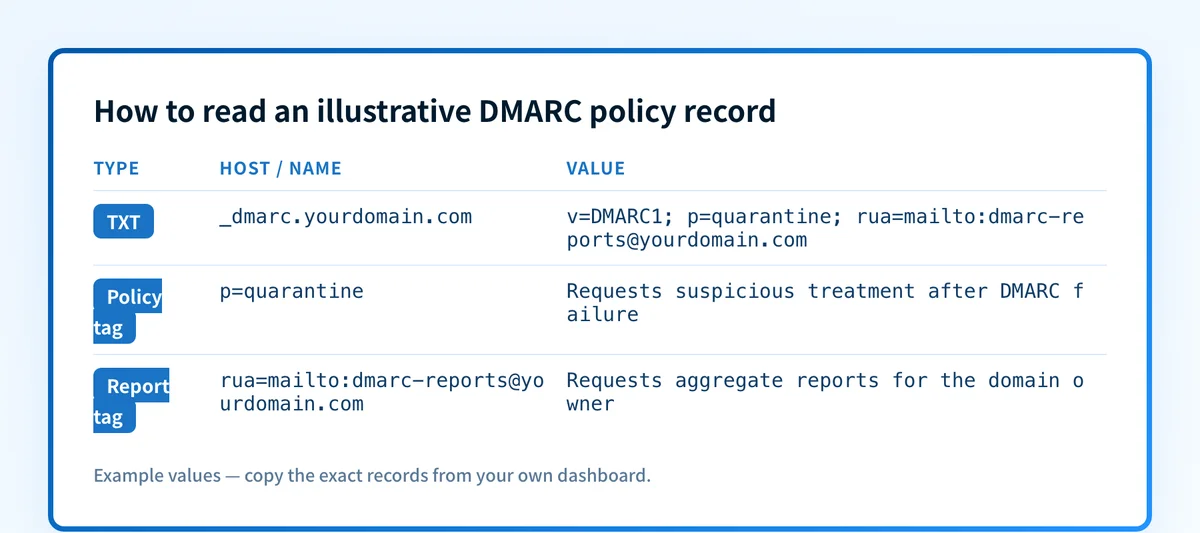
v=DMARC1; p=quarantine; rua=mailto:dmarc-reports@yourdomain.comThis record has three relevant parts:
v=DMARC1identifies the record as a DMARC policy record.p=quarantinerequests suspicious treatment for messages that fail DMARC.rua=mailto:dmarc-reports@yourdomain.comrequests aggregate reports at that destination.
Host: _dmarc.yourdomain.com
Type: TXT
Value: v=DMARC1; p=quarantine; rua=mailto:dmarc-reports@yourdomain.com
Do not copy another organization's report address, selector, or DNS value into your record. Use values generated and approved for your own domain.
A policy record cannot identify every legitimate sender that uses the domain. Before moving toward quarantine or reject, validate important production paths with delivered-message authentication results and aggregate-report data. The narrower choice between enforcement requests is covered in DMARC reject vs. quarantine.
Check the policy with the evidence you have
If you have a domain name, inspect its public DMARC TXT record first. Query _dmarc.yourdomain.com through authoritative DNS and at least one public resolver, then compare the answer with the intended record in your DNS change history or DNS-as-code source.
A public lookup is the DNS layer of validation. It does not show whether an application is signing mail, whether SPF or DKIM aligns on a live message, or how a receiver handled that message. For those questions, inspect a delivered message's authentication results, then review DMARC aggregate reports after data accumulates.
Check the published DMARC record
If the record says p=none, do not assume enforcement is active. If it says p=quarantine or p=reject, do not assume every sender is ready. The record is the domain owner's request. Real message headers and aggregate reports show whether the production sending paths meet DMARC.
Keep policy changes tied to sender evidence
A one-time DNS lookup cannot reveal which production sources later fail alignment, whether DNS drifts, or whether a new sender begins using the domain. Palisade is agentic DMARC software that analyzes DMARC aggregate-report data, identifies sending sources and authentication or alignment issues, and creates prioritized remediation tickets. It can propose the next policy step when the evidence indicates readiness, while a human reviews the evidence and applies the DNS change.
Palisade does not autonomously change the DMARC policy, prove every future message will authenticate, or determine a receiver's private delivery decision.
Evidence
Sources and further reading
Questions readers ask
Frequently asked questions
How do I enable DMARC for my domain?
Publish a DMARC TXT record at _dmarc.yourdomain.com with a valid v=DMARC1 and p tag. Start by validating SPF and DKIM alignment for legitimate production senders, then use aggregate reports before requesting stronger handling with quarantine or reject.
What does it mean if a domain doesn't have a DMARC policy?
It means receivers cannot find a usable DMARC policy record through standard DMARC discovery for that domain. SPF or DKIM can still authenticate mail, but the domain is not publishing a DMARC handling request through a usable DMARC record.
How do I check if DMARC is enabled for a domain?
Look up the TXT record at _dmarc.domain.example and confirm it contains a usable DMARC record beginning with v=DMARC1. A public lookup confirms published DNS, but a delivered-message header is needed to confirm that a particular message passed or failed DMARC.
Should the DMARC policy be enabled?
Only after legitimate sending sources have been identified and their important message paths show aligned SPF or DKIM authentication. A stronger policy can protect the domain from unauthorized use, but publishing it before validating legitimate senders can disrupt wanted mail.
Does p=none mean DMARC is disabled?
No. p=none is a valid DMARC policy that requests no specific failure handling. It can still request aggregate reports through rua, which helps a domain owner inventory senders and prepare for stronger enforcement.
Does p=reject guarantee that spoofed mail is blocked?
No. p=reject asks receivers to reject messages that fail DMARC, but each receiver can apply its own local policy. DMARC also does not control messages that do not use the protected domain in the visible From field.

Written by
Samuel ChenardCEO & Co-Founder, Palisade
Samuel Chenard is the CEO and co-founder of Palisade, agentic DMARC software for IT teams and MSPs, from one domain to thousands.
More from Samuel →