How to enable DMARC policy in cPanel?
 ChatGPT
 Claude
 Gemini
 Perplexity
 Grok
GrokIn brief
How to enable DMARC policy in cPanel: confirm your cPanel interface version, find the applicable official instructions, then validate the published DNS.

You should enable a DMARC policy in cPanel only by following the official instructions for your exact cPanel interface version and then checking the DNS record that your domain publishes. cPanel's documentation distinguishes interface versions, including Jupiter and Meridian, so an unverified menu path can be wrong for the account in front of you. Do not treat a saved DNS change as proof that mail is using the intended policy.
At a glance
Quick takeaways
- cPanel publishes version-specific user documentation for interfaces including Jupiter and Meridian.
- Confirm the interface version before following any cPanel DNS instructions.
- The available cPanel documentation does not establish one universal DMARC settings path.
- A DMARC policy must be published for the exact domain whose visible From address needs the policy.
- A public DNS lookup can show a published record, but it cannot prove that every production message passes DMARC.
- A subdomain can require separate policy consideration from its parent domain.
How cPanel DMARC configuration works
cPanel's user documentation says it covers account access, features, and cPanel interfaces, and asks readers to choose an interface version: Jupiter or Meridian. That version choice matters before changing DNS because the available material does not document a single, version-independent cPanel procedure for adding or editing a DMARC record.
DMARC is a domain-level email authentication policy. If you need the protocol context before making a DNS change, start with Palisade's DMARC guide. The practical point for cPanel is narrower: identify the domain, identify the cPanel interface version, and use the official documentation that applies to that interface and account.
Do not rely on an unlabeled tutorial, a screenshot from another hosting provider, or a record copied from another organization. DNS records can contain domain-specific reporting destinations and other values that should not be reused without authorization.
When the answer changes
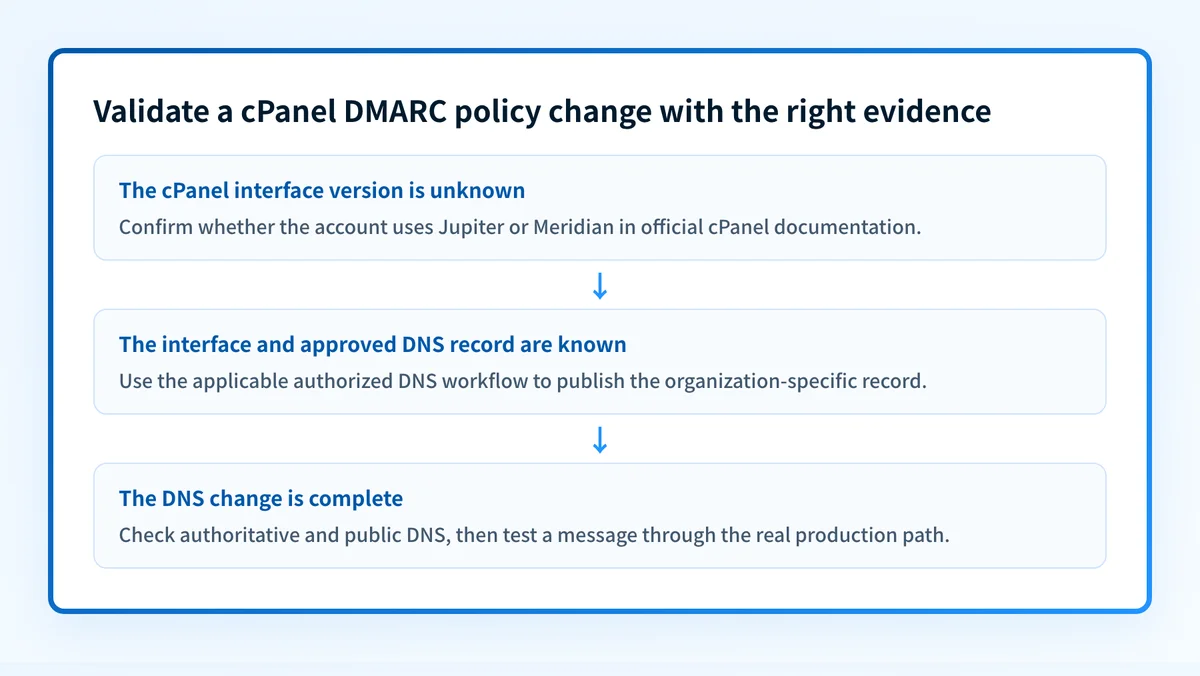
The correct next action changes with the evidence you have.
- If you do not know whether the account uses Jupiter or Meridian, begin at the cPanel documentation site and select the interface version before seeking a DNS procedure.
- If your organization has an approved DMARC record and an authorized DNS change process, compare the intended record with the one that DNS currently publishes before changing anything.
- If the visible From address uses a subdomain, determine whether that subdomain has its own policy requirements. See DMARC policy for subdomains before assuming that a parent-domain change answers the question.
- If a recipient has rejected a message, preserve the delivered-message evidence and the provider's exact error. A public record lookup alone does not establish why that recipient made its decision. The related guidance on a 550 5.7.0 DMARC policy violation addresses that distinct symptom.
Do not publish a copied record from another tenant. A DMARC record can include addresses and controls that belong only to the organization that generated it.
The available cPanel material does not confirm whether an account exposes a dedicated DMARC control or requires a general DNS TXT-record change. It also does not document a current validation message, save behavior, or error state. Use the official documentation for the selected cPanel interface rather than inferring those details.
A safe evidence checklist before enabling the policy
Use this decision rule: do not make a DNS change until the account interface, the authorized domain, and the approved record source are all known.
Before a cPanel DMARC change:
Interface version: Jupiter or Meridian confirmed
Domain: the exact visible From domain identified
Change authority: DNS owner and approval path confirmed
Record source: approved organization-specific DMARC value available
Post-change check: authoritative DNS and public DNS lookup planned
Message check: real production message headers retained for review
This is a change-control checklist, not a DMARC record to publish. The available cPanel documentation does not provide a verified record syntax or a cPanel-specific field mapping, so the actual value must come from your organization's approved configuration or applicable official documentation.
After the change is complete, validate at separate layers:
- DNS: query the authoritative DNS service and at least one public resolver.
- Vendor: check the relevant cPanel or hosting status only if the applicable official interface documentation defines that status.
- Message: send a real message through the production application and retain its authentication results.
- DMARC: review aggregate-report data after it accumulates.
What to do next with the evidence you have
If you have only a domain name, inspect its currently public DMARC record before requesting or approving a cPanel change.
Check the published DMARC record
Compare the result with the approved record and the exact domain used in the visible From address. If the domain has a cPanel account, use the official documentation for its confirmed interface version to locate the applicable DNS workflow.
If you have a delivery failure instead, preserve the raw message headers and the provider's error before changing policy. A published-record check cannot show which production source sent the message, repair a cPanel configuration, monitor later DNS changes, or prove a receiver's private delivery decision.
For an ongoing inventory of sending sources and alignment issues, Palisade is agentic DMARC software that analyzes DMARC aggregate-report data, identifies authentication or alignment issues, and proposes a next policy step for human review. It does not autonomously change your cPanel DNS policy or guarantee delivery.
Evidence
Sources and further reading
Questions readers ask
Frequently asked questions
How to enable DMARC in cPanel?
Confirm which cPanel interface the account uses, Jupiter or Meridian, then follow the DNS instructions in cPanel's own documentation for that version. Add the DMARC record your organization approved, for the exact domain that appears in your visible From address. After you save it, query both authoritative DNS and a public resolver to confirm the record really published.
How do you enable a DMARC policy?
Publish a DMARC TXT record at _dmarc.yourdomain.com for the domain in your From address. Start at p=none so you collect reports without changing how receivers handle your mail, then read those reports to find every legitimate sender before you tighten to quarantine or reject. In cPanel, that record goes in whichever DNS editor your interface version provides.
How to fix DMARC policy not enabled?
Start by looking up what _dmarc currently publishes for the exact domain in your From address. That phrase comes from whichever checking tool reported it rather than from cPanel, so note which tool said it and which domain it checked. Then compare the published record with the one your organization approved, and check any subdomain separately.
Does the DMARC policy need to be enabled?
Yes for any domain you send business mail from, because without a DMARC record you get no reports and no say in how receivers treat mail that fails authentication. cPanel does not require it and will not decide it for you. How far past p=none you go depends on your sending setup and on the requirements of the mailbox providers you send to.
Does a public DMARC lookup prove that cPanel is configured correctly?
No, because a lookup only reads what DNS publishes at that moment. It cannot show which cPanel screen created the record, whether your production mail aligns with it, or how a receiver will handle your next message. Confirm those with a real delivered message and, later, with DMARC aggregate reports.

Written by
Samuel ChenardCEO & Co-Founder, Palisade
Samuel Chenard is the CEO and co-founder of Palisade, agentic DMARC software for IT teams and MSPs, from one domain to thousands.
More from Samuel →