Publish a DMARC record with Palisade: DNS handoff
 ChatGPT
 Claude
 Gemini
 Perplexity
 Grok
GrokIn brief
Publish a DMARC record with Palisade: hand off the approved TXT value, save it in authoritative DNS, verify publication, and review sender alignment next.
To publish a DMARC record with Palisade, take the approved TXT value to the domain's authoritative DNS provider, save it at _dmarc.yourdomain.com, and compare the public answer with your change record. Use the DMARC generator to draft the value first, then give the DNS owner the approved record and retain the publication evidence.
A public DNS result confirms the policy receivers can retrieve. It does not prove that a sender has aligned SPF or DKIM.
At a glance
Quick takeaways
- A DMARC policy is one TXT record published at
_dmarc.yourdomain.com. - The
v=DMARC1tag must be first, and thep=tag states the requested policy. p=nonerequests monitoring, whilep=quarantineandp=rejectrequest enforcement.- Keep a DNS change record before publication so the owner, value, approval, and follow-up are clear.
- A public lookup validates record visibility, not sender configuration, delivered-message authentication, or inbox placement.
- Move toward enforcement only after reviewing sender evidence and DMARC aggregate-report data.
What should the DNS owner receive?
The DNS owner needs an approved owner name, an exact TXT value, a publication time, and a rollback value if an existing record will change. The DMARC generator owns record drafting; the Palisade DMARC checker owns the public lookup. Keep their outputs with the change ticket so the DNS owner can compare what was approved with what is actually published.
RFC 9989 defines DMARC record discovery at the _dmarc subdomain and the DMARC policy tags. Publication is only the DNS layer of setup. The DMARC learning hub covers the wider protocol and policy rollout.
How do you publish the approved DMARC record?
1. Identify the visible From domain
Use the domain after @ in the visible From: address that recipients receive. DMARC evaluates alignment against that domain, which can differ from an envelope sender or a provider-owned sending domain.
Treat each visible From domain as its own setup and validation task. A DMARC record for yourdomain.com does not automatically apply to otherdomain.com.
2. Attach the approved value to the DNS change record
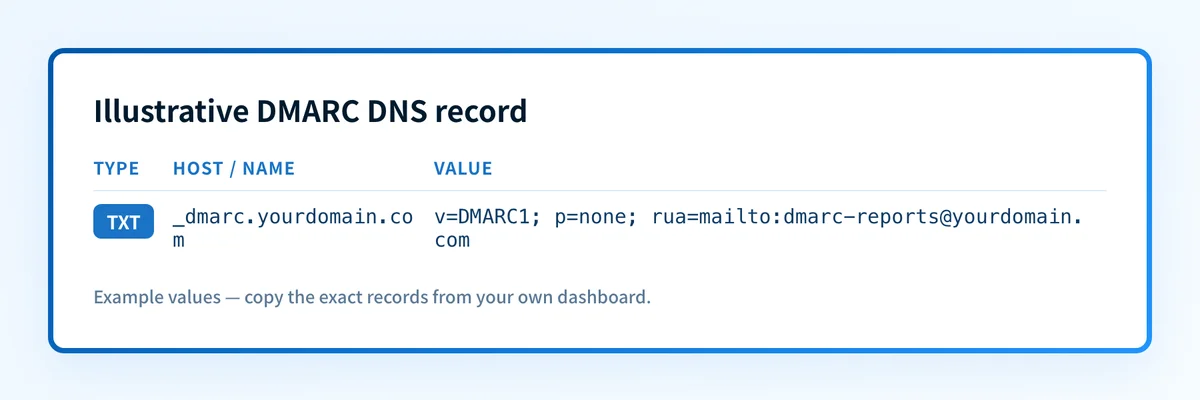
Use the DMARC generator if you still need a draft, then have the policy and reporting destination reviewed before publication. Attach the exact approved value to the change ticket. The example below shows the handoff format only; do not publish it unchanged or use a reporting destination without authorization.
_dmarc.yourdomain.com. IN TXT "v=DMARC1; p=none; rua=mailto:dmarc-reports@yourdomain.com"In this example, v=DMARC1 identifies the DMARC record version, p=none requests monitoring, and rua requests aggregate reports at the named mailbox. RFC 9989 describes these tags and the allowed policy values.
Record the change before publishing it. This creates an auditable handoff between the person drafting the policy and the person responsible for the DNS zone.
- Visible From domain:
yourdomain.com - DNS provider or zone owner: the provider and account responsible for the authoritative zone
- Exact owner name:
_dmarc.yourdomain.com - Proposed record value:
v=DMARC1; p=none; rua=mailto:dmarc-reports@yourdomain.com - Purpose of each tag:
videntifies DMARC,prequests the receiver policy, andruanames the aggregate-report destination - Approver or change ticket: your approved change record, such as
CHG-0000 - Rollback value: the previous TXT value, if replacing an existing policy
- Publish time: the planned UTC publication time
- DNS verification result: the returned authoritative and public DNS answers after publication
- Real-message or report follow-up date: the date to inspect a new message from each active sender and later review aggregate reports
3. Save one TXT record in the authoritative DNS zone
Open the DNS zone for the visible From domain and add a TXT record. Some DNS interfaces append the zone name automatically. In those interfaces, enter _dmarc as the host. If the interface requires a fully qualified owner name, enter _dmarc.yourdomain.com.
For a domain hosted at GoDaddy, follow the GoDaddy DMARC setup instructions for the provider-specific DNS steps.
Paste the final TXT value exactly as approved. Do not add the domain twice. A provider that appends yourdomain.com to an entered _dmarc.yourdomain.com can publish the wrong owner name.
Publish only one DMARC TXT record at the _dmarc owner name. Multiple DMARC records at that name can leave a receiver unable to select a valid DMARC policy.
4. Check the public DNS answer
Enter the visible From domain in the Palisade DMARC checker and compare its returned record with the approved value in the DNS change record.
You can also repeat the public lookup independently:
dig +short TXT _dmarc.yourdomain.comA public answer can remain cached until the record's TTL expires. Compare the result with the authoritative DNS provider before treating an earlier public answer as a failed publication.
What counts as a completed DNS handoff?
A DMARC record is returned
A returned record means the lookup found public TXT data at the expected DMARC owner name. Compare the entire string with the approved value. Check that v=DMARC1 is first, the policy is intentional, and the rua destination is the one your organization approved. A reporting service may supply an external destination; confirm its required authorization before relying on reports.
This is syntax and publication evidence. It does not establish that a specific sender aligns. To make that conclusion, inspect a delivered message from that sender and its receiver-added authentication results.
No DMARC record is returned
Confirm that you entered the visible From domain and that the DNS owner is _dmarc.yourdomain.com. Check whether the provider expects _dmarc or a fully qualified name, then inspect the authoritative zone for accidental duplication.
If the record was just saved, note the publication time and TTL in the change record. Retest after the relevant cache period instead of creating another TXT record.
The returned record differs from the approved value
Treat a mismatch as a DNS publishing issue until the authoritative answer explains it. Common causes include editing the wrong zone, retaining an older TXT value, or publishing the host name in a form the provider expanded twice.
Correct the single authoritative record, update the change record with the observed result, and repeat the same lookup.
How to act on the result
No record or an incorrect owner name
Correct the TXT owner name in the authoritative zone first. Use _dmarc only where the provider appends the domain automatically. Then validate with the authoritative provider and a public resolver.
A monitoring policy is published
With p=none, keep the DNS record in place and move to evidence from each active sender. Confirm the sender's own authentication setup, send a real message through the production route, and inspect the recipient's Authentication-Results header. RFC 8601 defines the message header field used to report authentication results.
A specific message passes DMARC when either SPF or DKIM passes and aligns with the visible From domain. A correctly formatted record does not make that happen. If you need to separate DNS publication from message signing, the DKIM record setup guide explains why both checks matter.
You are considering quarantine or reject
Do not choose an enforcement policy because the DNS record looks valid. First identify legitimate senders, validate a delivered message from each production path, and review DMARC aggregate reports after they accumulate. The DMARC setup guide provides additional rollout context.
Use the DNS change record to document the evidence reviewed, the intended policy change, the approver, and the rollback value. A policy change is a human-controlled DNS change. Palisade does not autonomously change the DMARC policy.
How to retest
Repeat the same Palisade DMARC checker lookup after the authoritative DNS record changes. The expected DNS result is the exact approved v=DMARC1 TXT value at _dmarc.yourdomain.com.
Then validate the other layers separately:
- DNS: Compare the authoritative answer and a public resolver answer.
- Vendor: Check each sending service's current domain-authentication or verification status.
- Message: Send a new message through the same production path and inspect its
Authentication-Results. - DMARC: Review aggregate-report data after reports accumulate.
Track sender alignment after the DNS record is live
The public record is one part of the work. The remaining question is which production senders still fail authentication or alignment as reports arrive. Start with Palisade to analyze DMARC aggregate-report data, identify sending sources and alignment issues, and create prioritized remediation tickets before a human reviews and applies a policy change.
Palisade does not autonomously publish DNS changes, prove every future message will authenticate, or guarantee inbox placement.
Evidence
Sources and further reading
Questions readers ask
Frequently asked questions
Where do I publish a DMARC record?
Publish the DMARC TXT record at _dmarc.yourdomain.com, where yourdomain.com is the domain in the visible From address you want to protect.
Can I publish more than one DMARC TXT record?
No. Publish one DMARC record at the _dmarc owner name for the domain. Multiple DMARC TXT records can prevent a receiver from selecting a valid policy.
Does a valid DMARC record prove my email passes DMARC?
No. A valid public record proves that receivers can retrieve the policy. You still need a delivered message from each production sender to confirm aligned SPF or DKIM authentication.
Should I start with p=none?
Yes, when you still need to identify legitimate sending sources and validate their authentication. p=none requests monitoring rather than quarantine or rejection.
When can I move to p=quarantine or p=reject?
Only after you have reviewed sender configuration, delivered-message evidence, and DMARC aggregate-report data for the production sources that use the domain. A DNS check alone is insufficient evidence for enforcement.

Written by
Samuel ChenardCEO & Co-Founder, Palisade
Samuel Chenard is the CEO and co-founder of Palisade, agentic DMARC software for IT teams and MSPs, from one domain to thousands.
More from Samuel →