MXToolbox DMARC monitoring: check, interpret, and retest
 ChatGPT
 Claude
 Gemini
 Perplexity
 Grok
GrokIn brief
MXToolbox DMARC monitoring starts with a DNS check. Learn what a result can show, when to investigate further, and how to retest safely today.
MXToolbox DMARC monitoring can help you keep track of DMARC configuration, but a public check is only one piece of evidence. Use it to establish what DNS returns for the domain, then compare that observation with the sending service, a real delivered message, and DMARC aggregate reports before deciding that mail authentication is working.
At a glance
Quick takeaways
- MXToolbox states that its Delivery Center can keep tabs on DMARC Configuration alongside inbox placement, reputation, and Google Spam Rate.
- A public DNS result shows what the lookup retrieved at that time, not whether every production sender authenticates correctly.
- A passing DMARC record check does not prove inbox placement or explain a rejection from one receiver.
- Forwarding can change a message after initial delivery and can cause DKIM failures, according to MXToolbox.
- Retest after a DNS change, then validate the same production message path and review DMARC report data as it accumulates.
What this tool checks
MXToolbox describes its Delivery Center as a place to keep tabs on "Google Spam Rate, Inbox Placement, Email Reputation, DMARC Configuration and more" in its Delivery Center overview. That establishes the vendor's stated monitoring context. It does not establish the current interface path, record-result labels, alert rules, plan limits, or the exact evidence shown for an individual domain. To compare MXToolbox and Palisade side by side for DMARC work, see MXToolbox vs Palisade.
For a public record check you can also use the Palisade DMARC checker. Enter the domain you are investigating and treat the returned DNS observation as a starting point. If you already have an MXToolbox result in front of you, the guide to reading a single MXToolbox DMARC lookup explains what that result shows and what it leaves out. A public record check cannot prove the production sending path, message signing, continuous state, a receiver's private decision, or why one recipient rejected one message.
The distinction matters because DMARC is evaluated on messages, not on a DNS record in isolation. A record can be visible publicly while an application sends without the expected authentication, signs with an unrelated domain, or sends through a path that does not produce the expected result. If you need the policy context before investigating a checker result, start with the Palisade DMARC guide.
How to run the check
1. Identify the visible From domain
Use the domain after the @ symbol in the visible From address of the message or campaign you are investigating. Do not substitute a mail server hostname, an IP address, or the domain in a Reply-To address.
If the problem concerns a specific message, preserve a redacted copy of its raw headers. That message is later evidence for the actual sending path. A public lookup alone cannot replace it.
2. Run a public DNS lookup
Open the Palisade DMARC checker and submit the visible From domain. Record the domain you checked, the time of the run, and the returned DNS details.
You can repeat the public lookup independently with an example domain:
dig +short TXT _dmarc.yourdomain.comThe command asks DNS for TXT data at the DMARC owner name. Use yourdomain.com only as a structural example. Query the real domain only when you are authorized to inspect it.
3. Check the authoritative DNS answer
A public resolver can return a cached answer. If you are changing DNS or investigating an unexpected result, query the domain's authoritative name server as well. You can also use the Palisade DNS lookup tool to inspect DNS records. MXToolbox explains on its MX lookup page that its MX test queries the authoritative name server. That statement applies to its MX lookup, not necessarily to every MXToolbox product or DMARC workflow.
Record the authoritative answer separately from the public result. If they differ, wait for DNS propagation or investigate the zone publication before changing sender settings.
4. Preserve the result as DNS evidence
Save the result with the checked domain and timestamp. Do not treat a green status, a visible record, or an apparently complete policy as a conclusion about delivery.
Move to the sending platform when DNS looks correct but a message still fails. Move to raw message headers when the question is whether the exact message authenticated. Move to aggregate reports when the question is which sources are using the domain over time.
How to interpret the results
A DMARC record is returned
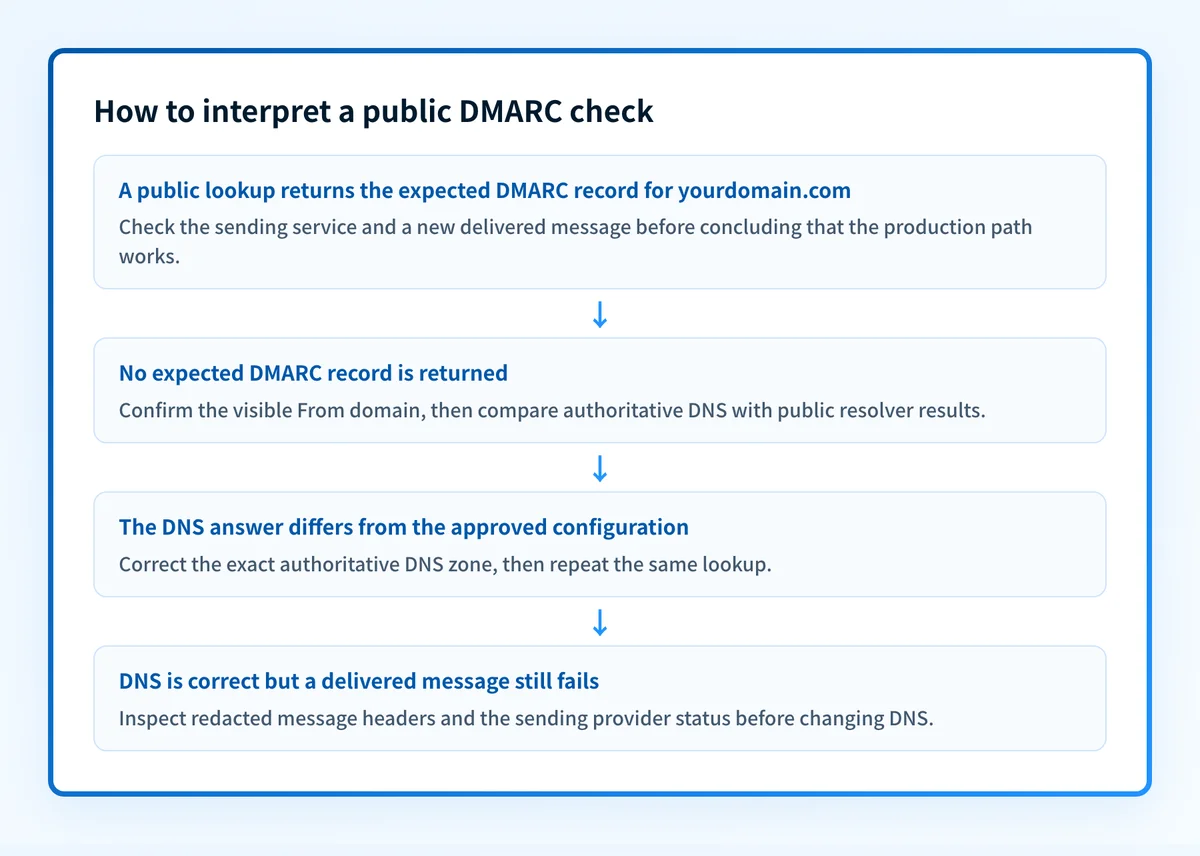
A returned record means the lookup found DNS data at the expected owner name during that run. It is useful evidence that the public DNS layer is responding.
The next question is narrower: does the record match the domain and deployment you intend to operate? Compare it with the DNS value generated or approved by the team responsible for the domain. Do not copy a record from another business unit, sending account, or tenant.
Then validate the vendor layer. Check the sending service's current authentication status for the same domain. A vendor status can show the service's configuration view, but it is still separate from a delivered-message result.
No expected record is returned
First, confirm the exact visible From domain. A subdomain and its organizational domain can have different DNS behavior, so changing a parent-domain record without checking the sending domain can create the wrong repair.
Next, query the authoritative server and inspect the DNS zone that owns the domain. If the authoritative lookup also returns no expected data, the domain owner needs to publish or correct the intended record. If the authoritative answer is present but a public check differs, treat that as a DNS publication or caching investigation.
Do not respond by changing DMARC policy first. Establish the DNS answer before making a policy decision.
The DNS answer does not match the intended configuration
A mismatch is a configuration-control problem. Compare the returned owner name and value against the value approved for that exact domain. Look for an outdated DNS change, a record published in the wrong zone, or a record intended for another sender environment.
Do not delete or replace a DMARC record based only on a public checker result. A mistaken DNS change can affect every sender that uses the visible From domain.
After correcting DNS, validate four layers independently:
- DNS: the authoritative answer and at least one public resolver return the expected value.
- Vendor: the sending provider shows its current authentication status for that domain.
- Message: a new message from the exact production path has receiver-added authentication results in its raw headers.
- DMARC: aggregate reports show how sources authenticate after report data has accumulated.
A message still has a DKIM-related failure
Do not infer that a visible DMARC record caused a DKIM failure. MXToolbox states in its forwarding explanation that forwarding is the most common reason it gives for a message to fail DKIM checks because the message can change after the initial send.
Inspect the delivered message's raw headers and compare them with a message sent directly through the production path. If forwarding is involved, identify where the message changed. MXToolbox also says that properly configured SPF records should ensure DMARC compliance in the forwarding scenario it describes. That is vendor commentary about that scenario, not proof that every forwarded message will pass DMARC.
How to act on the result
Start with the evidence that is closest to the fault:
- If DNS does not return the intended configuration, correct the exact DNS zone after confirming domain ownership and the approved value.
- If DNS is correct but the sender platform is not authenticated, use the provider's documented domain-authentication workflow.
- If both DNS and the provider status appear correct but a delivered message fails, inspect the message's
Authentication-Resultsand signing headers before changing DNS. - If one source passes and another fails, keep the sources separate. A correct result for one sending application does not validate every application using the domain.
- If you need source-level visibility over time, collect and review DMARC aggregate-report data. A one-time public lookup does not inventory all active senders.
How to retest
Repeat the same domain check after the authoritative DNS answer changes. Record the before-and-after result so you can tell a true DNS correction from a cached or unrelated change.
Then send a new message through the same application, authenticated domain, gateway, and recipient path that produced the original problem. Inspect its raw headers. Finally, review DMARC aggregate reports after they have had time to collect data from the relevant receivers.
The expected change depends on the repair:
- After a DNS correction, the authoritative and public lookups should return the intended configuration.
- After a sender-configuration correction, the provider should show the intended domain status.
- After a message-path correction, a new delivered message should show the expected authentication result for that path.
- After a source-level remediation, aggregate-report data should show the changed source behavior over time.
Track the senders a DNS check cannot identify
A public DMARC lookup can show the record available for a domain today. It cannot identify every production sending source that later fails authentication or alignment.
Palisade is agentic DMARC software for teams that need to analyze DMARC aggregate-report data, identify sending sources and authentication or alignment issues, and create prioritized remediation tickets. It can propose the next policy step when the evidence supports it, while a human reviews the evidence and applies the change.
Palisade does not autonomously change the DMARC policy, repair every sender, or guarantee delivery or inbox placement.
Evidence
Sources and further reading
Questions readers ask
Frequently asked questions
Does MXToolbox DMARC monitoring prove that all mail passes DMARC?
No, monitoring does not prove that, because a DNS or monitoring result only describes the configuration it can see. It cannot show that every production sender authenticates correctly, or that a given receiver will accept a message.
Can a public DMARC check explain a single rejected email?
No, a public check cannot explain one rejection, because it never sees that message's path. Investigate a single rejection with the message's raw headers, the sending provider's status page, and any diagnostics the receiver gives you.
Should I change a DMARC record when a checker result looks wrong?
Change it only once you have confirmed three things: the visible From domain, the authoritative DNS answer for that exact domain, and the configuration you actually intended. Never paste in a record value copied from another tenant or sending account.
Why can a message fail DKIM after forwarding?
A forwarded message often fails DKIM because the message changed after it was signed. MXToolbox gives forwarding as the most common reason it sees for DKIM failures. Compare a direct delivery with the forwarded copy to find where the path altered the message.
Is a passing DNS result the same as DMARC monitoring?
No, they answer different questions. A passing DNS result is a single observation of what public DNS holds right now. DMARC aggregate reports build separate evidence about which sources send with your domain and how they authenticate over time.
Do I need DMARC reports after the DNS record is visible?
Yes, you still need the reports, because DNS visibility only confirms what you published. The reports are what show which sources are sending with your domain and where authentication or alignment still fails.

Written by
Taylor TabusaCo-Founder & Head of Business Development, Palisade
Taylor Tabusa is the co-founder and Head of Business Development at Palisade, helping managed service providers turn email security into a practical, valuable service.
More from Taylor →