DMARC MX tools: check the right DNS record
 ChatGPT
 Claude
 Gemini
 Perplexity
 Grok
GrokIn brief
DMARC MX tools separate DMARC TXT-record checks from MX routing checks, so you can repair the right DNS record, verify public DNS, and retest it.
DMARC MX tools answer two different DNS questions. Use a DMARC check to inspect whether the domain publishes the DMARC-related TXT configuration, and use an MX lookup to see where inbound email for the domain is routed and the priority of those mail servers. A good MX answer does not confirm a DMARC policy, and a visible DMARC record does not prove that production messages authenticate.
At a glance
Quick takeaways
- MX records identify mail-routing destinations and their priority for a domain.
- DMARC is commonly configured through DNS TXT records, not MX records.
- An MX result and a DMARC result should be treated as separate evidence.
- Public DNS checks do not prove the production sending path or a receiver's private delivery decision.
- Retest the exact record type you changed after the authoritative DNS answer updates.
What this tool checks
A DMARC checker is the appropriate starting point when the question is whether a domain exposes DMARC-related DNS configuration. For broader policy context, see the DMARC learning hub and the explanation of what DMARC is.
An MX lookup answers a different question. MXToolbox describes an MX lookup as listing a domain's MX records in priority order, while DNS Checker describes MX records as information about where a domain's email should be routed and mail-server priority. DNS Checker also identifies SPF, DKIM, and DMARC as configurations commonly carried in TXT records.
That difference is a DNS record-type distinction. It does not mean MX routing has no operational relationship to email. A mail flow issue can involve routing, sender authentication, or both. The useful first step is to avoid treating an MX answer as proof of a DMARC configuration.
A public check can inspect what DNS returns at the time of the query. It cannot prove which application sent a production message, whether that message was signed, whether the visible From domain aligned, why one receiver rejected it, or what a receiver will decide about a future message.
How to run the check
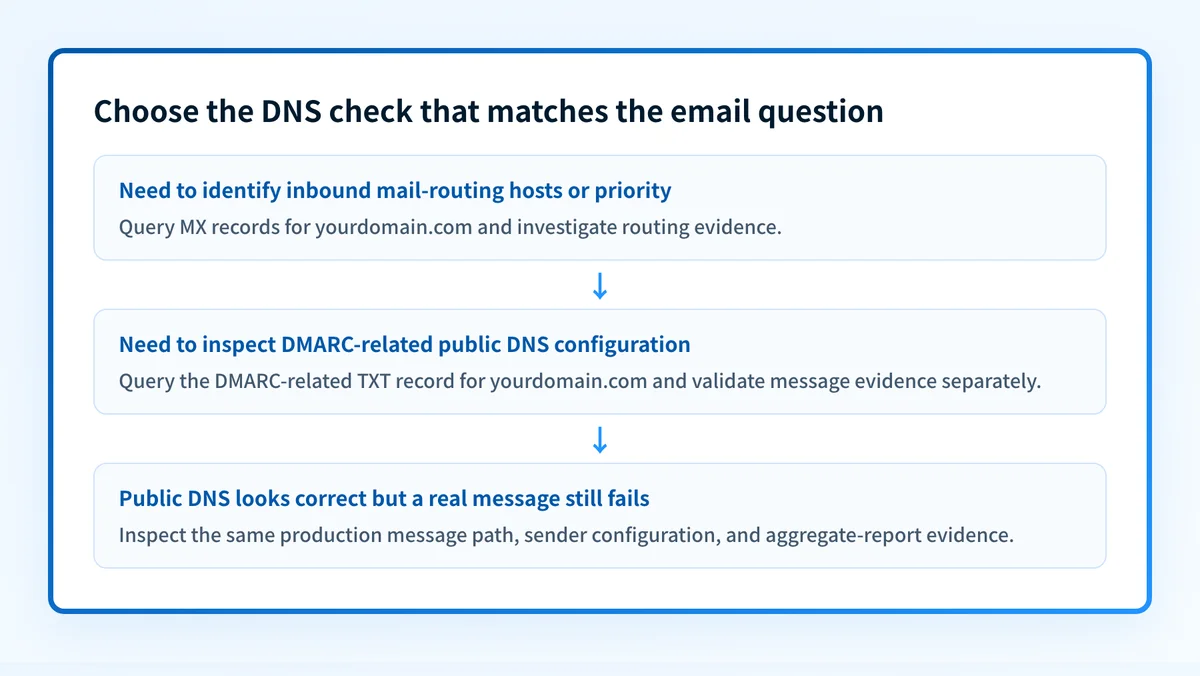
1. Start with the question you need to answer
Choose the DMARC path when you are investigating the domain's DMARC DNS configuration. Choose the MX path when you need to identify inbound mail-routing hosts or their priority.
Do not use an MX lookup as a substitute for a DMARC check. The records have different jobs and can both be present while a separate message-path problem remains unresolved.
2. Check the domain's DMARC DNS configuration
Open the Palisade DMARC checker and use the domain you are investigating. Keep a copy of the returned DNS evidence and the time of the check.
If the problem concerns a delivered message, collect the raw message headers separately. A DNS result is public-record evidence. It is not evidence that the sending application used the expected authentication setup.
3. Look up MX routing separately when routing is in scope
Use an MX lookup when inbound delivery, mail-server priority, or an expected receiving host is part of the incident. MXToolbox states that its MX lookup queries the domain's authoritative name server, so its statement that changes should appear immediately applies to that specific lookup behavior, not to every DNS resolver or every operational dependency.
You can independently ask a public resolver for an example domain's records:
dig +short MX yourdomain.com
dig +short TXT _dmarc.yourdomain.com
The first command asks for MX records. The second asks for TXT records at the conventional DMARC DNS owner. Treat the commands as separate checks with separate outputs.
4. Record what changed before you retest
Write down the domain, record type, query time, resolver or tool used, and the exact result. If you changed MX routing, retest MX. If you changed DMARC configuration, retest the DMARC-related TXT result.
Do not replace an MX record because a DMARC check looks wrong, or replace a DMARC-related TXT record because an MX lookup looks wrong. A record-type mix-up can interrupt mail flow.
How to interpret the results
An MX answer is present
A returned MX answer indicates that the lookup found mail-routing records for the queried domain. The listed preference values help order mail-server destinations. This is routing evidence, not evidence that the domain has published or applied DMARC configuration.
If a domain has an MX answer but the DMARC check does not show the expected DNS configuration, investigate the DMARC-related TXT record separately. If the issue is inbound routing, continue with the MX evidence and the receiving mail system's configuration.
An MX answer is absent or unexpected
An absent or unexpected MX result calls for a routing investigation. Confirm that the queried domain is correct, then compare the returned answer with the intended mail-routing configuration in the domain's DNS provider.
Do not infer a DMARC failure from this result. DNS Checker identifies MX and TXT as different record categories, so the missing or unexpected MX evidence does not itself tell you whether the domain's DMARC-related TXT configuration is visible.
A DMARC check shows the expected public DNS configuration
A visible DMARC-related DNS result is evidence that a public lookup can retrieve the configuration. It is not a complete authentication test.
Move to a real message from the exact production sender and inspect its receiver-added authentication results. Then observe aggregate-report data once it accumulates. Those layers answer questions that a public DNS check cannot: which senders are active, whether authentication or alignment issues occur, and whether the domain is ready for a later policy stage.
A DMARC check does not show the expected public DNS configuration
First confirm the exact domain being checked and inspect the DNS provider's published record for that same domain. Then repeat the public lookup. Keep this diagnosis scoped to record visibility until you have message evidence.
If the record has recently changed, do not assume that one public result explains every resolver's answer or every sender's behavior. Compare authoritative DNS evidence, a public lookup, the vendor's verification status where relevant, and a new delivered message from the same production path.
How to act on the result
Repair the record type that matches the evidence.
For an MX mismatch, work in the DNS provider or mail-routing configuration. Confirm the intended host names and priority values with the organization that operates inbound mail. Then validate through authoritative DNS and at least one public resolver.
For a DMARC-related TXT mismatch, work from the current configuration intended for that domain. Do not copy DNS values from another organization or tenant. After publication, check the DNS answer again, then send a new message through the same production sender and inspect the received headers.
PowerDMARC describes a DMARC workflow that includes configuring a policy and aggregate reporting, publishing the record in DNS, observing mail activity, then moving from p=none toward p=quarantine or p=reject. Its DMARC implementation guidance describes that sequence, but it is not a universal timing rule. Policy changes need evidence from the domain's actual senders and reports.
Use a four-layer check before treating a repair as complete:
- DNS: confirm the intended record from the authoritative server and a public resolver.
- Vendor: check the current authentication or verification status in the applicable sending service.
- Message: send a new message through the exact production path and inspect its raw headers.
- DMARC: review aggregate-report data after it has accumulated.
_dmarc.example.com for DMARC), and the MX checker shows the mail-routing hosts and their priority. Neither tool can show private receiver policy decisions or prove future inbox placement.
Investigate this with your coding agent
Use this when the public result is unclear and you need an evidence-backed map of what the site can return before changing DNS. Prepare only a redacted domain and the visible result. Do not include message headers, credentials, tokens, or customer data.
Agent handoff
Copy the prepared prompt
Give this to a coding agent that can inspect the relevant repository or configuration source of truth.
Problem: Determine which DMARC DNS record states the Palisade DMARC tool can return for a redacted test domain and whether it also exposes MX evidence.
Evidence: Redacted domain, timestamped public tool result, and any non-sensitive DNS response text.
Repository scope: Inspect /tools/dmarc, src/app/api/dns/route.ts, and directly related tests or configuration only.
Constraints: Inspect before editing. Do not apply changes until I approve the proposed diff. Do not query or expose credentials, private keys, tokens, unredacted headers, or customer data. Do not alter product code or DNS.
Requested output: Evidence-backed result mapping, the minimal proposed change if a defect is found, rollback, and unknowns.
Verification: Reproduce each documented state with a redacted test domain through the same public tool path and compare its DNS response.
Stop if: Credentials, private data, production mutation, or missing evidence is required.
Human approval required: Review the proposed diff and verification plan before allowing changes. Do not paste secrets, private keys, API tokens, unredacted headers, or customer data.
How to retest
Repeat the same record-specific check after the DNS change.
For an MX repair, repeat the MX lookup and compare the returned host names and priority order with the intended routing configuration. For a DMARC-related TXT repair, repeat the DMARC check, then test a newly sent production message. A successful public DNS response is one layer of validation, not the final result.
If an authoritative DNS response and a public resolver disagree, preserve both timestamps and escalate through the DNS provider before changing unrelated mail settings. If DNS answers match but a real message still fails, investigate the sender configuration and message headers rather than changing MX routing.
Move from one DNS check to an ongoing DMARC workflow
After a DMARC record is visible, the remaining question is which production sources authenticate and align over time. Start with Palisade to have the DMARC Agent analyze aggregate-report data, identify sending sources and authentication or alignment issues, and create prioritized remediation tickets for review.
Palisade can propose the next policy step when the evidence supports it, but a human reviews the evidence and applies any DNS policy change. It does not change DMARC policy on its own, prove every future message will authenticate, or guarantee delivery or inbox placement.
Evidence
Sources and further reading
Questions readers ask
Frequently asked questions
How do I get DMARC for my domain?
Publish a DMARC TXT record at _dmarc.yourdomain.com with a monitoring policy and an address for aggregate reports, then read the reports that come back. PowerDMARC's implementation guidance describes observing mail activity before moving from p=none to a stricter policy. Base any later policy change on evidence about the domain's actual senders, not on a calendar.
What is an example of a DMARC?
A DMARC record is a DNS TXT record published at _dmarc.yourdomain.com. It opens with the version tag, states a policy of none, quarantine, or reject, and usually names a mailbox for aggregate reports, so a monitoring record reads like v=DMARC1; p=none; rua=mailto:dmarc-reports@yourdomain.com. Treat that shape as illustrative and use the values intended for your own domain rather than copying another organization's record.
What is DMARC used for?
DMARC is used to tell receiving servers how to treat mail that claims to come from your domain without an aligned SPF or DKIM pass, and to send the domain owner reports about that mail. PowerDMARC states that a stricter DMARC policy can help protect against spoofing, phishing, business email compromise, and ransomware. That is a vendor-stated benefit, not a guarantee that every unwanted message will be blocked.
What is MX, SPF, DKIM, and DMARC?
MX records identify where a domain's email should be routed and the priority of mail servers. DNS Checker identifies SPF, DKIM, and DMARC as configurations commonly associated with TXT records, while EasyDMARC describes DMARC, SPF, and DKIM as email-authentication protocols with different roles in an email-security system.
Does an MX record prove that DMARC is configured?
No, an MX record proves nothing about DMARC, because MX records only say where inbound mail for the domain should be routed. DMARC lives in a TXT record at _dmarc.yourdomain.com, so check that separately. A delivered message is what shows you how the production sender actually authenticated.
Check the published DMARC record before changing policy
Enter your domain.

Written by
Dominic LandryDeliverability & DNS
Dominic Landry works on email deliverability and DNS configuration at Palisade, from SPF and DKIM records through to DMARC enforcement.
More from Dominic →