Analyze email headers online
 ChatGPT
 Claude
 Gemini
 Perplexity
 Grok
GrokIn brief
Analyze email headers online by separating message evidence from DNS and MX checks, then use the right source for routing and transport issues.

To analyze email headers online safely, first separate the copied message evidence from the sending domain's published DNS and MX configuration. A header copy can point to a routing or transport question, but an MX or DNS lookup checks the domain's current public configuration rather than the contents of that individual message. There is no single published universal requirement or operative date for online header analysis.
At a glance
Quick takeaways
- An email header is message-level evidence, while MX and DNS lookups inspect a domain's published configuration.
- A public MX lookup can list MX records in priority order, but it cannot inspect a copied message header.
- A routing-related clue in a message may justify a separate mail-server diagnostic.
- Current DNS results do not prove the configuration that existed when a specific message was delivered.
- An online check cannot establish a receiver's private delivery decision from public DNS alone.
Who is affected?
This guidance applies to an operator investigating one delivered, delayed, rejected, or suspicious email and trying to decide what evidence to collect next. It is also useful for teams responsible for a domain's mail-routing configuration.
The scope is deliberately narrow. A copied message header and a domain lookup answer different questions:
- Message evidence concerns the particular email you received or sent.
- DNS and MX evidence concerns the records a domain publishes when the lookup occurs.
- Mail-server diagnostics concern the reachable server and its observable network behavior.
Do not treat a current public lookup as a historical record of the exact delivery path. DNS records can change after a message arrives. A public lookup also cannot reveal a mailbox provider's private filtering or placement decision.
What are the requirements?
There is no IETF or mailbox-provider requirement in the available public evidence that defines one universal process for analyzing email headers online. The practical requirement is to match the test to the evidence you have, and to avoid treating one kind of evidence as proof of another.
Keep the message copy and domain lookup separate
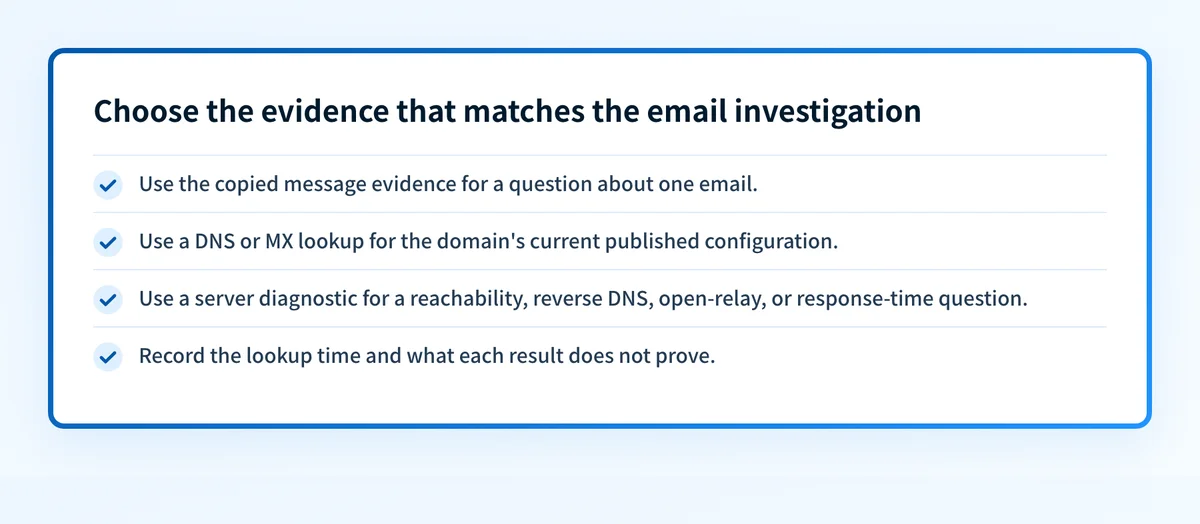
If you have a copied header from one message, preserve it as message evidence. If you also need to inspect the domain's public routing configuration, perform that check separately by querying the domain's MX records.
MXToolbox describes its MX Lookup test as listing a domain's MX records in priority order and performing the lookup against the authoritative name server. That supports a narrow operational conclusion: an MX lookup can help inspect current routing configuration, but it does not analyze the header copy from an individual email.
Message evidence
  A copied header from one delivered or rejected email
Domain evidence
  MX and DNS records returned for yourdomain.com at lookup time
Do not equate these two evidence sets.
Use a DNS check for the published domain, not the message body
When the question is "What does this domain publish now?", use a DNS lookup. The Palisade DNS lookup is appropriate for checking public DNS records associated with a domain.
A DNS result can support a configuration investigation. It cannot prove that the message used a particular production path, that the mail server accepted a particular SMTP session, or that a recipient evaluated the message in a particular way.
Use example values when recording the distinction for a ticket or handoff:
Domain to inspect: yourdomain.com
Question: What records are publicly published now?
Evidence collected: DNS lookup result and lookup time
Evidence not established: contents or handling of one specific message
Escalate a routing clue to a mail-server diagnostic
A message investigation can uncover a routing-related question that public DNS alone does not answer. In that case, use a diagnostic that targets the mail server itself.
MXToolbox states that its Diagnostics option can “connect to the mail server, verify reverse DNS records, perform a simple Open Relay check and measure response time performance.” That is distinct from reading a message header and distinct from listing MX records.
This distinction matters in practice. A domain can publish MX records, while a separate server-level question remains open. Conversely, a mail-server diagnostic does not reconstruct the exact content or handling of a message you received.
Do not paste unredacted headers, recipient addresses, message identifiers, or other customer data into a third-party service unless your organization's data-handling rules permit it. Keep the original message and its evidence in an approved system.
When does the requirement take effect?
No dated, universal header-analysis requirement applies to this task in the available source material. Header analysis is an investigation method, not a single mailbox-provider compliance deadline.
MX records are DNS configuration data. Their current result reflects the lookup performed at that time, not a requirement date for interpreting an individual message. If your investigation concerns a provider-specific deadline, use that provider's current official documentation rather than applying a general header-analysis rule.
For the related transport layer, see email transport security. Transport-security requirements and mailbox-provider enforcement policies need their own source-backed dates and scope.
How do I implement the requirement?
1. Define the question before choosing a checker
Write down whether you are investigating a specific message, a domain's published routing records, or a reachable mail server. One question can lead to more than one check, but each check should have a defined purpose.
A useful ticket note can look like this:
Observed issue: Delivery or routing question for one message
Message evidence available: copied header, if approved for handling
Domain evidence needed: current MX or DNS records
Server evidence needed: only if routing or reachability needs investigation
2. Preserve the message evidence in an approved location
Keep the original message evidence with the incident or support case. Remove or restrict access to personal data according to your organization's policy.
Do not assume a domain lookup can replace message evidence. The two artifacts may be collected at different times and answer different questions.
3. Check published DNS and MX records separately
Run the sending or receiving domain through the DNS lookup tool when you need current public record evidence. Record the domain and the time of the lookup with the result.
If the issue is an MX-routing question, an MX lookup can show the current priority-ordered records. That result is useful for comparing current configuration with the question raised by the message, but it does not prove the historical path of that message.
4. Use a server diagnostic only for a server-level question
If the evidence points to reachability, reverse DNS, open-relay exposure, or response time, use an appropriate server diagnostic. Keep the diagnostic result separate from the copied message evidence.
This avoids a common investigation error: treating a successful public configuration check as proof that the individual message was handled correctly.
5. Record what each result does not establish
Every investigation note should state the limit of the evidence. For example, a current DNS check does not establish a receiver's private filtering decision. A mail-server diagnostic does not prove the full path or interpretation of a prior message.
For authentication-specific troubleshooting, email authentication failure: diagnose the right layer helps keep DNS, vendor status, delivered-message evidence, and DMARC reporting separate.
How do I validate compliance?
Validate the evidence at the layer where the question exists.
- For public routing configuration, collect the domain's current DNS or MX result and the lookup time.
- For a mail-server question, collect the diagnostic result that addresses the server behavior.
- For a specific message, retain the approved message evidence and compare it only with claims that the evidence can support.
- For ongoing authentication posture, use DMARC aggregate-report data after it has accumulated. A one-time DNS lookup does not show every production sender or later configuration drift.
Do not describe a public lookup as proof of inbox placement, future delivery, or a mailbox provider's private decision. Those conclusions require evidence from the relevant system and may remain unavailable.
Check the transport-security context behind the routing question
If the header investigation has narrowed the issue to mail transport or domain routing, review email transport security before changing DNS or mail-server configuration.
That guide provides transport context. It does not analyze a specific copied message header, prove the exact historical route of a message, or reveal a receiver's private delivery decision.
Evidence
Sources and further reading
Questions readers ask
Frequently asked questions
Can an MX lookup analyze an email header online?
An MX lookup cannot analyze a header, because it inspects the MX records a domain publishes rather than the contents of one message. Read the header from your preserved copy of that message, and treat the MX result as separate evidence about the domain's current routing.
Does a current DNS lookup prove how a past email was routed?
No, a current DNS lookup cannot prove how an earlier message was routed, because it only shows the records returned at the moment the lookup runs. Records can change after a message arrives. Save the lookup time with the result so nobody later reads it as a historical record.
Can a mail-server diagnostic replace message evidence?
No, a server diagnostic cannot replace message evidence, because it reports server behavior such as reverse DNS, open-relay exposure, and response time. It does not reconstruct the header content or the handling of a message that was already delivered. Keep both artifacts and compare them.
Does a public DNS check prove inbox placement?
No, a public DNS check cannot prove inbox placement, because mailbox providers keep their filtering and placement decisions private. That evidence has to come from the receiving provider or from the messages your sending path actually delivered.

Written by
Samuel ChenardCEO & Co-Founder, Palisade
Samuel Chenard is the CEO and co-founder of Palisade, agentic DMARC software for IT teams and MSPs, from one domain to thousands.
More from Samuel →