Email authentication failure: diagnose the right layer
 ChatGPT
 Claude
 Gemini
 Perplexity
 Grok
GrokIn brief
Email authentication failure diagnosis starts with the failed message. Separate SPF, DKIM, DMARC, and SMTP evidence before changing DNS and headers.
An email authentication failure must be diagnosed at the layer that failed: SPF authorization for the envelope identity, DKIM signature verification, DMARC identifier alignment, or a separate SMTP receiver policy. Preserve the failed message and its complete headers first. Then compare the named identities and retest through the same application and route. A public DNS result is useful, but it does not prove what happened to that production message.
At a glance
Quick takeaways
- A trusted receiver-added
Authentication-Resultsfield is stronger evidence than a public DNS lookup. - SPF evaluates the MAIL FROM or HELO identity, which can differ from the visible From domain.
- DKIM verification depends on the exact
d=signing domain ands=selector in the failed message. - DMARC needs an aligned SPF pass or an aligned DKIM pass for the visible From domain.
- SPF and DKIM can both pass while DMARC fails when their passing identities do not align.
- Do not relax the DMARC policy to hide an SPF, DKIM, or alignment problem.
What does the failure mean?
Authentication-Results records message-authentication results inside a receiver's trust boundary. Use the result added by the receiving system that accepted the message. A copied header in a forwarded message can be untrusted evidence.
Start by creating a labelled failure evidence packet. It keeps DNS work, sender configuration, and receiver evidence tied to the same failed transaction.
- Visible From domain: the domain in the message's
From:header. - SPF envelope domain and result:
smtp.mailfrom,smtp.helowhen present, and the SPF result. - DKIM domain, selector, and result:
header.d,header.s, and the reported DKIM result. - DMARC disposition and alignment result:
header.from, the DMARC result, and any reported disposition. - DNS owner names checked: the owner responsible for the SPF identity, DKIM selector record, and
_dmarcrecord. - Message ID and time: the Message-ID and UTC timestamp for the failed message.
- Sender and application: the application, ESP, stream, region, and outbound gateway used.
- SMTP response: the complete provider response, including its exact text and subcode, when the message was rejected during SMTP.
Authentication-Results: receiver.example;
  spf=pass smtp.mailfrom=returns.example.net;
  dkim=pass header.d=mailer.example.net header.s=s1;
  dmarc=fail header.from=example.com
SPF and DKIM may pass while DMARC fails because their passing domains are returns.example.net and mailer.example.net, while the visible From domain is example.com. DMARC requires identifier alignment between the visible From domain and at least one passing SPF or DKIM identifier. The result does not mean every domain in the message failed.

The DMARC learning hub explains how SPF, DKIM, and DMARC work together. This guide focuses on assigning a reported failure to the layer that can actually resolve it.
What usually causes it?
The receiver evaluated a different SPF identity
SPF evaluates the MAIL FROM identity and, when needed, the HELO identity. The visible From address can use example.com while a sending service uses returns.example.net as its envelope sender. An SPF record for example.com does not authorize a production IP for returns.example.net.
A temporary result needs a same-path retry and DNS investigation before changing the record. SPF authorization does not determine a receiver's final delivery decision.
The SPF result code points at a different fix
RFC 7208 defines several distinct SPF results, and they mean very different things:
- pass: the sending IP is authorized. Nothing to fix.
- fail (hardfail): the IP is explicitly not authorized. A record ending in
-allproduces it, and receivers are entitled to reject the message. The-allvs~alldistinction decides which of the next two results a non-matching IP earns. - softfail: the IP is probably not authorized, but the domain is not asserting it firmly. A record ending in
~allproduces it. Mail is usually accepted but marked suspicious. - neutral: the domain explicitly takes no position (
?all). Receivers treat it the same as having no SPF record at all. - none: the domain publishes no SPF record, or none could be found.
- permerror: a permanent error in the record itself: broken syntax, more than one SPF record, or too many DNS lookups. The check cannot complete until the record is fixed.
- temperror: a transient DNS problem, such as a timeout. It usually resolves on its own.
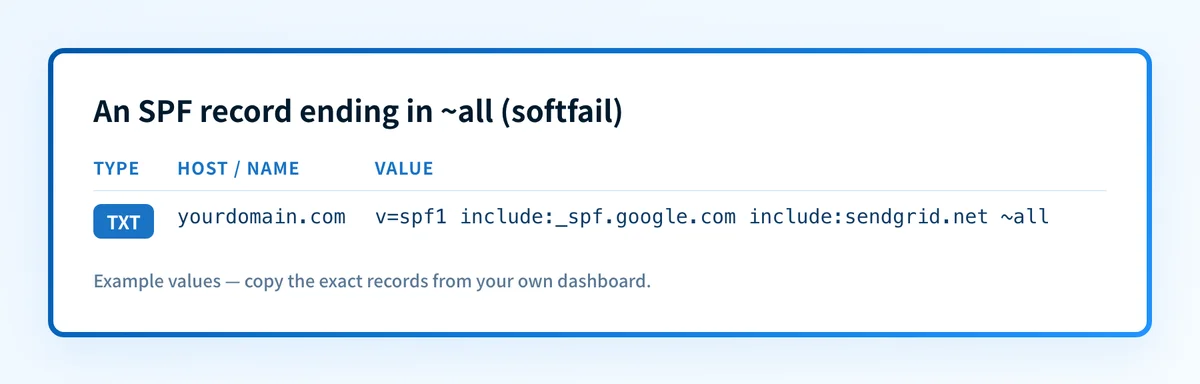
A duplicate record is a common permerror cause. A domain may publish only one SPF TXT record. When two exist, often one left behind by a previous provider, the result is a permerror for all of the domain's mail. Merge everything into a single v=spf1 record.
The DKIM selector record or signing path is wrong
DKIM signatures name the signing domain with d= and selector with s=. The receiver looks up the selector-specific public key. A lookup for a guessed selector, or for the visible From domain instead of the signed domain, does not test the failed signature.
A missing public key, an active private key that does not match the published key, or a body change after signing can cause DKIM failure. If the receiver reports a body-hash mismatch, the responsible post-signing hop is an inference until raw message copies or controlled tests isolate it.
Passing identifiers do not align with the visible From domain
A third-party sender can pass SPF for its own return-path domain and DKIM for its own signing domain. DMARC still fails when neither passing identifier aligns with header.from.
The repair is normally an aligned custom MAIL FROM domain, an aligned DKIM signing domain, or a sender configuration change. The email authentication checker guide describes why DNS, vendor status, message headers, and DMARC reports are separate evidence layers.
The message passed authentication but hit a separate receiver policy
A 5.7.x SMTP response can concern authentication, but it can also concern recipient policy, TLS, content, reputation, volume, or a local administrator rule. Preserve the complete response.
Unless the provider's response explicitly identifies authentication as the cause, concluding that authentication caused the rejection is an inference. Changing SPF, DKIM, or DMARC does not repair an invalid recipient, prohibited attachment, reputation decision, or private inbound rule.
How do I diagnose the failure?
1. Preserve the exact failed transaction
Save the raw source or complete SMTP response for one failed message. Record the evidence packet fields before making DNS changes.
Keep an access-controlled original for byte-level work. Redact recipient addresses, message content, tokens, and customer data before sharing evidence. A manually sent message from another mailbox does not reproduce a failure from a billing platform, CRM, or transactional sender.
2. Identify the trusted result and each evaluated identity
Find the receiver-added Authentication-Results header. Record the method result beside the identity it evaluated.
SPF:    result and smtp.mailfrom or smtp.helo
DKIM:   result and header.d plus header.s
DMARC:  result, header.from, and aligned pass if present
SMTP:   complete response text and provider subcode
Do not treat a copied authentication header as trusted outside the trust boundary defined by RFC 8601. For a rejection without a delivered message, begin with the full SMTP response and the sender's transaction logs.
3. Check only the DNS name named by the evidence
For SPF, inspect the exact MAIL FROM or HELO domain. For DKIM, inspect the DNS name formed from the failed message's selector and signing domain.
selector1._domainkey.yourdomain.comThis is illustrative only. Use the s= and d= values from the failed message, not this example. For DMARC, inspect _dmarc..
Run the visible From domain through the Email Security Score after preserving the failed-message identities. Its public checks can identify a published DNS gap. They cannot prove the sender used the corresponding private key, that the live IP followed the SPF path, what a receiver saw at failure time, or why one receiver made a private delivery decision.
4. Assign the failure to the right owner
The DNS owner publishes the record. The sender-service owner enables signing or configures the custom return path. The gateway owner removes a confirmed post-signing modification. The application owner selects the authenticated From domain and sending route.
Document the owner beside each DNS name and sender setting. This avoids republishing a correct DKIM key while the production service continues to sign with a different selector.
5. Reproduce the same production path
Send a new message through the same application, stream, region, visible From domain, envelope sender, outbound gateway, and recipient path. Inspect trusted headers from the receiving mailbox.
Change one scoped setting at a time. A changed result after one controlled change is stronger evidence than several unrelated DNS edits.
How do I fix it?
Repair a DNS publication failure
When the failed result identifies a missing, malformed, or incorrect SPF, DKIM, or DMARC DNS record, obtain the exact value from the sender service or the approved DNS change record. Publish it at the exact owner name identified in the evidence packet.
For SPF, publish one SPF policy record for an identity and account for DNS lookup limits defined by RFC 7208. If lookup-limit maintenance is required, reduce or consolidate documented includes only after confirming the actual production senders. Do not add a second SPF TXT record.
Do not replace an account-generated DKIM selector, CNAME target, or token with an example value. The sending service generates the production value.
This repair changes DNS publication. It does not prove that the sender has started using the corrected record.
Repair a DKIM signing failure
When the record resolves but the message still reports DKIM failure, compare the active d= and s= values with the sender's verified configuration. Confirm the sender is using the expected signing domain and selector.
For a body-hash failure, trace the path after signing. Move signing after a confirmed body-changing gateway, or remove the confirmed transformation. Do not change the DMARC policy for a DKIM signature problem. That changes enforcement, not signature verification.
Repair an identifier alignment failure
When SPF or DKIM passes but DMARC fails, compare each passing identity with header.from. Configure an aligned custom return-path domain, an aligned DKIM signing domain, or the sender's supported authenticated-domain setting.
This repair changes identifier alignment. It does not guarantee inbox placement or override receiver-specific policy.
Escalate a separate SMTP policy failure
When the message authentication results pass or the provider response does not identify authentication, stop changing authentication records. Investigate the provider response, recipient policy, transport logs, content, TLS, or reputation evidence with the relevant owner.
Do not weaken p= as an incident workaround. A DMARC policy change changes requested enforcement and reporting behavior. It does not correct an unauthorised sending IP, invalid DKIM signature, or private receiver decision.
How do I validate the repair?
Repeat the exact production path that failed. Validation has four layers:
- DNS: query the authoritative DNS server and at least one public resolver for the corrected owner name.
- Vendor: confirm the sending service reports the expected domain, return path, or DKIM status.
- Message: inspect a newly delivered message's trusted
Authentication-Resultsfield. - DMARC: review aggregate reports after data accumulates for the same production sending source.

A green vendor status is not a delivered-message check. A public lookup is not proof of private-key use or future receiver treatment.
After the one-message diagnosis, an IT team or MSP may need a way to identify every production source that still fails authentication or alignment. Palisade's DMARC Agent remediation guidance uses DMARC aggregate-report findings to identify affected sending sources and create prioritized remediation tickets. It proposes the next policy step or security level for human review. It does not change DMARC policy automatically, reproduce a private receiver decision, or guarantee future delivery.
Check the public email-authentication configuration
Use the Email Security Score for the visible From domain after you have saved the failed-message evidence. Compare the public DNS findings with the exact SPF, DKIM, and DMARC identities from the production message.
A public DNS check cannot prove that the same sender path authenticated, repair a DKIM signature, monitor later production changes, or explain an individual receiver's private decision. If the repair exposes an ongoing source-ownership or multi-domain monitoring gap, Start with Palisade to review DMARC aggregate-report evidence and the proposed remediation work with a human-controlled policy change.
Evidence
Sources and further reading
Questions readers ask
Frequently asked questions
Can SPF and DKIM pass while DMARC fails?
Yes. SPF and DKIM can pass for domains that differ from the visible From domain. DMARC fails when neither passing identifier aligns with the From: domain under the DMARC alignment rule.
Should I check the visible From domain or the SPF envelope domain?
Yes, check both when SPF is involved. The visible From domain is the DMARC identity, while SPF evaluates the smtp.mailfrom or HELO identity recorded in the trusted receiver result.
Does a passing DKIM DNS lookup prove DKIM is working?
No. It proves that a public record is visible for the queried selector and domain. It does not prove the production sender used the matching private key, that the message survived unchanged after signing, or that the receiver accepted the signature.
Will changing DMARC to p=none fix an authentication failure?
No. Changing p= changes the domain's requested DMARC handling. It does not authorize an SPF sender, repair a DKIM signature, or create identifier alignment.
What should I do if the SMTP rejection does not mention SPF, DKIM, or DMARC?
Preserve the exact SMTP response and stop treating authentication as the proven cause. Investigate the provider-specific response, recipient policy, transport logs, TLS, content, or reputation evidence with the owner of that layer.

Written by
Samuel ChenardCEO & Co-Founder, Palisade
Samuel Chenard is the CEO and co-founder of Palisade, agentic DMARC software for IT teams and MSPs, from one domain to thousands.
More from Samuel →