Why is my BIMI SVG format causing logo issues?
 ChatGPT
 Claude
 Gemini
 Perplexity
 Grok
GrokIn brief
Why BIMI SVG format causes logo issues: check the public SVG Tiny PS asset, BIMI DNS record, certificate status, and delivered-message evidence.
BIMI SVG format causes logo issues when the public URL in the BIMI record does not return a BIMI-compatible SVG Tiny PS file, or when the asset is valid but another eligibility condition prevents a mailbox client from displaying it. Start with the exact public l= URL and the validator result. DNS edits alone do not repair an incompatible SVG export, an inaccessible hosted file, or a receiver's display decision.
At a glance
Quick takeaways
- BIMI DNS, the hosted SVG asset, certificate evidence, and mailbox display are separate checks.
- BIMI logo artwork must use the constrained SVG Tiny Portable/Secure profile, usually called SVG Tiny PS.
- A logo that opens locally can still fail when retrieved from the public URL in the BIMI record.
- A valid SVG and BIMI record establish public publication evidence, not a promise that every provider or client will show the logo.
- Check a fresh message from the affected production path after repairing the public asset.
- Preserve an evidence packet before replacing artwork, DNS values, or certificate references.
What does the failure mean?
A BIMI record tells receivers where to retrieve a brand logo. The BIMI Group's SVG conversion guidance requires a constrained SVG Tiny PS profile rather than an ordinary web SVG. If a checker reports an SVG-format issue, it is evidence that the published asset could not be accepted as BIMI artwork. It does not prove that the domain's DMARC authentication, certificate status, or a receiver's logo-display rules are correct.
Preserve the observed evidence exactly before changing the logo:
Sending domain: example.com
Published BIMI record name: default._bimi.example.com
Published logo URL: https://assets.example.com/brand/bimi-logo.svg
Hosted URL status: 200
Hosted response content type: <record the observed value>
Validator result: <copy the exact error text>
Production message evidence: <redacted Authentication-Results or provider status>
The relevant file is the response a recipient can retrieve from the HTTPS URL published in DNS. A local design preview, staging URL, or file attached to a ticket does not test that public response.
What usually causes it?
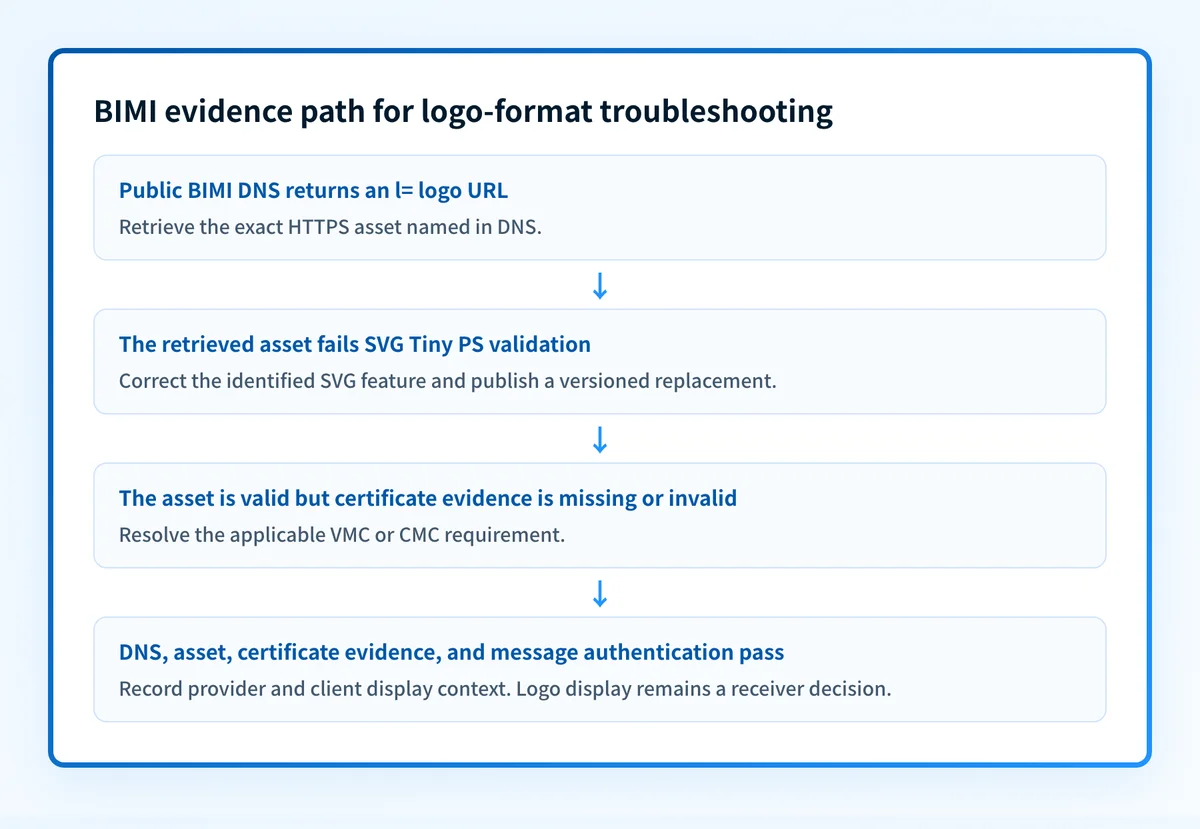
The published logo is ordinary SVG rather than SVG Tiny PS
Design applications can export SVG files with elements or metadata outside the BIMI profile. The artwork can render correctly in a browser while a BIMI validator rejects it. The BIMI SVG Tiny PS conversion requirements explain why a general SVG export is not enough for BIMI.
This is the most likely branch when the public URL returns the intended file and the validator identifies an SVG-format failure. The particular unsupported element remains an inference until the validator or direct file inspection identifies it.
The BIMI record points to the wrong public asset
The l= tag can contain an old URL, a test path, or a typo. DNS can therefore be valid as DNS while still identifying artwork that is not the approved logo.
Use the Palisade BIMI checker to inspect the BIMI record visible through public DNS. A public lookup can show the currently published record. It cannot prove what a receiver cached, whether the sending message qualifies for BIMI, or whether a logo will appear in a particular mailbox client.
The asset cannot be retrieved over HTTPS
The public URL can redirect to an error page, require access, return HTML instead of the SVG, or serve a different object than the uploaded file. The BIMI Group implementation guidance treats the logo asset itself as part of the BIMI implementation.
This is a hosting or deployment issue, not evidence that the source artwork is malformed. Retrieve and retain the downloaded response, its final URL after redirects, response headers, and file hash.
A required VMC or CMC is missing or invalid
Some mailbox-provider implementations require a verified mark certificate before displaying a BIMI logo. Google Workspace's BIMI documentation describes its certificate and authentication requirements for displaying brand indicators in Gmail. A valid SVG does not replace a certificate requirement where that provider applies one.
Treat certificate status as its own evidence branch. Record whether the published BIMI record includes an a= location, whether that location retrieves as expected, and the certificate status reported by the applicable provider or certificate issuer.
The production message does not meet authentication conditions
BIMI relies on email authentication conditions beyond the artwork file. RFC 9989 defines DMARC, including how aligned SPF or DKIM results support DMARC evaluation. A compatible SVG does not repair a production message that fails DMARC.
Inspect a delivered message from the exact application and route where the logo is expected. Do not substitute a test from another sending platform.
The provider or client did not display the logo
Mailbox providers and clients apply their own support, eligibility, caching, and presentation decisions. A valid BIMI record, accessible SVG, and passing message establish useful evidence, but they do not guarantee logo display in every provider or client. If the asset checks pass, the SVG is no longer the confirmed cause. Review the affected provider's documentation and preserve the delivered-message context.
How do I diagnose the failure?
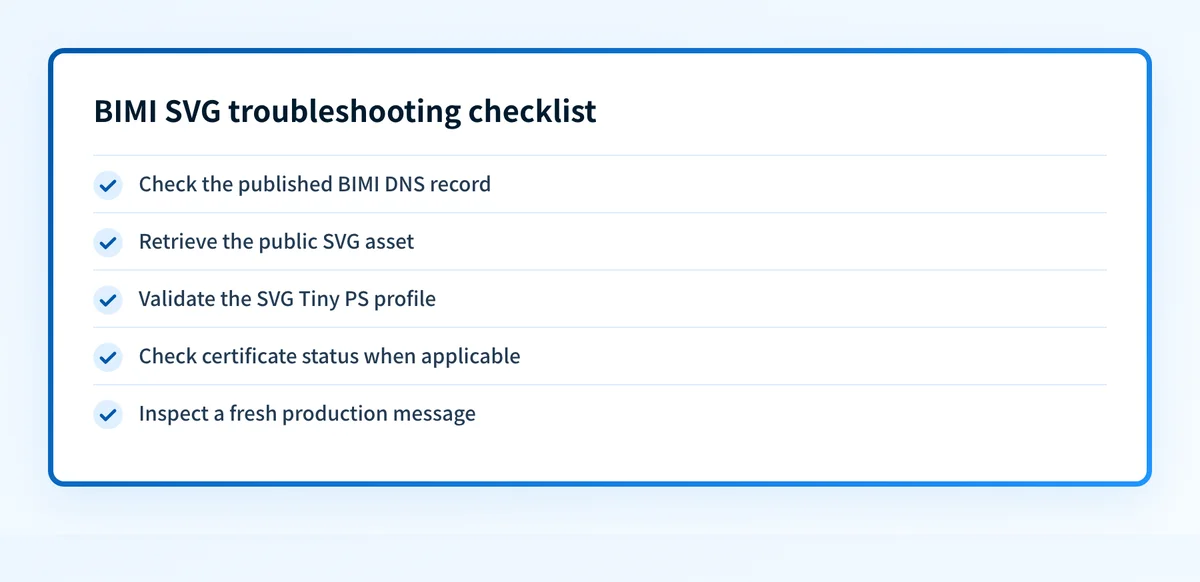
1. Preserve the public record and validator result
Save the claimed sending domain, full BIMI DNS owner name, complete TXT value, exact l= URL, validator result, timestamp, and resolver used. Do this before uploading a replacement file or changing DNS.
The email infrastructure learning center has related guidance on separating DNS publication from delivered-message authentication evidence. A new export can remove the evidence that distinguished an asset problem from a DNS or provider-display problem.
2. Query the published BIMI record
Query the exact BIMI owner name through the authoritative DNS service and at least one public resolver:
dig TXT default._bimi.yourdomain.comThis command is illustrative only. Use your organization's domain and published selector. If the authoritative response and public resolver differ, allow the DNS update to propagate before attributing the issue to the SVG.
Record the result as a redacted DNS-to-SVG evidence fragment:
Domain: example.com
DNS owner: default._bimi.example.com
TXT value: v=BIMI1; l=https://assets.example.com/brand/bimi-logo.svg; a=https://assets.example.com/brand/example-vmc.pem
SVG asset: https://assets.example.com/brand/bimi-logo.svg
Asset SHA-256: <redacted recorded hash>
Asset version: 2026-08-12-v2
SVG validation: <copy the exact validator result>
This is an illustrative structure only. Do not publish another organization's logo URL, certificate URL, hash, or DNS value.
3. Retrieve the exact SVG asset
Request the l= URL outside the design or hosting environment. Confirm the final response returns the intended SVG file rather than a login page, object-store error, HTML document, or unexpected redirect.
Compare the downloaded file's hash and version with the approved export. If they differ, repair the deployment first. Re-exporting artwork does not fix a CDN, object permission, or URL-mapping problem.
4. Inspect the file against SVG Tiny PS requirements
Compare the retrieved file with the BIMI Group SVG Tiny PS requirements. Ask the artwork owner to identify the exact feature cited by the validator and remove or replace only that feature in the editable source.
Keep the original artwork and upload the corrected export at a new approved HTTPS URL. This keeps the prior asset available for rollback while public retrieval and validation are retested.
Do not overwrite the only known working logo asset during a broad send. Keep the prior URL and DNS value available until the replacement has passed the same public checks.
5. Record the BIMI evidence packet
Collect these fields in the incident record so DNS, file, certificate, and display evidence do not get mixed together:
- Claimed sending domain.
- BIMI DNS owner name and complete published value.
- SVG asset URL, downloaded file hash, and version or deployment identifier.
- SVG Tiny PS profile result or the exact validator result.
- VMC or CMC status, when applicable, including the published
a=location. - Observed mailbox provider and client context.
- Timestamp of the observation and planned retest date.
- A redacted copy of the delivered message's relevant authentication results.
6. Check a fresh production message
Send a new message through the same application, sender identity, outbound route, recipient provider, and mailbox client where the logo is expected. Preserve the full raw message in an access-controlled record.
RFC 8601 defines the Authentication-Results header field. Record the receiver-added DMARC, SPF, and DKIM outcomes, including aligned identifiers when provided. A green status in a sending platform is useful evidence, but it is not a delivered-message check.
How do I fix it?
Replace an invalid SVG structure
When the validator identifies an unsupported SVG feature, correct that feature in the editable artwork and export a BIMI-compatible SVG Tiny PS file. The free Palisade BIMI SVG converter converts an SVG to the Tiny Portable/Secure profile (square canvas, correct profile, valid title, no scripts) in the browser. It flags live l= value if the URL changed.
This repair changes the logo asset. It does not change DMARC enforcement or prove mailbox display.
Repair an inaccessible asset or HTTPS response
When the public URL returns a redirect loop, access-denied response, HTML error page, or an unintended object, correct the hosting path, object permissions, HTTPS configuration, or deployment mapping. Retest the final URL from outside the hosting account before editing DNS.
Do not change the BIMI record to hide a hosting failure. The record should name the asset that independent recipients can retrieve.
Correct missing or invalid certificate evidence
When the affected provider requires a VMC or CMC and its documented status indicates a missing or invalid certificate, resolve the certificate issue with the applicable issuer and publish the correct a= reference where required. Follow the provider's current documentation for its certificate and authentication conditions.
This repair affects certificate evidence. It does not alter the SVG structure or guarantee client display.
Document provider or client display variation
When DNS, SVG retrieval, certificate status, and the production message all pass, record the mailbox provider, client, observation time, and any provider diagnostics. Treat a missing display as provider or client variation unless evidence identifies another cause.
Do not loosen the DMARC policy as a response. Changing p= changes requested enforcement. It does not repair SVG compatibility, public hosting, certificate validity, or a receiver's display choice.
How do I validate the repair?
To validate the repair, repeat the original failure path with a fresh message. Check four independent layers:
- DNS: Confirm the authoritative DNS service and a public resolver return the intended BIMI owner name and
l=value. - Vendor or certificate: Confirm the relevant sending platform or certificate process reports the expected current status, where applicable.
- Message: Inspect a newly delivered message from the same production path and record trusted receiver-added authentication results.
- DMARC: Review aggregate-report data after it accumulates to confirm the source continues to authenticate and align as expected.
Check the published BIMI record before replacing the asset
If the failure evidence still points to the public record or l= location, inspect the currently published BIMI record before making another artwork change.
A public BIMI lookup can inspect the record visible in DNS. It cannot validate a private sending path, repair the hosted SVG, confirm a receiver's certificate decision, or guarantee logo display.
For teams that need to track which sending sources continue to pass DMARC after the asset issue is resolved, Palisade is DMARC software that analyzes aggregate-report data, identifies authentication or alignment issues, and proposes the next policy step for human review. It does not control a mailbox provider's private logo-display decision.
Evidence
Sources and further reading
Questions readers ask
Frequently asked questions
Does a valid SVG Tiny PS file guarantee that my BIMI logo will display?
No. A valid public SVG asset establishes file-format evidence. A provider or client can still apply separate authentication, certificate, eligibility, caching, and presentation conditions.
Can I use any SVG export for BIMI?
No. BIMI requires SVG Tiny PS rather than a general-purpose SVG export. Validate the file retrieved from the public l= URL, not only the local artwork file.
Does changing DMARC to p=none fix a BIMI SVG problem?
No. Changing p= changes the DMARC policy's requested enforcement. It does not repair SVG structure, the hosted response, a VMC or CMC issue, or a mailbox provider's display decision.
Should I replace the SVG before checking the published URL?
No. First preserve the BIMI record, the exact public URL response, and the validator result. If the public URL returns the wrong object or an access error, replacing the local export will not solve the hosting issue.
Can a BIMI DNS checker prove that Gmail will show my logo?
No. A public checker can show the BIMI record visible through DNS. It cannot prove Gmail's private eligibility decision, a particular client's display behavior, or future logo presentation.
What evidence should I keep after a BIMI retest?
Keep the domain, BIMI DNS owner and value, SVG URL, downloaded hash and version, SVG validation result, certificate status when applicable, mailbox and client context, timestamp, retest date, and redacted delivered-message authentication results.

Written by
Johanie DupontBrand & Ecommerce Email
Johanie Dupont works on brand and ecommerce email at Palisade: BIMI and verified marks, sender requirements, and getting marketing mail into the inbox.
More from Johanie →