Email reverse DNS lookup: check and interpret a PTR record
 ChatGPT
 Claude
 Gemini
 Perplexity
 Grok
GrokIn brief
Email reverse DNS lookup: check an SMTP sending IP's PTR record, confirm forward DNS, interpret results, and retest the mail path for reliable mail.
An email reverse DNS lookup checks whether a sending IP address has a PTR record that maps it to a hostname. Start with the actual SMTP sending IP, inspect its PTR result, then resolve that hostname forward to confirm it includes the same IP. A PTR result is useful sender-infrastructure evidence, but it does not prove message authentication, mailbox-provider acceptance, or inbox placement.
At a glance
Quick takeaways
- Reverse DNS maps an IP address to a hostname through a PTR record.
- The Palisade IP Reputation Checker accepts an IPv4 or IPv6 address and displays its reverse DNS result.
- A hostname returned by a PTR lookup is not forward-confirmed reverse DNS until its A or AAAA records resolve back to the original IP.
- Google requires valid forward and reverse DNS records for sending domains or IPs, with the sending IP matching the PTR hostname's IP.
- A missing PTR result in the checker can also mean the lookup timed out, so confirm it with an independent DNS query.
- Reverse DNS is one infrastructure check. It does not replace SPF, DKIM, DMARC, blocklist, or delivered-message evidence.
What this tool checks
The Palisade IP Reputation Checker takes an IP address, runs a reverse lookup, and shows the result in its IP information card under Reverse DNS (PTR). When a PTR hostname is available, the tool lists it. When it has no returned hostname, the row reads: “No PTR record found. Mailbox providers expect sending IPs to have reverse DNS.”
A PTR record is a DNS record that points to a location elsewhere in the DNS namespace, as defined in RFC 1035's PTR record specification. For IPv4, reverse lookups use the special in-addr.arpa namespace with the address octets reversed.
The result is a public lookup of the IP address. It cannot prove that the IP is the one your production application used, that the SMTP server's HELO or EHLO name matches the PTR hostname, that a hostname resolves back to the IP, or that a recipient accepted a particular message. For those questions, use a delivered message's headers and the sending platform's configuration. Email transport security depends on several controls, not reverse DNS alone.
How to run the check
1. Identify the actual SMTP sending IP
Get the source IP from the sending service, mail gateway, or a delivered test message. Do not use the visible From-domain address as a substitute. A domain can send through several outbound IPs, and each IP can have a separate PTR record.
If you have a received message, analyze its email headers to identify the relevant relay path before testing an address.
2. Submit the IP address to the checker
Open the IP Reputation Checker, enter the IPv4 or IPv6 address, and inspect the Reverse DNS (PTR) row in IP information.
The checker rejects text that is not a valid IP address. Verify that you copied the numerical source address rather than a hostname, URL, domain, or an address with a port number attached.
3. Repeat the public lookup independently
Use a DNS query against the same IP address. This checks the PTR answer independently and gives you a repeatable record of the test.
dig +short -x 203.0.113.25Use an IP you control when investigating production mail. 203.0.113.25 is an illustrative documentation address, not a sending server to configure or publish.
How to interpret the results
A PTR hostname is displayed
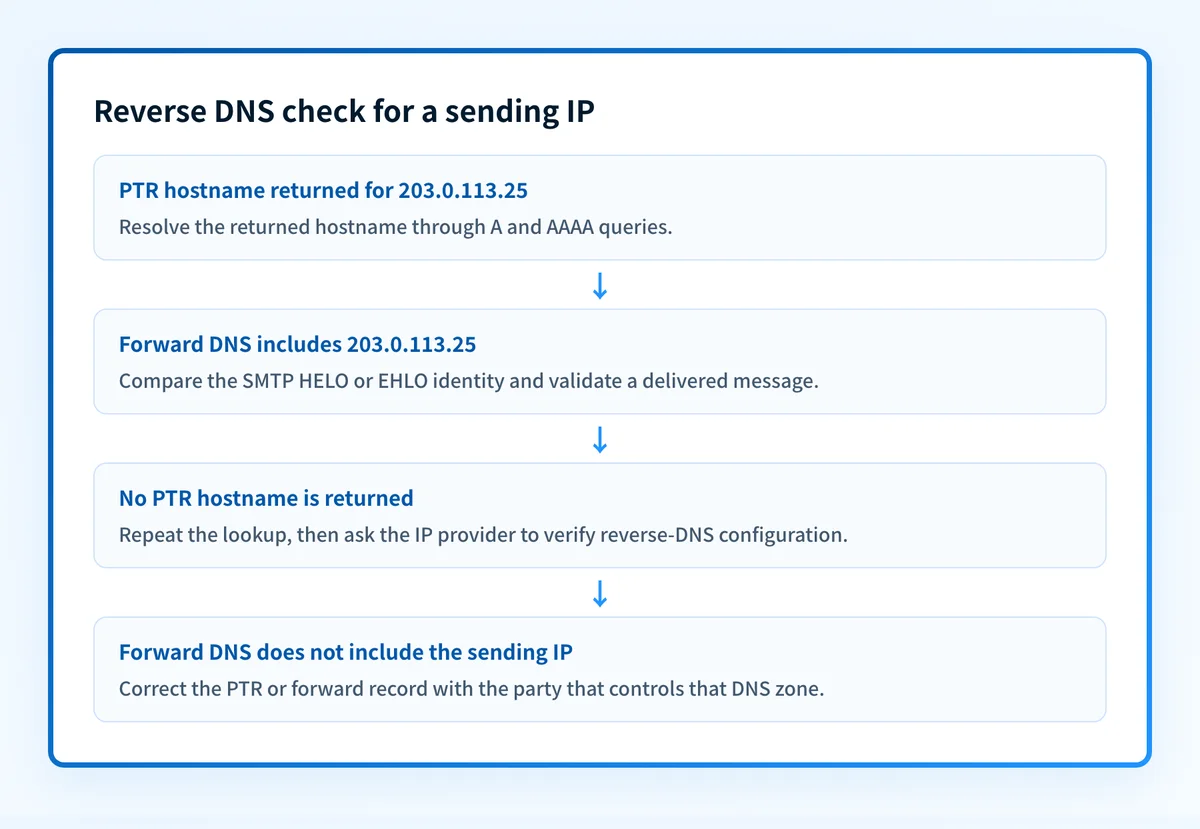
A displayed hostname means the reverse lookup returned one or more PTR names for the submitted IP. Treat this as the first part of the check, not the final result.
RFC 8601 calls the full forward-confirmed check iprev. The receiver first performs a PTR query for the client IP, then resolves the returned names through A and AAAA queries. The check passes only when the original IP appears in those forward answers. RFC 8601 defines the iprev method and its pass condition.
Query the returned hostname directly:
dig +short A mail.yourdomain.com
dig +short AAAA mail.yourdomain.com
Replace mail.yourdomain.com with the hostname returned for your sending IP. If neither answer includes the original sending IP, the PTR result alone does not meet the RFC 8601 forward-confirmation condition.
Google's email sender guidelines state that sending domains or IPs need valid forward and reverse DNS records, and that the sending IP must match the IP address of the hostname specified in the PTR record. Microsoft likewise says the source email server should have a reverse DNS entry and that the HELO or EHLO command should match the sending IP's reverse DNS, in its outbound mail best-practices guidance.
“No PTR record found” is displayed
This state means the tool did not receive a PTR hostname for the lookup. It can indicate that no PTR data is published, but it can also occur when the reverse query does not complete in time. Retest with the same IP and run dig +short -x before concluding that the PTR record is absent.
If both checks return no hostname, the owner of the IP address must normally publish or correct the PTR record. That is often the cloud provider, hosting provider, ISP, or email service that controls the IP allocation. Do not add a PTR record to your domain's normal DNS zone unless that provider specifically delegates control. PTR records for sending IP ranges are usually managed at the network provider level.
RFC 8601 defines permerror for iprev when no PTR data is published. A timeout or temporary resolver problem is different from an absent record, which is why a single null result needs confirmation.
The checker rejects the input
The IP Reputation Checker returns an invalid-input error when the value is not IPv4 or IPv6. Recheck the value against the message relay information or the sending platform's outbound-IP list.
A hostname such as smtp.yourdomain.com is not valid input for this check. Use its resolved IP address instead. For forward DNS records such as A, AAAA, MX, TXT, and CNAME, use the Palisade DNS Lookup tool. That tool checks forward record types, not PTR records.
How to act on the result
For a PTR hostname that resolves back to the sending IP, compare the SMTP server's HELO or EHLO name with that hostname. Microsoft documents that these names should match. Then send a test message through the same application and relay path, and inspect the received headers for the actual source path and authentication outcomes.
For an absent PTR result confirmed by repeated DNS queries, identify who owns the outbound IP. Open that provider's current reverse-DNS documentation or support process, then request or configure the PTR hostname there. Keep the forward A or AAAA record under your DNS control aligned with the chosen hostname. Changing an unrelated web-domain record will not repair reverse DNS for the mail server.
Do not change a PTR hostname before checking every service that sends through the IP. A shared relay, gateway, or provider-managed address may have provider-specific naming requirements.
For a PTR hostname that does not resolve back to the IP, correct the forward A or AAAA record, the provider-managed PTR record, or both according to the party that controls each DNS zone. Retest after DNS propagation, then validate a fresh message. A public reverse-DNS lookup cannot explain why one recipient rejected a message or establish that future mail will reach the inbox.
If the IP also appears on a blocklist, keep that as a separate diagnosis. A working PTR does not delist an address. Use the email blocklist guide to separate reputation evidence from DNS identity evidence, then check whether the domain itself is listed.
How to retest
Run the same IP through the Palisade IP Reputation Checker after the authoritative PTR answer changes. Repeat the dig +short -x query and resolve every returned PTR hostname through A and AAAA queries. Record the IP, hostname, answers, and test time together.
Then send a new message through the exact production sending path. Confirm the message used the expected outbound IP, review its HELO or EHLO identity where available, and inspect its authentication results. Once sufficient mail has flowed, review DMARC aggregate-report data to see which sources authenticate and align. Reverse DNS supports sender infrastructure, but DMARC reports reveal a different layer of evidence.
Track reverse-DNS gaps across active sending sources
A successful lookup for one IP does not show whether another production sender has a missing PTR record, an alignment issue, or a new source that appeared later. Palisade is agentic DMARC software that analyzes DMARC aggregate-report data, identifies sending sources and authentication or alignment issues, and creates prioritized remediation tickets. It proposes the next policy step for human review. It does not change a PTR record, control a receiver's private decision, or guarantee delivery.
Evidence
Sources and further reading
Questions readers ask
Frequently asked questions
What is an email reverse DNS lookup?
An email reverse DNS lookup queries a sending IP address for its PTR record. The PTR result identifies the hostname associated with that IP, if one is published. For a complete iprev check, resolve that returned hostname forward and confirm it includes the original IP.
Does a PTR record prove that email will be delivered?
No, a PTR record does not prove delivery, because it only describes the sending IP's infrastructure. It says nothing about SPF, DKIM, or DMARC results, the receiver's view of your reputation, or where the message lands. A missing PTR can cause rejections, but a present one is only the first hurdle cleared.
Can I create a PTR record in my normal domain DNS zone?
You cannot, unless the IP provider has delegated the reverse-DNS zone to you. PTR records live in the reverse zone for the IP range, which the provider that owns the range normally controls, so adding one to your forward domain zone does nothing. Request the change through that provider's documented process instead.
Why does reverse DNS show a hostname that does not match my From domain?
A reverse DNS hostname identifies the sending server or IP, while the From domain identifies the visible message author. They can differ. The important checks are whether the PTR hostname resolves back to the sending IP and whether the SMTP HELO or EHLO identity follows the sending provider's requirements.
What does “No PTR record found” mean?
"No PTR record found" means the reverse lookup came back with no hostname for that IP. Either the IP has no published PTR record, or the lookup itself failed or timed out. Repeat the check and confirm it with a direct dig -x query before you ask the IP provider for a repair.

Written by
Dominic LandryDeliverability & DNS
Dominic Landry works on email deliverability and DNS configuration at Palisade, from SPF and DKIM records through to DMARC enforcement.
More from Dominic →