What is an email blocklist and how do you check one?
 ChatGPT
 Claude
 Gemini
 Perplexity
 Grok
GrokIn brief
A blocklist flags an IP a DNS-based list has linked to spam. Learn how blocklisting works and how to check if your mail server is blocklisted.
Blocklisting means a DNS-based blacklist, often called a DNSBL or RBL, has flagged a sending IP address as associated with spam or abuse. Mail systems can consult that list before accepting a message, so a listed IP risks rejection, quarantine, or spam-folder placement. Blocklisting is separate from an SPF, DKIM, or DMARC failure because those checks read different DNS records. A blacklist lookup tool can tell you whether a mail server's IP address currently appears on one of these lists.
At a glance
Quick takeaways
- A blocklist, also called a DNSBL or RBL, is a list an outside operator maintains that flags IP addresses associated with spam or abuse. Mail systems can check it before accepting a message.
- Lookup tools such as MXToolbox check a domain's mail server IP addresses against a set of DNS-based blacklists, 105 lists in MXToolbox's own published count, in one pass.
- Blocklisting is a reputation check on an IP address. It is not the same as an SPF, DKIM, or DMARC failure, which involve separate DNS records that DNSChecker describes as commonly holding authentication configuration.
- Some lookup tools bundle a blacklist check with a reverse-DNS verification and a basic open-relay test in the same diagnostic pass.
- Each blocklist operator sets its own listing criteria and delisting process. A lookup tool reports whether an IP is listed, not why, and not how to get it removed.
- Blocking a sender inside your own inbox in Gmail or Outlook is a mail-client feature. It is a different action from your domain or IP being blocklisted by an outside operator.
How a blocklist check works
A DNS-based blacklist is maintained by an operator outside your organization, not by your mail server or your domain's DNS zone. MXToolbox's own description of its MX Lookup tool states that it checks each mail server IP address resolved from a domain's MX record against a set of these lists, which it refers to as "commonly called RBLs, DNSBLs." As of this writing, MXToolbox states it checks each IP against 105 such lists in one pass. That figure is a vendor-reported count and can change over time.
A blocklist check answers one narrow question: does at least one operator currently associate this IP address with spam or abuse. It does not test your domain's authentication setup. DNSChecker describes the TXT DNS record type as commonly used for SPF, DKIM, or DMARC configuration, which are separate mechanisms that validate whether a message is authorized to use your domain, not whether the sending IP has a poor reputation. A domain can pass DMARC and still send from an IP that a blocklist has flagged, and a domain can fail DMARC from an IP with a clean reputation. For the wider set of factors that affect inbox placement, see what affects email deliverability.
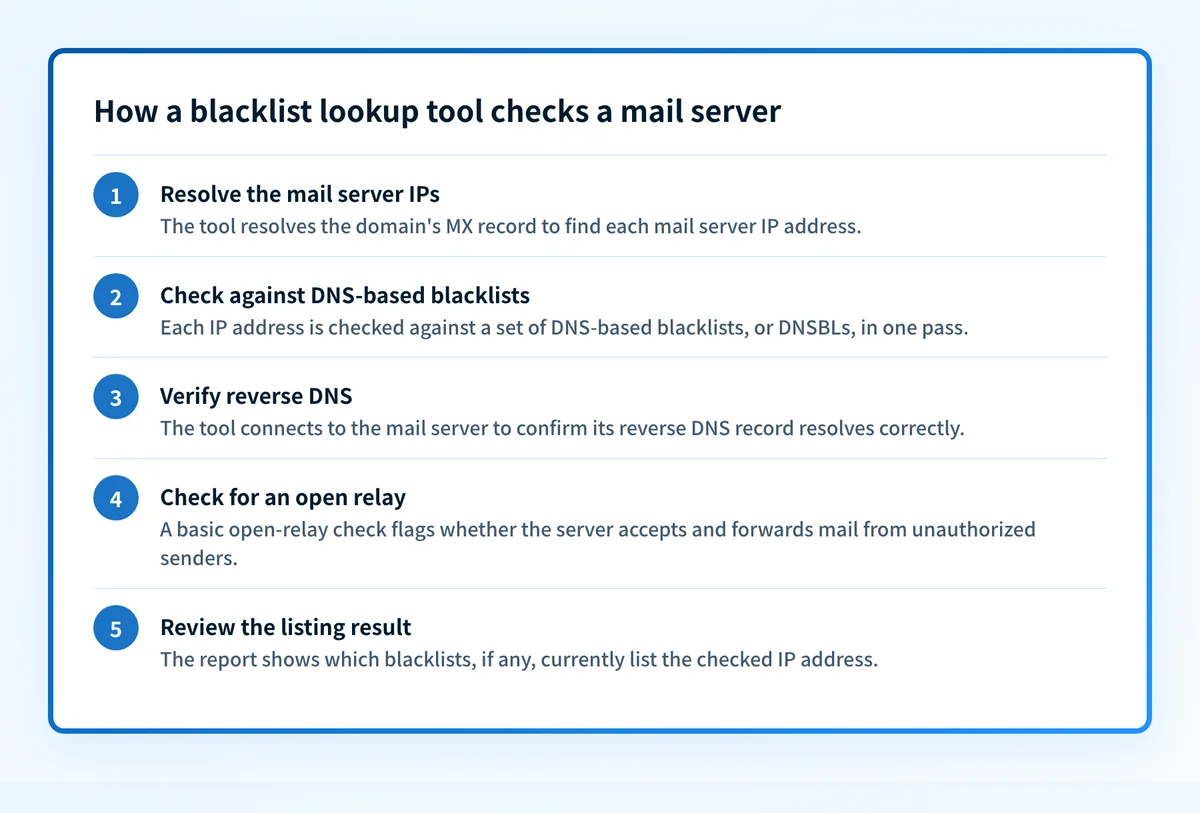
MXToolbox's Diagnostics feature, reached from the MX Lookup results, extends the check beyond the blacklist lookup itself. It connects to the mail server, verifies its reverse DNS record, runs a basic open-relay check, and measures response-time performance. Reverse DNS and open-relay status both feed into a mail server's reputation, even though the blacklist databases evaluate them separately from the lookup.
When this does not apply
Whether an IP or domain is currently blocklisted depends on which list you check, when you check it, and which mail server actually sent the message.
A domain can send from several IP addresses. A marketing platform, a transactional email service, and an internal mail server can all send mail using the same domain. This article's lookup flow is IP-specific: check every outbound sending IP tied to the affected path instead of treating one result as evidence for every source. A listing on one of those IPs does not by itself establish the status of the others.
A listing status also changes between checks. A DNS-based blacklist result reflects the operator's records at the moment the query runs. DNSChecker notes that complete DNS resolution across its checked server network can take up to 48 hours, a propagation window that applies to DNS record changes in general, not to how quickly a blocklist operator adds or removes a listing. Treat any single lookup as a point-in-time result.
Blocklisting is also not the only reason a message gets stopped. A message can get blocked because the sending domain is not authenticated at all, which Gmail treats differently from a reputation-based blacklist listing. A message can also land in the spam folder without being blocked outright, which has a separate set of causes in Outlook. Confirm which of these you are looking at before you chase a blocklist that may not be the actual cause.
The phrase "blocklist email" also covers a second, unrelated question: how to block unwanted senders inside your own inbox. That is a mail-client feature in Gmail, Outlook, and similar apps, controlled from your own account settings, not a DNS-based list an outside operator maintains. The rest of this article covers the DNSBL sense; the FAQ below addresses the inbox-blocking sense separately.
A worked example
A blacklist lookup tool typically reports a result shaped like this for a checked domain:
Domain checked: yourdomain.com (illustrative only)
Mail server IPs found: 203.0.113.10, 203.0.113.11
Blacklists checked: 105 (vendor-published count, checked 2026-08-11)
Currently listed on: 0 of 105
Reverse DNS: resolves correctly
Open relay: not detected
Reading that result: "Blacklists checked" reflects the tool's own list count at the time of the query. "Currently listed on" shows how many of those lists flagged the IP right now. The reverse-DNS and open-relay lines come from the same diagnostic pass in tools that bundle them, such as MXToolbox's Diagnostics feature. A result of zero listings reports the state of that query at that moment. It does not certify the IP will stay clean afterward.
What to check next
Start with the specific evidence you already have.
If a bounce message or a rejection reason names a blacklist or a reputation problem, look up the exact IP address the bounce identifies, not just the domain's primary sending IP. If you have no bounce message and want a general reputation check before something breaks, look up the mail server IP directly rather than waiting for a complaint.
Check your sending IP's reputation, then find what else is sending
A single reputation lookup answers one question about one IP address at one moment. Run the mail server IP tied to the bounce or complaint through Palisade's checker to see whether it currently appears on reputation databases.
To ask the narrower question, whether a specific domain or IP is currently listed on the major blocklists, use Palisade's blocklist checker instead.
That check does not tell you whether another server, sending on your domain's behalf without your knowledge, is the one causing the problem. Palisade's agent investigates sources observed in aggregate DMARC reports, drafts fixes, and proposes each policy step. You approve before anything ships. When a DNS change is approved, Smart DNS Deployment can write the record into your own zone at your own provider.
Palisade's one-time blocklist and reputation checks can inspect current public evidence, but Palisade cannot change a blocklist operator's listing or delisting decision. Its DMARC workflow helps identify the sending source that needs investigation. It does not control a receiver's private reputation system or guarantee delivery.
Evidence
Sources and further reading
Questions readers ask
Frequently asked questions
How do I find my blocked email list?
Only a current blacklist lookup can show whether a public list flags your mail server IP addresses. MXToolbox's MX Lookup resolves a domain's MX record, then checks each resulting IP address against its set of DNS-based blacklists in one pass, so you see which lists, if any, currently flag that IP.
How can I see if my email is blacklisted?
Only a current DNSBL or blacklist check can answer this reliably. A tool such as MXToolbox's MX Lookup and Diagnostics resolves your domain's mail server IP addresses, checks each one against its blacklist set, and in the same pass verifies reverse DNS and checks for an open relay, two other signals tied to mail server reputation.
How do I block a list of emails?
Not through a DNSBL: this is a different action from your domain being blocklisted. Blocking or muting multiple senders happens inside your own mail client, such as Gmail or Outlook, using that provider's own sender-blocking or filter settings. The exact menu path depends on the client and changes over time, so check that provider's current help documentation for the steps.
How do I permanently block an email sender?
Only an inbox-side block-sender or filter setting can block that sender for your account; DNSBL blocklisting is a different system. Since interfaces change, confirm the current steps in your mail client's own help center rather than relying on a fixed set of clicks.
Is being blocklisted the same as blocking a sender in my inbox?
No. Being blocklisted means an outside DNSBL operator has flagged your sending IP address as associated with spam or abuse, and mail systems can act on that listing before accepting your mail. Blocking a sender in your inbox is a setting you control in your own mail client that filters messages from a specific address for you alone. The two features do not affect each other.

Written by
Dominic LandryDeliverability & DNS
Dominic Landry works on email deliverability and DNS configuration at Palisade, from SPF and DKIM records through to DMARC enforcement.
More from Dominic →