DKIM vs SPF: The Difference and Why It Matters
 ChatGPT
 Claude
 Gemini
 Perplexity
 Grok
GrokIn brief
SPF checks whether the sending server is authorized; DKIM signs the message so tampering shows. Here is how they differ and why you need both.
At a glance
Quick Takeaways
- SPF validates the sending server’s IP (Return-Path), while DKIM validates the message content with a cryptographic signature.
- SPF can fail on forwarded emails; DKIM survives most forwarding unless the content changes.
- Neither one checks the address the recipient actually sees, DMARC ties SPF and DKIM to the visible From address.
- Gmail, Yahoo, and Microsoft now require SPF, DKIM, and DMARC for bulk senders (5,000+ messages a day), with Gmail rejecting non-compliant mail since November 2025.
- Use Palisade’s free tools to check SPF, DKIM, DMARC, and BIMI status instantly.
What is SPF?
SPF (Sender Policy Framework) is a path-based authentication method that checks whether the sending server’s IP address is authorized to use the domain in the Return-Path (envelope-from) header. Domain owners publish an SPF record as a DNS TXT record listing every server and service permitted to send on their behalf, and receiving servers verify the connecting IP against that list.
The check is about where the mail came from, not what it contains. If the IP is on the list, SPF passes; if it is not, SPF fails. That makes SPF simple to reason about, but it also means SPF says nothing about whether the message was altered in transit.
What is DKIM?
DKIM (DomainKeys Identified Mail) signs outgoing messages with a private key held by the sending service. The signature (a hash of selected headers and the body) is added to a DKIM-Signature header. The receiver fetches the matching public key from the sender’s DNS (published under a selector) and recomputes the hash. If it matches, two things are proven: the message came from a domain that holds the key, and the signed parts were not modified after signing.
Where SPF authenticates the path, DKIM authenticates the content. That single difference explains almost everything about how the two behave in the real world.
SPF vs DKIM at a glance
| SPF | DKIM | |
|---|---|---|
| What it checks | Sending server’s IP | Message signature |
| Where it lives | Return-Path (envelope) | DKIM-Signature header |
| Survives forwarding? | Often fails | Usually survives |
| Detects tampering? | No | Yes |
| Breaks when… | Mail is relayed by an unlisted server | Body or signed headers are changed |
Why use both SPF and DKIM?
SPF and DKIM protect different parts of an email, so running one without the other leaves an obvious hole. SPF stops unauthorized servers from using your domain in the envelope but ignores the message body. DKIM proves the content is intact but says nothing about which server sent it. Together they give a receiver two independent reasons to trust a message, and, just as important, two independent signals that DMARC can align to the visible From address.
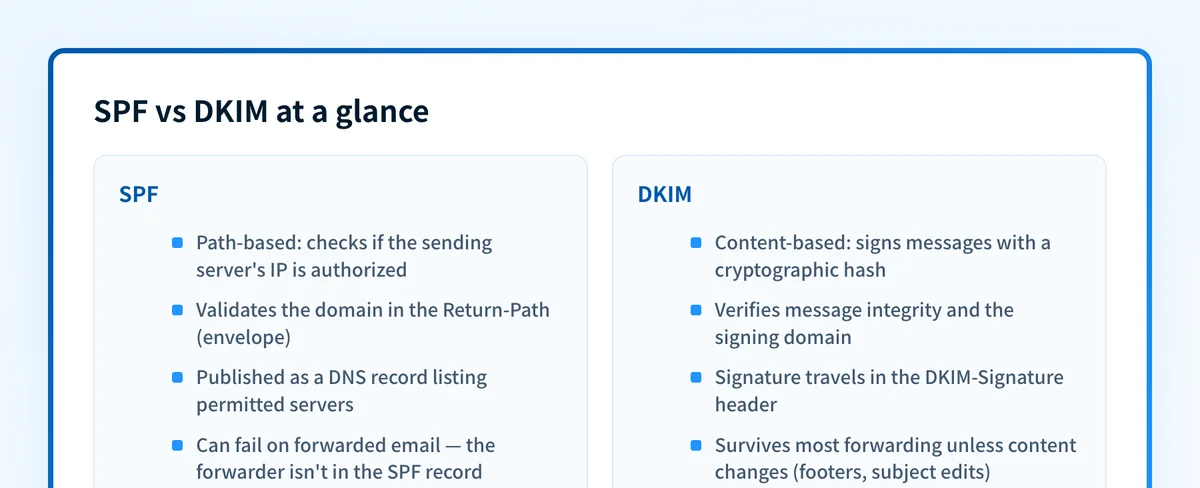 SPF validates the path; DKIM validates the content: together they provide layered defense against spoofing.
What is the forwarding problem with SPF?
When an email is forwarded, the original Return-Path usually stays the same, but the forwarding server isn’t listed in the sender’s SPF record. The receiving server checks the forwarder’s IP, finds it is not authorized, and SPF fails. Even though the message is legitimate. This is why SPF alone is fragile for mail that travels through mailing lists, aliases, or corporate relays.
How does DKIM handle forwarding?
Because DKIM validates the message content rather than the connecting IP, the signature stays valid through most forwarders as long as the signed content isn’t altered. That resilience is exactly why DMARC treats a passing DKIM signature as enough on its own. The catch: mailing-list footers, subject-line tags, or content rewriting break the hash, and once broken, DKIM fails too. When both SPF and DKIM break on forwarded mail, DMARC is what decides whether it still gets delivered.
What role does DMARC play?
DMARC (Domain-based Message Authentication, Reporting & Conformance) is the layer that makes SPF and DKIM meaningful to the recipient. On their own, SPF checks the envelope and DKIM checks the signing domain, but a spoofer can pass both while showing a forged address in the visible From field. DMARC closes that gap by requiring alignment: the domain the recipient sees must match the domain SPF or DKIM authenticated. It also lets domain owners set a policy (none, quarantine, or reject) and receive aggregate reports showing exactly who is sending under their name.
How to implement SPF and DKIM step-by-step
- Publish a strict SPF record that lists every legitimate sender, and verify it resolves.
- Configure DKIM signing on your outbound mail server and each third-party sending service.
- Add a DMARC record in
p=nonemode and monitor the reports. - Adjust SPF and DKIM based on the unaligned senders the reports reveal.
- Gradually tighten the DMARC policy to
quarantineand thenrejectonce the data confirms it is safe.
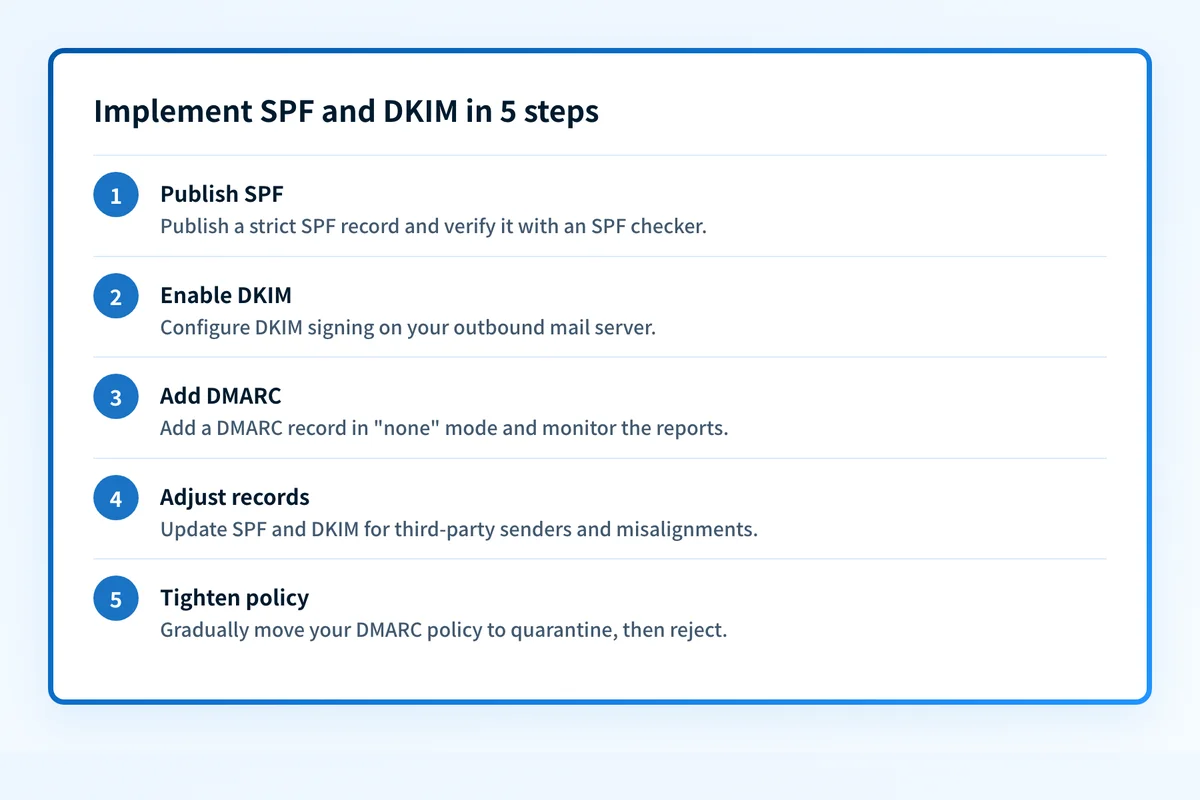 Start DMARC in none mode, monitor reports, then tighten to quarantine and reject.
Not sure where you stand today? The free Email Security Score checks SPF, DKIM, DMARC, and BIMI in one scan and tells you which record is missing or misconfigured.
Questions readers ask
Frequently asked questions
Should I always implement both SPF and DKIM?
Yes. Gmail, Yahoo, and Microsoft require both to be configured for bulk senders, and together they close gaps that either one leaves open. DMARC only needs one of them to align and pass, but publishing both gives forwarded and relayed mail a second chance to authenticate.
Can SPF or DKIM alone protect my domain?
No. SPF fails on forwarding and ignores the message body; DKIM can break when content is changed and says nothing about the sending server. Neither checks the visible From address, so neither stops direct-domain spoofing without DMARC on top.
Which one passes when an email is forwarded?
Usually DKIM. The signature travels with the message, so it stays valid unless a forwarder rewrites the content. SPF typically fails on forwarded mail because the forwarding server is not in your SPF record.
How do I know if my records are correct?
Run your domain through Palisade’s free SPF, DKIM, and DMARC checkers, or get everything in one pass with the Email Security Score.

Written by
Samuel ChenardCEO & Co-Founder, Palisade
Samuel Chenard is the CEO and co-founder of Palisade, agentic DMARC software for IT teams and MSPs, from one domain to thousands.
More from Samuel →