Proofpoint SPF checker: check and validate an SPF record
 ChatGPT
 Claude
 Gemini
 Perplexity
 Grok
GrokIn brief
Proofpoint SPF checker workflow: check a published SPF record, interpret SPF outcomes, repair DNS evidence, and validate a delivered message.
A Proofpoint SPF checker can help you inspect the public SPF record for one or more domains, but its result is DNS evidence only. Use the public Proofpoint form to check the published domain, then compare the record with the sender configuration and a real delivered message. SPF authorizes the envelope sender or HELO identity, not the visible From address by itself.
At a glance
Quick takeaways
- Proofpoint's public Japanese DMARC and SPF tool accepts one domain per line, with up to 100 domains in one check.
- An SPF record is a DNS TXT record that authorizes hosts for the MAIL FROM or HELO identity.
- A published SPF record does not prove that a production service uses that record successfully.
- SPF can pass while failing DMARC alignment if its authenticated domain does not align with the visible From domain.
- Check DNS, the sending-service status, a delivered message, and DMARC reports before calling a production path complete.
What this tool checks
The Proofpoint DMARC/SPF creation and check tool has an SPF section headed チェックするドメイン名を入力して下さい. Its published instructions state that each line can contain one domain and that you can enter up to 100 domains before selecting Check.
That form checks information visible in public DNS. It can help establish whether a domain publishes an SPF-related configuration, but it cannot inspect a Proofpoint tenant, a sending application's settings, the private logic used by a receiving mailbox provider, or the authentication result for one delivered message.
Proofpoint also documents Hosted Sender Policy Framework as a DNS service for Proofpoint Email Fraud Defense customers, administered through a customer portal. That product brief does not establish that visitors to the public checker have Hosted SPF access or that a public result reflects a customer's tenant configuration.
For a separate public lookup, use the Palisade SPF checker. A public record check cannot prove the production sending path, message signing, continuous state, or why a particular receiver rejected a message.
How to run the check
1. Identify the domain that SPF actually evaluates
Start with a delivered message if one is available. SPF evaluates the SMTP MAIL FROM identity, also called the envelope sender, or the SMTP HELO identity when the MAIL FROM identity is empty. RFC 7208 defines those SPF identities and the evaluation model.
Do not substitute the visible From domain for the envelope sender without checking the message headers. The two domains may differ.
2. Submit the domain to the Proofpoint public form
Open Proofpoint's public checker and enter the domain you want to inspect. Keep each domain on its own line. For an operational check involving multiple domains, record the time of the run and preserve which domain produced which result.
Use a public DNS query alongside the form so you can compare the visible TXT answer yourself:
dig +short TXT yourdomain.comThe command queries a resolver, not necessarily the authoritative DNS server. If results differ during a change, query the authoritative nameserver for the domain as well.
3. Isolate the SPF TXT record
A domain can publish several TXT records for unrelated purposes. Locate the record that begins with v=spf1. RFC 7208 requires SPF records to be published as DNS TXT records.
An illustrative record shape is:
v=spf1 include:spf.example-mail-provider.com -allDo not copy this record into DNS. Your sending service generates the include domains, IP addresses, and mechanisms that belong to your own sending path.
If the domain sends through more than one service, inventory each service before editing. Replacing an existing record with a single provider's example can remove authorization for other legitimate mail.
How to interpret the results
The domain has no SPF record
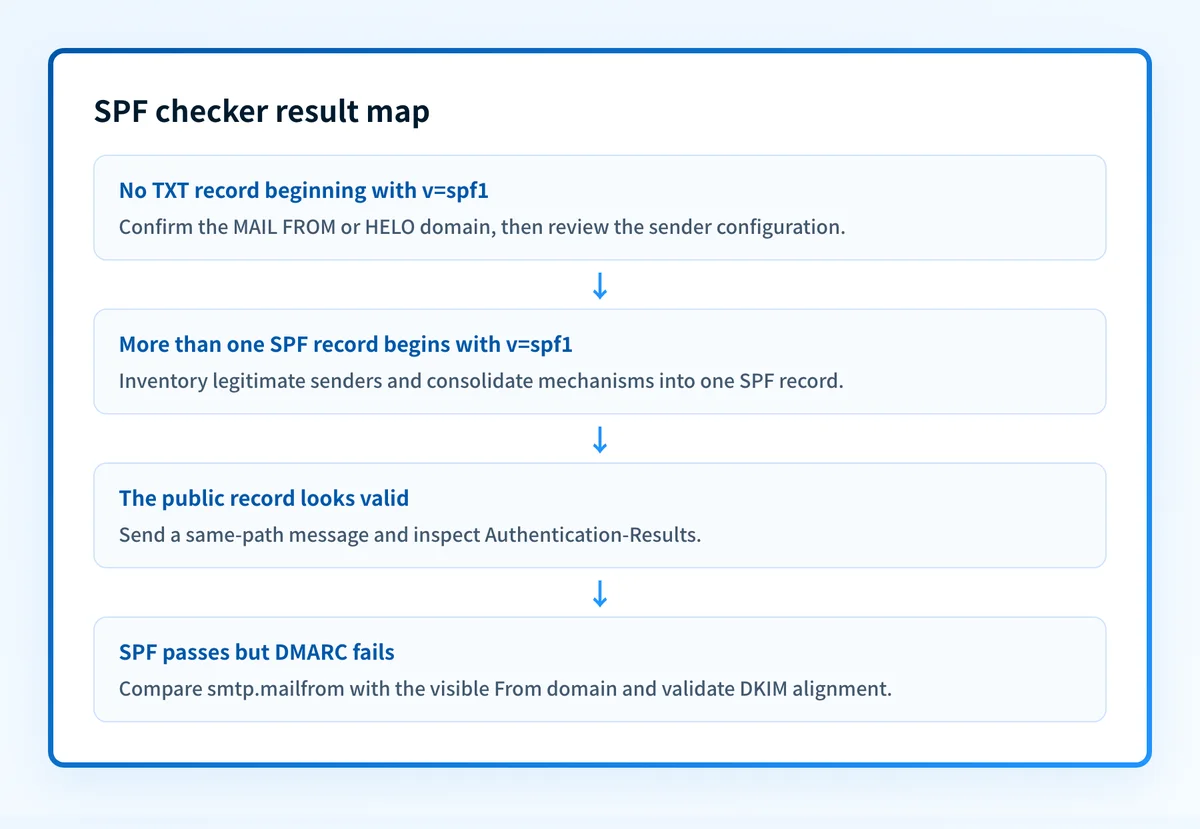
If the public lookup finds no TXT record beginning with v=spf1, SPF cannot find an authorization policy for that domain. Confirm that the queried domain is the envelope sender domain or HELO domain from the message, rather than assuming the visible From domain is the SPF identity.
Then check the sending-service setup. A service may use a provider-owned envelope domain, or it may require you to publish an SPF record for your own domain. The SPF record mechanics explained in this SPF guide help separate those two cases.
The domain has more than one SPF record
RFC 7208 says a domain must not have multiple SPF records. Multiple records that begin with v=spf1 create an SPF permerror condition. Consolidate authorized mechanisms into one record only after identifying every legitimate sender that currently uses the domain.
Do not merge DNS records by guessing which include statements are safe. Compare each mechanism with the current configuration in the sending service and with message evidence.
The SPF record authorizes the sending host
A record can authorize a host and still be incomplete evidence. SPF evaluation can return pass only for the MAIL FROM or HELO identity being tested. A valid public record does not show that the application emitted that envelope sender, that DNS was reachable when the receiver evaluated it, or that the receiver accepted the message.
Send a new message through the exact production path and inspect its receiver-added Authentication-Results field. RFC 8601 defines the message header field used to report authentication results. Record the SPF result and the identity shown beside it, such as smtp.mailfrom or smtp.helo.
The SPF record has an error or exceeds a processing limit
RFC 7208 defines SPF outcomes including none, neutral, pass, fail, softfail, temperror, and permerror. It also limits SPF evaluation to ten DNS-query-causing terms. A record can look plausible in a DNS response but fail because recursive include, a, mx, exists, redirect, or ptr processing exceeds that limit.
Treat a DNS-processing failure as a record-design issue until message evidence shows otherwise. Trace the include chain from the actual record, identify which sending services require each mechanism, and remove only mechanisms that no longer represent a legitimate sender.
The SPF result passes but DMARC still fails
SPF pass is only one possible DMARC authentication path. For SPF to support DMARC, the domain authenticated by SPF must align with the domain in the visible From address. A provider-owned bounce domain may pass SPF without aligning to your From domain.
Check the message's Authentication-Results fields and compare the visible From domain with smtp.mailfrom. If they do not align, examine DKIM as the alternate DMARC path. The difference between DKIM and SPF explains why a message can have a useful DKIM result even when SPF alignment is unavailable.
How to act on the result
Work from the narrowest evidence outward.
- For a missing record, confirm which identity the sending service uses. Publish only the DNS record generated for your account and sending domain.
- For multiple SPF records, make one inventory of every authorized sender, then combine valid mechanisms into one
v=spf1record. Retain unrelated TXT records. - For a DNS-limit or syntax problem, trace the existing record before shortening it. Removing an include can break mail from a service that still uses it.
- For a passing record with an SPF failure in a delivered message, compare the message's envelope identity with the DNS owner you checked. Then inspect the sender's verification or authentication status in its own interface.
- For an SPF pass that does not align, validate DKIM on the same message. Do not change the DMARC policy based only on a public SPF lookup.
- DNS: query the published record through the authoritative server and at least one public resolver.
- Vendor: confirm the sender's current domain or authentication status in the sending provider's interface.
- Message: send a real message through the same production application, sender identity, gateway, and recipient path.
- DMARC: review aggregate reports after data accumulates to identify sources and alignment outcomes across the domain.
How to retest
After a DNS correction, rerun the same Proofpoint public form with the same domain and repeat the public lookup:
dig +short TXT yourdomain.comNext, send a fresh message through the exact sender you changed. Inspect the delivered message's Authentication-Results header and compare the SPF identity with the visible From domain. Finally, review DMARC aggregate-report data after reports have had time to arrive. The expected change is a corrected DNS answer first, then a matching delivered-message result. These observations may not appear at the same time.
Move from a one-time SPF check to sender inventory
A Proofpoint SPF check can show the public record at one point in time. It does not identify every production source that uses the domain, track later DNS drift, or determine when the domain is ready for a DMARC policy change.
Palisade is agentic DMARC software that analyzes DMARC aggregate-report data, identifies sending sources and authentication or alignment issues, and creates prioritized remediation tickets. It proposes the next policy step for human review, but it does not autonomously change your DMARC policy or guarantee delivery. If you are weighing Proofpoint Email Fraud Defense for that work, Proofpoint vs Palisade compares the two side by side.
Palisade does not grant access to Proofpoint Hosted SPF, repair a public SPF record automatically, or prove that every future message will authenticate.
Evidence
Sources and further reading
Questions readers ask
Frequently asked questions
Can I use the Proofpoint SPF checker for several domains?
Yes. Proofpoint's public Japanese checker states that you can enter one domain per line and check up to 100 domains. Treat each result as a public DNS observation for that domain, then validate important senders with a delivered message.
Does a published SPF record prove that mail passes SPF?
No. A published record proves only that a DNS record is visible. SPF pass depends on the MAIL FROM or HELO identity used by the actual message, DNS processing during evaluation, and the receiver's evaluation of that message.
Does SPF pass mean DMARC passes?
No. SPF must pass and the authenticated SPF domain must align with the visible From domain to satisfy the SPF branch of DMARC. DKIM can independently provide an aligned authentication path.
Should I create a second SPF record for a new email provider?
No. RFC 7208 permits only one SPF record for a domain. Add the new provider's required mechanism to the existing SPF record after confirming that it belongs to an active sender.
Can a public SPF checker show my Proofpoint Hosted SPF settings?
No. A public checker can inspect public DNS. Proofpoint describes Hosted SPF as a service for Email Fraud Defense customers with a customer portal, and public DNS results do not reveal tenant access or portal settings.

Written by
Taylor TabusaCo-Founder & Head of Business Development, Palisade
Taylor Tabusa is the co-founder and Head of Business Development at Palisade, helping managed service providers turn email security into a practical, valuable service.
More from Taylor →