Kitterman SPF checker: interpret and retest an SPF lookup
 ChatGPT
 Claude
 Gemini
 Perplexity
 Grok
GrokIn brief
Kitterman SPF checker results explained: inspect the public SPF record, repair evidenced DNS issues, check lookup limits, and retest safely.
A Kitterman SPF checker lookup can show the SPF policy currently published in public DNS, but it cannot prove that a production message used that policy or passed SPF at its recipient. Use the lookup to identify the exact DNS issue, make a narrow correction, then retest the same hostname. Confirm delivery separately with headers from a new message.
At a glance
Quick takeaways
- An SPF checker reads the public TXT record for the domain's SPF identity.
- SPF permits only one record beginning with
v=spf1for a domain. - SPF evaluation has a limit of 10 DNS lookups during a single check.
- A valid public SPF record does not prove that an application sent with the expected envelope sender.
- Keep a copy of the returned record and lookup count before changing DNS.
- Use a delivered message's authentication results to confirm the production path after a DNS repair.
What this tool checks
A Kitterman SPF checker is useful for a one-off inspection of a domain's published SPF policy. For a current public-DNS check, use the Palisade SPF checker. Enter the domain that appears in the SMTP envelope sender or, when that evidence is unavailable, the domain whose public SPF policy you need to inspect.
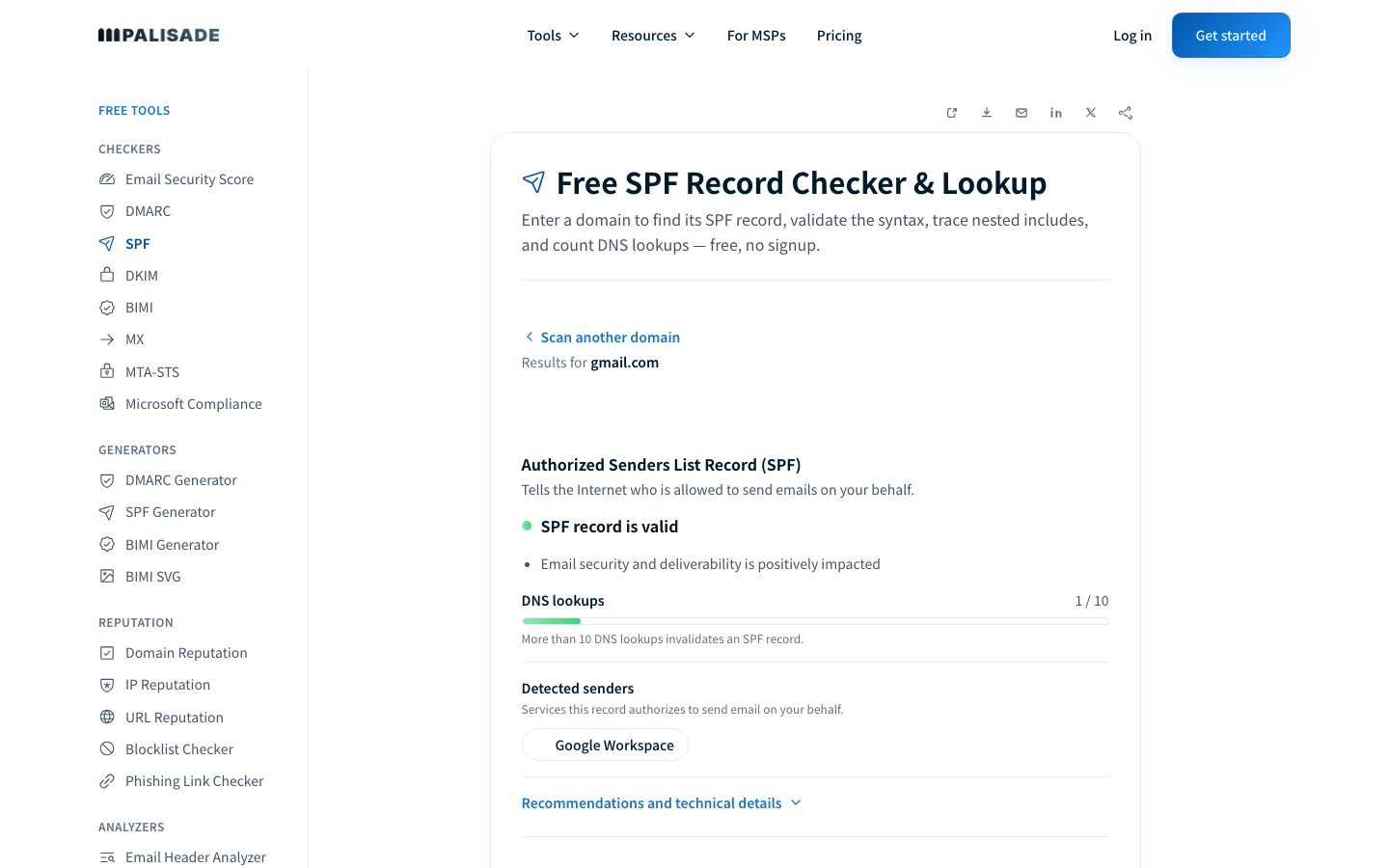
The checker returns public DNS evidence: the SPF record it found, a validity finding, its lookup count, and detected senders. That supports a DNS diagnosis. It cannot see which outbound application generated a message, its MAIL FROM identity, its headers, a receiver's private filtering decision, or changes that occur after the lookup.
SPF authorizes hosts for a domain used in the SMTP transaction. RFC 7208 defines the SPF record format and evaluation rules. It is one part of email authentication, alongside the concepts explained in Palisade's email authentication guide. A public DNS result is useful evidence, but it is not a message-delivery test.
How to run the check
1. Choose the SPF identity to inspect
Start with the envelope sender domain from a delivered message if you have one. In an Authentication-Results header, this commonly appears as smtp.mailfrom. That identity can differ from the visible From address, so do not assume the visible domain is the one SPF evaluated. RFC 8601 defines the Authentication-Results header field and its properties.
If no message is available, inspect the domain whose SPF record you plan to change. Record the hostname before opening a checker so you can retest the identical target later.
2. Run the public SPF lookup
Submit the hostname to the Palisade SPF checker. Save the returned SPF record, validity finding, lookup count, and detected-sender list. Those fields establish what was publicly visible at that time.
You can repeat the public lookup from a terminal with an example domain:
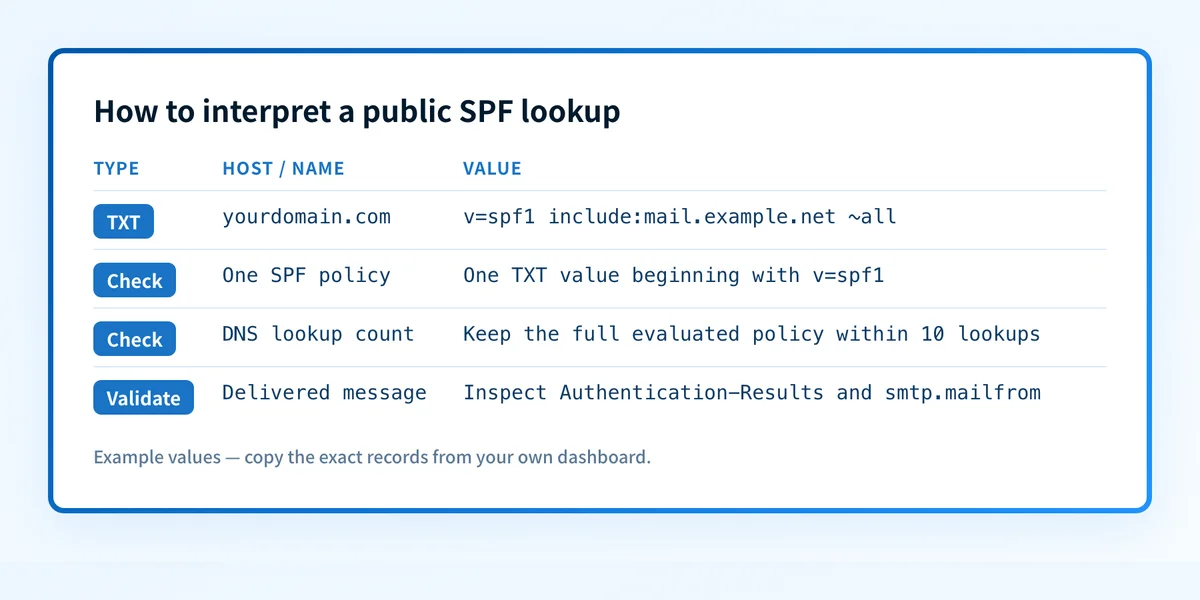
dig +short TXT yourdomain.comLook for the single TXT value that begins with v=spf1. The command may return other TXT records that are unrelated to SPF. A resolver answer is still public-DNS evidence. It does not show whether the exact production sender used this record.
3. Preserve message evidence before changing DNS
If the lookup relates to a delivery failure, send a new test through the same application, account, sender identity, and recipient path. Open the received message's raw headers and preserve the receiver-added Authentication-Results value.
A DNS checker may show a syntactically valid policy while the production message uses another envelope sender or does not pass SPF. For a header-led investigation, use the related guide on checking DMARC alignment. Keep the lookup result and the delivered-message result as separate observations.
How to interpret the results
A single valid SPF record is returned
A valid result means the checker found one publicly visible SPF record beginning with v=spf1 and could evaluate its published structure. It does not mean every listed sending service is active, every message uses the policy, or every recipient will accept a message.
Review each mechanism in the returned policy. An include: delegates part of the evaluation to another domain's SPF policy. An ip4: or ip6: mechanism authorizes specified addresses. The terminal all mechanism sets the result for senders that did not match earlier mechanisms. RFC 7208 describes these SPF mechanisms and their evaluation.
No SPF record, or an invalid SPF policy, is returned
First confirm the queried domain. SPF applies to the identity being evaluated, not automatically to the visible From domain. Then inspect the authoritative DNS provider to determine whether the TXT record is absent, published under the wrong hostname, or malformed.
Do not add an SPF record beside an existing one without checking first. The repair target is the exact SPF identity and its existing TXT records. If an application generated a record for setup, copy only the value generated for your account and domain. Never reuse a record from another tenant.
More than one SPF record is present
A domain must not publish multiple SPF records. RFC 7208 treats multiple SPF records as a permanent error. Consolidate the authorized mechanisms into one policy, then remove or replace the duplicate SPF TXT value according to your DNS provider's record editor.
Removing a record can stop legitimate mail from passing SPF. Before consolidation, inventory every authorizedinclude:,ip4:,ip6:,a:, and other active mechanism from the existing policy.
For a focused duplicate-record repair workflow, see how many SPF records a domain can have.
The lookup count reaches or exceeds the limit
SPF has a maximum of 10 DNS lookup-causing terms during evaluation. The count can include nested include: mechanisms, so a short-looking record may still exceed the limit. RFC 7208 section 4.6.4 specifies the limit.
Treat a high count as a maintenance issue before it becomes a failure. Remove services that no longer send mail, verify whether overlapping includes are still needed, and ask each active sender which SPF authorization it requires. Do not flatten a record by copying addresses from an unrelated domain or from an outdated supplier article. Address ownership can change.
The detected-sender list needs review
A detected-sender list reflects mechanisms visible in the published policy. It is an inventory starting point, not proof that each source currently sends for the domain. Compare it with approved sender records and a message from each important production path.
A sender can pass SPF with an unaligned envelope domain. If DMARC is the concern, compare the SPF identity with the visible From domain and inspect the DKIM result as well. Why Brevo does not provide SPF alignment by default illustrates why SPF authorization and DMARC alignment are separate questions.
How to act on the result
Repair only the issue established by the public result.
For a missing or malformed record, obtain the current record value from the sending service that requires authorization, then publish it at the correct root domain. For duplicates, merge only known, active authorization mechanisms into one SPF policy. For excessive DNS lookups, remove stale sender entries before considering structural changes.
Then validate at four layers:
- Check the authoritative DNS provider and at least one public resolver for the corrected TXT answer.
- Confirm the sending service still reports the intended domain or authentication setup.
- Send a new message through the same production route and inspect
Authentication-Results. - Review DMARC aggregate-report data after it accumulates to find sources or alignment failures that a one-off SPF lookup cannot expose.
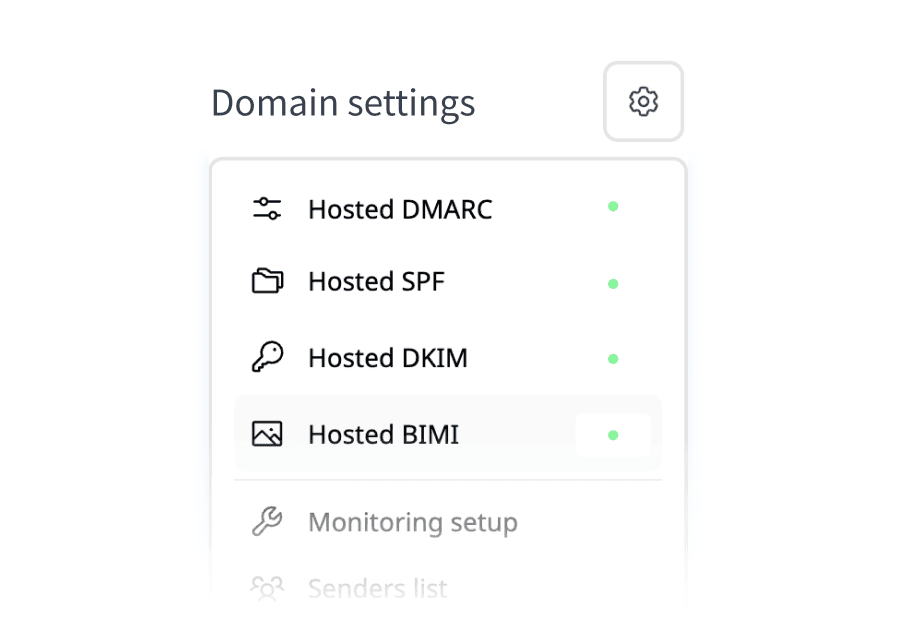
include: mechanism and Palisade publishes the included updates. Its setup requires copying every existing authorization into the Hosted SPF configuration before publishing the new root record. Hosted SPF does not validate sender alignment or guarantee delivery.
Investigate this with your coding agent
Use this after you have saved a redacted public SPF result and a redacted header from the affected message. Do not include private keys, tokens, full recipient addresses, or customer message content.
Agent handoff
Copy the prepared prompt
Give this to a coding agent that can inspect the relevant repository or configuration source of truth.
Problem: A public SPF lookup for yourdomain.com reports a missing, duplicate, invalid, or lookup-limit SPF policy.
Evidence: Redacted checker result for yourdomain.com, returned v=spf1 value, lookup count, and redacted Authentication-Results with smtp.mailfrom.
Repository scope: DNS-as-code files or deployment configuration that publishes TXT records for yourdomain.com.
Constraints: Inspect before editing. Do not apply changes until I approve the proposed diff. Do not alter unrelated TXT records, credentials, private keys, tokens, or production DNS.
Requested output: Diagnosis, minimal proposed change, rollback, and unknowns.
Verification: Query dig +short TXT yourdomain.com, rerun the same public SPF lookup, then send a new message through the same production path and inspect Authentication-Results.
Stop if: Credentials, private data, production mutation, or missing evidence is required.
Human approval required: Review the proposed diff and verification plan before allowing changes. Do not paste secrets, private keys, API tokens, unredacted headers, or customer data.
How to retest
Wait until the authoritative DNS provider shows the intended answer, then repeat the same public lookup for the exact hostname. The expected change is narrow: one valid SPF record, with the corrected mechanism set and a lookup count below the evaluation limit where that was the issue.
Next, send a new message through the same source that exposed the problem. Check the recipient's Authentication-Results field for the smtp.mailfrom identity you intended to authorize. A passing public lookup without that message evidence leaves the production-path question open.
Check the published SPF policy after the repair
Recheck the exact SPF identity after the DNS answer changes, then compare the result with a new message from the affected sender.
A public record check cannot repair DNS, prove that a particular production message used the record, monitor later changes, or guarantee delivery. If recurring sender inventory or alignment issues remain after the immediate repair, Palisade can analyze DMARC aggregate-report data, identify sending sources and authentication or alignment issues, and create prioritized remediation tickets. It does not change DNS or control a receiver's filtering decision.
Evidence
Sources and further reading
Questions readers ask
Frequently asked questions
Does a valid SPF checker result prove that email will be delivered?
No. It proves only that the public SPF policy could be evaluated at the time of the lookup. Delivery also depends on the production sending path, message authentication results, recipient policy, and other receiver decisions.
Can a domain have two SPF TXT records?
No. A domain must have one SPF record beginning with v=spf1. Multiple SPF records produce an SPF permanent error under RFC 7208.
Does every include count as one SPF lookup?
Not always. An include: causes evaluation of another policy, and nested mechanisms can cause further DNS lookups. Count the complete evaluation path, not only the mechanisms visible in the root record.
Should I change SPF after one failed message?
Only when the message evidence and public DNS result identify an SPF authorization problem. First verify the envelope sender domain and the receiver's Authentication-Results, because the visible From domain may not be the identity SPF evaluated.
Can Hosted SPF fix DMARC alignment?
No. Hosted SPF manages SPF record updates through a delegated include. DMARC SPF alignment still depends on the domain used in the production message's envelope sender and the visible From domain.

Written by
Samuel ChenardCEO & Co-Founder, Palisade
Samuel Chenard is the CEO and co-founder of Palisade, agentic DMARC software for IT teams and MSPs, from one domain to thousands.
More from Samuel →