SPF check failure: how to interpret and fix the result
 ChatGPT
 Claude
 Gemini
 Perplexity
 Grok
GrokIn brief
SPF check failure: interpret Palisade SPF record results, repair duplicate or over-limit records, and retest the published DNS record after DNS changes.
An SPF check failure can mean two different things: a public SPF record has a structural problem, or a receiving server evaluated one message and returned the SPF fail result. Start with the Palisade SPF checker to inspect the published record, then use a delivered message and DMARC evidence to determine whether the production sending path also fails.
At a glance
Quick takeaways
- Palisade's SPF checker evaluates the public SPF record, not a message sent from a particular IP address.
- The checker uses
pass,warn, andfailfor record health, which are different from SPF evaluation results defined in RFC 7208. - More than 10 SPF DNS lookups makes an SPF record invalid during SPF evaluation.
- Multiple
v=spf1TXT records for one domain cause an SPF failure. - A passing SPF result does not prove SPF alignment for DMARC.
- A public DNS check cannot prove continuous state, message signing, a receiver's private decision, or future inbox placement.
What this tool checks
The Palisade SPF checker accepts a domain and inspects its public Authorized Senders List Record (SPF). It normalizes a domain or email-style input, retrieves the published record, reports its status, shows a DNS lookup count, and can expose the nested include structure and detected senders.
SPF authorizes domains or IP addresses to send mail for an envelope sender domain. RFC 7208 defines SPF and its receiver-side evaluation results, including pass, fail, softfail, temperror, and permerror. Those results apply when a receiver evaluates a particular message. They are not the same as Palisade's record-health labels.
The checker can inspect public DNS. It cannot see the IP address that sent a message, the envelope MAIL FROM value used in production, the receiving server's complete evaluation, or why one recipient rejected a message. Use the broader SPF learning hub when you need the protocol context behind the record.
How to run the check
1. Identify the domain you need to inspect
Use the domain that appears in the sender configuration or the envelope sender from a delivered message. Do not submit a recipient domain or assume that the visible From domain is the SPF identity.
If you have a failed message, preserve its bounce details and raw headers. A domain lookup is useful evidence, but it does not replace the receiver's message-specific result.
2. Run the public SPF lookup
Open the Palisade SPF checker and enter the domain. The checker presents the SPF record, its status, the DNS-lookup count, and any warnings tied to the published record.
You can independently retrieve the public TXT answer with this repeatable lookup:
dig +short TXT yourdomain.comIf the returned SPF policy is split across more than one TXT record beginning with v=spf1, do not merge the values by hand. That is a configuration error that needs correction at the authoritative DNS provider.
3. Record the exact result before changing DNS
Save the domain, returned SPF record, status, lookup count, and listed warning. If the tool expands the include tree, identify the include or redirect path that contributes lookups before changing a record.
Do not replace an SPF record with values copied from another account or tenant. Sending services generate account-specific authorization values, and an unrelated record can break legitimate mail.
How to interpret the results
SPF record is missing
This headline means the checker did not find a usable SPF policy for the queried domain. Confirm that the domain is the actual envelope sender domain before publishing a record. A missing record in public DNS does not prove every message will receive RFC 7208 none, because the receiver evaluates the message and domain it actually receives.
Multiple SPF records found
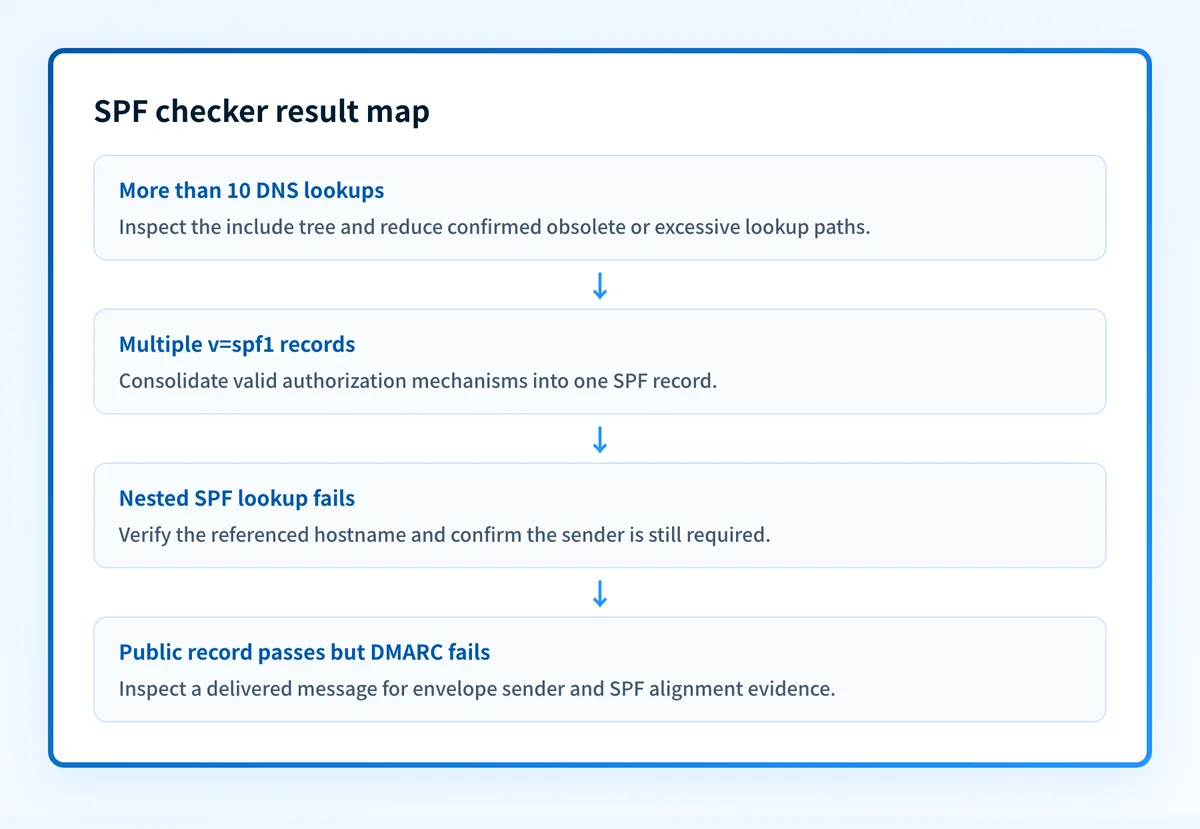
Palisade reports this as a failure because an SPF evaluator encountering multiple records that begin with v=spf1 returns permerror. RFC 7208 requires a domain to publish one SPF record for evaluation purposes. Consolidate the authorized mechanisms into one record, then remove the duplicate SPF-version TXT record.
SPF record performs more than 10 DNS lookups
The checker displays a DNS lookups meter. RFC 7208 section 4.6.4 requires SPF implementations to limit relevant DNS-triggering terms to 10. The include, a, mx, ptr, and exists mechanisms, plus the redirect modifier, consume that budget. ip4, ip6, and all do not.
Palisade flags more than 10 lookups as invalid. Inspect the include tree and remove obsolete senders, consolidate services where the sending provider supports it, or replace broad nested includes with the provider's current approved mechanism. Do not delete an include until you know which production source uses it.
SPF record lookup failed
This result means an endpoint referenced by the SPF record could not be resolved as expected. Check the exact hostname in the tool's detail view, then verify that the referenced service still publishes the required SPF record. A failed nested lookup may be a DNS publishing issue or an obsolete sender reference. The public check does not identify which application last used that sender.
SPF record uses a PTR mechanism or a self-referring loop
Palisade identifies the ptr mechanism as deprecated and marks a self-referring loop as invalid. RFC 7208 limits DNS evaluation to prevent unreasonable lookup load, and a loop prevents a clean evaluation path. Remove the ptr mechanism or break the loop with the sender's current published authorization method.
SPF record is too rigid
Palisade can warn on a record ending in -all and recommend ~all. That is Palisade's record-health recommendation, not an RFC 7208 requirement. RFC 7208 defines distinct semantics for fail and softfail; it does not require one ending for every domain. Before changing the qualifier, confirm every legitimate sender and consider the domain's DMARC policy and mail flow.
How to act on the result
Repair the smallest confirmed problem first.
- For duplicate SPF records, inventory every current
v=spf1TXT record and consolidate valid mechanisms into one record. - For an over-limit record, use the checker detail to locate nested includes, then remove only retired sources or adopt the sending provider's documented consolidation method.
- For a failed nested lookup, verify the exact referenced hostname at the authoritative DNS provider and confirm whether the sender is still in use.
- For a warning about the final
allmechanism, treat it as a policy decision. Test the real production mail path before changing it. - For a message-specific failure, inspect the delivered message's envelope sender and receiver-added authentication result. Email authentication requires separate DNS, vendor, message, and DMARC evidence.
From domain with an authenticated identifier. RFC 9989 defines SPF alignment as alignment between the author domain and the SPF-authenticated envelope sender domain. Use DMARC alignment checks in a delivered message when the SPF record looks healthy but DMARC reports a failure.
How to retest
Repeat the same Palisade SPF check after the authoritative DNS change is published. Confirm that the returned record no longer has the duplicate, failed endpoint, loop, or excessive lookup path you changed.
Then send a new message through the same application, sender identity, gateway, and recipient path. Check the receiver's authentication result for that new message. Once aggregate data accumulates, review DMARC reports or Palisade monitoring to identify other sources that use the domain.
Track SPF issues beyond one public lookup
A corrected public SPF record does not show which production sending sources later fail authentication or alignment. Palisade is agentic DMARC software that analyzes DMARC aggregate-report data, identifies sources and alignment issues, and creates prioritized remediation tickets. It proposes the next policy step, while a human reviews the evidence and applies any change.
Palisade does not replace a message-specific SPF evaluation, change your DMARC policy automatically, or guarantee delivery or inbox placement.
Evidence
Sources and further reading
Questions readers ask
Frequently asked questions
What does SPF check failed mean?
An SPF check failure can mean the published record has a structural issue, such as multiple SPF records or more than 10 DNS lookups. It can also mean a receiver evaluated one message and returned the RFC 7208 fail result. Check which kind of result you have before changing DNS.
How to fix SPF failure?
Fix the exact problem the check reports, and only that one. Consolidate duplicate v=spf1 records, shorten a lookup path that runs over the limit, repair an included hostname that fails to resolve, or remove a loop. Then retest the same domain and send a fresh message through the same production path.
How to fix 550 SPF check failed?
Start with the complete bounce message, because the text after the 550 code is what tells you which check the receiver ran and why it refused. Keep the full error and the message headers, work out which provider the recipient uses, and follow that provider's documented SMTP guidance. Changing your public SPF record alone will not necessarily clear it.
Why does SPF alignment fail?
SPF alignment fails when the domain authenticated by SPF for the envelope MAIL FROM identity does not align with the visible From header domain under the domain's DMARC alignment mode. SPF can pass for its own envelope sender while the SPF branch of DMARC fails.
Does a passing SPF checker result prove email delivery?
No, a passing check only means your published record cleared the checker's record-level assessment. It does not show that your application actually sent through that record, that a receiver scored a specific message as SPF pass, or that the message reached an inbox.


Written by
Samuel ChenardCEO & Co-Founder, Palisade
Samuel Chenard is the CEO and co-founder of Palisade, agentic DMARC software for IT teams and MSPs, from one domain to thousands.
More from Samuel →