SPF flattening tool
 ChatGPT
 Claude
 Gemini
 Perplexity
 Grok
GrokIn brief
SPF flattening tool guidance: check DNS lookup usage, understand the 10-lookup limit, assess flattening risk, and retest public SPF records.
An SPF flattening tool replaces DNS-based SPF mechanisms with IP address ranges to reduce DNS lookups. Before using one, check the published SPF record and its lookup usage. The Palisade SPF checker can inspect the public SPF record for a domain, but it does not generate, publish, or maintain a flattened record. A passing public lookup also does not prove the production sender uses the intended SPF policy.
At a glance
Quick takeaways
- SPF evaluation permits no more than 10 DNS-querying terms during one check.
- Exceeding the SPF lookup limit produces an SPF
permerrorunder RFC 7208. - Flattening replaces some DNS indirection with IP ranges, which creates a maintenance obligation when providers change their infrastructure.
- Do not flatten
include:spf.protection.outlook.comunless Microsoft has approved a stable range arrangement and you can maintain it. - A public SPF check must be paired with a delivered-message check to confirm the production sending path.
- DMARC aggregate reports show whether real traffic later passes SPF and aligns with the visible From domain.
What this tool checks
The Palisade SPF checker accepts a domain and checks its publicly visible SPF DNS record. Use it to inspect the record before deciding whether lookup count is the problem. It is a diagnostic checker. For the hosted service that keeps a record under the limit permanently, see SPF flattening.
SPF records can cause further DNS work through mechanisms and modifiers such as include, a, mx, ptr, exists, and redirect. RFC 7208 section 4.6.4 limits an SPF evaluation to 10 DNS-querying terms. A receiver that needs to evaluate an eleventh term must return permerror.
The checker cannot see:
- The actual SPF identity a receiving server evaluated, such as the SMTP
MAIL FROMdomain or HELO domain. - Whether a sending application used the domain you checked.
- Whether the receiver accepted, rejected, or spam-foldered a particular message.
- Changes inside an external provider's sending infrastructure after the public check.
- The current IP ranges that a separate flattening service may have generated.
How to run the check
1. Identify the envelope-sending domain
Start with a recent delivered message from the affected production path. In the raw message source, find the receiver's Authentication-Results header and identify the SPF result and the domain associated with the evaluated SMTP identity. RFC 8601 defines the Authentication-Results header field.
Do not assume the visible From domain is the domain whose SPF record the receiver evaluated. SPF normally evaluates the SMTP envelope sender, and DMARC later tests whether a passing SPF domain aligns with the visible From domain.
2. Inspect the published SPF record
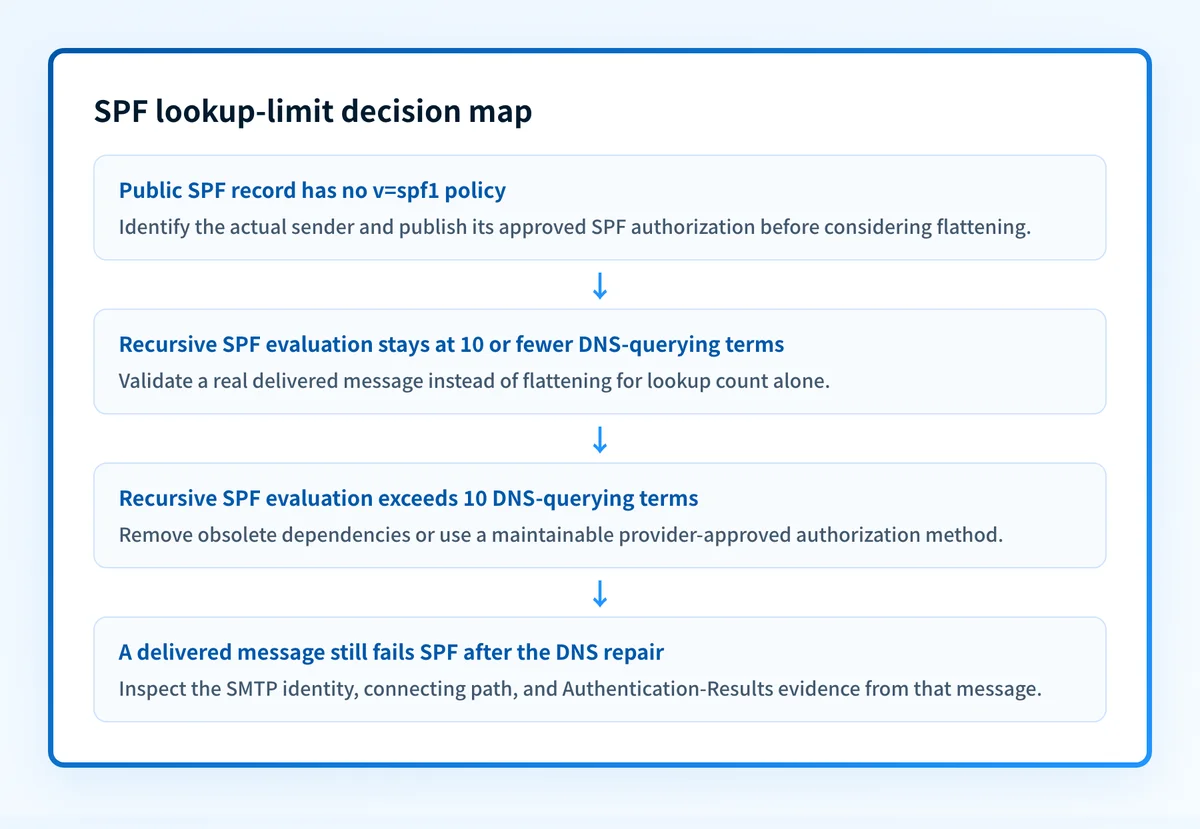
Enter the exact sending domain in the Palisade SPF checker. Record the returned SPF policy and the time of the check. If the domain has no SPF record, flattening is not the first task. First establish which system sends mail for that domain and obtain its approved SPF configuration.
You can repeat the public DNS lookup independently:
dig +short TXT yourdomain.comIf several TXT strings appear, identify the one beginning with v=spf1. DNS may return the parts of one long TXT record separately. Preserve their order when reviewing the full policy.
Do not publish a flattened record by copying IP ranges from another organization's DNS or documentation. Use only values generated and approved for your own sending services.
3. Count terms that can trigger DNS lookups
Read the policy recursively. Each include causes another SPF policy evaluation, and that nested policy can contain more DNS-querying terms. An include does not count as only one lookup if its target expands into additional DNS work.
Count the terms that RFC 7208 identifies as capable of causing DNS queries:
Illustrative only
v=spf1 include:mailer.yourdomain.com include:crm.yourdomain.com -all
The two visible include terms are only the start of the count. Query each included domain and count its DNS-querying mechanisms too. This is why a short-looking SPF record can still exceed the limit.
4. Separate a lookup problem from another SPF failure
If a receiver reports permerror, confirm that the error relates to the lookup limit before changing the record. A missing record, malformed syntax, an incorrect envelope domain, and an authorization mismatch need different repairs.
Keep four evidence layers separate:
- DNS: Query the record from the authoritative DNS provider and a public resolver.
- Vendor: Confirm the sending service's domain-authentication status in its current interface.
- Message: Send a new message through the same production application and inspect its raw headers.
- DMARC: Review aggregate-report data after reports accumulate to find sources that still fail SPF or fail alignment.
How to interpret the results
The SPF policy stays within the DNS lookup limit
A record that stays within the 10 DNS-querying-term limit does not need flattening solely for lookup count. Continue with message evidence. A delivered message can still fail SPF because the sender uses a different envelope domain, an unauthorized IP address, or a different route than the one assumed from DNS.
If SPF passes but DMARC fails, compare the SPF-authenticated domain to the visible From domain. SPF can pass without satisfying DMARC alignment.
The SPF policy exceeds the DNS lookup limit
An SPF evaluation that exceeds the limit returns permerror under RFC 7208 section 4.6.4. Reduce the recursive DNS-querying terms before treating the policy as reliable.
Flattening can reduce queries by replacing selected dependencies with current IP ranges. That improvement has a cost: the range list must change when the provider changes its infrastructure. A stale flattened policy can exclude legitimate sending IPs or retain addresses that no longer belong in the authorization set.
The SPF record is missing or does not match the sender
A missing SPF record is not evidence that flattening will help. Identify the actual outbound service, then use that service's current domain-authentication instructions to publish the correct SPF authorization.
If the public record looks correct but the message fails, inspect the message's evaluated SMTP identity and the connecting IP. The failure may be in the sender configuration or routing path rather than the visible DNS policy.
The public record is valid but the message still fails
Treat DNS and message results as separate facts. The record may authorize one provider while the failed message came from another source, subdomain, relay, or return path.
Use the receiver-added Authentication-Results header to establish the SPF result for the delivered message. Then compare the evaluated domain with the record you checked. Do not infer message behavior from a public DNS result alone.
How to act on the result
If the recursive count exceeds 10, first remove obsolete services and duplicate authorization paths. Each retired sender should be removed only after confirming it no longer sends through the domain.
For active services, prefer a provider-supported authorization method that keeps the policy maintainable. Flatten only the dependencies you can refresh from an approved source and validate after each provider-side change.
Microsoft specifically warns administrators not to flatten include:spf.protection.outlook.com in ordinary Office 365 configurations. Microsoft's SPF configuration guidance describes a narrow stable-range exception that requires ongoing maintenance. Do not substitute a copied address list for the published Microsoft include.
If the issue is an SPF permerror, follow the repair process in How to fix SPF PermError: too many DNS lookups. If you need a checker-centered workflow for the existing public record, use the SPF record checker.
How to retest
Query the same domain again after the authoritative DNS answer changes. Then send a new message through the same application, sender address, relay, and recipient path that produced the original result.
The expected DNS change is a public SPF record whose recursive DNS-querying terms stay at or below the RFC limit. The expected message change is an SPF result from the exact production path that no longer returns permerror.
After message evidence is available, review DMARC aggregate reports. They reveal whether the domain has other production sources that were not represented in the single retest message.
Check lookup usage before changing SPF
Use the Palisade SPF checker to inspect the current public SPF policy and identify whether the published record needs a closer lookup-count review before you change it.
A public SPF check cannot generate or safely maintain a flattened policy, prove the production sending path, or guarantee delivery at a receiving mailbox.
Evidence
Sources and further reading
Questions readers ask
Frequently asked questions
Does an SPF flattening tool fix every SPF error?
No. Flattening addresses DNS lookup depth for selected dependencies. It does not fix a missing SPF record, an unauthorized sending IP, an incorrect envelope sender, malformed syntax, or DMARC alignment.
Can I flatten Microsoft 365 SPF records?
Only under Microsoft's documented stable-range exception and with a process to maintain the ranges. Microsoft's normal guidance says not to flatten include:spf.protection.outlook.com.
Does a public SPF check prove that SPF passes in production?
No. It proves only what is publicly published at the checked domain and time. A real delivered message is needed to confirm the SMTP identity, connecting path, and receiver's SPF result.
Why does SPF have a 10-lookup limit?
RFC 7208 limits SPF evaluation to 10 DNS-querying terms to bound the DNS work required during message evaluation. Exceeding that limit returns permerror.
Should I flatten every include in an SPF record?
No. Flattening every include can create a record that becomes stale when providers change their sending ranges. Remove unused services first, then flatten only dependencies you can maintain and validate.

Written by
Dominic LandryDeliverability & DNS
Dominic Landry works on email deliverability and DNS configuration at Palisade, from SPF and DKIM records through to DMARC enforcement.
More from Dominic →