PowerDMARC SPF checker
 ChatGPT
 Claude
 Gemini
 Perplexity
 Grok
GrokIn brief
PowerDMARC SPF checker information: what PowerDMARC publicly lists, what an SPF lookup can establish, and which evidence is still needed today.
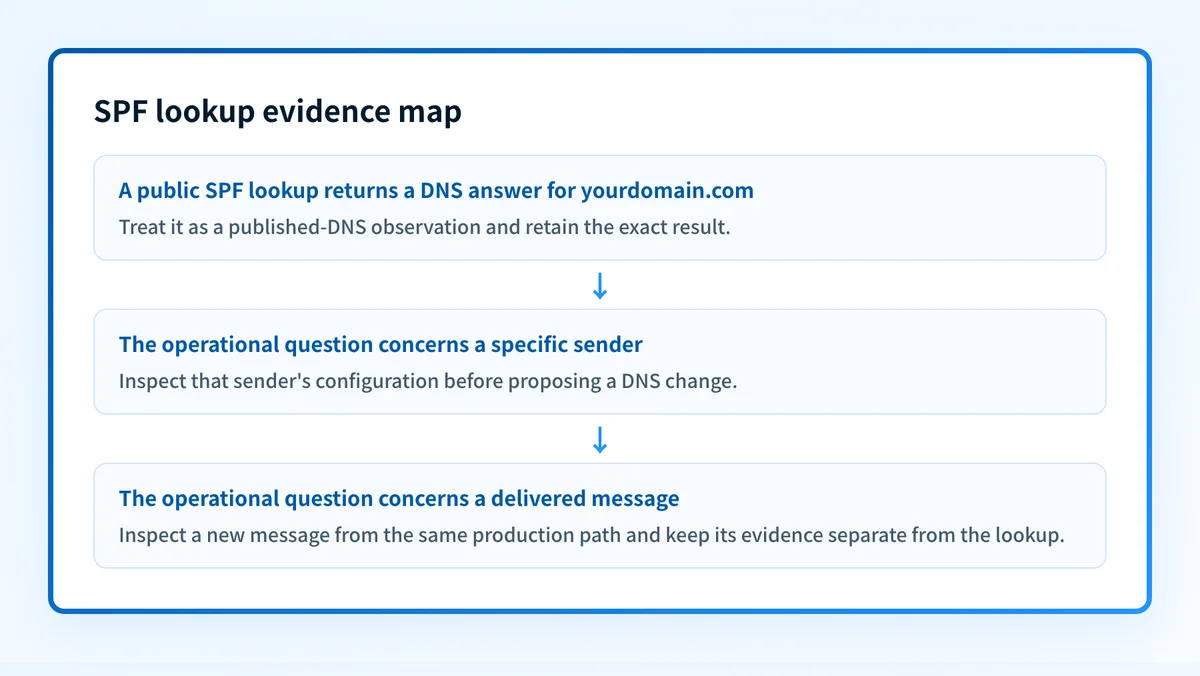
PowerDMARC publicly lists an "SPF Lookup" tool and a hosted SPF service, but its public homepage and support index do not document the lookup's current input fields, result labels, warnings, or repair workflow. Treat a lookup as a way to inspect a published SPF configuration, then keep that DNS observation separate from evidence about the production sender and a delivered message.
At a glance
Quick takeaways
- PowerDMARC lists "SPF Lookup" among its tools.
- PowerDMARC's support index lists "Free SPF Record Lookup" under Tools.
- The publicly available pages reviewed for this article do not establish the lookup's current result states or UI workflow.
- A public SPF-record result is DNS evidence, not proof of a specific production sending path.
- A checker result alone cannot explain an individual receiver's decision about one message.
- Compare a public lookup with sender and message evidence before changing a production record.
What this tool checks
PowerDMARC's public homepage includes the tool name "SPF Lookup," and its support index includes "Free SPF Record Lookup." Those public references establish that PowerDMARC offers an SPF lookup, but they do not establish what the current tool asks a reader to enter, how it resolves DNS, or how it labels a result. The public references also do not document whether the tool evaluates a record beyond displaying it.
PowerDMARC separately describes hosted SPF as:
"One-click Hosted SPF optimization with record flattening or SPF Macros approach to always stay under the lookup limit and enjoy error-free SPF."
That statement concerns PowerDMARC's hosted product. It is not evidence that the free lookup performs record flattening, detects a particular problem, repairs DNS, or returns a particular warning.
This distinction matters when comparing a vendor lookup with another workflow. A public check can inspect an answer visible in DNS. It cannot see which service sent a particular message, whether that service used the expected return path, whether a receiver accepted the message, or what happens after the check completes. Readers comparing SPF tools can run the same inspection with the free Palisade SPF checker, or use the Palisade comparison hub to place that narrower task beside broader email-authentication work.
How to run the check
The current public PowerDMARC material does not provide a verified step sequence for its SPF Lookup interface. Do not rely on a guessed field name, button label, or result color when documenting or using that interface. Open the vendor's current PowerDMARC website or PowerDMARC support center and follow the live tool path shown there.
1. Identify the domain whose published configuration you need to inspect
Use the domain associated with the sending identity under investigation. Keep the domain separate from any assumptions about an individual application, mailbox provider, or message recipient.
If the question is comparative, identify the task first: inspecting a published SPF configuration is different from confirming what an outbound message actually did. The email-authentication guidance for Gmail is relevant when the operational question concerns mail sent to Gmail, rather than a public DNS result alone.
2. Run a repeatable public DNS lookup
Use a public DNS query as an independent record of the answer you observed. Replace the example domain with the domain you are authorized to inspect.
dig +short TXT yourdomain.comA DNS response is useful evidence to retain alongside the tool result. It does not establish that every TXT response is an SPF record, nor does it prove that an application used an authorized production path.
3. Record only the observations the live tool actually returns
Capture the domain you entered, the time of the check, and the exact result text shown by the live service. If the service shows a returned record, retain that text. If it shows an error or warning, retain the exact wording rather than converting it into a diagnosis.
Do not infer a vendor result state from its hosted-product marketing. "Hosted SPF optimization" is a separate product statement. It does not document the behavior of the free lookup.
How to interpret the results
The public material does not document PowerDMARC SPF Lookup result labels, warning strings, or an interpretation guide. The safe interpretation is therefore limited to the evidence itself.
A published record is shown
If the live tool displays a published SPF-related DNS result, treat that as a public-DNS observation for the domain submitted at that time. Preserve the exact returned text and compare it with an independent DNS query.
Do not use that result alone to conclude that a production application is authorized. A public record can be present while the sender under investigation uses a different identity or configuration. A delivered message from the same production path remains separate evidence.
No usable result is shown
If the live tool does not show a usable result, record the exact text it returns and repeat the DNS query against the same domain. The public documentation reviewed here does not establish whether a particular message means no record exists, DNS resolution failed, the submitted value was invalid, or another condition applies.
Move to the authoritative DNS provider when the public answer and the configured record need to be compared. Do not copy a record from another domain or tenant to resolve an unclear result.
A warning or recommendation is shown
Treat a warning as a vendor-specific observation until the current vendor documentation explains its condition and remedy. The available public PowerDMARC pages do not document the lookup's warning taxonomy, so a warning cannot be translated into a repair threshold from those pages alone.
The practical next step is evidence collection: retain the exact warning, inspect the published DNS response, identify the production sender, and inspect a delivered message from that sender. This keeps a DNS observation from becoming an unsupported conclusion about mail flow.
A hosted SPF option is offered
PowerDMARC's homepage describes hosted SPF optimization with record flattening or SPF Macros. That is a hosted-product description. It does not show that a specific free-lookup result requires hosted SPF, or that adopting the hosted service will resolve a particular sending problem.
Before changing DNS, determine which record is currently published and which sender is affected. A tool recommendation can inform the next question, but it does not replace evidence from the sender configuration and a real message.
How to act on the result
Start with the least assumptive action. Preserve the exact domain and DNS response from the lookup. Then identify the application or service that sent the message at issue. If the operational question arose from delivery to Gmail, compare the result with the sender's actual configuration and the delivered-message evidence described in how to authenticate an email for Gmail.
When a message uses a third-party sending service, do not assume that a visible SPF result answers DMARC alignment. The Brevo SPF alignment explanation illustrates why sender-path evidence and alignment questions must stay distinct.
Do not replace or flatten a production SPF record from a checker result alone. A DNS change can alter mail authorization for every service that uses the domain.
Use these evidence layers before approving a record change:
- DNS: compare the authoritative record with at least one public DNS response.
- Sender: identify the application and configuration responsible for the relevant mail.
- Message: inspect a delivered message from that same production path.
- DMARC: review aggregate-report evidence after data accumulates.
Investigate this with your coding agent
Use this when a public SPF lookup identified a record that needs investigation and the domain's DNS configuration is managed in a repository. Provide only a redacted result and non-sensitive configuration context.
Agent handoff
Copy the prepared prompt
Give this to a coding agent that can inspect the relevant repository or configuration source of truth.
Problem: A public SPF lookup for the domain returned a result that needs investigation before any DNS change.
Evidence: Redacted checker result, domain name, timestamp, public DNS response, and the names of known sending services. Do not provide credentials, private keys, tokens, unredacted message headers, or customer data.
Repository scope: Inspect the repository locations that define DNS records, mail-sender configuration, and deployment runbooks for the affected domain.
Constraints: Inspect before editing. Do not apply changes until I approve the proposed diff. Do not alter unrelated DNS records. Treat the public lookup as DNS evidence only, and identify any sender relationship that cannot be proven from repository contents.
Requested output: Diagnosis, minimal proposed change, rollback, and unknowns.
Verification: Repeat the same public SPF lookup and the same public DNS query for the affected domain after an approved change.
Stop if: Credentials, private data, production mutation, or missing evidence is required.
Human approval required: Review the proposed diff and verification plan before allowing changes. Do not paste secrets, private keys, API tokens, unredacted headers, or customer data.
How to retest
Repeat the same lookup path with the same domain after an approved DNS change. Retain the before-and-after result text and repeat the public DNS query.
dig +short TXT yourdomain.comThe expected DNS change is only the changed public answer for the affected domain. A changed lookup result does not prove that a production application has adopted the intended configuration. Send a new message through the same application and recipient path, then inspect that delivered message before treating the repair as complete.
For a broader inventory task, a bulk DMARC checker can help organize domain-level checks. It does not replace sender-level or delivered-message evidence.
Compare the next SPF-checking workflow
If you need to compare a public SPF lookup with another vendor workflow, start with the Palisade comparison hub. Choose a checker based on the evidence you have: a domain for public DNS inspection, a sender configuration for setup review, or a delivered message for message-path validation.
A comparison page cannot prove what one production message used, repair a DNS record, monitor later changes, or explain a receiver's private delivery decision. For a side-by-side comparison of PowerDMARC and Palisade as platforms, see PowerDMARC vs Palisade.
Evidence
Sources and further reading
Questions readers ask
Frequently asked questions
Does PowerDMARC offer an SPF lookup?
Yes. PowerDMARC publicly lists "SPF Lookup" among its tools, and its support index lists "Free SPF Record Lookup" under Tools.
Does the public PowerDMARC information document the SPF Lookup result states?
No. The public homepage and support index reviewed for this article do not document the current input fields, result labels, warnings, or repair workflow for the lookup.
Can a checker result explain why one receiver handled a message a certain way?
No. A public DNS result cannot establish a receiver's private decision about an individual message. Inspect the delivered message and the relevant sender configuration.
Should a hosted SPF product be treated as the same thing as a free lookup?
No. PowerDMARC describes hosted SPF optimization separately from its publicly listed SPF Lookup tool. The public statements do not establish that the free lookup performs hosted optimization or that a given lookup result requires it.

Written by
Taylor TabusaCo-Founder & Head of Business Development, Palisade
Taylor Tabusa is the co-founder and Head of Business Development at Palisade, helping managed service providers turn email security into a practical, valuable service.
More from Taylor →