DKIM Selectors: Multiple Keys and Safe Key Rotation
 ChatGPT
 Claude
 Gemini
 Perplexity
 Grok
GrokIn brief
How to run several DKIM selectors at once and rotate signing keys without breaking authentication: the DNS layout, the cutover order, and what to avoid.
A DKIM selector is the small label that tells a receiving mail server which public key to use when it checks your signature. DKIM lets you publish more than one signing key at a time (one per sending service, plus old and new keys during a rotation) and the selector is what keeps them straight. Get it wrong and valid signatures fail; get it right and every stream authenticates cleanly. This guide is about operating them: running several selectors side by side, and rotating a key without a window where mail goes out unsigned.
What a selector does
Every DKIM-signed message carries a DKIM-Signature: header, and two of its tags do the routing: d= names your domain, and s= names the selector. A receiver combines them into a single DNS query:
<selector>._domainkey.<yourdomain.com>So a message signed with d=yourdomain.com; s=mail2026 sends the receiver to look up mail2026._domainkey.yourdomain.com. That DNS record holds the public key. The matching private key never leaves your sending infrastructure, it's what computes the signature on the way out. The selector's whole job is to point the receiver at the right public key out of however many you have published.
Because the lookup name includes the selector, you can publish many keys under one domain without collision. google._domainkey.yourdomain.com, s1._domainkey.yourdomain.com, and selector2._domainkey.yourdomain.com can all be live at once, each holding a different key for a different service, and each message names exactly which one signed it.
How a selector works during signing and verification
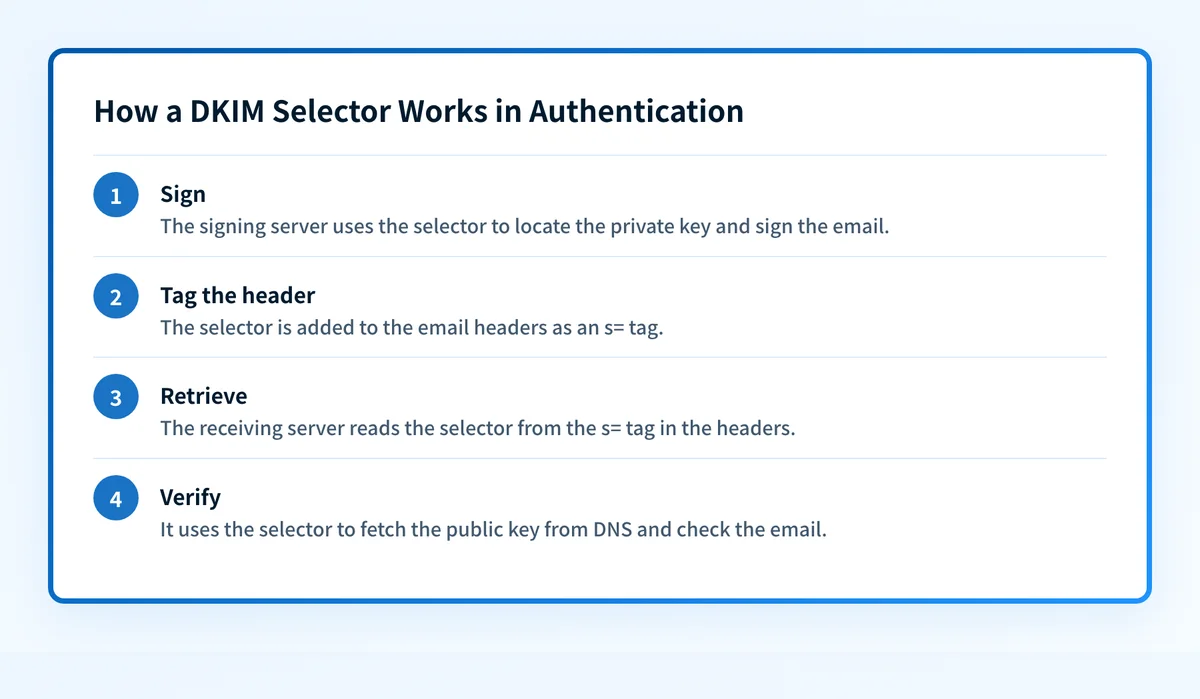 The selector links the signing key to the public key a receiving server fetches from DNS.
On the sending side, your mail server hashes selected headers and the body, encrypts that hash with the private key, and writes the result into the DKIM-Signature: header along with d= (your domain) and s= (the selector for the key it used).
On the receiving side, the server reads s= and d= from the message header, builds the
Verification is a different thing from alignment, which DMARC adds on top: alignment checks that the d= domain matches your visible From: domain. A signature can verify perfectly and still fail alignment, which is a common and confusing failure mode, see why DKIM signatures fail alignment.
How to find your DKIM selector
You don't guess a selector. You read it off a real message:
- Send an email from the service in question to an inbox you control (Gmail or Outlook both work).
- Open the full message headers ("Show original" in Gmail, "View message source" in Outlook).
- Find the
DKIM-Signature:header and read thes=value. That's your selector; thed=value is the signing domain.
Why you'd run multiple selectors
There are two everyday reasons to have more than one selector live at the same time.
Key rotation. Signing keys should be replaced periodically so that a leaked or brute-forced private key has a limited useful life. Rotation is only safe if the new key can go live before the old one is retired, and separate selectors are what make that overlap possible.
Multiple sending services. Your transactional mail, marketing platform, and helpdesk each sign with their own key. Give each its own selector and they never interfere; retiring one service's key doesn't touch the others. Managing several at once is a discipline of its own, see how to manage multiple DKIM records.
Rotating DKIM keys with selectors
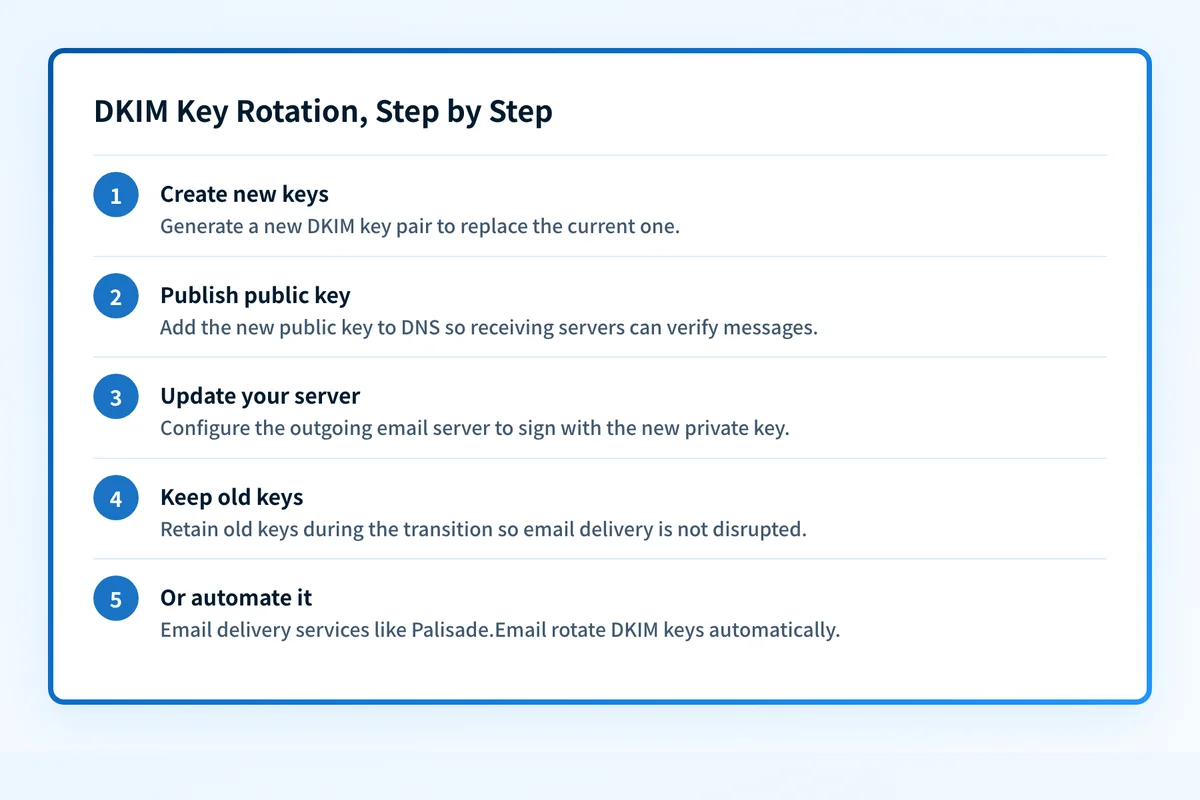 Rotating keys regularly limits the damage a compromised private key can do.
A clean rotation uses a fresh selector for the new key so the two never clash:
- Generate a new key pair (2048-bit RSA is the common baseline).
- Publish the new public key in DNS under a new selector, e.g.
2026a._domainkey.yourdomain.com, as a TXT record (or a CNAME if your provider hosts the key for you). - Switch signing to the new private key and selector on your mail server.
- Keep the old selector live for a grace period. Messages already in transit were signed with the old key and still need to verify.
- Retire the old key once no mail depends on it, and repeat on a schedule.
Selector vs. DKIM record: what's the difference?
They're related but not the same. The selector is the name (s= tag) that locates a key. The DKIM record is the DNS entry at
If you're setting DKIM up alongside SPF and DMARC for the first time, the DMARC, DKIM, and SPF overview shows how the three fit together, and the Email Security Score checks all of them in one pass.
Related reading
- What are DMARC, DKIM, and SPF?
- Why does my DKIM signature fail alignment?
- How can you effectively manage multiple DKIM records?
Questions readers ask
Frequently asked questions
Can I have more than one DKIM selector on the same domain?
Yes: that's the point of selectors. You can publish as many as you have keys, each at its own
What happens if two services use the same selector name?
They collide. If two providers both try to use, say, s1, only one public key can live at s1._domainkey.yourdomain.com, so mail from the other service fails verification. Give each service a distinct selector, many providers already namespace theirs (like google or a provider-specific prefix) to avoid exactly this.
How often should I rotate DKIM keys?
Rotate DKIM keys every six to twelve months for most senders, and immediately if you suspect a private key was exposed. The security benefit comes from limiting how long any single key is useful to an attacker; a new selector each cycle makes the change safe. Automated rotation removes the temptation to skip it.
Does changing my DKIM selector break existing mail?
Not if you overlap. Publish the new selector's key, switch signing, and leave the old selector in DNS until in-flight mail signed with the old key has been delivered and verified. Only then retire it. Removing the old record too soon is the usual cause of a rotation that bounces legitimate mail.
Why does DKIM pass but DMARC still fails?
DKIM verifying only proves the signature is valid. DMARC additionally requires the d= domain to align with your From: domain. A third-party platform signing with its own domain will verify but not align. The fix is to sign under a selector on your own domain; see why DKIM signatures fail alignment and the common reasons DKIM fails.

Written by
Ian BussieresCTO & Co-Founder, Palisade
Ian Bussieres is the CTO and co-founder of Palisade, agentic DMARC software for IT teams and MSPs.
More from Ian →