Dig DKIM record
 ChatGPT
 Claude
 Gemini
 Perplexity
 Grok
GrokIn brief
Use dig to query a DKIM record by selector, interpret TXT or CNAME results, and know when DNS evidence is not a message pass.
To dig a DKIM record, query the selector and signing domain from DKIM-Signature: dig +short TXT . For example, s=mail2026 and d=example.com become mail2026._domainkey.example.com. A non-empty p= value shows public key material at that name. An empty p= revokes the key and cannot verify a signature. Neither result proves that a receiving mailbox passed a specific message. RFC 6376 defines the selector-based lookup.
At a glance
Quick takeaways
- Start with the
s=selector andd=signing domain, not the visible From address. - Query the selector-scoped name for a TXT answer.
- Treat a non-empty
p=value as DNS-publication evidence only; an emptyp=revokes the key. - If the selector is a CNAME, verify the target before judging the key path.
- Use receiver-added
Authentication-Resultsto check whether a delivered message passed DKIM.
Build the DKIM DNS name
A DKIM signature identifies a signing domain with d= and a selector with s=. A verifier combines them as
Use an actual delivered message when possible. Copy the values from its DKIM-Signature field instead of guessing a selector from a provider name or querying the root domain. This is an illustrative header, not a record to publish:
DKIM-Signature: v=1; d=example.com; s=mail2026; ...Those values produce this lookup name:
mail2026._domainkey.example.comRun the dig command
Run the TXT query against the full selector-scoped name:
dig +short TXT mail2026._domainkey.example.comReplace both example values with the s= and d= values for the message or the exact provider-generated selector. Cisco's DNS lookup guide for DKIM documents the same dig approach for DKIM-related DNS records.
If that command does not show a TXT public key, ask DNS specifically whether the selector is delegated:
dig +short CNAME mail2026._domainkey.example.comThen query the returned target for TXT. Do not replace the target with a guessed provider hostname. A CNAME record can be a valid delegation path, but the target must still return usable DKIM key material for the lookup to reach a public key.
Read the result
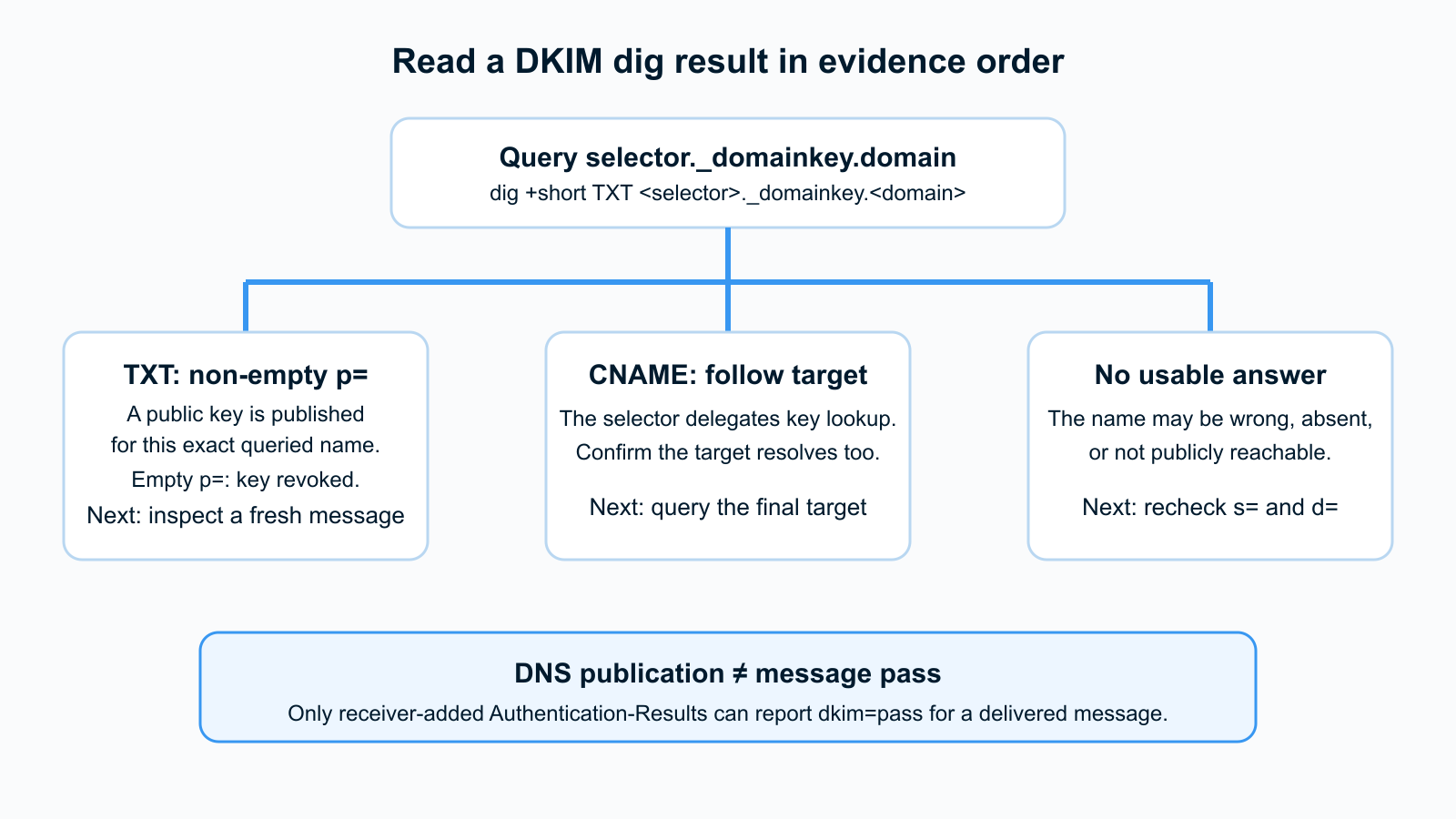
A TXT result with a non-empty p= value contains public key material for the exact name you queried. It supports the limited conclusion that the selector's public DNS path is published. An empty p= means the key is revoked and cannot verify a signature. Neither result reveals a private key, proves that a sender is currently signing, or establishes the result at a receiving mailbox. RFC 6376 section 3.6.1 defines the DKIM key record and its p= tag.
A CNAME result means the selector name delegates elsewhere. Follow that target and inspect its TXT result. A no-answer or NXDOMAIN result means the queried name did not provide a usable answer. It can reflect a wrong selector, wrong signing domain, unpublished record, or resolver view. It is not evidence that the entire domain has no DKIM configuration.
What to do after the DNS lookup
When the TXT record is present, send a fresh message through the same production path and inspect the receiver's Authentication-Results. A dkim=pass result there is message-level evidence, whereas the DNS query only checked the public lookup path. RFC 8601 specifies the Authentication-Results field and its trust boundary.
When the selector does not resolve, compare the exact s= and d= values with the sender's generated settings and the authoritative DNS zone. Do not create a new key just to make a lookup return something: a working DKIM signer also needs the matching private key. For a focused missing-record workflow, see why a DKIM checker says no record found.
If the record resolves but a message still fails, move to message evidence rather than changing DNS blindly. The DKIM record-check workflow explains that distinction, and the DKIM alignment guide covers the separate case where DKIM can pass but DMARC does not align. For the protocol background, read what DKIM is.
Check the selector without the terminal
If you have the selector and signing domain but need a browser-based public-DNS check, use Palisade's DKIM checker after the command result. Its public tool page describes a public DKIM lookup. It cannot validate an unseen message, access a private key, change DNS, or control a receiver's DKIM verdict.
Evidence
Sources and further reading
Questions readers ask
Frequently asked questions
Where do I find the DKIM selector?
Find it in the s= tag of a delivered message's DKIM-Signature header or in the sending provider's generated DKIM settings. A DNS lookup cannot reliably enumerate every selector a domain might use.
Why does dig show a CNAME instead of a DKIM key?
A CNAME can delegate the selector to another DNS name, often operated by the sending service. Query the returned target for TXT and confirm that its answer contains usable DKIM key material before treating the lookup path as complete.
Does a public DKIM record mean DKIM passes?
No. A public record establishes that a key is published at the queried DNS name. A pass also depends on a message being signed with the matching private key and surviving verification by the receiver.
What does an empty p= value mean?
An empty p= value means the DKIM key is revoked. It is not usable public key material, so a verifier cannot use it to verify a signature. Check the sender's current selector and its published key before replacing DNS records.
What does no answer mean for a DKIM dig lookup?
It means the exact selector-scoped name did not return usable key material to that query. Recheck the selector, signing domain, authoritative DNS zone, and any CNAME delegation before concluding that DKIM is absent.

Written by
Dominic LandryDeliverability & DNS
Dominic Landry works on email deliverability and DNS configuration at Palisade, from SPF and DKIM records through to DMARC enforcement.
More from Dominic →