How long does DNS propagation take for email records?
 ChatGPT
 Claude
 Gemini
 Perplexity
 Grok
GrokIn brief
DNS changes take effect as cached copies expire, not on a fixed timer. What TTL controls for MX, SPF, DKIM and DMARC, and how to verify a change landed.
DNS changes for SPF, DKIM, DMARC, and MX records take effect when DNS resolvers stop using their cached answer and query again. For an ordinary record edit, that is normally bounded by the TTL that was published when the resolver cached the old value. It can be minutes or hours, not a fixed global "propagation" period. A new record can also be delayed by cached negative responses.
At a glance
Quick takeaways
- DNS "propagation" usually means different resolvers have different cached answers.
- The old record's TTL controls how long an already cached answer may remain usable.
- SPF, DKIM, DMARC, and MX records follow the same DNS caching rules.
- Lowering a TTL helps a future planned change, not a record that resolvers already cached.
- A missing new record may be a negative-cache result rather than a failed publication.
- A public DNS lookup confirms a published answer, not that a production message used it.
How DNS cache timing works for email records
A DNS authoritative server publishes the current record. Recursive resolvers, including the resolvers used by mailbox providers, can cache that answer for its TTL. RFC 2181 defines TTL handling for DNS resource records, including the rule that a cached record's remaining TTL decreases over time until the resolver must obtain fresh data.
This applies to common email records:
- SPF is published as a DNS TXT record.
- DKIM commonly uses a TXT or CNAME record at a selector name.
- DMARC uses a TXT record at
_dmarc.. - MX records identify the hosts that accept inbound mail, and an MX record check returns the published set with its preference order.
The same cache behavior can make a new record appear absent. RFC 2308 specifies negative caching for DNS: a resolver can cache a negative response such as NXDOMAIN or no-data, using the applicable SOA-based negative TTL. That matters when you create a new DKIM selector or first publish a DMARC record.
For broader context on the records involved, see the email authentication learning hub.
When the timing changes
The useful decision rule is to compare the old TTL, the change type, and the evidence you have.
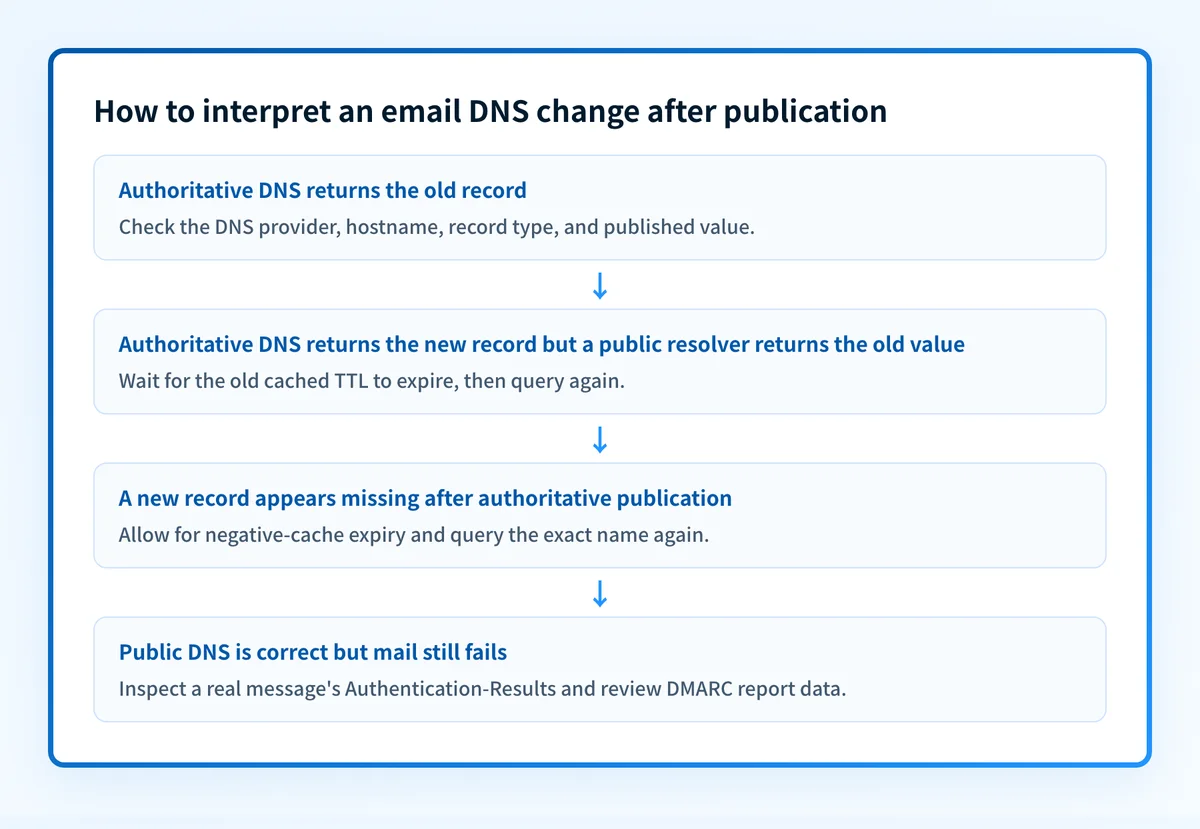
- If you edited an existing TXT or MX record, expect resolvers that cached the old answer to keep it until its remaining old TTL expires.
- If you published a record at a name that did not previously exist, allow for negative caching before treating a missing public answer as a DNS-host failure.
- If the authoritative nameserver still returns the old value, the problem is publication or the queried name, not downstream cache expiry.
- If authoritative DNS returns the new value but public resolvers disagree, the difference is consistent with independent caches expiring at different times.
- If the record is visible publicly but mail still fails, inspect a real message and the sending service's status. DNS visibility alone does not show that the application signs with the intended DKIM selector or uses an aligned SPF identity.
Keep the old MX destination available through the planned cache-expiry window during a mail-host migration. Removing it too early can cause mail to reach a server that no longer accepts it.
A worked DNS timing example
Assume a domain changes its DMARC record at 14:00. A resolver queried the old record at 13:45, when the TTL was 3600 seconds. That resolver may continue returning the old record until about 14:45, even though authoritative DNS returned the new value immediately after the edit.
Illustrative only. Query the exact record name and type.
# DMARC policy record
dig TXT _dmarc.yourdomain.com
# DKIM selector record
dig TXT selector1._domainkey.yourdomain.com
# MX records
dig MX yourdomain.com
A query response includes a TTL value beside the returned record. Compare that value and content across an authoritative server and more than one public resolver. The authoritative result establishes what your DNS provider is publishing. Public resolver results show what those particular caches currently return.
A long TXT value may be split into multiple quoted character-strings in DNS presentation, while still forming one TXT record value. Review the DNS record length limit for email records before treating that formatting as a propagation problem.
Check the change with the evidence you have
Start with the evidence closest to the change:
- If you have DNS access, query the authoritative nameserver for the exact hostname and record type. Confirm the new value is present there before waiting on caches.
- If authoritative DNS is correct, use a DNS lookup to inspect the public result for the same hostname and record type. Repeat after the old TTL window, rather than using one lookup as proof of global state.
- If the record is a DKIM, SPF, or DMARC change, send a real message through the exact production service. Inspect its
Authentication-Resultsheader. RFC 8601 defines the Authentication-Results header field, which records authentication assessment results from the evaluating system. - After DMARC reports accumulate, use them to identify sending sources and authentication or alignment failures. A delivered-message check and DMARC report data answer different questions from a DNS query.
Check the published email DNS record
Run the domain through Palisade's DNS lookup to inspect the currently public DNS answer after you confirm the exact hostname and record type.
Check the published DNS record
A public lookup does not prove which production service sent a message, whether a message passed SPF, DKIM, or DMARC, or what a receiving mailbox provider will do with future mail. For ongoing DMARC work, Palisade can analyze aggregate-report data, identify sending sources and alignment issues, and propose a next policy step for human review. It does not apply the DMARC policy change for you.
Evidence
Sources and further reading
Questions readers ask
Frequently asked questions
Does DNS propagation always take 24 to 48 hours?
No. An ordinary email DNS record change is governed by cached TTLs, so the relevant wait is the remaining TTL on cached old answers. A fixed 24 to 48 hour expectation does not describe every SPF, DKIM, DMARC, or MX edit.
Will lowering the TTL after a DNS change make it appear faster?
No. Resolvers that already cached the record can use the TTL that applied when they received that answer. Lower the TTL before the next planned change, then wait through the prior TTL before making that change.
Why does a new DKIM or DMARC record still appear missing?
It may be a cached negative DNS response. RFC 2308 allows resolvers to cache negative answers, so a resolver that checked the name before publication can continue reporting no record until that negative cache expires.
Does clearing my computer's DNS cache update Gmail or another mailbox provider?
No. Clearing a local cache changes only what your own device queries next. A mailbox provider evaluates mail using its own infrastructure and DNS resolver state.
Can a DNS lookup prove my email authentication is working?
No. A DNS lookup can show the published record returned by the resolver you queried. Validate the real sending path with a delivered message's authentication results, then use DMARC aggregate reports as they accumulate.
Look up the published DNS answer before changing it
Enter your domain and record.

Written by
Dominic LandryDeliverability & DNS
Dominic Landry works on email deliverability and DNS configuration at Palisade, from SPF and DKIM records through to DMARC enforcement.
More from Dominic →