What does 'all' mean in an SPF record?
 ChatGPT
 Claude
 Gemini
 Perplexity
 Grok
GrokIn brief
What does 'all' mean in an SPF record? Learn how SPF all matches senders, what qualifiers mean, and how to validate the final policy correctly.
In an SPF record, all is the final mechanism that matches every sending IP address not matched earlier in the record. Its qualifier sets the SPF result for those remaining senders: -all returns Fail, ~all returns SoftFail, ?all returns Neutral, and a bare all returns Pass. RFC 7208 defines all as a mechanism that always matches, so it belongs at the end of the record.
At a glance
Quick takeaways
- The SPF
allmechanism always matches when evaluation reaches it. - SPF checks mechanisms from left to right and stops at the first match.
-allproduces an SPF Fail result for senders not authorized earlier in the record.~allproduces SoftFail, while?allproduces Neutral.- A bare
allhas the default+qualifier and produces Pass for every sender. - Any SPF mechanism written after
allcannot be evaluated.
Who is affected?
The all mechanism affects every domain that publishes an SPF policy, including domains that send through a hosted mailbox provider, an email service provider, a helpdesk, a payroll system, or an application server.
SPF evaluates the SMTP client IP address against the domain used in the SMTP MAIL FROM command, or against the HELO or EHLO domain when MAIL FROM is empty. RFC 7208's SPF evaluation rules require a receiver to evaluate mechanisms in order and stop when one matches.
all does not identify a legitimate sender. Earlier mechanisms such as ip4, ip6, a, mx, and include do that work. The final all mechanism supplies the default result for everything left over.
This rule applies only to SPF's identity checks. SPF Pass alone does not prove that the visible From: domain is authenticated. DMARC evaluates whether SPF or DKIM aligns with that visible domain. The email authentication learning hub explains how SPF, DKIM, and DMARC fit together.
What are the requirements?
all always matches
RFC 7208 defines all as a mechanism that always matches. A receiver reaches it only if no previous mechanism has matched the sending IP address.
v=spf1 include:_spf.example.net ip4:192.0.2.10 -allIn this illustrative record, a sender authorized by include:_spf.example.net or using 192.0.2.10 receives SPF Pass before evaluation reaches -all. Every other sender reaches -all and receives SPF Fail.
Do not publish this example unchanged. Your email providers generate their own include domains, IP addresses, and sending configuration.
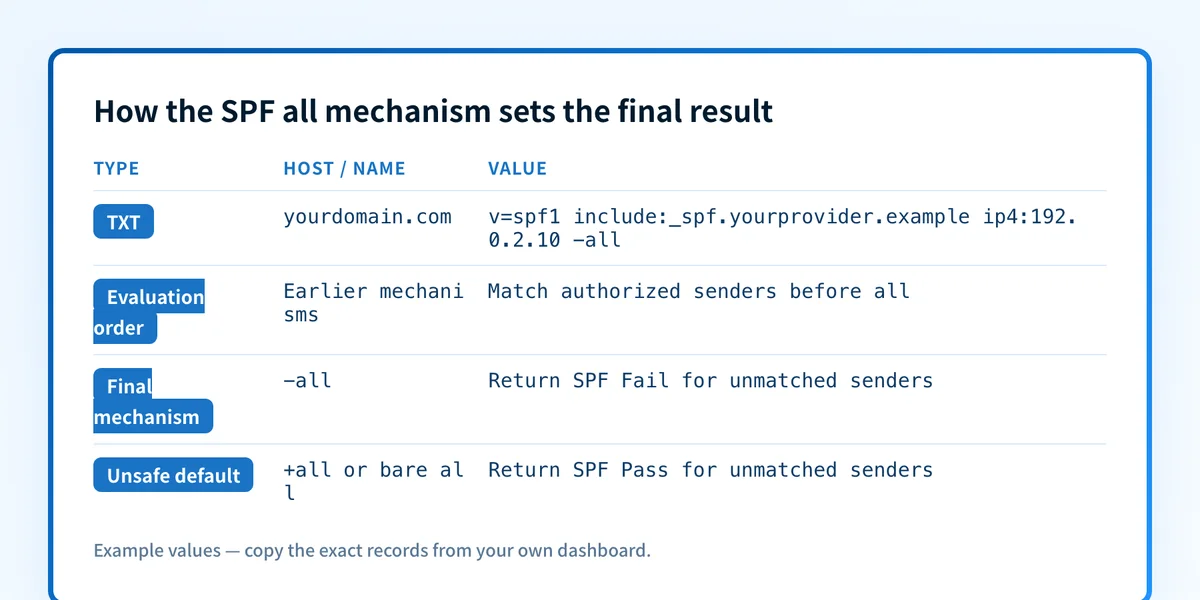
Because all matches every remaining sender, it must be last. RFC 7208 section 5.1 states that mechanisms after all will never be tested.
The qualifier determines the SPF result
An SPF mechanism can have a qualifier. RFC 7208 defines + as Pass, - as Fail, ~ as SoftFail, and ? as Neutral. If a qualifier is omitted, + is the default.
v=spf1 -all
v=spf1 ~all
v=spf1 ?all
v=spf1 +all
-all means that an IP address reaching this mechanism receives SPF Fail. It does not instruct every receiver to reject a message. SPF produces an authentication result, and each receiver applies its own mail-handling policy.
~all means the sender receives SPF SoftFail. RFC 7208 describes SoftFail as a result for a host that is probably not authorized, while allowing the receiver to accept the message. Treat it as a distinct SPF result, not as a guarantee that mail will be delivered or accepted.
?all produces Neutral. RFC 7208 says Neutral means the domain owner has explicitly stated that nothing can be said about the validity of the identity.
+all, or a bare all, produces Pass for every sender that reaches it. It makes SPF unable to distinguish an unauthorized IP address from an authorized one for that evaluated identity.
The record has one SPF policy record
A domain name must not publish multiple SPF records that begin with v=spf1. RFC 7208 section 3.2 says multiple records cause SPF evaluation to return PermError.
Keep authorized sending mechanisms in one record, then put the selected all mechanism last. Do not merge policies by appending a second all or by adding mechanisms after the existing one.
For a focused explanation of individual address mechanisms, see what ip4 means in an SPF record and what ip6 means in an SPF record.
When does the requirement take effect?
The controlling standard is RFC 7208, Sender Policy Framework, published in April 2014. It is a final IETF Standards Track RFC and obsoletes RFC 4408.
RFC 7208 does not set a future enforcement date for all. The rule that all always matches, the qualifier meanings, and the left-to-right evaluation behavior apply whenever a receiver evaluates an SPF record under the RFC.
Mailbox providers can make separate decisions about how they use SPF results. Those decisions can change and are outside the all mechanism's protocol definition. An SPF Fail from -all is evidence that the evaluated sender was not authorized by the SPF policy. It is not, by itself, proof of a particular mailbox-provider action.
How do I implement the requirement?
1. Inventory every system that sends with the domain
List each production system that sends mail using the domain's SMTP envelope identity. Include employee mail, marketing platforms, transactional mail, support systems, billing services, and servers under your control.
Ask each provider for its documented SPF include domain or the IP ranges it requires. Do not copy another organization's record values. A sender that is absent from the policy will reach the final all mechanism.
2. Put authorized mechanisms before all
Add each approved include, ip4, ip6, a, or mx mechanism before the final policy. Keep the policy as one DNS TXT record beginning with v=spf1.
v=spf1 include:_spf.yourprovider.example ip4:192.0.2.10 ~allThis is a structural example only. Use the values supplied by your own provider and domain configuration.
If your record starts with the required version tag, the v=spf1 mechanism guide explains why that tag identifies the TXT record as an SPF policy.
3. Select the final qualifier deliberately
Publish ~all on a domain that sends mail, and -all on a domain that sends none. Under an enforcing DMARC policy, SoftFail and Fail give a receiver the same non-pass for an unlisted sender, and Fail carries the extra risk that a receiver rejects during the SMTP transaction before DMARC evaluation runs. SPF hard fail versus softfail weighs that decision in full, with the receiver behaviour and the vendor guidance on both sides.
Whichever qualifier you publish, an unlisted sender still needs finding and authorizing. The qualifier sets the result for what is left over; it does not complete the inventory.
Avoid +all and a bare all unless you intentionally want every sender to receive SPF Pass. ?all explicitly publishes Neutral and does not express an authorization boundary.
4. Keep DNS lookup limits in view
An SPF evaluation can cause DNS lookups through mechanisms such as include, a, mx, exists, and redirect. RFC 7208 section 4.6.4 limits those DNS-querying terms to 10 during one SPF check. If evaluation exceeds the limit, the result is PermError, so a receiver may never get as far as the result you intended from all.
Count the evaluated lookup path after each provider change. A syntactically correct final all mechanism does not repair a policy that exceeds the lookup limit, because PermError is returned before evaluation reaches it.
How do I validate compliance?
First, inspect the authoritative DNS TXT response and at least one public resolver response. Confirm there is one v=spf1 policy, every authorized mechanism appears before all, and the chosen all qualifier is at the end.
Then send a real message through each production path. In the delivered message headers, inspect the receiver's Authentication-Results field for the SPF result and the identity it evaluated. RFC 8601 defines the Authentication-Results header field, including SPF result properties such as smtp.mailfrom and smtp.helo.
Finally, review DMARC aggregate reports after data has accumulated. This is the layer that helps identify production sources and alignment outcomes across real traffic. A DNS lookup confirms the published text. A provider dashboard can confirm its own configuration. Neither one proves that a production message used the intended return-path domain or that every receiver will make the same delivery decision.
Check the final SPF policy before changing it
Before changing the final qualifier, inspect the published record with the SPF record checker. Compare the result with message headers from each sender and with DMARC aggregate-report evidence.
Palisade autonomously analyzes DMARC aggregate-report data, identifies sending sources and SPF or DKIM alignment issues, and creates prioritized remediation tickets for human review. It can help expose senders that a public SPF lookup cannot see across time. A DNS check does not prove the production sending path, continuously monitor later changes, or guarantee a receiver's delivery decision.
Evidence
Sources and further reading
Questions readers ask
Frequently asked questions
Does all have to be last in an SPF record?
Yes. all always matches, and SPF evaluation stops at the first matching mechanism. Any mechanism after all is unreachable.
Is a bare all the same as +all?
Yes. The default SPF qualifier is +, so all produces Pass for every sender that reaches it.
Should I use ~all or -all?
Use ~all on a domain that sends mail, and -all on a domain that sends none. Once DMARC is at p=quarantine or p=reject, SoftFail and Fail give the same non-pass for an unlisted sender, so Fail adds no protection on a sending domain while still risking SMTP-time rejections of forwarded mail.
What happens if a record has no all mechanism?
Evaluation runs off the end of the record without a match and returns Neutral, the same result ?all states explicitly. A redirect= modifier is the exception: it replaces the evaluation with another domain's record, and that record's own all mechanism supplies the result.
Can SPF all protect the visible From address?
No. SPF evaluates the SMTP envelope identity, usually the MAIL FROM domain. DMARC checks whether that authenticated identity aligns with the visible From: domain.

Written by
Dominic LandryDeliverability & DNS
Dominic Landry works on email deliverability and DNS configuration at Palisade, from SPF and DKIM records through to DMARC enforcement.
More from Dominic →