Email deliverability Q&A
How do I move from DMARC p=none to p=reject?

By Samuel Chenard · CEO & Co-Founder, Palisade · Reviewed August 16, 2026
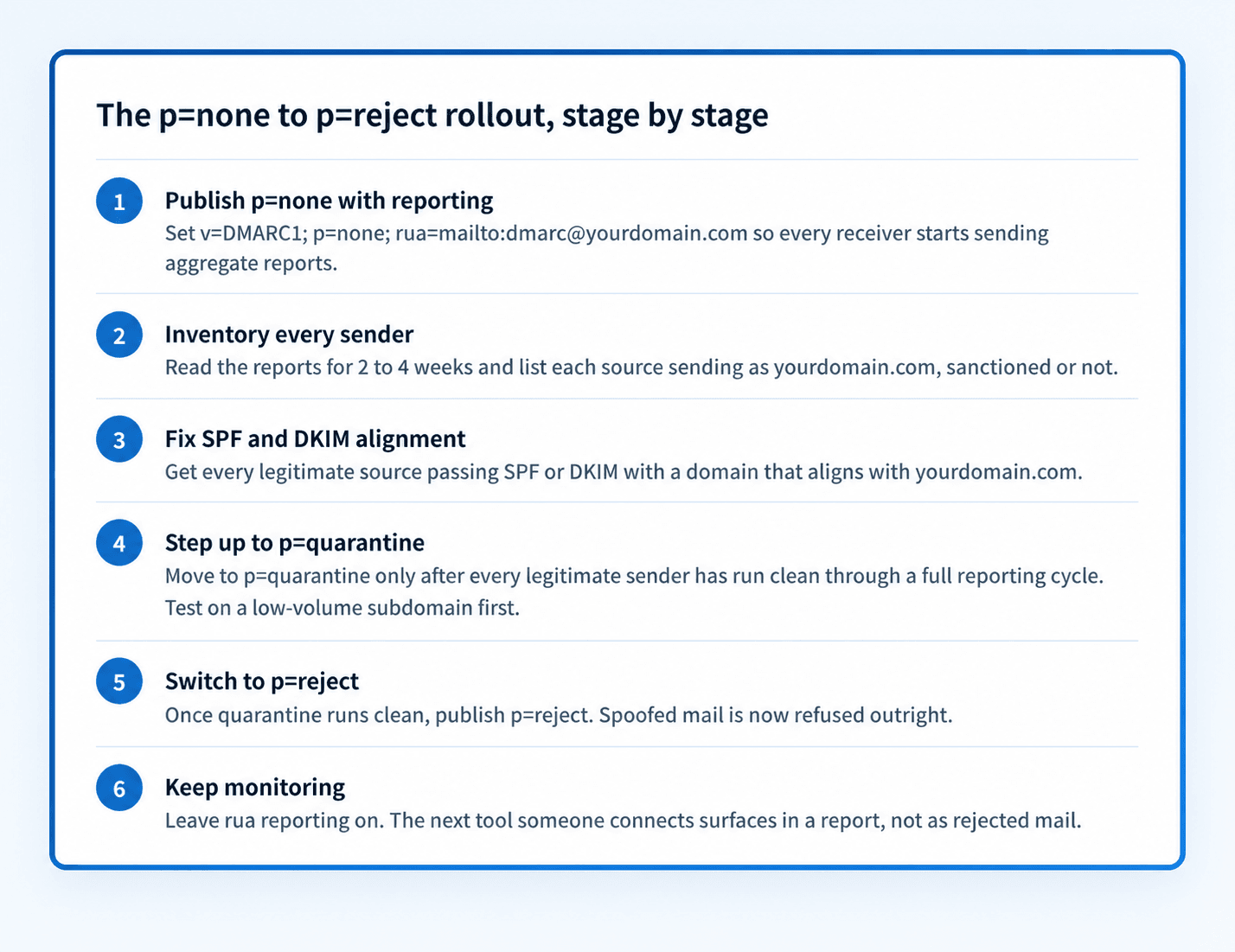
Move in stages: monitor at p=none with rua reporting, fix alignment for every legitimate sender the reports reveal, apply full p=quarantine to a low-volume subdomain first, then switch clean domains to p=reject. RFC 9989 removed percentage sampling, so reports and whole-policy stage gates (not pct) control the rollout. Expect four to twelve weeks end to end.
| At a glance | |
|---|---|
| The stages | p=none with rua reporting, then full p=quarantine on a lower-risk scope, then p=reject |
| Minimum monitoring | Google: one week at p=none is usually enough for reports to cover all mail streams |
| Realistic total | 4 to 6 weeks for a simple single-vendor domain; 2 to 4 months for a domain with many sending services |
| The gate for each step | Every legitimate sender passing DMARC alignment in your aggregate reports, not a date on a calendar |
| Rollback | One DNS TXT edit back to the previous policy; receivers honor it as soon as the record's TTL expires |
| Why bother | Only quarantine and reject stop spoofed mail; p=none is a camera, not a lock |
The move from monitoring to enforcement is the whole point of DMARC, and it is also where domains get hurt. Jump straight to p=reject and every legitimate tool that sends as your domain but fails alignment (a CRM, a billing system, a newsletter platform someone connected two years ago) starts getting its mail refused. The staged rollout exists so you find those senders in reports before receivers find them for you.
The mechanics are simple: DMARC policy is one DNS TXT record, and the policy tag steps through three values. What each value does is covered in the glossary entries for p=none (/learning/glossary/dmarc-p-none), p=quarantine (/learning/glossary/dmarc-p-quarantine), and p=reject (/learning/glossary/dmarc-p-reject). The separate pct glossary entry explains why the old sampling tag is now historic. This page is about the order, the evidence to collect at each stage, and when you are actually ready to advance.
Google and Microsoft still publish older examples that use pct, but RFC 9989 removed that tag in May 2026 after inconsistent receiver implementation. Keep the useful parts of their rollout advice: start at p=none with aggregate reporting, test a low-volume subdomain before the parent domain, and advance only when the data is clean. Finishing at reject remains the goal because only enforcement stops direct-domain spoofing.
What Google and Microsoft actually recommend
| Source | Published rollout guidance | Notes |
|---|---|---|
| Google Workspace (Recommended DMARC rollout) | Start at p=none with rua; monitor daily reports; then move through quarantine toward reject. The page still shows legacy pct sampling. | Use its reporting and sequencing advice, but not pct: RFC 9989 made that tag historic |
| Google (Email sender guidelines) | Bulk senders (5,000+ messages/day to Gmail) must publish a DMARC record; enforcement policy can be none | p=none satisfies the mandate; it does not stop spoofing |
| Microsoft 365 (Set up DMARC) | Gradual rollout to p=reject; start with a low-volume subdomain and save the parent domain for last. The page still shows legacy pct increments. | The subdomain sequencing remains useful; current records should omit pct |
| Microsoft (Outlook.com postmaster + high-volume sender announcement) | Since May 5, 2025, domains sending 5,000+ messages/day to Outlook consumer addresses must pass SPF, DKIM, and DMARC; non-compliant mail is junked, then rejected | Microsoft's announcement of the requirements sets the minimum DMARC policy at p=none; enforcement remains your job |
All sources checked 2026-08-16; links in Sources below. Google and Microsoft require a DMARC record, and p=none satisfies their sender mandates. RFC 9989 now controls current DMARC syntax, so this playbook does not reproduce the vendors' legacy pct examples.
Reading aggregate reports: the gate between every stage
Aggregate reports are the evidence that says advance or wait. Each report lists every source IP that sent mail claiming to be your domain, the volume, and whether SPF and DKIM aligned. Your job at p=none is to sort those sources into three buckets: legitimate and passing (fine), legitimate and failing (fix before you enforce), and not yours (the spoofers enforcement will cut off).
The legitimate-and-failing bucket is the work. For each source, get it aligned: add the service to your SPF record, or turn on custom DKIM signing with your domain at the service, so at least one of the two aligns with your From domain. The common trap where raw SPF passes but DMARC still fails is alignment, covered in the sibling page linked below on DMARC failing while SPF passes.
You are ready to leave p=none when the failing-but-legitimate bucket has been empty (or a knowingly accepted loss, like unfixable forwarded mail) for a full reporting cycle across all your mail streams. Monthly newsletters mean a monthly stream; if you send one on the 1st, a week of reports in mid-month never saw it. That is the strongest argument for stretching the monitoring stage past Google's one-week minimum.
Realistic timelines, and what actually sets them
A single domain that only sends through one platform, say Google Workspace plus one ESP, can go end to end in four to six weeks: one to two weeks at p=none, two to three weeks validating full quarantine on a lower-risk scope, then reject. A domain with eight SaaS tools sending as it, some owned by marketing and some by nobody, is a two-to-four-month project, and almost all of that time is chasing the owners of misaligned senders, not editing DNS.
The calendar is not the constraint; coverage is. Each stage ends when a full cycle of every mail stream has reported clean, and slow streams (monthly invoices, quarterly statements) stretch the schedule. Rushing a stage does not make the misaligned sender go away; it just moves the discovery from a report you read to a bounce your CEO forwards you.
Set the record's TTL to something short (an hour) while you ramp. It makes every step, forward or backward, take effect quickly, and it costs nothing.
Rollback: quarantine misfires are recoverable, reject misfires are not
The rollback mechanism is the same DNS edit as the rollout: drop the policy back one level, and receivers honor the new record as soon as the TTL expires. There is no penalty box for retreating; DMARC has no memory of your previous policy.
The asymmetry between the two enforcement levels is why the quarantine stage exists at all. Mail wrongly quarantined lands in spam folders and can be found, released, and used to diagnose which sender you missed. Mail wrongly rejected is gone; the sender gets a bounce and the recipient gets nothing. Watch reports and spam-folder complaints at full p=quarantine, and move to reject only after that scope has run clean for a full cycle.
Without pct sampling, reduce blast radius structurally: start with a lower-volume subdomain or a simpler domain, keep a short TTL, and predefine the one-step rollback to p=none. That produces a deterministic policy instead of depending on receiver-specific sampling.
Stage-by-stage: what you see, what it means, what to do
| Where you are | What the reports show | What to do |
|---|---|---|
| p=none, week 1 | Unknown source IPs failing alignment | Identify each: your tools first (check vendor docs for their sending IPs), then treat the rest as spoofing |
| p=none, ready to advance | All legitimate sources aligned for a full cycle of every mail stream | Move a low-volume subdomain to full p=quarantine with a short TTL |
| p=quarantine on a lower-risk scope | A legitimate source starts failing after a vendor-side change | Drop that scope back to p=none, fix SPF or DKIM alignment, then retry quarantine |
| p=quarantine, full policy | Clean reports; spoofed volume being quarantined | Hold one more full cycle, then switch the policy tag to reject |
| p=reject | Spoofed mail rejected at the door; occasional forwarding losses | Keep rua reporting on forever; every new sending tool must be aligned before launch |
| Any stage, valid mail bouncing | Recipients' servers refusing your legitimate mail | Roll back one step, match the bounce code in the SMTP reference at /learning/smtp-error-codes, fix, re-advance |
Rejections for missing or failing authentication surface as hard bounces with provider-specific codes (Gmail's 550 5.7.26, Microsoft's 550 5.7.509 among them). Each code has its own walkthrough in the SMTP error-code reference at /learning/smtp-error-codes.
How to fix it
Check what your domain publishes today
Run your domain through the free DMARC checker below. It shows your current policy, reporting addresses, and any legacy pct tag, so you know which stage you are starting from and whether reports are flowing at all.
Run the check now
Enter your sending domain and the check runs instantly on the next page. Free, no signup.
Publish p=none with a rua address you will actually read
If you have no record yet, publish
v=DMARC1; p=none; rua=mailto:...with a dedicated mailbox or a report-parsing service as the destination. Raw reports are gzipped XML; nobody reads them by hand at any real volume.Inventory every sender from the aggregate reports
After a week or more of reports, list every source sending as your domain and classify it: legitimate and aligned, legitimate but failing, or spoofing. The middle bucket is your work queue; the sibling page on aggregate reports (linked below) covers how to read them.
Fix alignment for each legitimate source
Per source, make SPF or DKIM align with your From domain: add the service to SPF, or enable custom DKIM signing with your domain at the service. Validate each change with the checkers at /tools/spf and /tools/dkim before moving on.
Test full p=quarantine on a lower-risk scope
Once a full cycle of every mail stream reports clean, apply p=quarantine to a low-volume subdomain or a simpler domain first. Keep the TTL short, hold the full policy until reports and user feedback remain clean, then repeat on broader scopes.
Switch to p=reject
After full quarantine has run clean for a full cycle on the scope you are advancing, change the policy tag to reject. Spoofed mail now bounces off receivers instead of reaching spam folders.
Keep monitoring; enforcement is a state you maintain
Leave rua reporting on permanently. The next misconfigured tool someone connects will surface in a report, and at p=reject the cost of missing it is rejected mail, not a dashboard anomaly.
Related free tools: SPF checker · DKIM checker · DMARC record generator
The playbook is well documented; executing it is the grind
Nothing above is secret. Google and Microsoft both publish the stages, and every DMARC monitoring product will show you the failing senders. What monitoring tools do not do is the middle of the playbook: chasing alignment fixes across eight SaaS vendors, deciding when a stream has truly run clean, sequencing lower-risk scopes, and rolling back when a vendor silently changes its sending infrastructure. That is why so many domains sit at p=none for years with a dashboard nobody opens.
This ramp, from first report to a held p=reject, is exactly the work Palisade's agent takes on: it hosts the DMARC record, reads the reports, proposes each policy step as sources come into alignment, and keeps watch once enforcement holds. Your team approves every step before it ships. Monitoring is the means; p=reject is the product.
DMARC software that does the work
Palisade's AI agent carries every domain to p=reject, with you approving each step. The agent's fixes and hosted SPF, DKIM and DMARC records are part of the full product, which you can try before any charge.
Audit any domain free, no card needed. A card starts the 15-day trial.
Why it matters for MSPs
Across a client book, run the rollout as a portfolio, not fifty parallel snowflakes. Baseline every client domain at p=none with reporting on day one of onboarding; the aggregate reports then tell you which clients are two DNS edits from reject and which have a shadow-IT sender problem. Sequence by risk and simplicity: parked domains straight to reject, single-vendor domains next, the multi-tool marketing domains last. The stage gates are identical for every tenant, which is what makes this automatable: Palisade hosts the SPF, DKIM, and DMARC records per client domain, proposes each step to p=reject as its reports run clean for your team to approve, and keeps watch after enforcement, with ConnectWise, HaloPSA, and Autotask integrations so stage changes and new-sender alerts land in your PSA. Your own MSP domain is a free NFR domain to run the ramp on first.
Questions readers ask
Frequently asked questions
How long should I stay at p=none before moving to quarantine?
Can I skip p=quarantine and go straight from p=none to p=reject?
How do I reduce rollout risk now that pct is historic?
How do I roll back if legitimate mail starts getting rejected?
Do Google and Microsoft require p=reject?
What breaks most often when domains reach p=reject?
Should subdomains go to p=reject too?
Sources
Every benchmark above was verified against the vendor's own documentation on the date shown.
- Google's rollout page recommends p=none with rua first, then quarantine and optional reject; as of 2026-08-16 it still contains legacy pct sampling examples that predate RFC 9989. Google Workspace Help: Recommended DMARC rollout (checked 2026-08-16)
- Bulk senders (5,000+ messages/day to Gmail) must set up DMARC; the enforcement policy can be set to none, and the From domain must align with SPF or DKIM. Google Email sender guidelines (checked 2026-08-16)
- Microsoft recommends a gradual rollout to p=reject starting with a low-volume subdomain and saving the parent domain for last; as of 2026-08-16 the page still contains legacy pct examples and cites RFC 7489. Microsoft Learn: Set up DMARC to validate email in Microsoft 365 (checked 2026-08-16)
- Since May 5, 2025, Outlook.com enforces SPF, DKIM, and DMARC for domains sending over 5,000 messages/day; non-compliant mail is junked, with rejection to follow. Outlook.com postmaster (sender policies) (checked 2026-08-16)
- Outlook's high-volume sender requirements target consumer addresses (outlook.com, hotmail.com, live.com) for domains sending over 5,000 messages/day; DMARC must at least be p=none and align with SPF or DKIM; non-compliant mail is routed to Junk after May 5, 2025, with rejection to follow. Microsoft Tech Community: Strengthening Email Ecosystem: Outlook's New Requirements for High-Volume Senders (checked 2026-08-16)
- RFC 9989 replaced RFC 7489 in May 2026, removed pct from the active DMARC tag set, and recommends staged deployment based on reports and lower-risk domains rather than percentage sampling. RFC Editor: RFC 9989 (checked 2026-08-16)