Email deliverability Q&A
What are DMARC aggregate reports?

By Samuel Chenard · CEO & Co-Founder, Palisade · Reviewed July 20, 2026
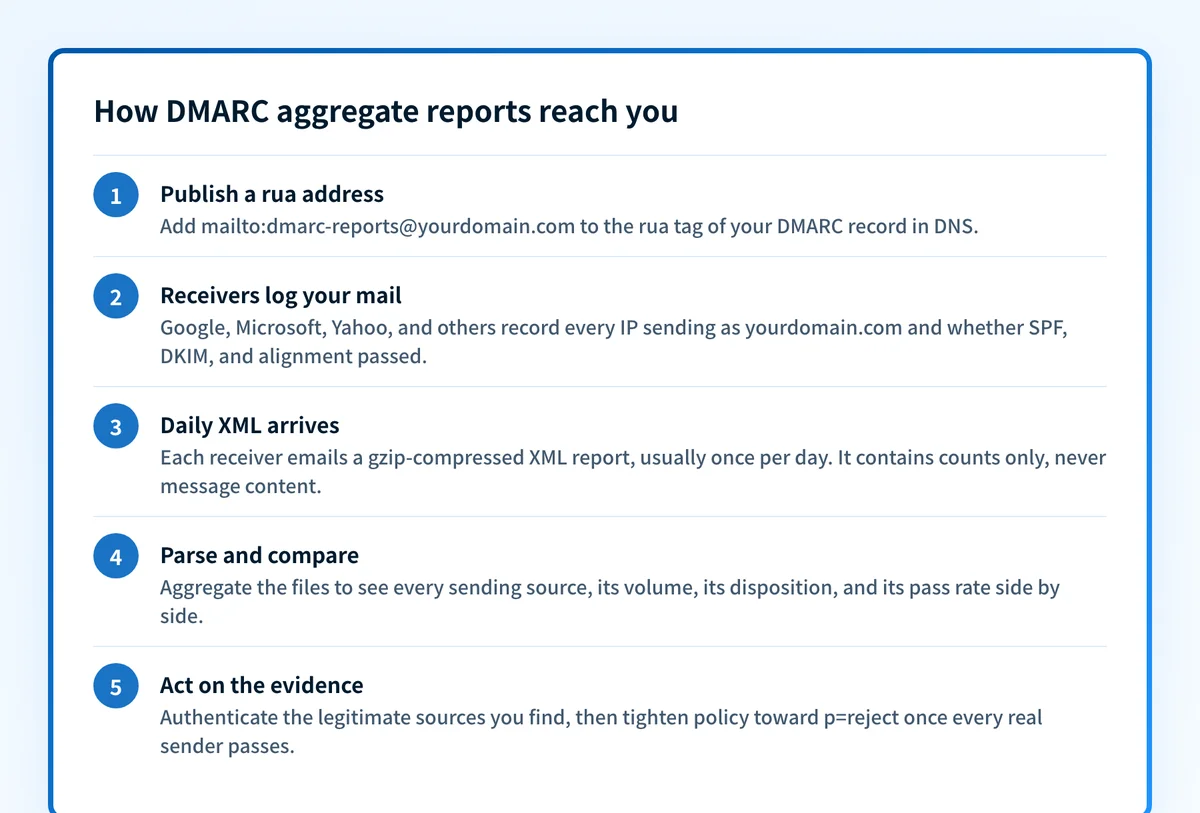
DMARC aggregate reports are XML summaries, usually sent daily, that receiving mail servers email to the address in your DMARC record's rua tag. Each report lists every IP that sent mail claiming to be your domain, how many messages it sent, what the receiver did with them, and whether SPF and DKIM passed. No message content is included.
| At a glance | |
|---|---|
| Format | XML file, usually gzip-compressed, attached to an email |
| Cadence | Daily by default (the ri tag's default is 86400 seconds) |
| Who sends them | Receiving mailbox providers (Google, Microsoft, Yahoo, and others) |
| Where they go | The mailto address in your DMARC record's rua tag |
| What's inside | Per-source-IP counts, disposition applied, SPF/DKIM results and alignment |
| What's NOT inside | Message bodies, subjects, or recipient addresses |
| Why they matter | The only complete inventory of who sends as your domain: the evidence for p=reject |
Publish a DMARC record with a rua tag and something useful happens: every major mailbox provider that receives mail claiming to be from your domain starts emailing you a regular accounting of it. Google's documentation puts it plainly: reports tell you "which servers or third-party senders are sending mail for your domain" and "what percentage of messages from your domain pass DMARC". That includes senders you forgot about and spoofers you never knew about.
The format is fixed by RFC 9990: an XML file that should be gzip-compressed, attached to an email, with a filename that encodes the receiver, your domain, and the reporting window. Cadence is convention rather than a rule, the spec describes daily or more frequent feedback without mandating an interval, and RFC 9989 retired the ri tag that used to request one. In practice you get one report per receiver per day, so a domain with real traffic collects dozens of XML files a week.
Aggregate means aggregate. A report never contains a message body, a subject line, or a recipient address; it contains counts. That distinction matters because DMARC defines a second, separate report type (ruf, the failure or forensic report) that does reference individual messages, and the two get conflated constantly. The next section splits them properly.
What's inside an aggregate report (RFC 9990, Appendix A)
| XML section | Fields | What it tells you |
|---|---|---|
| report_metadata | org_name, email, report_id, date_range (begin/end) | Who generated the report (e.g. google.com) and the window it covers |
| policy_published | domain, p, sp, pct, adkim, aspf, fo | The DMARC policy the receiver found in your DNS at evaluation time |
| record > row | source_ip, count | One sending IP and how many of its messages this receiver saw |
| record > policy_evaluated | disposition (none/quarantine/reject), dkim, spf, reason | What the receiver actually did, and the aligned pass/fail per mechanism |
| record > identifiers | header_from, envelope_from, envelope_to | The From domain the mail claimed, next to the SMTP envelope domain |
| record > auth_results | dkim (domain, selector, result), spf (domain, scope, result) | The raw authentication verdicts before alignment is applied |
The split between policy_evaluated and auth_results is the part worth internalizing: auth_results says whether SPF and DKIM passed at all, while policy_evaluated says whether they passed aligned with your From domain. Mail can pass raw SPF for a vendor's bounce domain and still fail DMARC; the report shows you both layers. Schema verified against RFC 9990 Appendix A, 2026-08-12.
Aggregate (rua) vs forensic (ruf): two different report types
RFC 9989 defines both tags, and the DMARCbis split gives each its own spec. rua requests aggregate feedback, defined in RFC 9990: the XML count summaries this page describes, safe to receive because they carry no message content. ruf requests message-specific failure information, defined in RFC 9991: a per-message failure report in AFRF format (RFC 6591) generated when an individual message fails DMARC, which can include headers from the actual message.
In practice the two are not equally available. Google states in its DMARC setup documentation that "Gmail doesn't support the ruf tag, which is used to send failure reports", and most large receivers have followed the same path for privacy reasons. Plan your DMARC rollout around aggregate reports; treat any ruf data that arrives as a bonus, not a data source you can depend on. The glossary entries for the rf and fo tags cover the failure-report format and trigger options if you do publish one, note that RFC 9989 retired rf along with ri and pct.
How to actually read a record
Open a report and skip to the record blocks; everything else is context. For each record, read three things in order. First, source_ip and count: who sent, and how much. Look the IP up (the PTR record or an IP reputation check usually names the service) and decide whether you recognize it as your mail server, your CRM, your helpdesk, or nothing you run.
Second, policy_evaluated: the dkim and spf values here are the aligned verdicts, and disposition is what the receiver did (none, quarantine, or reject). A legitimate source showing fail on both aligned checks is a misconfiguration you need to fix before tightening policy; an unrecognized source showing fail is exactly the spoofing DMARC exists to stop.
Third, when something fails aligned but you know the sender is real, drop down to auth_results and identifiers to see why. The classic pattern is SPF passing for the service's own bounce domain in envelope_from while header_from is your domain: raw pass, alignment fail. That specific failure mode has its own page at /learning/email-questions/why-is-dmarc-failing-but-spf-passes.
Why nobody reads raw XML for long
One report is readable. The steady state is not: every receiving provider sends its own file for its own window, so a real domain accumulates hundreds of gzipped XML attachments a month, keyed by IP address rather than by sender name, with the same third-party service scattered across dozens of IPs. Answering the one question that matters ("is every legitimate sender passing aligned, and who is the rest?") means joining thousands of records across files and mapping IP ranges to services.
That is why DMARC report parsing exists as a product category: everything from open-source parsers to managed platforms ingests the XML at the rua address and turns it into a per-sender view over time. Palisade does this as part of its managed DMARC service, with unlimited report retention on paid plans, and uses the parsed data to propose each enforcement step for your approval rather than just chart it. Whatever tooling you choose, the goal is the same: stop reading XML, start reading senders.
Reading the report: pattern, meaning, action
| What you see in the records | What it means | What to do |
|---|---|---|
| Known sending service, aligned SPF or DKIM pass | Correctly authenticated source | Nothing; this sender is ready for enforcement |
| Known service, raw SPF pass but aligned fail | Service sends from its own envelope domain; no alignment | Set up custom DKIM signing (or a custom return-path) for that service |
| Known service, both aligned checks fail | Sender was never authenticated for your domain | Add it to SPF and enable DKIM before any policy tightening |
| Unknown IPs, small counts, everything fails | Spoofing or phishing attempts using your domain | No fix needed on their behalf; this traffic is why you move to p=reject |
| Known mail forwarded via a third party, SPF fails, DKIM passes | Forwarding breaks SPF; DKIM survives it | Normal. This is why aligned DKIM matters more than SPF for enforcement |
| A legitimate source appears only in some receivers' reports | Low volume to other providers, or reports still in transit | Wait for more days of data before concluding a sender is clean |
Treat the reports as a census that fills in over weeks, not a dashboard that is complete on day one. A sender that mails your customers monthly will not appear until it next sends.
How to fix it
Check what your DMARC record requests today
Run your domain through the free DMARC checker below. It shows whether a record exists, whether a
ruaaddress is set (no rua tag means no reports, ever), and what policy and interval you are currently publishing.Run the check now
Enter your sending domain and the check runs instantly on the next page. Free, no signup.
Publish a rua address you actually control
Add
rua=mailto:...to your DMARC record, pointing at a mailbox or a parsing service's ingest address. If the reports go to a different domain than the one being reported on, that domain must publish a DMARC verification record authorizing it (the external-destination check in RFC 9990 section 4).Let reports accumulate for two to four weeks
Daily reports from each receiver build the sender inventory over time. Weekly and monthly senders (billing runs, newsletters, renewal notices) only show up when they fire, and those are precisely the ones that break when policy tightens early.
Classify every source: yours, a vendor's, or hostile
Work through the source IPs until each one is identified and either authenticated with aligned SPF or DKIM, or confirmed as traffic you want rejected. The SPF and DKIM checkers at /tools/spf and /tools/dkim validate each fix as you go.
Use the evidence to ratchet the policy
When the reports show every legitimate source passing aligned for a full cycle of your sending calendar, the remaining failures are spoofing, and moving from
p=nonethroughp=quarantinetop=rejectis a decision backed by data instead of a leap. The step-by-step is at /learning/email-questions/how-to-move-from-dmarc-p-none-to-p-reject.
Related free tools: DMARC record generator · SPF checker · DKIM checker
Reports are the evidence; enforcement is the point
It is easy to run DMARC as a reporting hobby: reports arrive, a dashboard fills, and the policy stays at p=none forever, which blocks nothing. The reports have exactly one job: to prove, sender by sender, that tightening the policy will not break legitimate mail. Once they prove it, the value is in acting on it.
Palisade's agent does that work: it hosts your SPF, DKIM, and DMARC records, reads the aggregate reports continuously, and proposes each step to p=reject when the evidence supports it. Your team approves each one, so spoofed mail gets dropped by receivers instead of counted by dashboards.
DMARC software that does the work
Palisade's AI agent carries every domain to p=reject, with you approving each step. The agent's fixes and hosted SPF, DKIM and DMARC records are part of the full product, which you can try before any charge.
Audit any domain free, no card needed. A card starts the 15-day trial.
Why it matters for MSPs
Aggregate report volume scales with tenants: fifty client domains means fifty streams of daily XML from every receiver, and hand-parsing stops being a viable service model at about domain number three. The MSP play is one ingest pipeline and a per-client sender inventory, so onboarding a new client starts with two weeks of reports naming every shadow-IT mailer before you touch a record. Palisade runs that pipeline per client domain with unlimited report retention on paid plans, carries each domain to p=reject with your team approving each step, and pushes alerts into ConnectWise, HaloPSA, or Autotask so a new unauthenticated source becomes a ticket. Pricing is per client domain with rates that improve as the portfolio grows, client email volume is not metered, and your own MSP domain is a free NFR domain to run it on first.
Questions readers ask
Frequently asked questions
How often are DMARC aggregate reports sent?
ri tag that used to request one, so there is nothing to publish that changes the cadence. Google's documentation likewise says reports are usually sent once a day by email.What is the difference between rua and ruf reports?
rua tag requests aggregate reports: XML count summaries per source IP, with no message content. The ruf tag requests per-message failure (forensic) reports in AFRF format, which can include headers from failing messages. Aggregate reports are widely sent; Google states Gmail does not support the ruf tag at all.Do DMARC aggregate reports contain email content or personal data?
Why am I not receiving any DMARC reports?
rua tag, the record has a syntax error so receivers ignore it, the reports go to another domain that has not published the external-destination verification record RFC 9990 requires, or your domain simply sent no mail that reporting receivers saw. Check the record first.Can DMARC aggregate reports be read by a human?
How long should I collect aggregate reports before moving to p=reject?
Who actually sends DMARC aggregate reports?
Sources
Every benchmark above was verified against the vendor's own documentation on the date shown.
- The rua and ruf tags are defined in the DMARC Policy Record Format; rua requests aggregate feedback (RFC 9990) and ruf requests message-specific failure reports (RFC 9991). RFC 9989 retired the ri, rf, and pct tags. RFC 9989 (IETF), section 4.7 and Appendix C.5 (checked 2026-08-12)
- Aggregate reports MUST be XML, SHOULD be GZIP-compressed, and are delivered by email as an attachment to the rua mailto URIs, with a filename encoding receiver, policy domain, and reporting window; no reporting interval is mandated and the ri tag was retired by RFC 9989. RFC 9990 (IETF), section 3.5.2 (checked 2026-08-12)
- The Appendix A schema defines report_metadata, policy_published, and per-record source_ip, count, policy_evaluated (disposition/dkim/spf), identifiers (header_from, envelope_from), and auth_results; disposition values are none, quarantine, reject. RFC 9990 Appendix A (IETF) (checked 2026-08-12)
- DMARC reports are usually sent once a day by email, in XML format, and show which servers send mail for your domain and what percentage passes DMARC. Google Workspace Admin Help (checked 2026-07-20)
- Gmail doesn't support the ruf tag, which is used to send failure reports. Google Workspace Admin Help (DMARC setup) (checked 2026-07-20)