Email deliverability Q&A
Why are my Mailchimp emails going to spam?

By Samuel Chenard · CEO & Co-Founder, Palisade · Reviewed July 20, 2026
Usually because your own sending domain is not authenticated. Mailchimp signs mail and manages its shared IPs, but Gmail and Yahoo now judge the domain in your From address: if it lacks aligned DKIM and a DMARC record, filtering or outright rejection follows. Authenticate your custom domain in Mailchimp, publish DMARC, then fix list hygiene and engagement.
| At a glance | |
|---|---|
| Most common cause | Custom sending domain never authenticated in Mailchimp (no aligned DKIM, no DMARC) |
| Mailchimp's own warning | Sending from an unauthenticated domain may cause delivery issues, per Mailchimp Help |
| Free-address trap | From a gmail.com or yahoo.com address, Mailchimp rewrites your From to a mailchimpapp.com subdomain such as send.mailchimpapp.com |
| Shared IP factor | Most Mailchimp senders share IPs; other tenants' behavior colors the pool's reputation |
| Threshold to know | Gmail and Yahoo require a DMARC record for senders over 5,000 emails per day |
| Who fixes it | You. The decisive records live in your DNS, not Mailchimp's. |
Mailchimp runs one of the largest sending infrastructures in email marketing, so when campaigns start landing in spam, the platform is rarely the broken part. The variables that decide inbox placement sit on your side: whether your From domain is authenticated, what your list looks like, and how recipients react to what you send.
The shift that catches most senders is that mailbox providers stopped grading only the infrastructure and started grading the From domain. Since Gmail and Yahoo introduced bulk-sender requirements in 2024, mail that cannot prove a DKIM or SPF pass aligned with the visible From domain gets filtered or rejected, no matter how clean Mailchimp's servers are. Mailchimp's own documentation is blunt about it: Gmail and Yahoo require custom authentication, and a published DMARC record on top for anyone sending more than 5,000 emails to their users in a day.
So the diagnosis order is: authentication first, then shared IP reputation, then list hygiene and engagement. This page walks all four, in the order they actually cause spam placement.
What Mailchimp itself documents
| Topic | What Mailchimp's help docs say | What it means for you |
|---|---|---|
| Domain authentication | Sending from an unauthenticated domain may cause delivery issues; Gmail and Yahoo require custom authentication, plus a DMARC record above 5,000 emails per day | Authenticating your custom domain is baseline, not optional |
| Free From addresses | From a gmail.com or yahoo.com address, Mailchimp rewrites the From to its send.mailchimpapp.com or mail.mailchimpapp.com subdomain and passes DMARC on Mailchimp's domain | Deliverable, but the reputation accrues to Mailchimp's domain, never yours |
| Shared IP reputation | Some spam filters will flag your emails if anyone with the same IP address has sent spam | On the shared pool, other tenants' mistakes can cost you placement |
| List quality (Omnivore) | Mailchimp's abuse-prevention system checks imported addresses for spamtrap, complaint, and hard-bounce risk, and blocks sending when risk is too high | An Omnivore warning means your acquisition process is feeding you bad addresses |
All four rows verified against Mailchimp's live help center on 2026-07-20; links in Sources below. Mailchimp documents causes and requirements but publishes no inbox-placement percentage, so distrust any blog quoting one.
Cause 1: your sending domain was never authenticated
Out of the box, Mailchimp can deliver your campaigns signed with its own domains. That worked when filters graded the infrastructure; it fails now that Gmail and Microsoft grade DMARC alignment, which demands a DKIM or SPF pass whose domain matches the one in your From address. Mail sent as you@yourbrand.com without yourbrand.com's own aligned DKIM signature has no way to pass, and every campaign teaches filters that your domain sends unauthenticated bulk mail.
The free-address variant is sneakier. If your From address is a gmail.com or yahoo.com address, Mailchimp quietly rewrites it to one of its own mailchimpapp.com subdomains, something like yourname.gmail.com@send.mailchimpapp.com (or the mail.mailchimpapp.com equivalent), so the mail passes DMARC on Mailchimp's domain instead of failing on Gmail's. Delivery survives, but recipients see a strange From address, and every ounce of sender reputation you build lands on Mailchimp's subdomain rather than a domain you own.
The fix is one-time DNS work: verify your custom domain in Mailchimp, add the DKIM CNAME records, and publish a DMARC record. The step-by-step walkthrough lives in our Mailchimp SPF and DKIM setup guide at /learning/how-do-i-set-up-spf-and-dkim-for-mailchimp; no need to repeat it here.
Cause 2: the shared IP pool, and what it does and does not explain
Nearly all Mailchimp customers send from shared IP pools, and Mailchimp acknowledges the exposure plainly in its spam-filter documentation: some spam filters will flag your emails if anyone with the same IP address has sent spam. When a noisy tenant on your pool gets blocklisted, your campaigns can dip with them through no fault of your own.
But be honest about the size of this effect before blaming it. Mailchimp polices its pools aggressively (that is what Omnivore exists for), and modern filtering weights domain reputation heavily precisely because shared IPs say so little about any one sender. If your campaigns are consistently spam-foldered while other Mailchimp senders are fine, the differentiator is almost never the IP; it is your domain, your list, or your engagement.
This is also the strongest argument for authenticating your own domain: it is the only reputation surface in the whole pipeline that belongs entirely to you. On a shared pool, your aligned domain is how filters tell your mail apart from your pool-mates' mail.
Causes 3 and 4: list decay and engagement
Mailchimp screens what you upload. Its abuse-prevention system, Omnivore, checks new addresses for spamtrap, complaint, and hard-bounce risk and blocks sending when the risk runs too high. If you have seen an Omnivore warning, treat it as a free audit result: your signup forms, imports, or list age are feeding you addresses that mailbox providers will punish you for mailing.
Below Omnivore's threshold, decay does quieter damage. Old addresses go abandoned, role addresses (info@, sales@) accumulate, and every send to them costs opens without earning any. Gmail in particular reads sustained non-engagement as a spam signal for your whole domain, so a shrinking active segment slowly drags placement down for everyone else on the list. Prune subscribers who have not opened in six months or run a re-permission pass; a smaller list that opens beats a big one that ignores you.
Bounce codes in your campaign report tell you which problem you have: user-unknown bounces mean list decay, authentication rejections such as Gmail's 550 5.7.26 mean DNS. Each code has its own walkthrough in the SMTP error-code reference at /learning/smtp-error-codes.
Mailchimp spam-placement triage
| Symptom | Likely cause | The fix |
|---|---|---|
| Spam placement at Gmail and Yahoo specifically | From domain not authenticated in Mailchimp, or no DMARC record | Authenticate the custom domain, publish DMARC, confirm alignment |
| From address shows a mailchimpapp.com subdomain | Sending from a free gmail.com or yahoo.com From address | Buy a domain, set up a mailbox on it, authenticate it in Mailchimp |
| Sudden dip across all providers, nothing changed on your end | Shared IP pool turbulence or a blocklisting event | Check blocklists, wait a cycle; if chronic at volume, consider a dedicated IP |
| Omnivore warning on import or send | Purchased, scraped, or stale addresses in the upload | Remove the import, fix acquisition, reconfirm anything old |
| Placement decays slowly over months | Aging list, falling engagement | Cut inactive segments, send re-permission, mail your openers more |
| Hard bounces with an authentication code (e.g. 550 5.7.26) | DMARC alignment failing on your sending domain | Fix DKIM alignment for Mailchimp, then re-verify with the DMARC checker |
For the exact text of any bounce in your Mailchimp campaign report, match the code in the SMTP error-code reference at /learning/smtp-error-codes: verbatim provider strings and the per-code fix.
How to fix it
Score your sending domain before touching anything
Run the domain in your From address through the free email security score below. It checks SPF, DKIM, DMARC, and blocklist status in one pass, so you know immediately whether this is a DNS problem or a list problem.
Run the check now
Enter your sending domain and the check runs instantly on the next page. Free, no signup.
Authenticate your custom domain inside Mailchimp
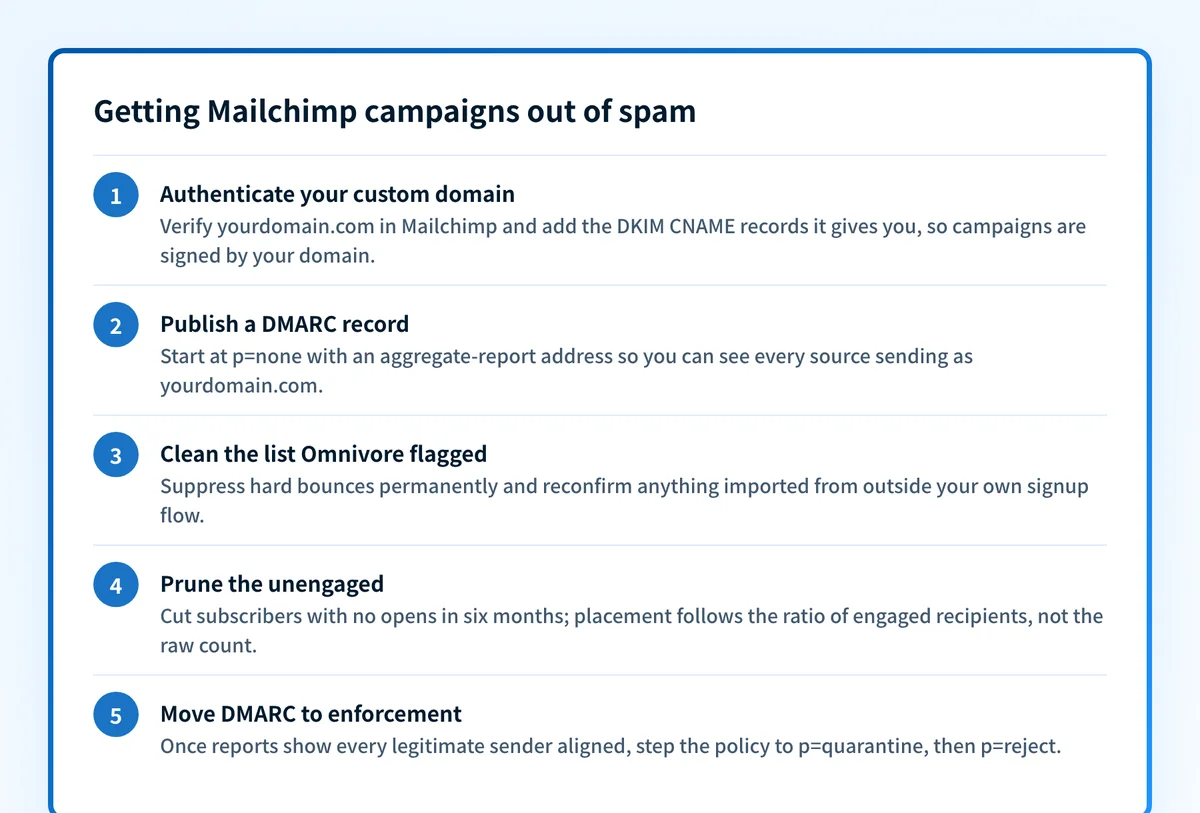
In Mailchimp, verify your domain and add the DKIM CNAME records it gives you, so campaigns are signed by your domain rather than Mailchimp's. The full walkthrough with screenshots is at /learning/how-do-i-set-up-spf-and-dkim-for-mailchimp.
Publish a DMARC record on the sending domain
Gmail and Yahoo require one above 5,000 emails per day, and it is the record that makes your DKIM alignment count. Start at
p=nonewith an aggregate-report address (rua) so you can see every source sending as your domain before tightening.Clean the list Omnivore is warning you about
Suppress hard bounces permanently, delete or reconfirm anything imported from outside your own signup flow, and prune subscribers with no opens in six months. Placement follows the ratio of engaged recipients, not the raw count.
Move DMARC to enforcement once reports run clean
After the aggregate reports show Mailchimp and your other legitimate senders aligned, step the policy to
p=quarantine, thenp=reject. That locks in the reputation you just built and shuts out anyone spoofing the domain your campaigns depend on.
Related free tools: DMARC checker · DKIM checker · SPF checker
Alignment is the backbone; enforcement makes it permanent
Every durable fix on this page runs through one property: mail from your domain proves it is yours, via DKIM aligned with your From address, with DMARC telling receivers to trust the proof. Get that right and the shared-IP question shrinks, the free-address rewrite disappears, and filters can finally score you on your own behavior.
But a DMARC record parked at p=none is a camera, not a lock. The end state is p=reject with every legitimate sender aligned: spoofed mail gets dropped at the door, and the domain reputation your campaigns depend on stops being something a phisher can spend.
DMARC software that does the work
Palisade's AI agent carries every domain to p=reject, with you approving each step. The agent's fixes and hosted SPF, DKIM and DMARC records are part of the full product, which you can try before any charge.
Audit any domain free, no card needed. A card starts the 15-day trial.
Why it matters for MSPs
Client marketing teams set up Mailchimp themselves, skip domain authentication, and the resulting spam complaints land in your queue as "email is broken." Make Mailchimp authentication part of domain onboarding: check every managed domain for aligned DKIM and a DMARC record before the first campaign goes out, and read the DMARC aggregate reports so an unauthenticated Mailchimp audience surfaces as a report line instead of a client escalation. Palisade hosts and manages SPF, DKIM, and DMARC records per client domain, carries each one to p=reject with your team approving each step, and plugs into ConnectWise, HaloPSA, and Autotask. Your own MSP domain is a free NFR domain to trial it on.
Questions readers ask
Frequently asked questions
Does Mailchimp authenticate my emails automatically?
Do I need a DMARC record to send with Mailchimp?
p=none with aggregate reporting shows you exactly which mail is failing alignment.Will a dedicated IP stop my Mailchimp emails going to spam?
Why does my Mailchimp From address show send.mailchimpapp.com?
What is Omnivore in Mailchimp and why did it flag my audience?
Sources
Every benchmark above was verified against the vendor's own documentation on the date shown.
- Gmail and Yahoo require custom authentication, and a published DMARC record for senders of more than 5,000 emails to their users in a 24-hour period; sending from an unauthenticated domain may cause delivery issues. Mailchimp Help: Set Up Email Domain Authentication (checked 2026-07-20)
- When sending from a free address, Mailchimp rewrites the From address to its send.mailchimpapp.com or mail.mailchimpapp.com subdomain so the mail passes DMARC on Mailchimp's domain. Mailchimp Help: Limitations of Free Email Addresses (checked 2026-07-20)
- Some spam filters will flag your emails if anyone with the same IP address has sent spam. Mailchimp Help: About Spam Filters (checked 2026-07-20)
- Omnivore checks audiences for spamtrap, abuse-complaint, and hard-bounce risk and prevents sending to addresses when risk is too high. Mailchimp Help: About Omnivore (checked 2026-07-20)
- Low-volume senders with small subscriber lists cannot build the reputation a dedicated IP needs; a shared IP address helps grow reputation by benefiting from the trustworthy reputations of other senders on the same IP. Mailchimp: Do You Need a Dedicated IP for Email Marketing? (checked 2026-07-20)