Email deliverability Q&A
What is a good email bounce rate?

By Samuel Chenard · CEO & Co-Founder, Palisade · Reviewed July 20, 2026
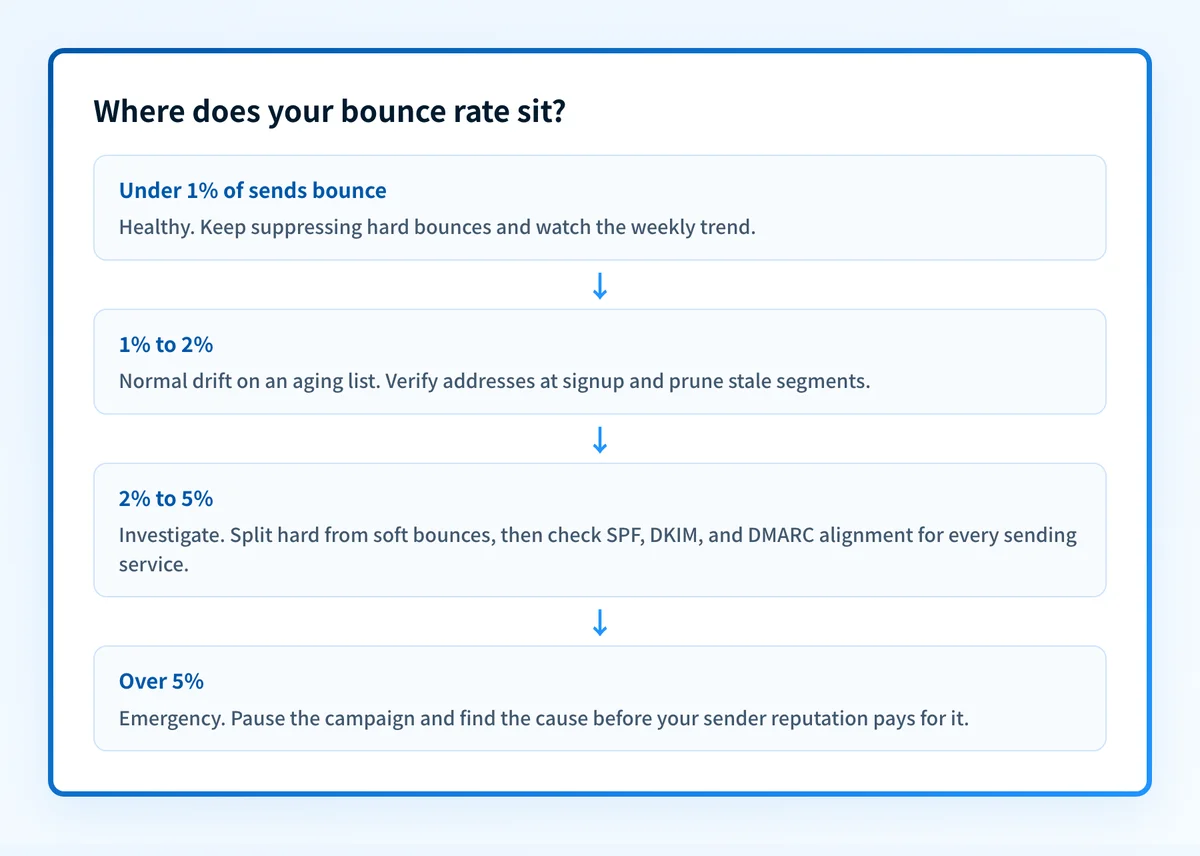
A good email bounce rate is under 2%, and under 1% is the number to aim for. Klaviyo's deliverability guidance rates a bounce rate below 1% as healthy, and Postmark requires under 10% and can suspend sending above it. Between 2% and 5%, investigate; above 5%, stop the campaign and find the cause before your sender reputation pays for it.
| At a glance | |
|---|---|
| Healthy | Under 1% (Klaviyo's documented threshold) |
| Acceptable | 1% to 2%: normal drift on an aging list |
| Investigate | 2% to 5%: something specific is wrong |
| Emergency | Over 5%: pause sending and diagnose. Postmark requires bounces below 10% and can suspend sending above that. |
| Hard vs soft | Hard bounces are permanent rejections; soft bounces are temporary failures that retry |
| Who fixes it | The sender. Almost every cause is on your side of the wire. |
Bounce rate is bounced messages divided by messages sent, per campaign or per stream. A bounce means the receiving server refused the message or could not deliver it, and the refusal came back to your sending platform. Every ESP reports it, and every mailbox provider quietly scores you on it.
The split that matters is hard versus soft. A hard bounce is a permanent failure: the address does not exist, the domain is dead, or the receiving server rejected the message outright (authentication and policy rejections land here). A soft bounce is temporary: a full mailbox, a server having a bad hour, a rate limit. Soft bounces retry and often deliver; hard bounces never will, and repeatedly sending to hard-bouncing addresses is the classic signature of a spammer's list.
Benchmarks vary less than marketing blogs suggest. The honest version: only some vendors publish a number at all, the published numbers cluster around 1%, and the enforcement ceilings sit far higher. The table below sticks to what ESPs state in their own documentation.
What ESPs actually publish
| Source | Published benchmark | Applies to |
|---|---|---|
| Klaviyo (Help Center) | Bounce rate under 1.0% rated healthy; roughly one returned message per 100 sent | Marketing email |
| Postmark (Servers FAQ + bounce guide) | Keep your bounce rate below 10%; exceeding it risks the server's sending being suspended | Transactional email (an enforcement ceiling, not a target) |
| Mailchimp (Help + benchmarks report) | Defines hard and soft bounces but publishes no acceptable-rate percentage; its current benchmarks report publishes no bounce-rate figures (its tables cover opens, clicks, and unsubscribes) | Marketing email |
Read the 10% figure correctly: it is the line above which Postmark can suspend your sending, not a number to sail toward. Mailbox providers apply their own unpublished limits well below any ESP ceiling, which is why the practical target stays under 1%. All three sources checked 2026-07-20; links in Sources below.
Why DMARC failures inflate your bounce rate
A bounce rate is usually read as a list-quality metric, but a growing share of hard bounces have nothing to do with the list. Since Gmail's 2024 sender requirements and Microsoft's 2025 equivalent, mail that fails SPF, DKIM, or DMARC alignment gets rejected at the door, and those rejections are counted as hard bounces by your ESP, exactly like a dead address.
The tell is valid addresses bouncing. If customers who received your mail last quarter are hard-bouncing now, or the spike coincides with a new sending tool, a domain change, or a DNS edit, you are looking at an authentication failure, not list decay. The bounce text names the code: Gmail's unauthenticated-mail rejection is 550 5.7.26, Microsoft's is 550 5.7.509. Each code has its own fix walkthrough in the SMTP error-code reference at /learning/smtp-error-codes; this page stays on the metric.
This class of bounce is the best kind to have, because it is entirely fixable in DNS. Correct SPF and DKIM for every sending service, aligned with your From domain, and the rejections stop; no address scrubbing required.
Bounce triage: class, cause, fix
| Bounce class | Typical cause | The fix |
|---|---|---|
| Hard: address does not exist (550 5.1.1) | Stale list, typos at signup, purchased addresses | Suppress immediately, verify at capture, use confirmed opt-in |
| Hard: rejected as unauthenticated (550 5.7.26, 550 5.7.509) | SPF, DKIM, or DMARC failing or unaligned for a sending service | Publish and align authentication records for every sender, then re-test |
| Hard: blocked for reputation or policy (554 5.7.1) | Blocklisted IP or domain, or content/policy refusal | Identify the blocklist, request delisting, fix the root cause first |
| Soft: mailbox full (552 5.2.2) | Abandoned or over-quota recipient mailbox | Let retries run; suppress addresses that soft-bounce repeatedly |
| Soft: throttled or greylisted (421 4.7.0) | Sending too much, too fast, from an IP with thin reputation | Slow the ramp, warm up new IPs and domains gradually |
| Soft: receiving server unavailable (451 4.3.0) | Recipient-side outage or maintenance | Nothing; retries handle it unless it persists for days |
For any specific code in a bounce message, match it in the SMTP error-code reference at /learning/smtp-error-codes: verbatim provider strings, ranked causes, and the step-by-step fix per code.
How to fix it
Rule out authentication before you blame the list
Run your sending domain through the free email security score below. It checks SPF, DKIM, DMARC, and blocklist status in one pass, so you know in a minute whether bounces are coming from your DNS or your data.
Run the check now
Enter your sending domain and the check runs instantly on the next page. Free, no signup.
Split hard from soft in your ESP's reporting
A blended bounce rate hides the diagnosis. Pull the last 90 days split by bounce class: hard bounces point at list quality or authentication, soft bounces point at reputation, volume, or recipient-side noise.
Suppress every hard-bounced address, permanently
Most ESPs do this automatically; verify nothing re-imports them. Re-sending to a known-dead address is the strongest spam signal you can volunteer to a mailbox provider.
Fix the DNS side: SPF, DKIM, and DMARC alignment
List every service that sends as your domain and confirm each one passes SPF or DKIM aligned with your From domain. The free checkers at /tools/spf and /tools/dkim validate each record as you go.
Watch the trend weekly and keep DMARC reports flowing
A healthy rate is a trend, not a snapshot. DMARC aggregate reports show every source sending as your domain and whether it authenticates, so the next misconfigured tool surfaces in a report instead of a bounce spike.
Related free tools: SPF checker · DKIM checker · DMARC checker
The durable fix is enforcement, not dashboard-watching
List hygiene keeps the 5.1.1 bounces down, but the authentication class of bounce only stays fixed if your SPF, DKIM, and DMARC records stay correct as tools change. Monitoring tells you when something broke; it does not stop the bounce that already happened.
The end state worth reaching is DMARC at p=reject with every legitimate sender authenticated: spoofed mail gets dropped by receivers, your own mail stops tripping authentication rejections, and your bounce rate reflects your list again instead of your DNS.
DMARC software that does the work
Palisade's AI agent carries every domain to p=reject, with you approving each step. The agent's fixes and hosted SPF, DKIM and DMARC records are part of the full product, which you can try before any charge.
Audit any domain free, no card needed. A card starts the 15-day trial.
Why it matters for MSPs
Read client bounce rates as a portfolio, not a pile of percentages. A slow drift upward on one tenant is list decay; a step-change across several tenants on the same week is a provider enforcement change or a shared platform misconfiguration, and it will hit every client you have not authenticated yet. Baseline each client at onboarding, split hard from soft, and treat any valid-address hard bounce as an authentication ticket, not a data ticket. Palisade hosts and manages SPF, DKIM, and DMARC records per client domain, watches the DMARC reports continuously, and carries each domain to p=reject (each step approved by your team), with ConnectWise, HaloPSA, and Autotask integrations so the alert lands in your PSA. Your own MSP domain is a free NFR domain to prove it on.
Questions readers ask
Frequently asked questions
Is a 2% email bounce rate bad?
Do soft bounces hurt my sender reputation?
Why did my bounce rate suddenly spike when my list didn't change?
What bounce rate will get my account suspended?
Sources
Every benchmark above was verified against the vendor's own documentation on the date shown.
- A bounce rate under 1.0% rates as healthy. Klaviyo Help Center (checked 2026-07-20)
- Requires bounce rate below 10%; elevated rates should be reduced to avoid the server's sending being suspended. Postmark Servers FAQ (checked 2026-07-20)
- Bounce rate should never exceed 10%; hard bounces are permanent, soft bounces temporary. Postmark email bounces guide (checked 2026-07-20)
- Hard and soft bounce definitions; no acceptable-rate percentage published. Mailchimp Help (checked 2026-07-20)
- Mailchimp's current benchmarks report covers opens, clicks, and unsubscribes, with no bounce-rate table. Mailchimp email marketing benchmarks (checked 2026-07-20)
- Starting February 1, 2024, senders to Gmail must authenticate; unauthenticated messages may be rejected with a 5.7.26 error. Google email sender guidelines (checked 2026-07-20)
- Outlook's 2025 authentication requirements for high-volume senders (SPF, DKIM, DMARC). Microsoft Tech Community announcement (checked 2026-07-20)
- Senders of 5,000+ messages to Microsoft consumer email services must pass SPF, DKIM, and DMARC or mail is rejected with 550 5.7.515. Microsoft Support (NDR 550 5.7.515) (checked 2026-07-20)