SMTP error code · permanent failure (5xx)
550 5.1.8 Access denied, bad outbound sender: how to fix

By Samuel Chenard · CEO & Co-Founder, Palisade · Reviewed September 20, 2026
550 5.1.8 "Access denied, bad outbound sender" is Microsoft 365 blocking one of your own mailboxes from sending. The account passed Exchange Online's outbound limits, usually because it was compromised and used for spam. An admin secures the account, then unblocks it on the Restricted entities page. The mailbox can still receive mail.
550 5.1.8 at a glance | |
|---|---|
| Code | 550 5.1.8 |
| Class | Permanent (5xx): the message was refused and will not retry |
| Category | Policy |
| Side at fault | Sender |
| Auth-related | None. Mail from a restricted mailbox is fully authenticated; the block is about sending volume and spam verdicts. |
What the bounce actually says
The exact wording varies by provider. These are the documented strings, verbatim. Match yours to pin down which variant you hit.
Microsoft 365 (Exchange Online): mailbox restricted from sending
5.1.8 Access denied, bad outbound senderSource: learn.microsoft.com
RFC 3463: the X.1.8 detail code, "Bad sender's system address"
The sender's system specified in the address does not exist or is incapable of accepting return mail. For domain names, this means the address portion to the right of the "@" is invalid for mail.Source: www.rfc-editor.org
Why you're seeing 550 5.1.8
The 550 5.1.8 bounce most people meet comes from Microsoft 365, and it is about the sending account, not the recipient. When a mailbox exceeds the service's outbound sending limits or the limits in an outbound spam policy, Exchange Online stops it from sending and lists it under Restricted entities in the Microsoft Defender portal. Every message the user then tries to send comes straight back with this text: "Your message couldn't be delivered because you weren't recognized as a valid sender. The most common reason for this is that your email address is suspected of sending spam and it's no longer allowed to send email." Microsoft calls exceeding the outbound limits an indicator of a compromised account, which is why the fix starts with securing the mailbox and only then unblocking it. The standard meaning of the code is different. RFC 3463 section 3.2 defines X.1.8 as "Bad sender's system address": the domain in the sender's address does not exist or cannot accept return mail. Mail servers outside Microsoft use it that way. Postfix's reject_unknown_sender_domain check refuses a MAIL FROM domain with no MX or A record. It replies 450 by default, so the permanent 550 5.1.8 form shows up only where the admin set unknown_address_reject_code to 550. Gmail's and Yahoo's published SMTP error lists do not include a 5.1.8 entry (checked 2026-09-18).
Likely causes, ranked
| Likely cause | What's happening |
|---|---|
| The mailbox was compromised and sent spam | The usual story. A phished password or a stolen session token lets an attacker send bulk spam or phishing from a real mailbox. Microsoft's outbound filtering watches for accounts sending spam, and its documentation says that once one passes an undisclosed limit the account is blocked from sending. The user often finds out from the bounce. |
| A legitimate bulk send went past the sending limits | A newsletter, invoice run, or mail merge sent from a normal mailbox. Exchange Online caps a mailbox at 10,000 recipients per day and 30 messages per minute, and Microsoft also blocks accounts that reach an overall outbound message limit regardless of the spam verdict. Microsoft's own guidance is to send bulk commercial mail through a third-party provider. |
| The tenant's outbound spam policy set a lower limit | Admins can set external, internal, and daily recipient limits per policy in Defender. With the action "Restrict the user from sending mail", a user who passes the limit stays blocked until an admin removes them from Restricted entities. A strict policy applied to a shared or application mailbox produces this bounce without any compromise. |
| An app or device is sending through a user mailbox | A scanner, alerting system, or line-of-business app that authenticates as a licensed user counts against that user's limits. An alert storm or a retry loop can burn through them in minutes and restrict the mailbox a person also relies on. |
| On a non-Microsoft server: the sender's domain can't take return mail | When the rejecting host is not Microsoft, read the code the standard way. The domain to the right of the @ in your envelope sender has no MX or A record, has a DNS outage, or is a typo in an app's configured return-path. The receiver refuses mail it could never bounce back. Which class you get depends on the receiving mail server. Postfix defers by default, returning 450 4.1.8 from its unknown_address_reject_code setting, and only returns a permanent code where the admin raised it. Either way the fix is on your side: make the envelope sender's domain resolve for mail. A sender domain that publishes a null MX gets a different code, 5.7.27, under RFC 7505. |
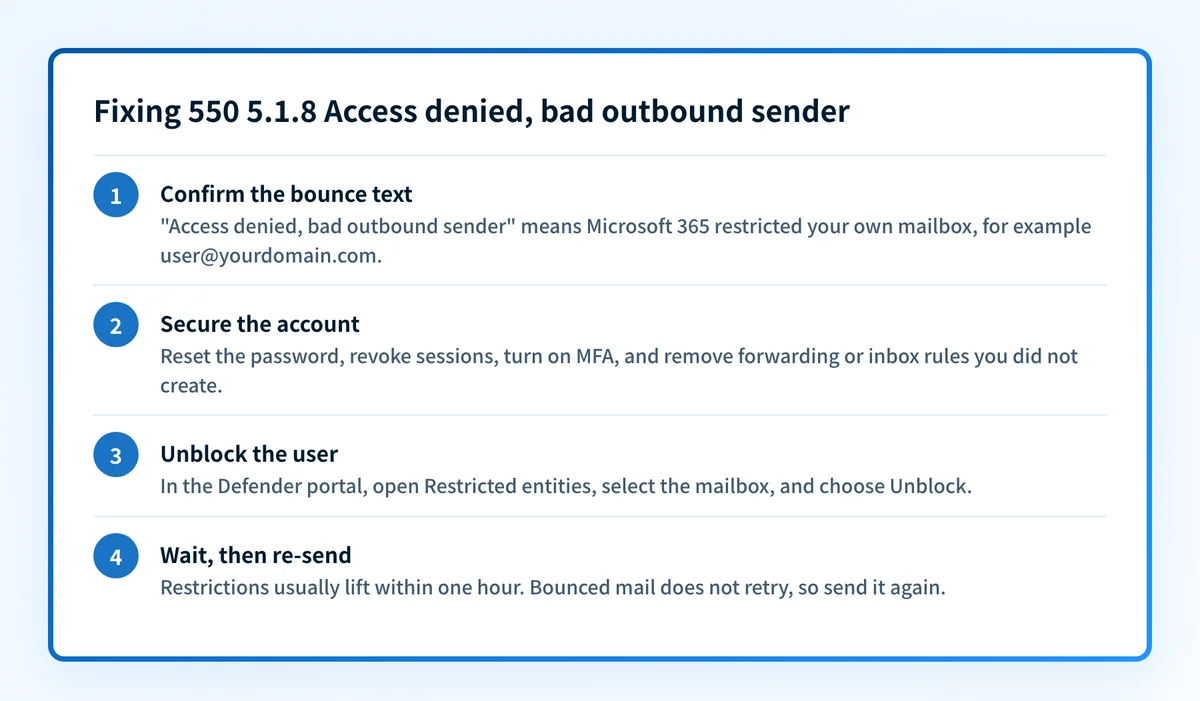
How to fix 550 5.1.8
Confirm which 5.1.8 you have from the bounce text
Read the full NDR. If it says
Access denied, bad outbound senderand your mail runs on Microsoft 365, your own mailbox is restricted and no DNS check will clear it: continue with steps 2 to 5. Microsoft 365 bought through GoDaddy shows the same string. If the bounce came from another server and talks about the sender address or domain, skip to step 6.Sources: Microsoft: Exchange Online NDR reference · Microsoft: NDR error code 550 5.1.8 · RFC 3463 section 3.2 (X.1.8)
Secure the account before you unblock it
Treat the mailbox as compromised until you have shown otherwise. Microsoft's response guide covers the order: disable the account, revoke active sessions, reset the password, review registered MFA devices and consented apps, and remove mail forwarding and inbox rules the attacker added. Unblocking first hands the attacker a working mailbox again.
Sources: Microsoft: Responding to a compromised email account
Unblock the user on the Restricted entities page
In the Microsoft Defender portal go to Email & collaboration, Review, Restricted entities. Select the mailbox, choose Unblock, work through the recommendations, and submit. This needs the Organization Management or Security Administrator role group. In Exchange Online PowerShell,
Get-BlockedSenderAddresslists restricted senders andRemove-BlockedSenderAddress -SenderAddress <emailaddress>removes one. GoDaddy-sold Microsoft 365 has its own unblock flow: Admin, or Microsoft 365 Admin, then Unblock Email in the Email & Office Dashboard, choosing Bad Outbound Sender and submitting one address at a time. GoDaddy's flow takes one address per request, so several blocked users means repeating it. Why GoDaddy email gets blocked walks that flow and the other GoDaddy-side causes.Sources: Microsoft: Remove blocked users from the Restricted entities page · GoDaddy: Unblock my Microsoft 365 email
Wait for the restriction to lift, then re-send
Microsoft says restrictions are normally removed within one hour, and that the total wait should be no longer than 24 hours. A 550 is a permanent failure, so nothing that bounced will retry. Once a test message goes out, the user re-sends what failed.
Sources: Microsoft: Remove blocked users from the Restricted entities page
Stop it from happening again
Turn on MFA for the account. Check that the default alert policy "User restricted from sending email" is on and that its recipients are people who will act on it. Move newsletters and application mail off user mailboxes and onto a bulk or transactional sending service, and review the limits in your outbound spam policies. See why Microsoft 365 blocks outbound email for the wider list of outbound blocks.
Sources: Microsoft: Outbound spam protection · Microsoft: Configure outbound spam policies · Microsoft: Exchange Online limits
Not Microsoft? Make the sender domain resolve for mail
Find the envelope sender (the Return-Path) of the rejected message and look up its domain with the MX lookup tool. The domain needs an MX record, or at least an A record, that answers. Fix a typo in the app's configured sender address, restore the missing DNS record, or send from a domain that can receive bounces, then re-send.
Sources: RFC 3463 section 3.2 (X.1.8) · IANA SMTP enhanced status codes registry · RFC 7505 (null MX, X.7.27) · Postfix: reject_unknown_sender_domain
Related free tools: MX lookup · DNS lookup · Email header analyzer · Blocklist checker
Why it matters for MSPs
For an MSP, a 550 5.1.8 ticket is a security incident that arrives looking like a mail-flow problem. The user says they can't send; the real finding is that someone else could. Work it as a compromise first: secure the account, check the client's other mailboxes for the same sign-in pattern, and only then unblock. Across a fleet of tenants, confirm that the "User restricted from sending email" alert in each one reaches a mailbox your team reads rather than a tenant admin address nobody opens. Be clear with the client about what DMARC does here. Spam sent from a hijacked mailbox is authenticated mail from the client's own tenant, so SPF, DKIM, and DMARC all pass, and no DMARC report will flag it. Palisade's agent reads DMARC reports to find outside sources sending as a client's domain and proposes the fixes for your review; a restricted mailbox is handled in Defender.
Questions readers ask