SMTP error code · permanent failure (5xx)
550 5.7.13: Sender was not authenticated for public folder

By Dominic Landry · Deliverability & DNS · Reviewed September 20, 2026
550 5.7.13 is Exchange Online's bounce for mail sent to a public folder that only accepts senders from inside its own organization. "Not authenticated" here means external, so your SPF, DKIM and DMARC are not the problem. Only the recipient's email admin can fix it: open the folder to outside senders, or add you to its allowed senders list.
550 5.7.13 at a glance | |
|---|---|
| Code | 550 5.7.13 |
| Class | Permanent (5xx): the message was refused and will not retry |
| Category | Policy |
| Side at fault | Recipient |
| Auth-related | None: "authenticated" here means signed in to the recipient's organization, not SPF, DKIM, or DMARC |
What the bounce actually says
The exact wording varies by provider. These are the documented strings, verbatim. Match yours to pin down which variant you hit.
Microsoft 365 (Exchange Online): public folder rejects senders outside its organization
550 5.7.13 Sender was not authenticated for public folderSource: learn.microsoft.com
Why you're seeing 550 5.7.13
Microsoft documents this code as one row, "5.7.13 or 135", in its Exchange Online NDR table: the recipient address is a mail-enabled public folder set up to reject messages sent from outside its organization. The word "authenticated" misleads most senders. In Exchange it means the sender is signed in to the recipient's own organization, and Microsoft's cmdlet reference spells it out as "authenticated (internal)" versus "unauthenticated (external)" senders. It has nothing to do with SPF, DKIM, or DMARC, so a domain with perfect email authentication still bounces. The standards define the number differently. RFC 3463 makes any 5.7.x code a permanent security or policy refusal, and RFC 5248 registers X.7.13 as "User Account Disabled", paired with basic code 525: a mail client logged in to its own submission server and the account turned out to be disabled. If your bounce starts with 550 and came from a Microsoft 365 recipient, you have the public folder case. Google's Gmail error reference does not list 5.7.13 at all.
Likely causes, ranked
| Likely cause | What's happening |
|---|---|
| The public folder requires authenticated senders and you are external | The usual case. The folder has "Require that all senders are authenticated" turned on, so Exchange Online accepts mail to it only from accounts inside that organization. Every outside sender gets this bounce, however well their domain is set up. |
| An internal device or app reaches the folder without signing in | A scanner, copier, or line-of-business app that sends straight to the tenant's MX host uses what Microsoft calls Direct Send, which it describes as unauthenticated email sent as an external server. The From address looks internal, but Exchange treats the message as external and the folder refuses it. |
| The address moved from a mailbox or group to a public folder | A shared address such as info@ or support@ that used to be a mailbox was rebuilt as a mail-enabled public folder with the authenticated-senders requirement turned on. Outside senders who wrote to it for years start bouncing on the day of the change. |
| You are on the allowed senders list but the check is still on (our inference) | Microsoft does not document this case. We infer it from the order of its own fix steps: its second fix is the folder's allowed senders list, and step one there is to clear "Require that all senders are authenticated". An admin who adds your mail contact to that list but leaves the box ticked has not opened the folder to you, so outside mail keeps getting this bounce. |
| A non-Microsoft server returned 5.7.13 for a disabled account | Rare in a bounce. Under RFC 5248 the code means the account you logged in with has been disabled, for example for non-payment or abuse. You would normally see it in a mail client or app log during SMTP AUTH, paired with 525. Your own mail provider is the one to contact. |
How to fix 550 5.7.13
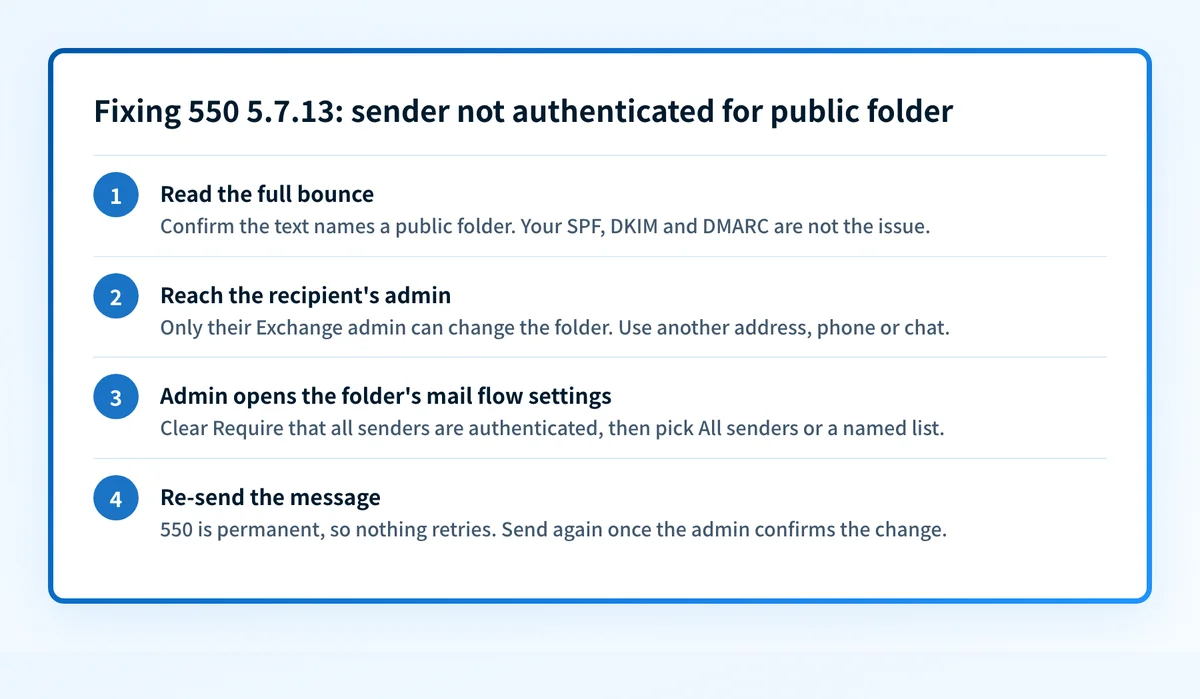
Read the full bounce and confirm it names a public folder
Look at the text after
550 5.7.13and at the generating server. If it reads "Sender was not authenticated for public folder" and the recipient is hosted on Microsoft 365, this page applies and no DNS change on your side will help. Microsoft documents sibling codes for the same restriction on other recipient types:5.7.133for a group,5.7.134for a mailbox,5.7.136for a mail user.Sender: contact the recipient's email admin another way
Microsoft's guidance is blunt: only an email admin in the recipient's organization can fix this. Reach your contact by phone, chat, or a personal mailbox at the same company, and send them the bounce and Microsoft's fix page. Re-sending unchanged only produces the same NDR.
Admin: let the folder accept outside senders
In the Exchange admin center go to Public folders, select the folder, choose Edit, then Mail flow settings. Under Message delivery restrictions, clear "Require that all senders are authenticated" and select All senders. In Exchange Online PowerShell the same switch is
Set-MailPublicFolder -Identity "<folder>" -RequireSenderAuthenticationEnabled $false.Sources: Microsoft: fix NDR 550 5.7.13 or 550 5.7.135 · Microsoft: Set-MailPublicFolder
Admin: or allow named senders only
To keep the folder closed to the wider internet, clear the same check box but choose "Only senders in the following list". Create a mail contact or mail user for each outside sender first, then add those plus a group that contains everyone internal. This list is separate from the anti-spam allowed senders list.
Internal device bouncing? Make it sign in
If the rejected sender is your own scanner or app, it is delivering by Direct Send, which Microsoft treats as unauthenticated external mail. Move it to client SMTP submission with a cloud mailbox's credentials so the message arrives authenticated, or point it at a regular mailbox or group that accepts outside mail.
Re-send once the folder is changed
A
5.x.xstatus is a permanent failure under RFC 3463, so the original message will never retry by itself. After the admin confirms the change, send it again. If it still bounces with the same text, the change went to a different folder or has not saved.Sources: RFC 3463: enhanced mail system status codes · RFC 5248: X.7.13 registration · IANA SMTP enhanced status codes registry
Related free tools: Email header analyzer · MX record checker
Why it matters for MSPs
For an MSP this ticket arrives from both directions. A client's customer reports bounces from the client's info@ or orders@ address, which turns out to be a mail-enabled public folder created during a migration with the authenticated-senders requirement switched on. Or a client's own scanner starts failing after a tenant move because it delivers by Direct Send. Neither case is a DMARC problem, so don't let the word "authenticated" send a technician into DNS. Before closing the ticket, list the tenant's mail-enabled public folders with Get-MailPublicFolder and review RequireSenderAuthenticationEnabled on each one that is meant to receive outside mail, so the next address does not bounce the same way.
Questions readers ask