SMTP error code · permanent failure (5xx)
550 5.1.0: address rejected, sender denied

By Dominic Landry · Deliverability & DNS · Reviewed September 20, 2026
550 5.1.0 is a permanent bounce that means the receiving server rejected something about the sender or recipient address. Microsoft labels it Sender denied. The usual causes are a recipient who blocks you, a stale Outlook Auto-Complete entry, a reply to an old exported message, or a sending domain whose SPF record returns a permanent error.
550 5.1.0 at a glance | |
|---|---|
| Code | 550 5.1.0 |
| Class | Permanent (5xx): the message was refused and will not retry |
| Category | Policy |
| Side at fault | Either side |
| Auth-related | Conditional: only when the bounce text names SPF, as in Microsoft's "SPF Permanent Error" diagnostic |
What the bounce actually says
The exact wording varies by provider. These are the documented strings, verbatim. Match yours to pin down which variant you hit.
Microsoft 365 (Exchange Online): user information section
Address Rejected. A problem occurred during the delivery of this message to this email address.Source: learn.microsoft.com
Microsoft 365 (Exchange Online): diagnostic information for administrators
Recipient address rejected: SPF Permanent Error.Source: learn.microsoft.com
Why you're seeing 550 5.1.0
5.1.0 is the catch-all of the address family. RFC 3463 section 3.2 defines X.1.0 as "Other address status" and says only that "something about the address specified in the message caused this DSN". It does not say which address, so receivers use the code for problems with the sender as well as the recipient. Microsoft's NDR references for both Exchange Online and on-premises Exchange Server give the code one description, "Sender denied", and explain that the destination server won't accept messages from you or for that recipient, often because the recipient blocks your address, your organization, or all of Exchange Online. Microsoft's NDR for this code can also carry the diagnostic "Recipient address rejected: SPF Permanent Error", which points at the sending domain's SPF record instead of the address. Google's Gmail SMTP error reference does not list 5.1.0 at all. The text after the code is the real verdict, so read it before you change anything.
Likely causes, ranked
| Likely cause | What's happening |
|---|---|
| The recipient blocks your address or your organization | Microsoft names this first. Your address may sit on the recipient's personal block list, or their mail system may block your domain or your whole sending service. The tell is that other people at the same domain receive your mail without trouble. |
| A stale Auto-Complete entry in Outlook | Outlook's Auto-Complete list (the nickname cache) stores internal identifiers next to the visible address. When a mailbox moves between on-premises Exchange and Exchange Online, those identifiers change and the cached entry breaks, even though the address on screen still looks right. |
| You replied to an old or exported message | Microsoft's NDR reference says this bounce commonly appears when someone saves a message to a file, opens it offline, and replies. The saved copy keeps only the recipient's legacyExchangeDN attribute, the lookup fails, and the recipient can't be resolved. |
| The sending domain's SPF record returns a permanent error | When the diagnostic reads "SPF Permanent Error", the receiver could not evaluate your SPF record at all. RFC 7208 returns permerror when a domain publishes more than one SPF record, when evaluation needs more than 10 DNS lookups, or when the record has a syntax error. Microsoft's admin guidance for this code is to check that the record is complete and covers every source of mail for the domain. |
| Sender filtering on an on-premises Exchange server | Exchange Server returns 5.1.0 when its Sender Filter agent blocks you. That happens when an admin blocked your address or domain directly, or when you are on a user's Blocked Senders list and the server applies those lists through safelist aggregation. |
| Another mail server using the generic code for its own address rule | Because RFC 3463 leaves X.1.0 open, any receiver can attach it to a sender or recipient address it refuses. In that case the sentence after 550 5.1.0 is the only explanation you get, and the rejecting host's admin is the person who can decode it. |
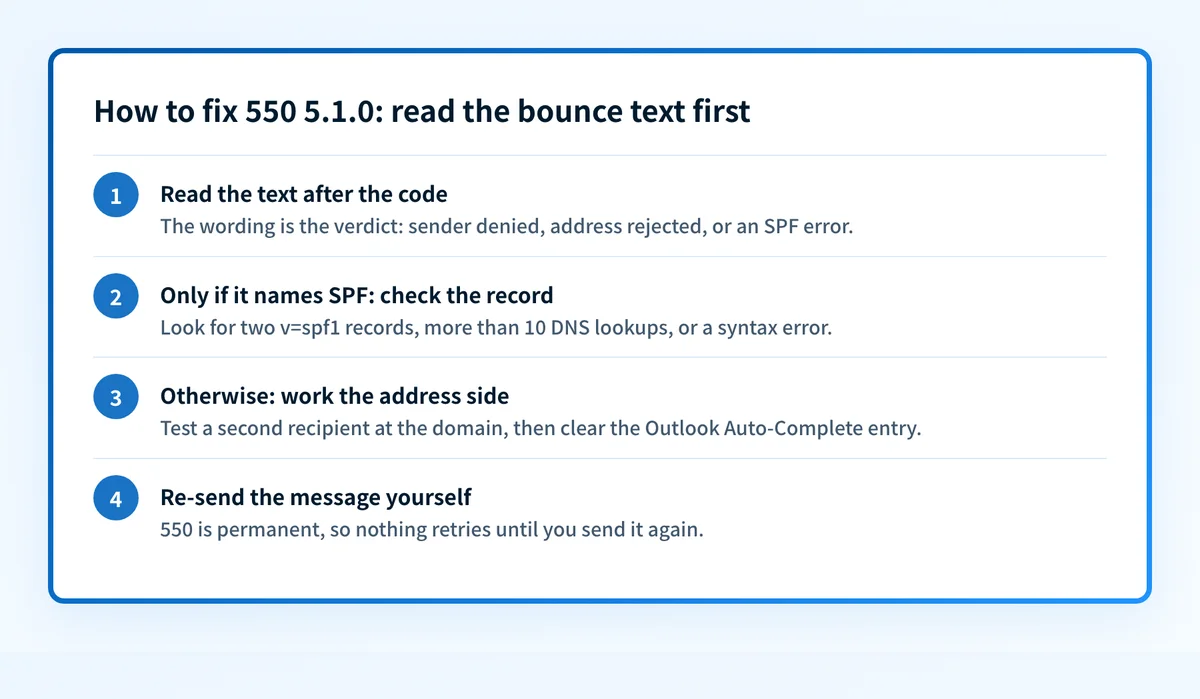
How to fix 550 5.1.0
Read the full bounce, then rule SPF in or out
Copy the whole NDR, including the rejecting host and the diagnostic section for administrators. "Sender denied" or "Address rejected" with no SPF wording points at a block or an address lookup problem. If the text reads "SPF Permanent Error", or you can't see the full text, run the domain you send from through the free SPF record checker. Look for two records that both start with
v=spf1, a lookup count above 10, or a syntax error. A clean result means the problem is on the address side. Google's Gmail SMTP error reference has no5.1.0entry, so a bounce with this code most often comes from Exchange or another mail server the recipient runs.Sources: RFC 3463 section 3.2 (X.1.0) · Microsoft: Exchange Online NDR reference · Microsoft: fix NDR error 550 5.1.0 · RFC 7208 sections 4.5 and 4.6.4 (SPF permerror) · Google: Gmail SMTP errors and codes
Run the check now
Enter the domain from the step above and the check runs instantly on the next page. Free, no signup.
Test another recipient at the same domain
Send a short message to a second person at the recipient's domain. If it arrives, Microsoft's guidance is that you are probably on the first recipient's own block list. Contact them by phone or chat and ask them to check it. If every address at that domain bounces, ask their email admin whether your domain or sending service is blocked. On an on-premises Exchange server that block is usually sender filtering.
Sources: Microsoft: fix NDR error 550 5.1.0 · Microsoft: Exchange Server NDR reference
Delete the Auto-Complete entry and write a new message
In Outlook, start typing the recipient's name, select the suggestion, and press Delete. Then type the full address by hand in a new message. Do not reply to an old thread or to a message you saved as a file, because the reply reuses recipient attributes that may no longer resolve.
Sources: Microsoft: fix NDR error 550 5.1.0
If SPF returned a permanent error, repair the record
Merge duplicate records into one
v=spf1record, remove services you no longer use, and bring the record under the 10-lookup limit. Add every service that sends as the domain. Microsoft's own instruction for admins on this code is to make the SPF record include all sources of mail for the domain.Sources: Microsoft: set up SPF for Microsoft 365 domains · RFC 7208 section 4.6.4 (DNS lookup limits)
Re-send the message yourself
RFC 5321 classes every 5yz reply as a permanent negative completion, and RFC 3463 says a class 5 failure is not likely to be resolved by resending the message in its current form. Nothing retries on its own. Once the block is lifted, the cached entry is gone, or the SPF record evaluates cleanly, send the message again.
Sources: RFC 5321 section 4.2.1 · RFC 3463 section 2 (class 5.XXX.XXX)
Related free tools: Email header analyzer · MX lookup
Why it matters for MSPs
Most 550 5.1.0 tickets are one user and one recipient: a block list or a stale Outlook entry, fixed at the desk. The SPF branch is different because a record that returns permerror affects every message the client domain sends, and it usually breaks when someone adds one more include: for a new tool. Receivers record permerror in DMARC aggregate reports. Palisade's DMARC Agent reads those reports for each client domain, identifies the SPF problem, and files a prioritized ticket in ConnectWise, HaloPSA, or Autotask with a proposed fix for your technician to review and apply.
Questions readers ask