SMTP error code · permanent failure (5xx)
SMTP error 550 5.1.10: recipient not found

By Samuel Chenard · CEO & Co-Founder, Palisade · Reviewed November 10, 2026
550 5.1.10 is Exchange Online's "Recipient not found": an SMTP address lookup didn't find the address the message was sent to. Usually the address is mistyped or the mailbox no longer exists. If the address is right, check forwarding rules, licenses, and hybrid domain settings. If you never sent the message, it's backscatter from someone forging your address.
550 5.1.10 at a glance | |
|---|---|
| Code | 550 5.1.10 |
| Class | Permanent (5xx): the message was refused and will not retry |
| Category | Recipient |
| Side at fault | Either side |
| Auth-related | Only for backscatter: SPF and an enforced DMARC policy make your domain harder to forge, which cuts the bounces you never caused |
What the bounce actually says
The exact wording varies by provider. These are the documented strings, verbatim. Match yours to pin down which variant you hit.
Why you're seeing 550 5.1.10
RFC 3463 reserves x.1.x for addressing problems, and Microsoft's NDR reference describes 5.1.10 plainly: an SMTP address lookup didn't find the recipient's address. Microsoft's fix page gives two reasons you might be holding one. The common one is that the recipient's address doesn't exist or couldn't be found, which covers typos, departed employees, and stale Outlook AutoComplete entries. The other is backscatter: a spammer sent mail to a nonexistent address with your address forged in the From field, and the bounce came back to you. Microsoft says backscatter means your account hasn't been compromised. When the address really is correct, the problem sits on the recipient's side, in a forwarding rule pointing somewhere broken, a mailbox with no license, a hybrid domain set to the wrong accepted domain type, or directory sync that hasn't caught up.
Likely causes, ranked
| Likely cause | What's happening |
|---|---|
| The address is wrong or the mailbox no longer exists | Microsoft's first reason is that the recipient's address doesn't exist or couldn't be found. A mistyped address, a person who left the company, and a stale entry in Outlook's AutoComplete list all end here. Microsoft specifically tells senders to delete the AutoComplete entry and retype the address, because a bad cached entry keeps failing. |
| You didn't send it: the bounce is backscatter | If the bounce is for a message you never wrote, Microsoft says a spammer probably forged your address as the sender of mail to a nonexistent recipient. You can ignore or delete it, and it doesn't mean your account was compromised. If you get a lot of it, Microsoft says your computer or device might be infected with spam-sending malware and suggests an anti-malware scan, and points admins to SPF to stop spammers impersonating you. A steady flow also means someone keeps forging your domain, which is what an enforced DMARC policy is for. |
| A forwarding rule sends the message to an address that doesn't exist | Microsoft asks senders to compare the address in the NDR with the one they sent to. If they differ, the recipient has an Inbox rule, account forwarding, or an admin's mail flow redirect rule pushing the message to a bad address. |
| The recipient has no license, or hybrid routing can't find them | On the receiving side, Microsoft lists a mailbox with no email license assigned, a hybrid domain set to Authoritative when on-premises users aren't represented in Exchange Online, directory sync that hasn't run, and a custom domain with more than one MX record, which Microsoft doesn't support for domains in Exchange Online. |
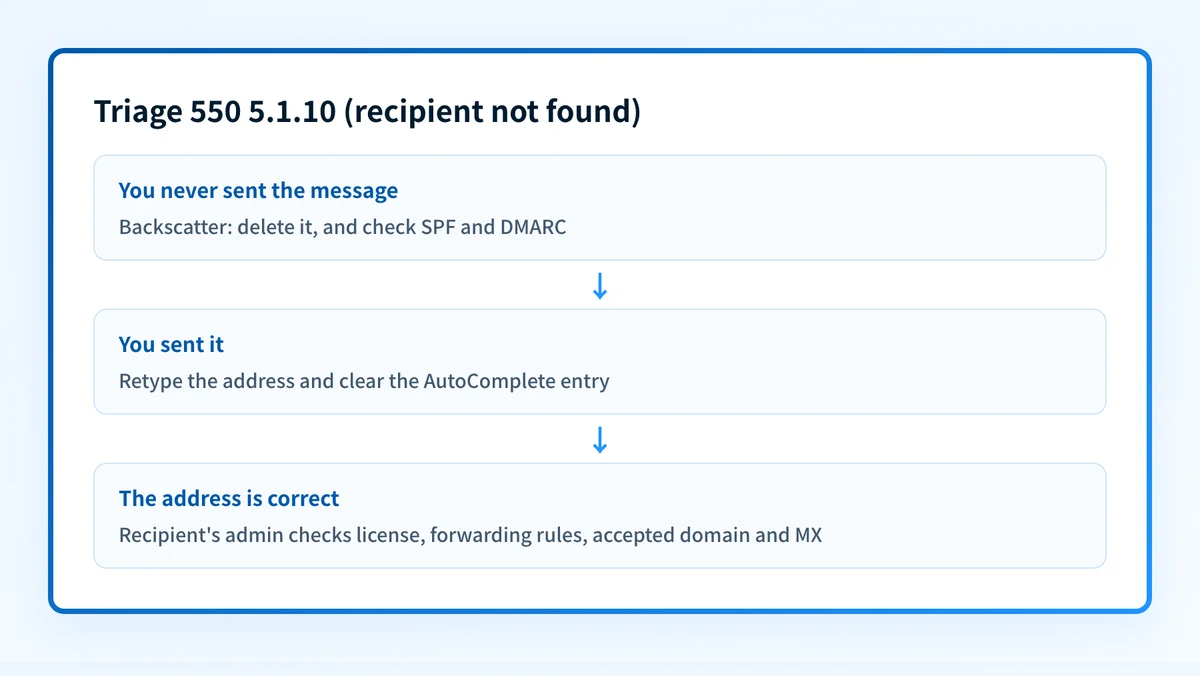
How to fix 550 5.1.10
Decide whether you sent the message at all
Open the original in Sent Items. If it isn't there, the bounce is backscatter and you can delete it. If you get a lot of it, check that your domain publishes SPF and a DMARC policy so receivers can reject forged mail: the DMARC checker shows what your domain has today.
Sources: Microsoft: fix NDR error 550 5.1.10
Run the check now
Enter the domain from the step above and the check runs instantly on the next page. Free, no signup.
Retype the address and clear the AutoComplete entry
Use Send Again from the bounce, delete the recipient, remove their entry from the AutoComplete list, then type the full address again and send. Confirm the address with the recipient by phone or chat if it still fails.
Sources: Microsoft: fix NDR error 550 5.1.10
Compare the address in the NDR with the one you used
If the NDR names a different address than the one you sent to, a forwarding rule on the recipient's side is failing. Tell the recipient: they can fix Inbox rules and account forwarding themselves, and their admin can check redirect rules in the Exchange admin center under Mail flow > Rules.
Sources: Microsoft: fix NDR error 550 5.1.10
Recipient's admin: check the user, license and accepted domain
In the Microsoft 365 admin center, find the user under Users > Active users and confirm they exist and have an email license. In a hybrid deployment, check the accepted domain type under Mail flow > Accepted domains and run
Start-ADSyncSyncCycle -PolicyType Deltaon the Microsoft Entra Connect server. Microsoft warns that changing a domain to Internal Relay needs a matching connector to on-premises and can cause other problems.Sources: Microsoft: fix NDR error 550 5.1.10 · Microsoft: manage accepted domains
Recipient's admin: confirm the domain has exactly one MX record
Under Settings > Domains, select the domain and choose Check DNS. Microsoft doesn't support more than one MX record for a domain in Exchange Online, and the record should point at the tenant's Microsoft 365 host. DNS changes usually show up within a few hours but can take up to 72.
Sources: Microsoft: fix NDR error 550 5.1.10 · RFC 3463, section 3.2
Related free tools: DMARC checker · SPF checker
Why it matters for MSPs
Two patterns show up across client tenants. A burst of 5.1.10 bounces for mail nobody sent means someone is forging the client's domain, and the durable fix is a DMARC policy at enforcement so receivers reject the forgeries. Real 5.1.10 bounces after a migration usually trace back to hybrid domains left Authoritative, unlicensed shared mailboxes, or a second MX record kept for a cutover. Palisade reads each client domain's DMARC reports, shows who is sending as that domain, including spoofers, files the problems as tickets in ConnectWise, HaloPSA, or Autotask, and proposes the next policy step for a human to approve. Your own MSP domain is a free NFR domain.
Questions readers ask