SMTP error code · permanent failure (5xx)
550 5.7.1 Rejected by policy: From header domain does not align with authenticated domain

By Dominic Landry · Deliverability & DNS · Reviewed October 26, 2026
550 5.7.1 Rejected by policy: From header domain does not align with authenticated domain is OVHcloud refusing to send your message. Since 20 July 2026, MX Plan, Zimbra and Web Hosting email reject mail whose From address uses a different domain than the mailbox you logged in with. Authenticate with a mailbox on the From domain instead.
550 5.7.1 From header domain does not align at a glance | |
|---|---|
| Code | 550 5.7.1 |
| Class | Permanent (5xx): the message was refused and will not retry |
| Category | Authentication |
| Side at fault | Sender |
| Auth-related | Direct: OVHcloud checks the From domain against the login mailbox at submission, a check in the same spirit as DMARC alignment |
What the bounce actually says
The exact wording varies by provider. These are the documented strings, verbatim. Match yours to pin down which variant you hit.
OVHcloud (MX Plan, Zimbra, and the email service bundled with a Web Hosting plan)
550 5.7.1 Rejected by policy: From header domain does not align with authenticated domainSource: docs.ovhcloud.com
Why you're seeing 550 5.7.1 From header domain does not align
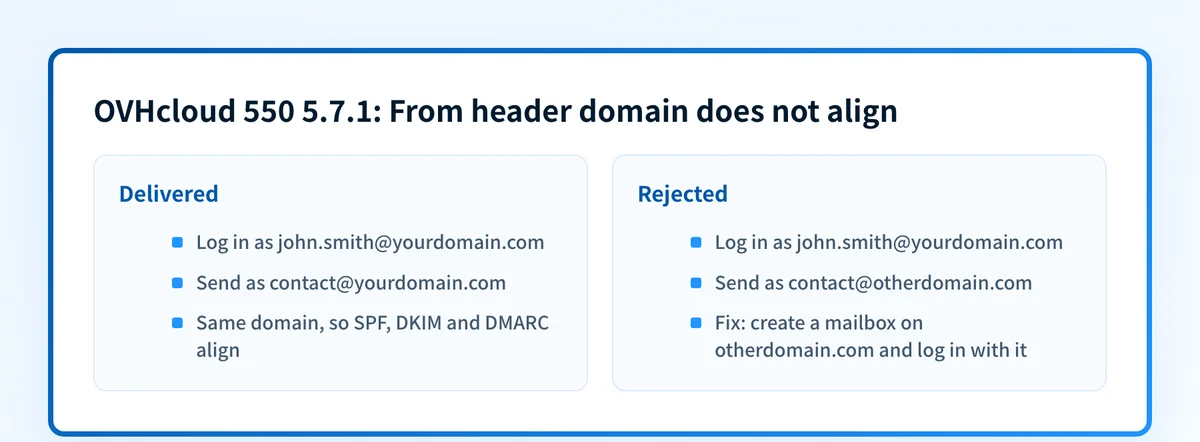
OVHcloud calls this cross-domain spoofing protection and enforces it from 20 July 2026. When you send, you log in with one mailbox, and the message carries a From address. If the From address is on the same domain as that mailbox, the message goes out. If it is on a different domain, OVHcloud rejects it with this reply before it leaves. The reason is DMARC: receivers judge a message by the domain in its From header, and SPF and DKIM have to line up with that domain for it to pass. OVHcloud says mail sent through one domain's mailbox while claiming another domain breaks that alignment, and that blocking it protects the reputation of your domains and the deliverability of your legitimate messages. Nothing is wrong with the recipient, and no setting on their side is involved.
Likely causes, ranked
| Likely cause | What's happening |
|---|---|
| A generic address lives on a different domain than your mailbox | You log in as john.smith@yourdomain.com and send as contact@, support@ or noreply@ on another domain you own. OVHcloud lists this among the cases its protection blocks. |
| An app, script or device sends with a different From domain | A website contact form, a CRM, a scanner or a monitoring script uses one OVHcloud mailbox's SMTP credentials but puts another domain in the From field. Automated setups are where OVHcloud says the mismatch is easiest to miss. |
| You send on behalf of a client or another brand | An agency invoicing with its client's domain, or one company sending for two brands from a single mailbox, hits the same rule. Each From domain now needs its own authenticated mailbox. |
| The From address is not the one you think | If every address you use is on one domain, this block should not fire. OVHcloud's advice is to confirm that the address you authenticate with matches the From address your sending app or device actually uses, because a mismatch is easy to miss in bulk or automated setups. |
How to fix 550 5.7.1 From header domain does not align
Compare the mailbox you log in with to the From address
Open the rejected message's headers and read the From address, then check which mailbox's credentials the sending app or device uses. If the two domains differ, this is the cause. If they match, look for another app or device sending with a different From address.
Create a mailbox on the domain you send from
This is OVHcloud's recommended fix. Add a mailbox on the From domain, for example on a Zimbra Starter plan as OVHcloud suggests, and authenticate with it. One mailbox can send as any address on its own domain, so
contact@otherdomain.comgoes out once you log in with any mailbox onotherdomain.com.Update the SMTP login in every app and device that sends
Point the contact form, CRM or script at the new mailbox's credentials, then wait a few minutes before you test, as OVHcloud advises after creating a mailbox or changing configuration.
Check that the From domain authenticates for the new path
Once mail leaves through a mailbox on the right domain, receivers still check that domain's records. Run it through the SPF checker, DKIM checker and DMARC checker so the messages that now get out also pass where they land.
Plan one mailbox per sending address, not one shared login
OVHcloud warns that it is preparing a setting that lets domain administrators turn off sending as other addresses on the same domain, so a setup built on one shared mailbox will break again. Use one mailbox per address you send from, or delegation: Send As and Send on Behalf on Exchange.
If it still fails, send OVHcloud support the evidence
OVHcloud asks for the rejected message's full headers, the address you authenticated with and the From address you intended. Those three items are what support needs to find the pairing it rejected.
Related free tools: SPF checker · DKIM checker
Authentication is the fix, not a workaround
Every path out of 550 5.7.1 From header domain does not align runs through the same three DNS records: SPF, DKIM, and DMARC. Mailbox providers no longer treat them as best practice; they're the entry ticket, and a domain that drifts out of alignment starts bouncing again without anyone changing a thing on your side.
The durable fix is enforcement: publish correct records, watch the DMARC reports for senders you missed, and move the domain to p=reject so receivers drop spoofed mail instead of bouncing yours.
DMARC software that does the work
Palisade's AI agent takes domains all the way to enforcement: hosted SPF, DKIM, DMARC, and MTA-STS records on paid plans, DMARC reports monitored continuously, and every policy step drafted for your approval on the way to p=reject.
Audit any domain free, no card needed. A card starts the 15-day trial.
Why it matters for MSPs
OVHcloud names agencies and service providers that send for clients from their own domain as one of the cases this blocks. If your team or your scripts send alerts, invoices or reports as a client's domain through an OVHcloud mailbox you own, each client domain now needs its own mailbox, with credentials stored per client. The same alignment rule decides delivery everywhere else too: Palisade reads each client's DMARC aggregate reports and identifies every source sending as the client domain, so the services that still send through the wrong path show up before a receiver rejects them.
Questions readers ask